
如何破解mssql for linux 3.5G内存的限制
在上有篇博客中主要介绍了如何在CentOS 中安装和配置mssql ,在安装过程中遇到3.5G内存的限制,下面介绍如何去破解,
微软发布了SQLServer for Linux,但是安装竟然需要3.5GB内存,这让大部分云主机用户都没办法尝试这个新东西 这篇我将讲解如何破解这个内存限制 要看关键的可以直接跳到第6步,只需要替换4个字节就可以破解这个限制
首先按照微软的给出的步骤安装和配置 https://docs.microsoft.com/zh-cn/sql/linux/sql-server-linux-setup-red-hat
到执行/opt/mssql/bin/sqlservr-setup时可以看到这个错误
sqlservr: This program requires a machine with at least 3250 megabytes of memory.
按错误文本查找消息在哪个文件里面
[root@localhost ~]# cd /opt/mssql/bin/

[root@localhost bin]# grep -irn "3250"

[root@localhost bin]# grep -irn "megabytes of memory"

Binary file sqlpackage matches

Binary file sqlpackage matches

Binary file sqlservr matches

[root@localhost bin]# strings sqlservr | grep "megabytes of memory"

%s: This program requires a machine with at least %zu megabytes of memory.

[root@localhost bin]# strings sqlpackage | grep "megabytes of memory"

%s: This program requires a machine with at least %zu megabytes of memory.
看来sqlservr和sqlpackage会检测这个限制,并且这个限制是一个常量
查找错误消息的位置
[root@localhost bin]# hexdump -C sqlservr | less
找到这里
0006baf0  72 69 6e 67 29 00 25 73  3a 20 54 68 69 73 20 70  |ring).%s: This p|

0006bb00  72 6f 67 72 61 6d 20 72  65 71 75 69 72 65 73 20  |rogram requires |
可以看到消息在0006baf6的位置
查找调用错误消息的位置
[root@localhost bin]# objdump -C -S sqlservr | less
找到这里
23940:       48 8d 35 af 81 04 00    lea    0x481af(%rip),%rsi        # 6baf6

   23947:       31 c0                   xor    %eax,%eax

   23949:       48 89 ca                mov    %rcx,%rdx

   2394c:       48 89 d9                mov    %rbx,%rcx

   2394f:       e8 6c e4 fe ff          callq  11dc0 <fprintf@plt>

   23954:       bf 01 00 00 00          mov    $0x1,%edi

   23959:       e8 e2 e1 fe ff          callq  11b40 <exit@plt>
判断的函数在这里
238e0:       55                      push   %rbp

   238e1:       48 89 e5                mov    %rsp,%rbp

   238e4:       53                      push   %rbx

   238e5:       48 83 ec 78             sub    $0x78,%rsp

   // 把这个函数接收的第二个参数放到rbx

   // 参考 https://en.wikipedia.org/wiki/X86_calling_conventions (System V AMD64 ABI)

   238e9:       48 89 f3                mov    %rsi,%rbx

   // 调用sysinfo获取内存大小

   // rdi是第一个参数,是一个在堆栈中的struct sysinfo

   // 参考 https://linux.die.net/man/2/sysinfo

   238ec:       48 8d 7d 88             lea    -0x78(%rbp),%rdi

   238f0:       e8 3b e3 fe ff          callq  11c30 <sysinfo@plt>

   // 偏移量的计算如下

   // -0x78: uptime (struct sysinfo的开头地址)

   // -0x70: loads[3]

   // -0x58: totalram

   // -0x50: freeram

   // -0x48: sharedram

   // -0x40: bufferram

   // -0x38: totalswap

   // -0x30: freeswap

   // -0x28: procs (short为什么占8个字节?看https://en.wikipedia.org/wiki/Data_structure_alignment)

   // -0x20: totalhigh

   // -0x18: freehigh

   // -0x10: mem_unit (同样,int 4个字节 align 4个字节)

   // 计算出rax = totalram * mem_unit

   238f5:       8b 45 f0                mov    -0x10(%rbp),%eax

   238f8:       48 0f af 45 a8          imul   -0x58(%rbp),%rax

   // 如果rax小于rbx则跳到23909,即显示内存不足并退出

   238fd:       48 39 d8                cmp    %rbx,%rax

   23900:       72 07                   jb     23909

   23902:       48 83 c4 78             add    $0x78,%rsp

   23906:       5b                      pop    %rbx

   23907:       5d                      pop    %rbp

   23908:       c3                      retq
调用判断的函数的代码在这里
// 这里的第二个参数是3250000000,可以看到内存的限制值是一个常量

   // 0xc1b71080 = 3250000000

   1486a:       be 80 10 b7 c1          mov    $0xc1b71080,%esi

   1486f:       4c 89 e7                mov    %r12,%rdi

   14872:       e8 69 f0 00 00          callq  238e0
顺道再用hexdump查找一下有多少处地方用了80 10 b7 c1,结果是只有一处
00014860  00 00 48 89 df e8 66 15  00 00 be 80 10 b7 c1 4c  |..H...f........L|

00014870  89 e7 e8 69 f0 00 00 0f  57 c0 0f 29 85 70 ff ff  |...i....W..).p..|
使用python修改代码 改条件判断的jb或者改8010b7c1都可以,我这里把8010b7c1改成更小的值0080841e(512M)
其实以上内容我是看不懂的,惭愧,直接复制粘贴过来,大体意思应该是找出哪里对内存进行了限制,下面的内容是主要的,所以我们如果看不懂的博友们可以直接使用下面的步骤进行破解,注意切换自己的mssql的bin目录下 使用下面的命令:
[root@localhost bin]# mv sqlservr sqlservr.old

[root@localhost bin]# python

>>> a = open("sqlservr.old", "rb").read()

>>> b = a.replace("\x80\x10\xb7\xc1", "\x00\x80\x84\x1e")

>>> open("sqlservr", "wb").write(b)

[root@localhost bin]# chmod +x sqlservr
如果怕自己打字出错,请直接复制粘贴,然后再重新来过我们的安装步骤 ./mssql -conf setup 就可以安装成功了。
可以继续替换掉sqlpackage中的限制值,但是不替换也可以使用
继续配置sqlserver
[root@localhost bin]# /opt/mssql/bin/sqlservr-setup

[root@localhost bin]# systemctl status mssql-server
如果你执行完命令后没有看到服务正常启动,可能是之前的配置没有成功导致的 删除mssql的数据文件夹并重试即可
[root@localhost bin]# rm -rf /var/opt/mssql

[root@localhost bin]# /opt/mssql/bin/sqlservr-setup
正常启动后可以看到
● mssql-server.service - Microsoft(R) SQL Server(R) Database Engine

   Loaded: loaded (/usr/lib/systemd/system/mssql-server.service; enabled; vendor preset: disabled)

   Active: active (running) since Mon 2016-12-05 22:50:06 EST; 20s ago

 Main PID: 2625 (sqlservr)

   CGroup: /system.slice/mssql-server.service

           ├─2625 /opt/mssql/bin/sqlservr

           └─2638 /opt/mssql/bin/sqlservr

Dec 05 22:50:10 localhost.localdomain sqlservr[2625]: 2016-12-06 03:50:10.85 spid17s     Server is listening on [ 0.0.0.0 ...433].

Dec 05 22:50:10 localhost.localdomain sqlservr[2625]: 2016-12-06 03:50:10.87 Server      Server is listening on [ 127.0.0....434].

Dec 05 22:50:10 localhost.localdomain sqlservr[2625]: 2016-12-06 03:50:10.89 Server      Dedicated admin connection suppor...1434.

Dec 05 22:50:10 localhost.localdomain sqlservr[2625]: 2016-12-06 03:50:10.89 spid17s     SQL Server is now ready for clien...ired.

Dec 05 22:50:11 localhost.localdomain sqlservr[2625]: 2016-12-06 03:50:11.77 spid6s      Starting up database 'tempdb'.

Dec 05 22:50:12 localhost.localdomain sqlservr[2625]: 2016-12-06 03:50:12.02 spid6s      The tempdb database has 1 data file(s).

Dec 05 22:50:12 localhost.localdomain sqlservr[2625]: 2016-12-06 03:50:12.02 spid20s     The Service Broker endpoint is in...tate.

Dec 05 22:50:12 localhost.localdomain sqlservr[2625]: 2016-12-06 03:50:12.03 spid20s     The Database Mirroring endpoint i...tate.

Dec 05 22:50:12 localhost.localdomain sqlservr[2625]: 2016-12-06 03:50:12.09 spid20s     Service Broker manager has started.

Dec 05 22:50:12 localhost.localdomain sqlservr[2625]: 2016-12-06 03:50:12.14 spid5s      Recovery is complete. This is an ...ired.

Hint: Some lines were ellipsized, use -l to show in full.
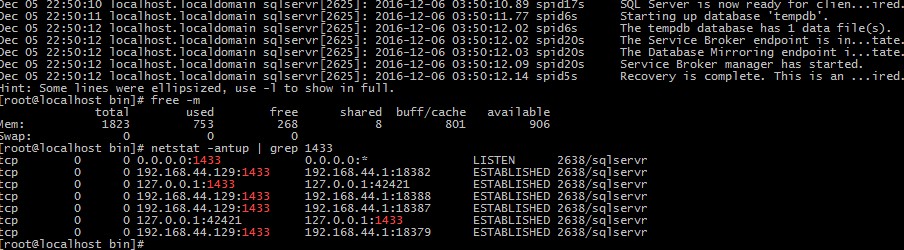
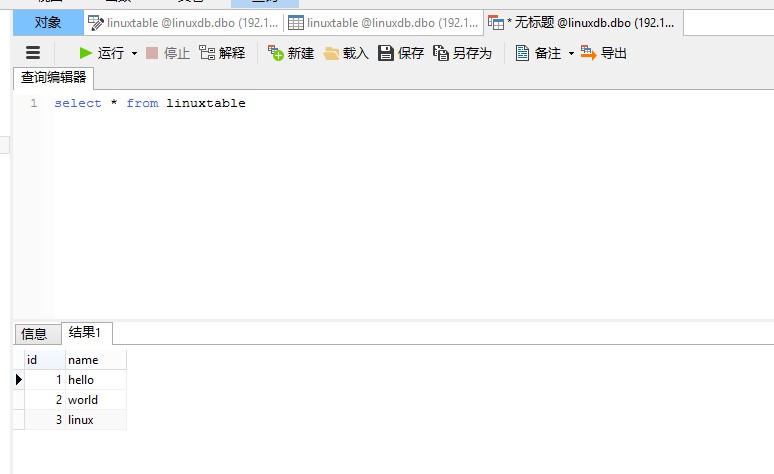
启动成功后使用微软提供的命令行工具连接也可以,使用windows上的客户端连接也可以 https://docs.microsoft.com/zh-cn/sql/linux/sql-server-linux-setup-tools 下图是2G内存上运行的mssql
本文转自 破解SQLServer for Linux预览版的3.5GB内存限制 (RHEL篇)
如何破解mssql for linux 3.5G内存的限制的更多相关文章
- 破解SQLServer for Linux预览版的3.5GB内存限制 (UBUNTU篇)
在上一篇中我提到了如何破解RHEL上SQLServer的内存大小限制,但是Ubuntu上还有一道检查 这篇我将会讲解如何在3.5GB以下内存的Ubuntu中安装和运行SQLServer for Lin ...
- 破解SQLServer for Linux预览版的3.5GB内存限制 (RHEL篇)
微软发布了SQLServer for Linux,但是安装竟然需要3.5GB内存,这让大部分云主机用户都没办法尝试这个新东西 这篇我将讲解如何破解这个内存限制 要看关键的可以直接跳到第6步,只需要替换 ...
- 破解SQLServer for Linux预览版的3.5GB内存限制 (RHEL篇) 转
https://www.ancii.com/database/30842.html 微软发布了SQLServer for Linux,但是安装竟然需要3.5GB内存,这让大部分云主机用户都没办法尝试这 ...
- Linux就这个范儿 第15章 七种武器 linux 同步IO: sync、fsync与fdatasync Linux中的内存大页面huge page/large page David Cutler Linux读写内存数据的三种方式
Linux就这个范儿 第15章 七种武器 linux 同步IO: sync.fsync与fdatasync Linux中的内存大页面huge page/large page David Cut ...
- 老司机带你开飞机 一: mssql on linux 安装指导
通常在本机开发环境中需要搭建所有的服务,还要修改本地的hosts,实在是不胜其烦.如今有了docker,完全不用污染本地环境,且看老司机带你搭建一个asp.net core的开发环境集群.愿你走出虚拟 ...
- linux中tomcat内存溢出解决办法
用命令 tail -f /root/apache-tomcat-6.0.20/logs/catalina.out(需要找到tomcat路径) 查看日志,查看是否有错误 linux中tomcat内存溢出 ...
- linux中tomcat内存溢出
刚开始测试服务器与线上后台都不能上传10分钟以上的视频,后来只要是视频就不能上传,进入服务器查日志得到如下错误: Caused by: java.lang.OutOfMemoryError: Java ...
- Linux内核笔记--内存管理之用户态进程内存分配
内核版本:linux-2.6.11 Linux在加载一个可执行程序的时候做了种种复杂的工作,内存分配是其中非常重要的一环,作为一个linux程序员必然会想要知道这个过程到底是怎么样的,内核源码会告诉你 ...
- Linux内核笔记——内存管理之slab分配器
内核版本:linux-2.6.11 内存区和内存对象 伙伴系统是linux用于满足对不同大小块内存分配和释放请求的解决方案,它为slab分配器提供页框分配请求的实现. 如果我们需要请求具有连续物理地址 ...
随机推荐
- stochastic matrix
w Stochastic matrix - Wikipedia https://en.wikipedia.org/wiki/Stochastic_matrix Suppose you have a ...
- Python 网络编程——socket
一 客户端/服务器架构 客户端(Client)服务器(Server)架构,即C/S架构,包括 1.硬件C/S架构(打印机) 2.软件C/S架构(web服务) 理想/目标状态—— 最常用的软件服务器是 ...
- javascript实例:点亮灯泡
<!doctype html> <html lang="en"> <head> <meta charset="UTF-8&quo ...
- PAT 1068. 万绿丛中一点红(20)
对于计算机而言,颜色不过是像素点对应的一个24位的数值.现给定一幅分辨率为MxN的画,要求你找出万绿丛中的一点红,即有独一无二颜色的那个像素点,并且该点的颜色与其周围8个相邻像素的颜色差充分大. 输入 ...
- make编译三
多目标 Makefile 的规则中的目标可以不止一个,其支持多目标,有可能我们的多个目标同时依赖于一个文件,并且其生成的命令大体类似.于是我们就能把其合并起来.但是如果多个目标的生成规则的执行命令是同 ...
- k8s 安装文档
k8s 安装文档 1.5 http://blog.csdn.net/bobpen/article/details/78958675
- 002-JVM运行时数据区【内存模型】
一.概述 JVM定义了不同运行时数据区,他们是用来执行应用程序的.某些区域随着JVM启动及销毁,另外一些区域的数据是线程性独立的,随着线程创建和销毁. 1.1.jvm自身物理结构 1.2.java内存 ...
- 4.2 使用STM32控制MC20发送短信
需要准备的硬件 MC20开发板 1个 https://item.taobao.com/item.htm?id=562661881042 GSM/GPRS天线 1根 https://item.taoba ...
- iOS学习之库
一.什么是库 库是程序代码的集合,是共享程序代码的一种方式. 二.库的分类 根据源代码的公开情况,库可以分为2种类型. 1.开源库 公开源代码,能看到具体实现. 比如,SDWebImage.AFNet ...
- 美图秀秀 web开发图片编辑器
美图秀秀web开发平台 http://open.web.meitu.com/wiki/ 1.环境配置 1.1.设置crossdomain.xml 下载crossdomain.xml文件,把解压出来的c ...