
SpringBoot13 利用mybatis-plus自动生成entity、dao、service、controller
1 环境配置
 =
=
2 新建一个新的springboot项目
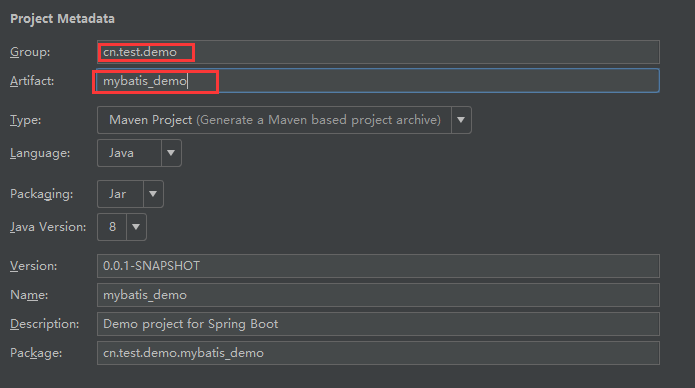
2.1 选择一些必要的依赖
web jpa mysql
<?xml version="1.0" encoding="UTF-8"?>

<project xmlns="http://maven.apache.org/POM/4.0.0" xmlns:xsi="http://www.w3.org/2001/XMLSchema-instance"

    xsi:schemaLocation="http://maven.apache.org/POM/4.0.0 http://maven.apache.org/xsd/maven-4.0.0.xsd">

    <modelVersion>4.0.0</modelVersion>

    <groupId>cn.test.demo</groupId>

    <artifactId>mybatis_demo</artifactId>

    <version>0.0.1-SNAPSHOT</version>

    <packaging>jar</packaging>

    <name>mybatis_demo</name>

    <description>Demo project for Spring Boot</description>

    <parent>

        <groupId>org.springframework.boot</groupId>

        <artifactId>spring-boot-starter-parent</artifactId>

        <version>2.0.1.RELEASE</version>

        <relativePath/> <!-- lookup parent from repository -->

    </parent>

    <properties>

        <project.build.sourceEncoding>UTF-8</project.build.sourceEncoding>

        <project.reporting.outputEncoding>UTF-8</project.reporting.outputEncoding>

        <java.version>1.8</java.version>

    </properties>

    <dependencies>

        <dependency>

            <groupId>org.springframework.boot</groupId>

            <artifactId>spring-boot-starter-data-jpa</artifactId>

        </dependency>

        <dependency>

            <groupId>org.springframework.boot</groupId>

            <artifactId>spring-boot-starter-web</artifactId>

        </dependency>

        <dependency>

            <groupId>mysql</groupId>

            <artifactId>mysql-connector-java</artifactId>

            <scope>runtime</scope>

        </dependency>

        <dependency>

            <groupId>org.springframework.boot</groupId>

            <artifactId>spring-boot-starter-test</artifactId>

            <scope>test</scope>

        </dependency>

    </dependencies>

    <build>

        <plugins>

            <plugin>

                <groupId>org.springframework.boot</groupId>

                <artifactId>spring-boot-maven-plugin</artifactId>

            </plugin>

        </plugins>

    </build>

</project>
2.2 添加mybatis生成代码所需的相关
<!-- Mybatis-Plus  自动生成实体类-->

        <dependency>

            <groupId>com.baomidou</groupId>

            <artifactId>mybatis-plus</artifactId>

            <version>2.0.6</version>

        </dependency>

        <dependency>

            <groupId>org.apache.velocity</groupId>

            <artifactId>velocity</artifactId>

            <version>1.7</version>

        </dependency>
<?xml version="1.0" encoding="UTF-8"?>

<project xmlns="http://maven.apache.org/POM/4.0.0" xmlns:xsi="http://www.w3.org/2001/XMLSchema-instance"

    xsi:schemaLocation="http://maven.apache.org/POM/4.0.0 http://maven.apache.org/xsd/maven-4.0.0.xsd">

    <modelVersion>4.0.0</modelVersion>

    <groupId>cn.test.demo</groupId>

    <artifactId>mybatis_demo</artifactId>

    <version>0.0.1-SNAPSHOT</version>

    <packaging>jar</packaging>

    <name>mybatis_demo</name>

    <description>Demo project for Spring Boot</description>

    <parent>

        <groupId>org.springframework.boot</groupId>

        <artifactId>spring-boot-starter-parent</artifactId>

        <version>2.0.1.RELEASE</version>

        <relativePath/> <!-- lookup parent from repository -->

    </parent>

    <properties>

        <project.build.sourceEncoding>UTF-8</project.build.sourceEncoding>

        <project.reporting.outputEncoding>UTF-8</project.reporting.outputEncoding>

        <java.version>1.8</java.version>

    </properties>

    <dependencies>

        <dependency>

            <groupId>org.springframework.boot</groupId>

            <artifactId>spring-boot-starter-data-jpa</artifactId>

        </dependency>

        <dependency>

            <groupId>org.springframework.boot</groupId>

            <artifactId>spring-boot-starter-web</artifactId>

        </dependency>

        <dependency>

            <groupId>mysql</groupId>

            <artifactId>mysql-connector-java</artifactId>

            <scope>runtime</scope>

        </dependency>

        <dependency>

            <groupId>org.springframework.boot</groupId>

            <artifactId>spring-boot-starter-test</artifactId>

            <scope>test</scope>

        </dependency>

        <!-- Mybatis-Plus  自动生成实体类-->

        <dependency>

            <groupId>com.baomidou</groupId>

            <artifactId>mybatis-plus</artifactId>

            <version>2.0.6</version>

        </dependency>

        <dependency>

            <groupId>org.apache.velocity</groupId>

            <artifactId>velocity</artifactId>

            <version>1.7</version>

        </dependency>

    </dependencies>

    <build>

        <plugins>

            <plugin>

                <groupId>org.springframework.boot</groupId>

                <artifactId>spring-boot-maven-plugin</artifactId>

            </plugin>

        </plugins>

    </build>

</project>
2.3 配置数据源
server:

  servlet:

    context-path: /dev

  port: 9999

spring:

  datasource:

    url: jdbc:mysql://127.0.0.1:3306/testdemo?useUnicode=true&characterEncoding=UTF-8&&useSSL=false

    driver-class-name: com.mysql.jdbc.Driver

    username: root

    password: root

#  jpa:

#    database: mysql

#    properties:

#      hibernate:

#        show-sql: true

#        format-sql: true

  jpa:

    database: mysql

    show-sql: true
2.4 编写一个测试控制层

package cn.test.demo.mybatis_demo.controller;

import org.springframework.web.bind.annotation.GetMapping;

import org.springframework.web.bind.annotation.RequestMapping;

import org.springframework.web.bind.annotation.RestController;

/**

 * @author 王杨帅

 * @create 2018-04-06 21:11

 * @desc 测试控制类

 **/

@RestController

@RequestMapping(value = "/test")

public class TestContorller {

    @GetMapping(value = "test01")

    public String test01() {

        String result = "===test01===";

        System.out.println(result);

        return result;

    }

}
2.5 编写代生成器
需要根据自己需要更改生成文件存放位置,以及一些其他信息
package cn.test.demo.mybatis_demo.util;

import com.baomidou.mybatisplus.generator.AutoGenerator;

import com.baomidou.mybatisplus.generator.config.DataSourceConfig;

import com.baomidou.mybatisplus.generator.config.GlobalConfig;

import com.baomidou.mybatisplus.generator.config.PackageConfig;

import com.baomidou.mybatisplus.generator.config.StrategyConfig;

import com.baomidou.mybatisplus.generator.config.rules.DbType;

import com.baomidou.mybatisplus.generator.config.rules.NamingStrategy;

/**

 * @author 王杨帅

 * @create 2018-04-06 21:43

 * @desc 自动生成代码工具类

 **/

public class AutoGenerateCode {

    public static void main(String[] args) throws InterruptedException {

        AutoGenerator mpg = new AutoGenerator();

        // 全局配置定义

        GlobalConfig gc = new GlobalConfig();

        gc.setOutputDir("F:\\javaProgramming\\springBoot\\testDemo\\mybatis_demo\\src\\main\\java\\cn\\test\\demo\\mybatis_demo\\util"); // 设置存储路径

        gc.setFileOverride(true);

        gc.setActiveRecord(true);

//        gc.setEnableCache(true);// XML 二级缓存

        gc.setBaseResultMap(true);// XML ResultMap

        gc.setBaseColumnList(true);// XML columList

        gc.setAuthor("王杨帅"); // 作者信息

        // 自定义文件命名,注意 %s 会自动填充表实体属性!

        gc.setMapperName("%sDao");

        gc.setXmlName("%sMapper");

        gc.setServiceName("%sService");

        gc.setServiceImplName("%sServiceImpl");

        gc.setControllerName("%sController");

        mpg.setGlobalConfig(gc); // 设置全局配置

        // 数据源配置定义

        DataSourceConfig dsc = new DataSourceConfig();

        dsc.setDbType(DbType.MYSQL);

        /*dsc.setTypeConvert(new MySqlTypeConvert(){

            // 自定义数据库表字段类型转换【可选】

            @Override

            public DbColumnType processTypeConvert(String fieldType) {

                System.out.println("转换类型:" + fieldType);

                return super.processTypeConvert(fieldType);

            }

        });*/

        dsc.setDriverName("com.mysql.jdbc.Driver");

        dsc.setUrl("jdbc:mysql://localhost:3306/testdemo?useUnicode=true&characterEncoding=UTF-8&generateSimpleParameterMetadata=true");

        dsc.setUsername("root");

        dsc.setPassword("182838");

        mpg.setDataSource(dsc); // 设置数据源

        // 策略配置

        StrategyConfig strategy = new StrategyConfig();

        // strategy.setCapitalMode(true);// 全局大写命名 ORACLE 注意

        // strategy.setTablePrefix(new String[] { "tlog_", "tsys_" });// 此处可以修改为您的表前缀

        strategy.setNaming(NamingStrategy.underline_to_camel);// 表名生成策略

        // strategy.setInclude(new String[] { "user" }); // 需要生成的表

        // strategy.setExclude(new String[]{"test"}); // 排除生成的表

        mpg.setStrategy(strategy);

        // 包配置

        PackageConfig pc = new PackageConfig();

        pc.setParent("org");

        pc.setModuleName("ibase4j");

        mpg.setPackageInfo(pc);

        // 执行生成

        mpg.execute();

    }

}
2.6 创建表
/*

Navicat MySQL Data Transfer

Source Server         : mysql5.4

Source Server Version : 50540

Source Host           : localhost:3306

Source Database       : testdemo

Target Server Type    : MYSQL

Target Server Version : 50540

File Encoding         : 65001

Date: 2018-04-08 12:54:08

*/

SET FOREIGN_KEY_CHECKS=0;

-- ----------------------------

-- Table structure for `equipment_check_item`

-- ----------------------------

DROP TABLE IF EXISTS `equipment_check_item`;

CREATE TABLE `equipment_check_item` (

  `id_` bigint(20) NOT NULL AUTO_INCREMENT COMMENT '记录ID',

  `eci_code` bigint(20) NOT NULL COMMENT '点检项目编号',

  `et_code` bigint(20) NOT NULL COMMENT '项目类型编号',

  `eci_name` varchar(60) NOT NULL COMMENT '点检项目名称',

  `eci_order` mediumint(4) NOT NULL COMMENT '点检项目顺序',

  `enable_` tinyint(1) NOT NULL COMMENT '记录有效性',

  `remark_` varchar(100) NOT NULL,

  `create_by` bigint(20) NOT NULL,

  `create_time` datetime NOT NULL,

  `update_by` bigint(20) NOT NULL,

  `update_time` datetime NOT NULL,

  PRIMARY KEY (`id_`),

  UNIQUE KEY `eci_code` (`eci_code`)

) ENGINE=InnoDB AUTO_INCREMENT=2 DEFAULT CHARSET=utf8;

-- ----------------------------

-- Records of equipment_check_item

-- ----------------------------

INSERT INTO `equipment_check_item` VALUES ('', '', '', '油量检查', '', '', '测试', '', '2018-04-01 19:05:10', '', '2018-04-04 19:05:23');

-- ----------------------------

-- Table structure for `equipment_check_resord`

-- ----------------------------

DROP TABLE IF EXISTS `equipment_check_resord`;

CREATE TABLE `equipment_check_resord` (

  `id_` bigint(20) NOT NULL AUTO_INCREMENT COMMENT '记录ID',

  `erc_code` bigint(20) NOT NULL COMMENT '设备点检记录编码',

  `ei_code` bigint(20) NOT NULL COMMENT '点检设备编码',

  `ci_code` bigint(20) NOT NULL COMMENT '点检职员编码',

  `erc_result` tinyint(1) NOT NULL DEFAULT '' COMMENT '点检结果:0正常 1故障 2报废 3待报废 4停用 5未使用 6待检',

  `erc_work` tinyint(1) NOT NULL DEFAULT '' COMMENT '点检后是否可作业:1可接收作业 0不可接收作业',

  `erc_date` datetime NOT NULL COMMENT '点检日期',

  `enable_` tinyint(1) NOT NULL DEFAULT '' COMMENT '记录状态:0无效,1有效',

  `remark_` varchar(100) DEFAULT NULL COMMENT '备注信息',

  `create_by` bigint(20) NOT NULL COMMENT '点检记录创建者',

  `create_time` datetime NOT NULL COMMENT '点检记录创建时间',

  `update_by` bigint(20) NOT NULL COMMENT '点检记录更新者',

  `update_time` datetime NOT NULL COMMENT '点检记录更新时间',

  PRIMARY KEY (`id_`),

  UNIQUE KEY `erc_code` (`erc_code`)

) ENGINE=InnoDB AUTO_INCREMENT=9 DEFAULT CHARSET=utf8;

-- ----------------------------

-- Records of equipment_check_resord

-- ----------------------------

INSERT INTO `equipment_check_resord` VALUES ('', '', '', '', '', '', '2018-04-01 13:51:41', '', null, '', '2018-04-05 13:51:53', '', '2018-04-05 13:51:57');

INSERT INTO `equipment_check_resord` VALUES ('', '', '', '', '', '', '2018-04-01 13:51:41', '', null, '', '2018-04-05 13:51:53', '', '2018-04-05 13:51:57');

INSERT INTO `equipment_check_resord` VALUES ('', '', '', '', '', '', '2018-04-01 13:51:41', '', null, '', '2018-04-05 13:51:53', '', '2018-04-05 13:51:57');

INSERT INTO `equipment_check_resord` VALUES ('', '', '', '', '', '', '2018-04-01 13:51:41', '', null, '', '2018-04-05 13:51:53', '', '2018-04-05 13:51:57');

INSERT INTO `equipment_check_resord` VALUES ('', '', '', '', '', '', '2018-04-01 13:51:41', '', null, '', '2018-04-05 13:51:53', '', '2018-04-05 13:51:57');

INSERT INTO `equipment_check_resord` VALUES ('', '', '', '', '', '', '2018-04-01 13:51:41', '', '设备出现故障', '', '2018-04-05 13:51:53', '', '2018-04-05 13:51:57');

INSERT INTO `equipment_check_resord` VALUES ('', '', '', '', '', '', '2018-04-01 13:51:41', '', '设备一切正常', '', '2018-04-05 13:51:53', '', '2018-04-05 13:51:57');

INSERT INTO `equipment_check_resord` VALUES ('', '', '', '', '', '', '2018-04-04 20:07:29', '', 'Hello Boy', '', '2018-04-05 20:07:43', '', '2018-04-05 20:07:47');

-- ----------------------------

-- Table structure for `equipment_info`

-- ----------------------------

DROP TABLE IF EXISTS `equipment_info`;

CREATE TABLE `equipment_info` (

  `id_` bigint(20) NOT NULL AUTO_INCREMENT COMMENT '记录ID',

  `ei_code` bigint(20) NOT NULL COMMENT '设备编号_唯一约束',

  `et_code` bigint(20) NOT NULL COMMENT '设备类型编号_最好添加外键约束',

  `di_code` bigint(20) NOT NULL COMMENT '部门编号_最好添加外键约束',

  `ci_code` bigint(20) NOT NULL COMMENT '负责员工编号_最好添加外键约束',

  `ei_name` varchar(60) NOT NULL COMMENT '设备名称',

  `ei_place` varchar(60) NOT NULL COMMENT '设备存放地址',

  `ei_specification` varchar(100) NOT NULL COMMENT '设备规格信息',

  `ei_manufacturer` varchar(60) NOT NULL COMMENT '设备制造商',

  `ei_price` double(10,0) NOT NULL COMMENT '设备单价',

  `ei_purchase_date` datetime NOT NULL COMMENT '设备购置日期',

  `ei_lifetime` mediumint(4) NOT NULL COMMENT '设备使用年限',

  `ei_galleryful` mediumint(4) NOT NULL COMMENT '设备工位数',

  `ei_desc` varchar(100) DEFAULT NULL,

  `enable_` tinyint(1) NOT NULL,

  `remark_` varchar(100) DEFAULT NULL,

  `create_by` bigint(20) NOT NULL,

  `create_time` datetime NOT NULL,

  `update_by` bigint(20) NOT NULL,

  `update_time` datetime NOT NULL,

  PRIMARY KEY (`id_`),

  UNIQUE KEY `et_code` (`et_code`)

) ENGINE=InnoDB DEFAULT CHARSET=utf8;

-- ----------------------------

-- Records of equipment_info

-- ----------------------------

-- ----------------------------

-- Table structure for `equipment_type`

-- ----------------------------

DROP TABLE IF EXISTS `equipment_type`;

CREATE TABLE `equipment_type` (

  `id_` bigint(20) NOT NULL AUTO_INCREMENT COMMENT '记录ID',

  `et_code` bigint(20) NOT NULL COMMENT '设备类型编号',

  `et_name` varchar(60) NOT NULL COMMENT '设备类型名称',

  `et_desc` varchar(100) DEFAULT NULL COMMENT '设备类型描述',

  `enable_` tinyint(1) NOT NULL DEFAULT '' COMMENT '是否启用: 0失效 1启用',

  `remark_` varchar(100) DEFAULT NULL COMMENT '备注信息',

  `create_by` bigint(20) NOT NULL,

  `create_time` datetime NOT NULL COMMENT '创建时间',

  `update_by` bigint(20) NOT NULL COMMENT '更新者编号',

  `update_time` datetime NOT NULL COMMENT '更新时间',

  PRIMARY KEY (`id_`),

  UNIQUE KEY `et_code_2` (`et_code`),

  KEY `et_code` (`et_code`)

) ENGINE=InnoDB AUTO_INCREMENT=8 DEFAULT CHARSET=utf8;

-- ----------------------------

-- Records of equipment_type

-- ----------------------------

INSERT INTO `equipment_type` VALUES ('', '', '铣床类', '主要加工硬质钢铁原型', '', null, '', '2018-02-01 15:09:09', '', '2018-04-03 16:36:21');

INSERT INTO `equipment_type` VALUES ('', '', '切削类', '主要对原材料进行切削加工', '', null, '', '2018-07-03 10:32:53', '', '2018-04-03 16:40:58');

INSERT INTO `equipment_type` VALUES ('', '', '钻孔类', '对产品进行钻孔擦操作', '', null, '', '2018-04-02 10:35:37', '', '2018-04-03 18:30:43');

INSERT INTO `equipment_type` VALUES ('', '', '包装类_修改', '主要对产品及逆行打包操作', '', null, '', '2018-03-28 10:57:18', '', '2018-04-04 22:22:30');

INSERT INTO `equipment_type` VALUES ('', '', '测试类_修改', '测试类型的设备负责成品的测试工作', '', null, '', '2018-04-03 19:03:41', '', '2018-04-03 19:40:34');

INSERT INTO `equipment_type` VALUES ('', '', '钻孔类', '这种设备类型主要负责对产品进行钻孔操作', '', null, '', '2018-04-03 20:42:35', '', '2018-04-05 10:39:58');

INSERT INTO `equipment_type` VALUES ('', '', '测试', '饿啊', '', null, '', '2018-04-04 12:20:57', '', '2018-04-05 10:58:46');

-- ----------------------------

-- Table structure for `tb_area`

-- ----------------------------

DROP TABLE IF EXISTS `tb_area`;

CREATE TABLE `tb_area` (

  `area_id` int(2) NOT NULL AUTO_INCREMENT,

  `area_name` varchar(200) NOT NULL,

  `priority` int(2) NOT NULL DEFAULT '',

  `create_time` datetime NOT NULL,

  `last_edit_time` datetime NOT NULL,

  PRIMARY KEY (`area_id`)

) ENGINE=InnoDB AUTO_INCREMENT=3 DEFAULT CHARSET=utf8mb4;

-- ----------------------------

-- Records of tb_area

-- ----------------------------

INSERT INTO `tb_area` VALUES ('', '东苑', '', '2018-03-07 08:50:37', '2018-04-08 09:58:01');

INSERT INTO `tb_area` VALUES ('', '南苑', '', '2018-04-08 09:44:48', '2018-04-08 09:44:48');
2.7 执行生成器
直接运行生成器就行了
SpringBoot13 利用mybatis-plus自动生成entity、dao、service、controller的更多相关文章
- mybatis generate 自动生成 entity dao 和 xml 文件
其中的一种方式 ,使用maven 插件 <build> <plugins> <plugin> <groupId>org.mybatis.generato ...
- 代码生成器实现的Entity,Dao,Service,Controller,JSP神器(含代码附件)
package com.flong.codegenerator; import java.sql.Connection; import java.sql.DatabaseMetaData; impor ...
- SprinfJdbcTemplate+SpringMVC 代码生成器实现的Entity,Dao,Service,Controller,JSP神器(含代码附件)
代码生成器实现的Entity,Dao,Service,Controller,JSP神器(含代码附件) 原文地址: http://jilongliang.iteye.com/blog/2262070 p ...
- 利用MyBatis生成器自动生成实体类、DAO接口和Mapping映射文件
1. mybatis-generator-core-1.3.5.jar 下载地址:https://github.com/mybatis/generator/releases 2. msyql-conn ...
- Mybatis 如何自动生成bean dao xml 配置文件 generatorconfig.xml (mysql)
1/自动生成的jar包:mybatis-generator-core-1.3.2.jar 2/generatorconfig.xml文件如: <?xml version="1.0& ...
- Mybatis 如何自动生成bean dao xml 配置文件 generatorconfig.xml (main()方法自动生成更快捷)
最近项目要用到mybatis中间件,中间涉及到要对表结构生成bean,dao,和sqlconfig.xml 所以记录一下学习过程 首先是准备工作,即准备需要的jar包:我们的数据库mysql,所以驱动 ...
- MyBatis代码自动生成(利用命令)
这几天在学习springmvc,需要用到mybatis,所以研究了一下mybatis自动代码生成,当然也可以手动敲,但是那样效率非常的慢,并且出错率也是很高的,利用MyBatis生成器自动生成实体类. ...
- MyBatis代码自动生成
MyBatis的代码自动生成的功能,由于MyBatis属于一种半自动的ORM框架,所以主要的工作就是配置Mapping映射文件,但是由于手写映射文件很容易出错,所以可利用MyBatis生成器自动生成实 ...
- 使用Mybatis Generator自动生成Mybatis相关代码
本文将简要介绍怎样利用Mybatis Generator自动生成Mybatis的相关代码: 一.构建一个环境: 1. 首先创建一个表: CREATE TABLE pet (name VARCHAR(2 ...
- 使用MyBatis Generator自动生成MyBatis的代码
这两天需要用到MyBatis的代码自动生成的功能,由于MyBatis属于一种半自动的ORM框架,所以主要的工作就是配置Mapping映射文件,但是由于手写映射文件很容易出错,所以可利用MyBatis生 ...
随机推荐
- linux ls-al 指令详解
ls -al 具体说明请自行找男人(man 中了鸟哥的毒 =.=).
- leetcode_sql_3,181,182,183
181. Employees Earning More Than Their Managers The Employee table holds all employees including the ...
- Google搜索被屏蔽,如何使用Google搜索
我们在国内使用搜索引擎最多的是Google和Baidu啦,在引擎上找一些我们需要的知识,最近好像www.google.cn已经无法访问了,并且香港的链接www.google.com.hk也无法访问了, ...
- Redis、Memcache和MongoDB
一.Memcached Memcached的优点:Memcached可以利用多核优势,单实例吞吐量极高,可以达到几十万QPS(取决于key.value的字节大小以及服务器硬件性能,日常环境中QPS高峰 ...
- css中伪类和伪元素的区别
转载:http://www.cnblogs.com/ihardcoder/p/5294927.html CSS3伪类和伪元素的特性和区别 前端er们大都或多或少地接触过CSS伪类和伪元素,比如最常 ...
- Yii框架的一些系统函数
Yii::app()->request->baseUrl 返回app所在目录,可以用来挂模板. var_dump(Yii::app()->db); 可以用来测试数据库配置成功否
- 1、python基础速成
基础模块 def prt(age,name):#函数定义 print("%s is %d 年龄 old"%(name,age)) if __name__=="__main ...
- 验证DataGridView单元格的值
private void gridPurchaseOrderDetail_CellValidating(object sender, DataGridViewCellValidatingEventAr ...
- 杂项:WiKi
ylbtech-杂项:WiKi Wiki是一种在网络上开放且可供多人协同创作的超文本系统,由沃德·坎宁安于1995年首先开发,这种超文本系统支持面向社群的协作式写作,同时也包括一组支持这种写作.沃德· ...
- Java开发进阶技能(附文章引用链接)
一.玩转源码 1.Java+Selenium3方法篇0-如何在Eclipse上查看Selenium源码 (在github上下载源码)