
Prelogin error: host 127.0.0.1 port 1434 Error reading prelogin response: Connection reset ClientConnectionId:26d4b559-c985-4b2e-bd8e-dd7a53b67e48
我在使用SSM框架的时候,连接的是sqlserver 2008r2数据库,但是查询数据的时候总是出现这样的警告信息,导致的结果是第一次登录的时候获取数据慢或者获取数据失败,具体的log信息如下
警告: ConnectionID:2 ClientConnectionId: 26d4b559-c985-4b2e-bd8e-dd7a53b67e48 Prelogin error: host 127.0.0.1 port 1434 Error reading prelogin response: Connection reset ClientConnectionId:26d4b559-c985-4b2e-bd8e-dd7a53b67e48
二月 13, 2017 12:16:11 下午 com.microsoft.sqlserver.jdbc.SQLServerConnection Prelogin
警告: ConnectionID:4 ClientConnectionId: 38e230ee-3a2f-4f40-bd1d-31fab938416e Prelogin error: host 127.0.0.1 port 1434 Error reading prelogin response: Software caused connection abort: recv failed ClientConnectionId:38e230ee-3a2f-4f40-bd1d-31fab938416e
二月 13, 2017 12:16:11 下午 com.microsoft.sqlserver.jdbc.SQLServerConnection Prelogin
警告: ConnectionID:2 ClientConnectionId: 43054ba2-7b80-4b14-b4bb-675a44da850c Prelogin error: host 127.0.0.1 port 1434 Error reading prelogin response: Connection reset ClientConnectionId:43054ba2-7b80-4b14-b4bb-675a44da850c
二月 13, 2017 12:16:11 下午 com.microsoft.sqlserver.jdbc.SQLServerConnection Prelogin
警告: ConnectionID:4 ClientConnectionId: 6a46f819-0541-469d-badf-3afe648a2334 Prelogin error: host 127.0.0.1 port 1434 Error reading prelogin response: Connection reset ClientConnectionId:6a46f819-0541-469d-badf-3afe648a2334
2017-02-13 12:16:11,482 [http-apr-8080-exec-8] DEBUG [org.mybatis.spring.transaction.SpringManagedTransaction] - JDBC Connection [jdbc:sqlserver://127.0.0.1:1434;authenticationScheme=nativeAuthentication;xopenStates=false;sendTimeAsDatetime=true;trustServerCertificate=false;sendStringParametersAsUnicode=true;selectMethod=direct;responseBuffering=adaptive;packetSize=8000;multiSubnetFailover=false;loginTimeout=15;lockTimeout=-1;lastUpdateCount=true;encrypt=false;disableStatementPooling=true;databaseName=db_zngkpt;applicationName=Microsoft JDBC Driver for SQL Server;applicationIntent=readwrite;, UserName=sa, Microsoft JDBC Driver 4.0 for SQL Server] will not be managed by Spring
然后在网上找解决方案,有很多说原因是:
第一次数据库连接后没有释放,然后接着第二次连接,就连接失败了,但是我使用的框架使用的是c3p0连接池,这个并不是我自己建的connection,所以,这个可以忽略了,那么还是别的原因么?
这个时候突然蹦出来一个说1434这个端口是已经被占用了,所以,没法使用,应该启用一个1433这个端口就没问题了,然后我就试着换了一个端口,然后呢,就正常了,以此来记录一下。
解决方案:
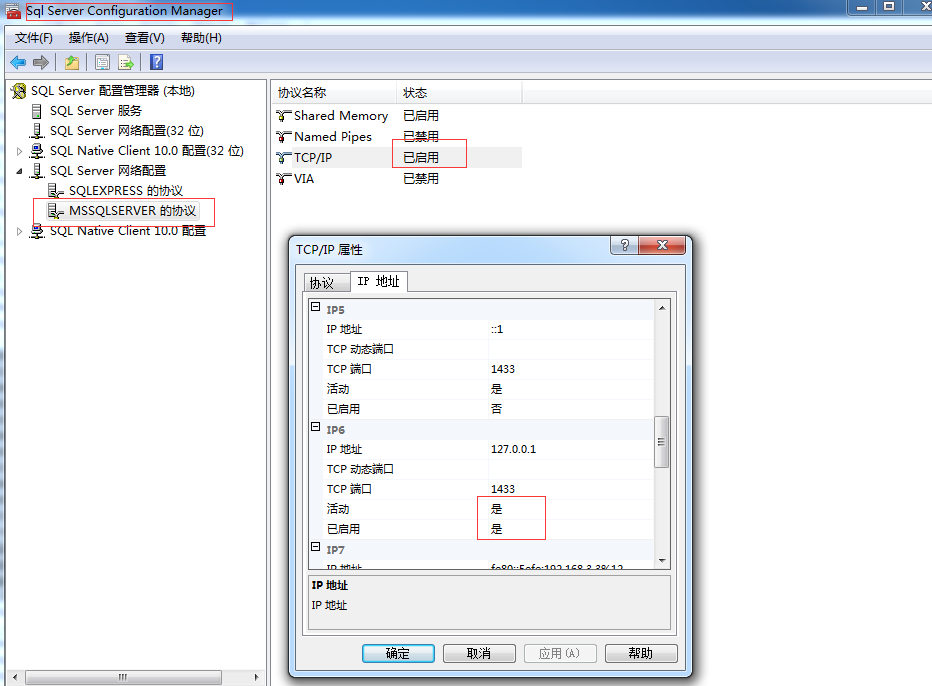
那么问题来了,1434和1433这两个端口各自的作用是什么呢?
关于1433和1434可以百度一下。
Prelogin error: host 127.0.0.1 port 1434 Error reading prelogin response: Connection reset ClientConnectionId:26d4b559-c985-4b2e-bd8e-dd7a53b67e48的更多相关文章
- connection reset by peer, socket write error问题排查
2018-03-15更新:弄明白connection reset产生的原因,见重新分析connection reset by peer, socket write error错误原因 在开发文件上传功 ...
- 安装xlrd包的时候,总是报错:ERROR: Could not install packages due to an EnvironmentError: HTTPConnectionPool (host='127.0.0.1', port=8888):。。。
安装xlrd包的时候,总是报错:ERROR: Could not install packages due to an EnvironmentError: HTTPConnectionPool (ho ...
- 解决org.openqa.selenium.WebDriverException: Unable to connect to host 127.0.0.1 on port 7055 after 45000 ms org.springframework.beans.BeanInstantiation
解决方法为将selenium-server-standalone-2.37.0.jar升级至selenium-server-standalone-2.41.0.jar即可. 下载地址:http://s ...
- IntelliJ运行下载的Servlet时报错 Error running Tomcat 8.5.8: Unable to open debugger port (127.0.0.1:49551): java.net.SocketException
学习Java Servlet时,从Wrox上下载了示例代码,准备run/debug时发现以下错误: Error running Tomcat 8.5.8: Unable to open debugge ...
- selenium在Eclipse中打开fireFox浏览器是报报错connect to host 127.0.0.1 on port 7055
1.相信很多同学刚接触selenium时,在Eclipse中打开fireFox浏览器是报报错: org.openqa.selenium.firefox.NotConnectedException: U ...
- Selenium2学习-038-firefox、webdriver版本不对称问题解决:org.openqa.selenium.firefox.NotConnectedException: Unable to connect to host 127.0.0.1 on port 7055
今天有个朋友在群里问,为何脚本运行不通过,其脚本操作步骤简单描述如下: 1.启动火狐浏览器 2.打开百度 3.查询框输入关键字 4.点击按钮[百度一下] 脚本挺简单的,其给出的应用报错信息如下所示: ...
- WebDriver:org.openqa.selenium.firefox.NotConnectedException: Unable to connect to host 127.0.0.1 on port 7055 after 45000 ms
今天尝试最新的webDriver与fireFox搭配: 运行代码时出现如下的问题,但是浏览器却可以打开: org.openqa.selenium.firefox.NotConnectedExcepti ...
- selenium 运行之后错误提示Unable to connect to host 127.0.0.1 on port 7055 after 45000 ms. Firefox console output
错误提示: org.openqa.selenium.firefox.NotConnectedException: Unable to connect to host 127.0.0.1 on port ...
- selenium 问题:Unable to connect to host 127.0.0.1 on port 7055 after 45000 ms
问题:Unable to connect to host 127.0.0.1 on port 7055 after 45000 ms 原因: selenium-server-standalone-x. ...
随机推荐
- RxJava 1.x 理解-1
先看下别人实现的最基本的RxJava的实现方式: 在RxJava里面,有两个必不可少的角色:Subscriber(观察者) 和 Observable(订阅源). Subscriber(观察者) Sub ...
- [Bug]CS0016: 未能写入输出文件“c:\Windows\Microsoft.NET\Framework\v4.0.30319\Temp
win7中安装asp.net的问题 编译器错误信息: CS0016: 未能写入输出文件问题解决办法 编译错误 说明: 在编译向该请求提供服务所需资源的过程中出现错误.请检查下列特定错误详细信息并适当地 ...
- RocketMQ(7)——通信协议
RocketMQ(7)——通信协议 RocketMQ的通信协议其实很简单,但是无论是官方的用户手册,还是网上的博客,并没有很清晰简单地把其中所有的内容和原理讲明白. 对于需要扩展其他语言SDK的开发来 ...
- 【FTP】org.apache.commons.net.ftp.FTPClient实现复杂的上传下载,操作目录,处理编码
和上一份简单 上传下载一样 来,任何的方法不懂的,http://commons.apache.org/proper/commons-net/apidocs/org/apache/commons/net ...
- 正点原子STM32探索者学习笔记1
1.在STM32的数据手册中,引脚定义中的I/O structure中如果是FT的话,说明该引脚兼容5V: 2.IO口一般都有多个功能,可以通过寄存器的设置来选择其IO口的功能,F1还有重映射的概念, ...
- pip install py-stringsimjoin error: INCLUDE environment variable is empty
在用pip install py-stringsimjoin的时候报错error: INCLUDE environment variable is empty,后来在网上搜索下了说是需要下载安装VCF ...
- How to simplify a PHP code with the help of the façade pattern?
原文:https://phpenthusiast.com/blog/simplify-your-php-code-with-facade-class ------------------------- ...
- 常见的七大排序算法Java实现
/** * @author Javen * @Email javenlife@126.com * 2015年12月9日 */ public class Sorting { static int[] a ...
- 【FAQ】Ubuntu环境下ant编译android代码问题
在Ubuntu14.04环境下,编译android程序时候,运行ant debug的时候出现如下异常:
- sencha touch结合webservice读取jsonp数据详解
sencha touch读取jsonp数据主要依靠Ext.data.JsonP组件,在mvc的store文件中定义代码如下: Ext.define('eparkapp.store.ParksNearb ...