
Prelogin error: host 127.0.0.1 port 1434 Error reading prelogin response: Connection reset ClientConnectionId:26d4b559-c985-4b2e-bd8e-dd7a53b67e48
我在使用SSM框架的时候,连接的是sqlserver 2008r2数据库,但是查询数据的时候总是出现这样的警告信息,导致的结果是第一次登录的时候获取数据慢或者获取数据失败,具体的log信息如下
警告: ConnectionID:2 ClientConnectionId: 26d4b559-c985-4b2e-bd8e-dd7a53b67e48 Prelogin error: host 127.0.0.1 port 1434 Error reading prelogin response: Connection reset ClientConnectionId:26d4b559-c985-4b2e-bd8e-dd7a53b67e48
二月 13, 2017 12:16:11 下午 com.microsoft.sqlserver.jdbc.SQLServerConnection Prelogin
警告: ConnectionID:4 ClientConnectionId: 38e230ee-3a2f-4f40-bd1d-31fab938416e Prelogin error: host 127.0.0.1 port 1434 Error reading prelogin response: Software caused connection abort: recv failed ClientConnectionId:38e230ee-3a2f-4f40-bd1d-31fab938416e
二月 13, 2017 12:16:11 下午 com.microsoft.sqlserver.jdbc.SQLServerConnection Prelogin
警告: ConnectionID:2 ClientConnectionId: 43054ba2-7b80-4b14-b4bb-675a44da850c Prelogin error: host 127.0.0.1 port 1434 Error reading prelogin response: Connection reset ClientConnectionId:43054ba2-7b80-4b14-b4bb-675a44da850c
二月 13, 2017 12:16:11 下午 com.microsoft.sqlserver.jdbc.SQLServerConnection Prelogin
警告: ConnectionID:4 ClientConnectionId: 6a46f819-0541-469d-badf-3afe648a2334 Prelogin error: host 127.0.0.1 port 1434 Error reading prelogin response: Connection reset ClientConnectionId:6a46f819-0541-469d-badf-3afe648a2334
2017-02-13 12:16:11,482 [http-apr-8080-exec-8] DEBUG [org.mybatis.spring.transaction.SpringManagedTransaction] - JDBC Connection [jdbc:sqlserver://127.0.0.1:1434;authenticationScheme=nativeAuthentication;xopenStates=false;sendTimeAsDatetime=true;trustServerCertificate=false;sendStringParametersAsUnicode=true;selectMethod=direct;responseBuffering=adaptive;packetSize=8000;multiSubnetFailover=false;loginTimeout=15;lockTimeout=-1;lastUpdateCount=true;encrypt=false;disableStatementPooling=true;databaseName=db_zngkpt;applicationName=Microsoft JDBC Driver for SQL Server;applicationIntent=readwrite;, UserName=sa, Microsoft JDBC Driver 4.0 for SQL Server] will not be managed by Spring
然后在网上找解决方案,有很多说原因是:
第一次数据库连接后没有释放,然后接着第二次连接,就连接失败了,但是我使用的框架使用的是c3p0连接池,这个并不是我自己建的connection,所以,这个可以忽略了,那么还是别的原因么?
这个时候突然蹦出来一个说1434这个端口是已经被占用了,所以,没法使用,应该启用一个1433这个端口就没问题了,然后我就试着换了一个端口,然后呢,就正常了,以此来记录一下。
解决方案:
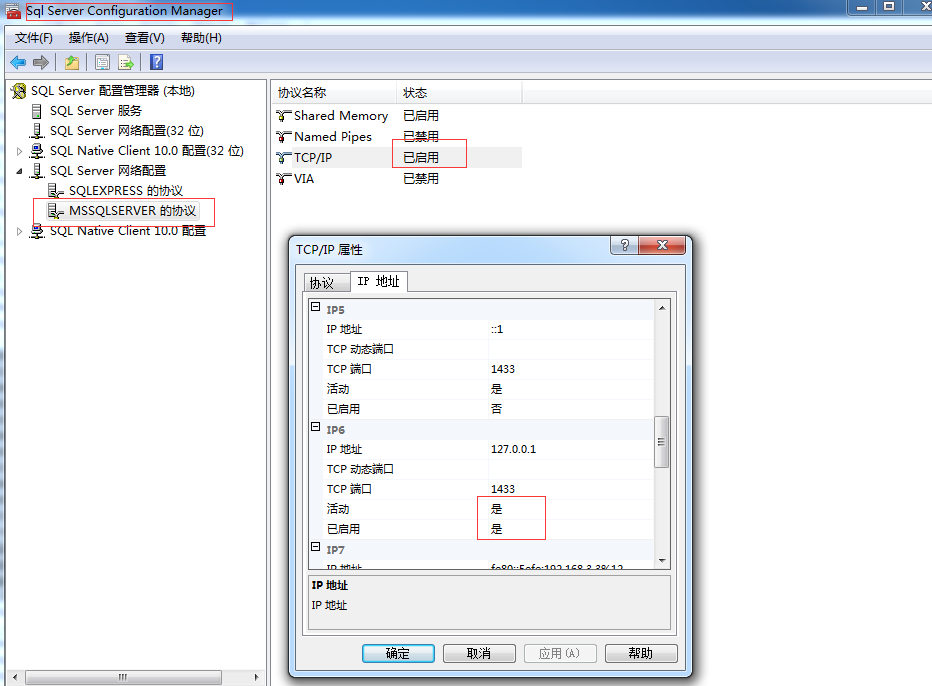
那么问题来了,1434和1433这两个端口各自的作用是什么呢?
关于1433和1434可以百度一下。
Prelogin error: host 127.0.0.1 port 1434 Error reading prelogin response: Connection reset ClientConnectionId:26d4b559-c985-4b2e-bd8e-dd7a53b67e48的更多相关文章
- connection reset by peer, socket write error问题排查
2018-03-15更新:弄明白connection reset产生的原因,见重新分析connection reset by peer, socket write error错误原因 在开发文件上传功 ...
- 安装xlrd包的时候,总是报错:ERROR: Could not install packages due to an EnvironmentError: HTTPConnectionPool (host='127.0.0.1', port=8888):。。。
安装xlrd包的时候,总是报错:ERROR: Could not install packages due to an EnvironmentError: HTTPConnectionPool (ho ...
- 解决org.openqa.selenium.WebDriverException: Unable to connect to host 127.0.0.1 on port 7055 after 45000 ms org.springframework.beans.BeanInstantiation
解决方法为将selenium-server-standalone-2.37.0.jar升级至selenium-server-standalone-2.41.0.jar即可. 下载地址:http://s ...
- IntelliJ运行下载的Servlet时报错 Error running Tomcat 8.5.8: Unable to open debugger port (127.0.0.1:49551): java.net.SocketException
学习Java Servlet时,从Wrox上下载了示例代码,准备run/debug时发现以下错误: Error running Tomcat 8.5.8: Unable to open debugge ...
- selenium在Eclipse中打开fireFox浏览器是报报错connect to host 127.0.0.1 on port 7055
1.相信很多同学刚接触selenium时,在Eclipse中打开fireFox浏览器是报报错: org.openqa.selenium.firefox.NotConnectedException: U ...
- Selenium2学习-038-firefox、webdriver版本不对称问题解决:org.openqa.selenium.firefox.NotConnectedException: Unable to connect to host 127.0.0.1 on port 7055
今天有个朋友在群里问,为何脚本运行不通过,其脚本操作步骤简单描述如下: 1.启动火狐浏览器 2.打开百度 3.查询框输入关键字 4.点击按钮[百度一下] 脚本挺简单的,其给出的应用报错信息如下所示: ...
- WebDriver:org.openqa.selenium.firefox.NotConnectedException: Unable to connect to host 127.0.0.1 on port 7055 after 45000 ms
今天尝试最新的webDriver与fireFox搭配: 运行代码时出现如下的问题,但是浏览器却可以打开: org.openqa.selenium.firefox.NotConnectedExcepti ...
- selenium 运行之后错误提示Unable to connect to host 127.0.0.1 on port 7055 after 45000 ms. Firefox console output
错误提示: org.openqa.selenium.firefox.NotConnectedException: Unable to connect to host 127.0.0.1 on port ...
- selenium 问题:Unable to connect to host 127.0.0.1 on port 7055 after 45000 ms
问题:Unable to connect to host 127.0.0.1 on port 7055 after 45000 ms 原因: selenium-server-standalone-x. ...
随机推荐
- VS2017序列号|Visual Studio 2017 激活码 序列号
企业版:NJVYC-BMHX2-G77MM-4XJMR-6Q8QF 专业版:KBJFW-NXHK6-W4WJM-CRMQB-G3CDH
- javascript如何写一个for循环
一个非常简单的for循环,也有不少的学问.假如,我们的目标是要遍历一个dom结点的所有孩子结点,然后打印结点的内容. 在javascript下,我刚学习的时间,我会这样写. for(var i = 0 ...
- winform treeview 绑定文件夹和文件
转载:http://www.cnblogs.com/zhbsh/archive/2011/05/26/2057733.html #region treeview 绑定文件夹和文件 /// <su ...
- 【mybatis】mybatis执行一个update方法,返回值为1,但是数据库中数据并未更新,粘贴sql语句直接在数据库执行,等待好久报错:Lock wait timeout exceeded; try restarting transaction
今天使用mybatis和jpa的过程中,发现这样一个问题: mybatis执行一个update方法,返回值为1,但是数据库中数据并未更新,粘贴sql语句直接在数据库执行,等待好久报错:Lock wai ...
- 搭建vue全家桶
1.直接利用vue-cli脚手架快速搭建 (1)全局安装vue-cli npm install -g vue-cli (2)创建项目 vue init webpack-simple my-projec ...
- 刷新神经网络新深度:ImageNet计算机视觉挑战赛微软中国研究员夺冠
微软亚洲研究院首席研究员孙剑 世界上最好计算机视觉系统有多精确?就在美国东部时间12月10日上午9时,ImageNet计算机视觉识别挑战赛结果揭晓——微软亚洲研究院视觉计算组的研究员们凭借深层神经网络 ...
- phpmyadmin后台4种拿shell方法 && php爆路径大法
php后台拿shell要知道php的路径,文章下面将讲诉爆php路径的方法!!! 方法一: CREATE TABLE `mysql`.`xss` (`xss1` TEXT NOT NULL ); IN ...
- spring注入之使用标签 @Autowired @Qualifier
使用标签的缺点在于必需要有源代码(由于标签必须放在源代码上),当我们并没有程序源代码的时候.我们仅仅有使用xml进行配置. 比如我们在xml中配置某个类的属性 <bea ...
- Laravel 5系列教程五:MVC的基本流程
免费视频教程地址https://laravist.com/series/laravel-5-basic 期间受到很多私事影响,终于还是要好好写写laravel的教程了. 上一篇我们说了数据库和Eloq ...
- Python 自用代码(知网会议论文网页源代码清洗)
#coding=utf-8 from pymongo import MongoClient from lxml import etree import requests jigou = u" ...