
Android开发:《Gradle Recipes for Android》阅读笔记(翻译)3.3——整合resource文件
问题:
想要在product的flavor里面改变图片,文字或者其它资源。
解决方案:
在flavor里面增加合适的资源目录,并且改变他们包含的值。
讨论:
考虑下3.2章的“hello world with attitude”应用,它定义了三个flavors:arrogant,friendly和obsequious。在每个情况下,app提示用户输入姓名,并且用这个姓名欢迎用户。每个的java代码都是相同的,但是看上去和感觉上好像每个都不一样。
product的flavors在gradle配置文件中像下面这样定义:
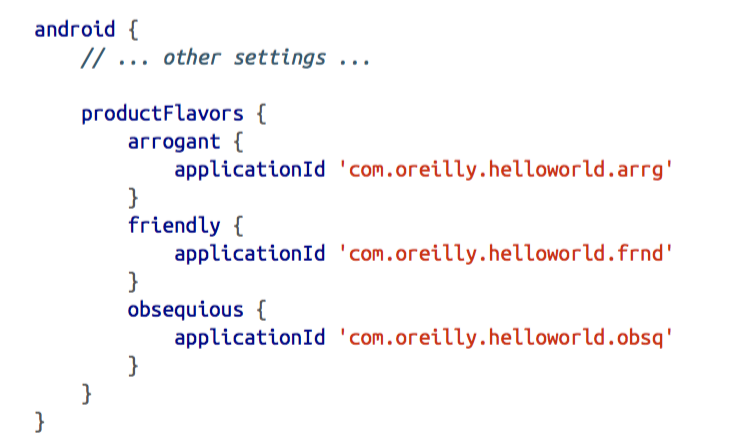
每个flavor都有一个不同的applicationId,这样他们可以被安装到同一台设备上供演示使用。
下面的示例,显示一个MainActivity类的onCreate和sayHello方法:
public class MainActivity extends AppCompatActivity {

  private EditText editText;

  @Override

  protected void onCreate(Bundle savedInstanceState) {

    super.onCreate(savedInstanceState);

    setContentView(R.layout.activity_main);

     editText = (EditText) findViewById(R.id.name_edit_text);

  }

  public void sayHello(View view) {

    String name = editText.getText().toString();

    Intent intent = new Intent(this, WelcomeActivity.class);

    intent.putExtra("user", name);

    startActivity(intent);

  }

}
这个activity有一个EditText属性,用来收集用户姓名。sayHello方法收集这个名字,并且将它作为extra放入intent中,并用这个intent启动welcomeActivity。
mainActivity的layout只是一个简单的包含textview,editText,button的linearLayout。
<LinearLayout
xmlns:android="http://schemas.android.com/apk/res/android"
xmlns:tools="http://schemas.android.com/tools"
android:layout_width="match_parent"
android:layout_height="match_parent"

android:orientation="vertical"
tools:context=".MainActivity">

<TextView

  android:id="@+id/name_text_view"
  android:layout_width="wrap_content"
  android:layout_height="wrap_content"
  android:text="@string/hello_world" />

<EditText

  android:id="@+id/name_edit_text"

  android:hint="@string/name_hint"

  android:layout_width="match_parent"

  android:layout_height="wrap_content" />

<Button

  android:onClick="sayHello"
 android:text="@string/hello_button_label"
  android:layout_width="wrap_content"
  android:layout_height="wrap_content" />

</LinearLayout>
MainActivity是启动项。下面展示arrogant flavor自定义的初始屏幕:
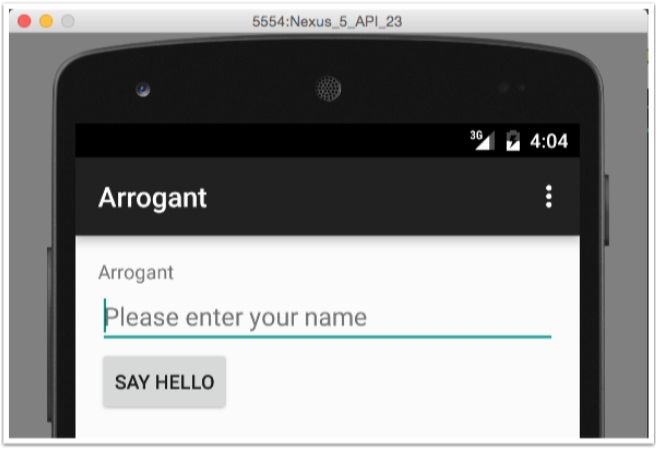
应用是如何命名和初始化设置?三个flavor都有自己的resources目录,在app/<flavor>/res下面。每个情况下都添加一个叫做values的子目录,并且将string.xml从app/src/main/res/values目录下拷贝进去。arrogant flavor的string.xml如下:
<resources>

  <string name="app_name">Arrogant</string>

  <string name="title_activity_welcome">His/Her Royal Highness</string>
  <string name="hello_world">Arrogant</string>

  <string name="greeting">We condescend to acknoweldge your presence, if just barely, %1$s.</string>
</resources>
arrogant的项目结构如下图:
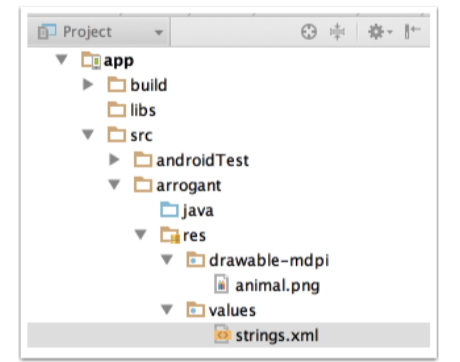
通过整合build type和主目录树下相同的文件夹中的res文件夹下的values实现整合资源。优先的是build type覆盖 product flavor,覆盖main source。
ps:非java资源互相覆盖,build type拥有最高优先级,其次是flavor,在后面是main目录。
welcomeActivity有一个onCreate方法接受用户姓名,并且和用户打招呼。
public class WelcomeActivity extends AppCompatActivity {

  @Override

  protected void onCreate(Bundle savedInstanceState) {
     super.onCreate(savedInstanceState);
     setContentView(R.layout.activity_welcome);

        String name = getIntent().getStringExtra("user");

        TextView greetingText = (TextView) findViewById(R.id.greeting_text);

        String format = getString(R.string.greeting);

        greetingText.setText(String.format(format, name));

  }

}
welcomeActivity的layout包含了一个textView和image。
<LinearLayout
xmlns:android="http://schemas.android.com/apk/res/android"
xmlns:tools="http://schemas.android.com/tools"
android:layout_width="match_parent"
android:layout_height="match_parent"

android:orientation="vertical"
tools:context="com.oreilly.helloworld.WelcomeActivity">

<TextView

android:id="@+id/greeting_text"
android:layout_width="wrap_content"
android:layout_height="wrap_content"
android:text="@string/hello_world"
android:textSize="24sp"
android:drawableBottom="@drawable/animal" />

</LinearLayout>
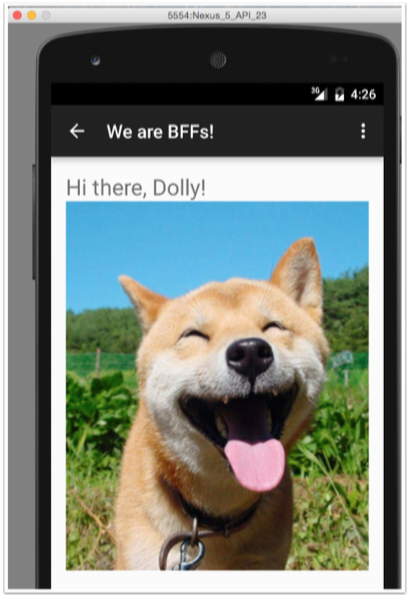
每个flavor都有自己的values.xml和animal.png。
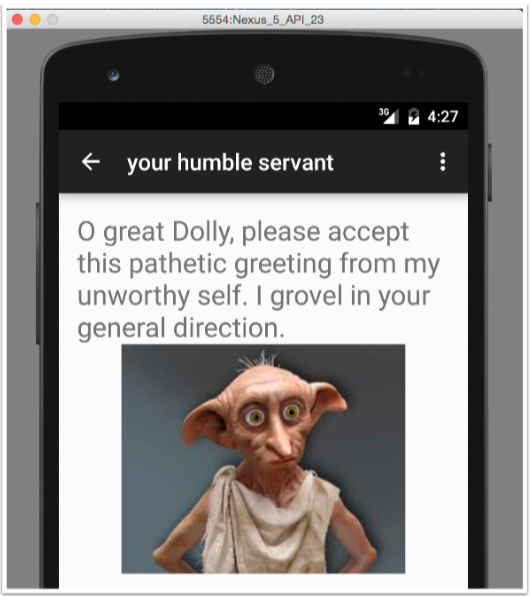
每个flavor都是相同的处理。obsequious flavor使用的strings.xml如下:
<resources>

<string name="app_name">Obsequious</string>

<string name="hello_world">Obsequious</string>

<string name="title_activity_welcome">your humble servant</string>
<string name="greeting">O great %1$s, please accept this pathetic

   greeting from my unworthy self. I grovel in your

   general direction.</string>
</resources>
friendly flavor的strings.xml如下:
<resources>

<string name="app_name">Friendly</string>

<string name="title_activity_welcome">We are BFFs!</string>
<string name="hello_world">Friendly</string>

<string name="greeting">Hi there, %1$s!</string>

</resources>
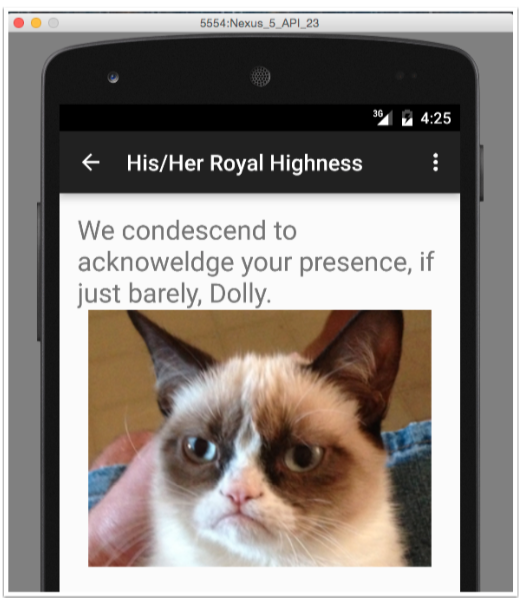
arrogant的欢迎界面:
friendly的欢迎界面:
obsequious的欢迎界面:
整合非java代码是容易的。只要增加合适的文件夹和文件,就可以覆盖main下面的文件。
Android开发:《Gradle Recipes for Android》阅读笔记(翻译)3.3——整合resource文件的更多相关文章
- Android开发工具全面转向Android Studio(3)——AS project/module的目录结构(与Eclipse对比)
如果AS完全还没摸懂的,建议先看下Android开发工具全面转向Android Studio(2)——AS project/module的CRUD. 注:以下以Windows平台为标准,AS以目前最新 ...
- Android开发工具全面转向Android Studio(2)——AS project/module的CRUD
本文有些地方可能需要衔接Android开发工具全面转向Android Studio(1)——准备开发环境,读起来效果会更好. 这个世界很奇妙,所有的东西离不开CRUD,即增删改查.即使人本身也遵循这个 ...
- 配置cordova的android开发环境(无android studio)
原文:配置cordova的android开发环境(无android studio) 趁元旦放假想试一下cordova,不想安装庞大的android studio,所以想最小化安装,居然花了一整天的时间 ...
- 收集整理Android开发所需的Android SDK、开发中用到的工具、Android开发教程、Android设计规范,免费的设计素材等。
AndroidDevTools Android Dev Tools官网地址:www.androiddevtools.cn 收集整理Android开发所需的Android SDK.开发中用到的工具.An ...
- Eclipse搭建Android开发环境并运行Android项目
Eclipse搭建Android开发环境并运行Android项目 (详细) 安装环境: window 10 64位 安装工具: JDK.Eclipse.SDK.ADT 安装步骤: 1.JAVA JDK ...
- Android开发:《Gradle Recipes for Android》阅读笔记(翻译)6.2——DSL文档
问题: 你需要查找Android Gradle DSL的完整文档. 解决方案: 访问Gradle Tools网站,从Android开发网站下载ZIP文件. 讨论:Android开发网站首页有完整的AP ...
- Android开发:《Gradle Recipes for Android》阅读笔记(翻译)5.1——单元测试
问题: 你想要测试app中的非android部分. 解决方案: 可以使用Android Studio1.1里面增加的单元测支持和Android的Gradle插件. 讨论: ADT插件只支持集成测试,并 ...
- Android开发:《Gradle Recipes for Android》阅读笔记(翻译)2.3——用Eclipse ADT导出App
问题: 想在一个已经存在的Eclipse ADT的项目中使用Gradle 解决方案: Eclipse ADT插件可以帮助生成Gradle文件 讨论: Eclipse的ADT插件是在2013年推出Gra ...
- Android开发:《Gradle Recipes for Android》阅读笔记1.2
在android开发中会需要配置使用app的android SDK的最低版本和目标版本,这个是bulidl.gradle的android模块设置.默认有以下几个设置: applicationId,这个 ...
随机推荐
- 查看某一个开发者代码修改量的脚本(ios平台可用)
#!/bin/sh # This is a script that help you get your team member's productivity # by analyzing his/he ...
- 怎么成为PHP专家
当阅读各种和PHP相关的博客.Quora问题.Google+社区.资讯和杂 志的时候,经常会注意到在技术上出现两极分化的现象.问题均围绕在“我如何连接到一个MySQL数据库?”,或者是“我如何使得邮件 ...
- [转载]linux 更新yum源 改成阿里云源
原文链接:https://www.cnblogs.com/bincoding/p/7892762.html 1.备份 mv /etc/yum.repos.d/CentOS-Base.repo /etc ...
- sipp中的action使用方法
最近在做sip服务器的压力测试 场景:当主叫收到200 Ok之后要将Contact 头域中的字段放在ACK消息中的请求行和to头域中发给被叫 查看sipp官网文档就使用action, 在主叫脚本中增加 ...
- 网络编程基础——学习阻塞,非阻塞(select和epoll)
<h3 class="xyn" helvetica="" neue',="" helvetica,="" aria ...
- libevent2源码分析之五:关键的调用链
用一个调用链来表示函数调用的流程,看起来更直观.根据上面的分析,总结了一些重要的调用链. 初始化 event_base_new event_base_new_with_config min_heap_ ...
- Activity设置切换动画时黑屏问题的解决
//当这么设置的时候.打开Acticity的时候会黑屏一下 overridePendingTransition(R.anim.activity_open,0); //改成例如以下代码 完美解决这个问题 ...
- hadoop english
for the same 同样previously 之前地overlay v. 覆盖; 镀金variable expansion 变量替换processed for 处理 entry(entries) ...
- 使用LoadRunner监控Apache的步骤 (转)
一.Apache上的设置 打开<Apache Installation>/conf/httpd.conf,进行如下修改: 1. 设置允许查看Apache运行状态的主机 # # Allow ...
- olede读excel
注意点:需要比较excel文件中是否有重复列时,需要设置HDR=No,IMEX=1,即把第一列当做数据读取,不然读到的datatable列名会被自动加数字后缀. /// < summary> ...