
Vue设置页面的title
原文地址:http://www.cnblogs.com/JimmyBright/p/7410771.html
前端框架如Vue、React等都是单页面的应用,也就是说整个web站点其实都是一个index页面,所谓的页面跳转都是替换index.html里边的内容,而页面的title是在每个页面初始化的时候才设置一次。对于现在的前端框架,传统的每个页面设置title标签的做法是不行的。
下面是在Vue框架下,利用路由来设置title的思路,当然还有别的方法。
先看项目目录
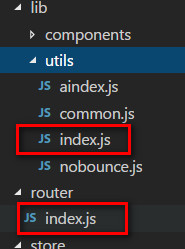
router的index.js代码如下:
 import Vue          from 'vue'

 import Router       from 'vue-router'

 import signProtocol from '@/components/pages/signProtocol'

 import personInfo   from '@/components/pages/personInfo'

 import uploadPhoto  from '@/components/pages/uploadPhoto'

 import utils        from '@/lib/utils'

 Vue.use(Router)

 var router= new Router({

   mode:'history',

   routes: [

     {

       path: '/',

       name: 'uploadPhoto',

       title:'上传身份证',

       component: uploadPhoto,

     },

     {

       path:'/personinfo',

       name:'personInfo',

       title:'提交信息',

       component:personInfo

     },

     {

       path:'/signprotocol',

       name:'signProtocol',

       title:'签署协议',

       component:signProtocol

     }

   ]

 })

 router.beforeEach((to, from, next) => {

   next()

 });

 router.afterEach((transition)=>{

   let name = transition.name

   let item = router.options.routes.filter((ele)=>{return ele.name == name})

   console.log(item[0].title)

   utils.setTitle(item[0].title)

 })

 export default router;
router/index.js
代码中在router中增加了参数title,在路由结束钩子afterEach里取到对应页面的title,再设置上去就可以了
需要用到的utils里的方法如下:
 import axios from 'axios';

 const SCREEN_WIDTH = document.body.clientWidth

 const SCREEN_HEIGHT=document.body.scrollHeight

 function service_sidi(url,body,successCallback,errorCallBack){

   axios.post(process.env.Host_url+url,body).then(function(result){

     successCallback(result)

   },function(error){errorCallBack(error)})

 }

 function service_jz(url,body,successCallback,errorCallBack){

   axios.post(process.env.Host_url+url,body).then(function(result){

     successCallback(result)

   },function(error){errorCallBack(error)})

 }

 function setTitle(title) {

   document.title = title

   var mobile = navigator.userAgent.toLowerCase()

   if (/iphone|ipad|ipod/.test(mobile)) {

     var iframe = document.createElement('iframe')

     iframe.style.display = 'none'

     // iframe.setAttribute('src', '')

     var iframeCallback = function () {

       setTimeout(function () {

         iframe.removeEventListener('load', iframeCallback)

         document.body.removeChild(iframe)

       }, 0)

     }

     iframe.addEventListener('load', iframeCallback)

     document.body.appendChild(iframe)

   }

 }

 var obj={

   service_sidi:service_sidi,

   service_jz:service_jz,

   SCREEN_WIDTH:SCREEN_WIDTH,

   SCREEN_HEIGHT:SCREEN_HEIGHT,

   setTitle:setTitle

 }

 export default obj;
lib/utils/index.js
Vue设置页面的title的更多相关文章
- .Net语言 APP开发平台——Smobiler学习日志:如何设置页面的title
1.修改Mobile Form的TitleText的属性 输入需要显示标题,如图1: 2.修改Mobile Form的TitleStyle属性 其中包括Image属性(窗体图标).BackColor属 ...
- 使用vue-router设置每个页面的title
进入 router 文件夹底下的index.js文件 首先引入: import Vue from 'vue' import Router from 'vue-router' 然后在路由里面配置每个路由 ...
- 获取页面的title值
<!DOCTYPE html> <html lang="en"> <head> <meta charset="UTF-8&quo ...
- python抽取指定url页面的title方法
python抽取指定url页面的title方法 今天简单使用了一下python的re模块和lxml模块,分别利用的它们提供的正则表达式和xpath来解析页面源码从中提取所需的title,xpath在完 ...
- vue项目设置每个页面的title
1.在项目目录下安装vue-wechat-title 2.在main.js中 使用vue-wechat-title 3.在router的配置中设置 4.在每个vue页面中加入 <div v-we ...
- java后台修改ZK页面的title
Clients.evalJavaScript("document.title='"+basicDBObject.getString("systemName")+ ...
- 每个页面的Title样式
<style>.zc_lan14 {}{ TEXT-ALIGN: center; FONT-FAMILY: "微软雅黑"; MARGIN-BOTTOM: 3px; ...
- 在父页面用Iframe加载子页面时,将父页面的title替换成子页面title
报告管理
- Python脚本控制的WebDriver 常用操作 <六> 打印当前页面的title及url
下面将使用WebDriver来答应浏览器页面的title和访问的地址信息 测试用例场景 测试中,访问1个页面然后判断其title是否符合预期是很常见的1个用例: 假设1个页面的title应该是'hel ...
随机推荐
- centos7搭建ANT+jmeter+jenkins接口测试自动化环境
一.环境准备 因为用到了jmeter和apache-tomcat,centos7必须要有java环境,所以配置jdk和apache-tomcat什么的,就不多说了,自行操作 帮你们偷懒: ant下载地 ...
- Charles 抓包使用教程
将 Charles 设置成系统代理 Charles 主界面介绍 过滤网络请求 截取 iPhone 上的网络封包 截取 Https 通讯信息 模拟慢速网络 修改网络请求内容 给服务器做压力测试 修改服务 ...
- Netty源码分析第4章(pipeline)---->第5节: 传播outbound事件
Netty源码分析第五章: pipeline 第五节: 传播outBound事件 了解了inbound事件的传播过程, 对于学习outbound事件传输的流程, 也不会太困难 在我们业务代码中, 有可 ...
- React Native移动开发实战-5-Android平台的调试技巧
Android平台的调试和其他平台的调试也很类似,例如:在Android Studio打开的工程中,打开源码MainActivity.java,然后,将鼠标移至代码编辑区的左侧后,单击鼠标即可添加断点 ...
- Docker部署Golang
1. 安装docker 2. mkdir myDocker 3. cd myDocker && touch Dockerfile 4. Dockerfile写入 # 将golang ...
- getField()与getDeclaredField()的区别
Java的反射机制中,用Class的getField(String name)或getDelaredField(String name)可以得到目标类的指定属性,返回类型是Field. 但这两个是有区 ...
- date命令详解
基础命令学习目录首页 原文链接:https://www.cnblogs.com/qmfsun/p/4598650.html date "+今天是%Y-%d-%m,现在是%H:%M:%S&qu ...
- ipcs命令详解
基础命令学习目录首页 多进程间通信常用的技术手段包括共享内存.消息队列.信号量等等,Linux系统下自带的ipcs命令是一个极好的工具,可以帮助我们查看当前系统下以上三项的使用情况,从而利于定位多进程 ...
- logout命令详解
基础命令学习目录首页 logout指令让用户退出系统,其功能和login指令相互对应.语法 logout
- [cmake] Basic Tutorial
Basic Project The most basic porject is an executable built from source code file. CMakeLists.txt cm ...