
CATransform3D的m34使用
CATransform3D的m34使用

效果图

源码
//

//  ViewController.m

//  StarWars

//

//  Created by YouXianMing on 15/11/3.

//  Copyright © 2015年 YouXianMing. All rights reserved.

//

#import "ViewController.h"

#import "UIView+SetRect.h"

#define DEGREE(d) ((d) * M_PI / 180.0f)

@interface ViewController ()

@end

@implementation ViewController

- (void)viewDidLoad {

    [super viewDidLoad];

    self.view.backgroundColor = [UIColor blackColor];

    // label

    UILabel *label      = [[UILabel alloc] initWithFrame:self.view.bounds];

    label.numberOfLines = ;

    label.textColor = [UIColor yellowColor];

    label.text          = @"\n\n\n\n\n\n\n\n\n\n\n\n\n\n\n\n\n\n\n\n\n\n\n\n\n\nStar Wars\nAn article (abbreviated art) is a word (or prefix or suffix) that is used with a noun to indicate the type of reference being made by the noun. Articles specify grammatical definiteness of the noun, in some languages extending to volume or numerical scope. The articles in the English language are the and a/an, and (in certain contexts) some. 'An' and 'a' are modern forms of the Old English 'an', which in Anglian dialects was the number 'one' (compare 'on', in Saxon dialects) and survived into Modern Scots as the number 'ane'. Both 'on' (respelled 'one' by the Normans) and 'an' survived into Modern English, with 'one' used as the number and 'an' ('a', before nouns that begin with a consonant sound) as an indefinite article.\nTraditionally in English, an article is usually considered to be a type of adjective. In some languages, articles are a special part of speech, which cannot easily be combined with other parts of speech. It is also possible for articles to be part of another part of speech category such as a determiner, an English part of speech category that combines articles and demonstratives (such as 'this' and 'that').";

    [label sizeToFit];

    // scrollView

    UIScrollView *scrollView   = [[UIScrollView alloc] initWithFrame:self.view.bounds];

    scrollView.backgroundColor = [UIColor blackColor];

    scrollView.contentSize     = CGSizeMake(self.view.width, label.height + self.view.height + );

    [self.view addSubview:scrollView];

    [scrollView addSubview:label];

    // CATransform3D

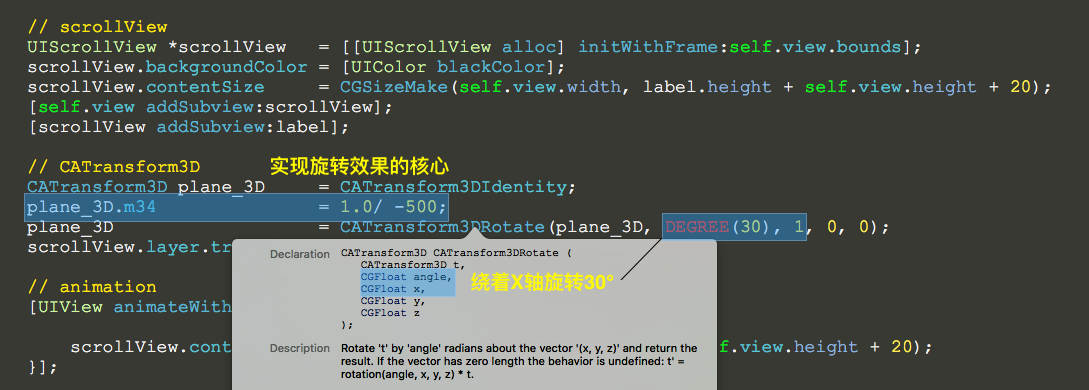
    CATransform3D plane_3D     = CATransform3DIdentity;

    plane_3D.m34               = 1.0/ -;

    plane_3D                   = CATransform3DRotate(plane_3D, DEGREE(), , , );

    scrollView.layer.transform = plane_3D;

    // animation

    [UIView animateWithDuration: animations:^{

        scrollView.contentOffset = CGPointMake(, label.height + self.view.height + );

    }];

}

@end
//

//  UIView+SetRect.h

//  StarWars

//

//  Created by YouXianMing on 15/11/3.

//  Copyright © 2015年 YouXianMing. All rights reserved.

//

#import "UIView+SetRect.h"

@implementation UIView (SetRect)

#pragma mark Frame

- (CGPoint)viewOrigin

{

    return self.frame.origin;

}

- (void)setViewOrigin:(CGPoint)newOrigin

{

    CGRect newFrame = self.frame;

    newFrame.origin = newOrigin;

    self.frame = newFrame;

}

- (CGSize)viewSize

{

    return self.frame.size;

}

- (void)setViewSize:(CGSize)newSize

{

    CGRect newFrame = self.frame;

    newFrame.size = newSize;

    self.frame = newFrame;

}

#pragma mark Frame Origin

- (CGFloat)x

{

    return self.frame.origin.x;

}

- (void)setX:(CGFloat)newX

{

    CGRect newFrame = self.frame;

    newFrame.origin.x = newX;

    self.frame = newFrame;

}

- (CGFloat)y

{

    return self.frame.origin.y;

}

- (void)setY:(CGFloat)newY

{

    CGRect newFrame = self.frame;

    newFrame.origin.y = newY;

    self.frame = newFrame;

}

#pragma mark Frame Size

- (CGFloat)height

{

    return self.frame.size.height;

}

- (void)setHeight:(CGFloat)newHeight

{

    CGRect newFrame = self.frame;

    newFrame.size.height = newHeight;

    self.frame = newFrame;

}

- (CGFloat)width

{

    return self.frame.size.width;

}

- (void)setWidth:(CGFloat)newWidth

{

    CGRect newFrame = self.frame;

    newFrame.size.width = newWidth;

    self.frame = newFrame;

}

#pragma mark Frame Borders

- (CGFloat)left

{

    return self.x;

}

- (void)setLeft:(CGFloat)left

{

    self.x = left;

}

- (CGFloat)right

{

    return self.frame.origin.x + self.frame.size.width;

}

- (void)setRight:(CGFloat)right

{

    self.x = right - self.width;

}

- (CGFloat)top

{

    return self.y;

}

- (void)setTop:(CGFloat)top

{

    self.y = top;

}

- (CGFloat)bottom

{

    return self.frame.origin.y + self.frame.size.height;

}

- (void)setBottom:(CGFloat)bottom

{

    self.y = bottom - self.height;

}

#pragma mark Center Point

#if !IS_IOS_DEVICE

- (CGPoint)center

{

    return CGPointMake(self.left + self.middleX, self.top + self.middleY);

}

- (void)setCenter:(CGPoint)newCenter

{

    self.left = newCenter.x - self.middleX;

    self.top = newCenter.y - self.middleY;

}

#endif

- (CGFloat)centerX

{

    return self.center.x;

}

- (void)setCenterX:(CGFloat)newCenterX

{

    self.center = CGPointMake(newCenterX, self.center.y);

}

- (CGFloat)centerY

{

    return self.center.y;

}

- (void)setCenterY:(CGFloat)newCenterY

{

    self.center = CGPointMake(self.center.x, newCenterY);

}

#pragma mark Middle Point

- (CGPoint)middlePoint

{

    return CGPointMake(self.middleX, self.middleY);

}

- (CGFloat)middleX

{

    return self.width / ;

}

- (CGFloat)middleY

{

    return self.height / ;

}

@end
//

//  UIView+SetRect.m

//  StarWars

//

//  Created by YouXianMing on 15/11/3.

//  Copyright © 2015年 YouXianMing. All rights reserved.

//

#import <UIKit/UIKit.h>

@interface UIView (SetRect)

// Frame

@property (nonatomic) CGPoint viewOrigin;

@property (nonatomic) CGSize  viewSize;

// Frame Origin

@property (nonatomic) CGFloat x;

@property (nonatomic) CGFloat y;

// Frame Size

@property (nonatomic) CGFloat width;

@property (nonatomic) CGFloat height;

// Frame Borders

@property (nonatomic) CGFloat top;

@property (nonatomic) CGFloat left;

@property (nonatomic) CGFloat bottom;

@property (nonatomic) CGFloat right;

// Center Point

#if !IS_IOS_DEVICE

@property (nonatomic) CGPoint center;

#endif

@property (nonatomic) CGFloat centerX;

@property (nonatomic) CGFloat centerY;

// Middle Point

@property (nonatomic, readonly) CGPoint middlePoint;

@property (nonatomic, readonly) CGFloat middleX;

@property (nonatomic, readonly) CGFloat middleY;

@end
说明
CATransform3D的m34使用的更多相关文章
- CATransform3D的m34值动画
CATransform3D的m34值动画 效果 源码 https://github.com/YouXianMing/Animations // // CATransform3DM34Controlle ...
- CATransform3D中m34字段的取值含义
转载自:http://zhidao.baidu.com/link?url=OlVQoGOKIBmaXKgQisOLtzliTLPvreOOsRmny3yebA1Wb6-B3KtuKlRXmv0tO3y ...
- CGAffineTransform与CATransform3D
CGAffineTransform 1.CG的前缀告诉我们,CGAffineTransform类型属于Core Graphics框架,Core Graphics实际上是一个严格意义上的2D绘图API, ...
- iOS动画 三维透视投影 m34
transform的结构如下:struct CATransform3D{ CGFloat m11, m12, m13, m14; CGFloat m21, m22, m23, m24; CGFl ...
- CoreAnimation2-视觉效果和变换
圆角 圆角矩形是iOS的一个标志性审美特性.这在iOS的每一个地方都得到了体现,不论是主屏幕图标,还是警告弹框,甚至是文本框.按照这流行程度,你可能会认为一定有不借助Photoshop就能轻易创建圆角 ...
- 【转】iOS-Core-Animation-Advanced-Techniques(二)
原文: http://www.cocoachina.com/ios/20150104/10816.html 视觉效果和变换 (四)视觉效果 嗯,园和椭圆还不错,但如果是带圆角的矩形呢? 我们现在能做到 ...
- [iOS Animation]-CALayer 变换
变换 很不幸,没人能告诉你母体是什么,你只能自己体会 -- 骇客帝国 在第四章“可视效果”中,我们研究了一些增强图层和它的内容显示效果的一些技术,在这一章中,我们将要研究可以用来对图层旋转,摆放或者扭 ...
- iOS-Core-Animation-Advanced-Techniques(二)
本文转载至 http://www.cocoachina.com/ios/20150104/10816.html 视觉效果和变换 (四)视觉效果 嗯,园和椭圆还不错,但如果是带圆角的矩形呢? 我们现在能 ...
- CALayer的m34 - 三维透视效果
CATransform3D transform = CATransform3DIdentity; // 修改transform的m34达到透视效果 // - 1.0 / (500 ~ 1000 效果最 ...
随机推荐
- redis 安装报错 jemalloc/jemalloc.h: No such file or directory。
对于redis安装的这个错误,我在博客redis 安装 与错误解决办法最后有提及,但是网上大部分文章的对这个问题的解答都是有误的.所以在这里单列出来. 错误内容: jemalloc/jemalloc. ...
- 将已有Git库代码推送到新建库中
cd /path/to/your/git/repo/ git remote -v git remote rm origin git remote add origin ssh://abc@gmail. ...
- php中文转拼音2
<?php /** * strtopinyin.php * * @name 汉字字符转拼音 * @author Kudosharry * @version v1.0 * */ class Str ...
- linux svn 自启动
.svn服务自启动脚本 把脚本放在/etc/init.d/下 vi /etc/rc.d/init.d/svn svn脚本内容: #!/bin/bash # chkconfig: - # descrip ...
- java面试⑦高级部分
2.6.2说一下Linux下面的一些常用命令 常用: pwd 获取当前路径 cd 跳转到目录 su -u 切换到管理员 ls 列举目录 文件操作命令: 文件 tail 查看 rm -rf 删除 vim ...
- JavaScript窗口打开与关闭及如何使用opener使子窗口对父窗口进行操作
一.打开与关闭窗口 1.打开窗口:可以使用window对象中的Open()方法. newWindow = window.open(url,windowname,location); 参数说明: url ...
- [转]使用EntityFramework6.1的DbCommandInterceptor拦截生成的SQL语句
本文转自:http://www.cnblogs.com/Ax0ne/p/3620958.html 开始 EF6.1也出来不少日子了,6.1相比6.0有个很大的特点就是新增了System.Data.En ...
- [转]AngularJS中$timeout和$interval的用法详解
本文转自:http://www.cnblogs.com/moli-/p/5827618.html 1. 先将$interval,$timeout,作为参数注入到controller中,例如rds.co ...
- WCF DEMO2 基于HTTP-GET的元数据交换及Configure()方法以及添加MEX终结点
using System; using System.Diagnostics; using System.Linq; using System.ServiceModel; using System.S ...
- 【转】一次由过量线程引发的OOM排查
mac的话,还得进行下特殊处理:右键mat显示包内容,进入Contents->MacOS下面,会有一个MemoryAnalyzer的命令. 打开终端,进入此路径找到MemoryAnalyzer, ...