
CATransform3D的m34使用
CATransform3D的m34使用

效果图

源码
//

//  ViewController.m

//  StarWars

//

//  Created by YouXianMing on 15/11/3.

//  Copyright © 2015年 YouXianMing. All rights reserved.

//

#import "ViewController.h"

#import "UIView+SetRect.h"

#define DEGREE(d) ((d) * M_PI / 180.0f)

@interface ViewController ()

@end

@implementation ViewController

- (void)viewDidLoad {

    [super viewDidLoad];

    self.view.backgroundColor = [UIColor blackColor];

    // label

    UILabel *label      = [[UILabel alloc] initWithFrame:self.view.bounds];

    label.numberOfLines = ;

    label.textColor = [UIColor yellowColor];

    label.text          = @"\n\n\n\n\n\n\n\n\n\n\n\n\n\n\n\n\n\n\n\n\n\n\n\n\n\nStar Wars\nAn article (abbreviated art) is a word (or prefix or suffix) that is used with a noun to indicate the type of reference being made by the noun. Articles specify grammatical definiteness of the noun, in some languages extending to volume or numerical scope. The articles in the English language are the and a/an, and (in certain contexts) some. 'An' and 'a' are modern forms of the Old English 'an', which in Anglian dialects was the number 'one' (compare 'on', in Saxon dialects) and survived into Modern Scots as the number 'ane'. Both 'on' (respelled 'one' by the Normans) and 'an' survived into Modern English, with 'one' used as the number and 'an' ('a', before nouns that begin with a consonant sound) as an indefinite article.\nTraditionally in English, an article is usually considered to be a type of adjective. In some languages, articles are a special part of speech, which cannot easily be combined with other parts of speech. It is also possible for articles to be part of another part of speech category such as a determiner, an English part of speech category that combines articles and demonstratives (such as 'this' and 'that').";

    [label sizeToFit];

    // scrollView

    UIScrollView *scrollView   = [[UIScrollView alloc] initWithFrame:self.view.bounds];

    scrollView.backgroundColor = [UIColor blackColor];

    scrollView.contentSize     = CGSizeMake(self.view.width, label.height + self.view.height + );

    [self.view addSubview:scrollView];

    [scrollView addSubview:label];

    // CATransform3D

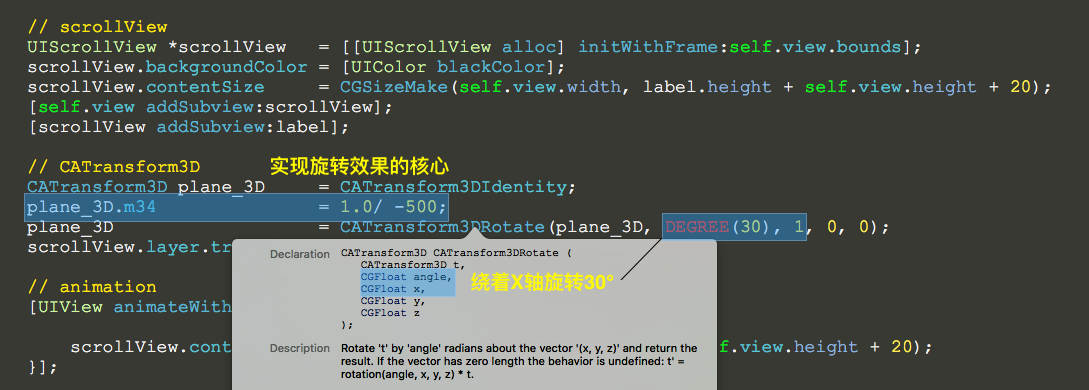
    CATransform3D plane_3D     = CATransform3DIdentity;

    plane_3D.m34               = 1.0/ -;

    plane_3D                   = CATransform3DRotate(plane_3D, DEGREE(), , , );

    scrollView.layer.transform = plane_3D;

    // animation

    [UIView animateWithDuration: animations:^{

        scrollView.contentOffset = CGPointMake(, label.height + self.view.height + );

    }];

}

@end
//

//  UIView+SetRect.h

//  StarWars

//

//  Created by YouXianMing on 15/11/3.

//  Copyright © 2015年 YouXianMing. All rights reserved.

//

#import "UIView+SetRect.h"

@implementation UIView (SetRect)

#pragma mark Frame

- (CGPoint)viewOrigin

{

    return self.frame.origin;

}

- (void)setViewOrigin:(CGPoint)newOrigin

{

    CGRect newFrame = self.frame;

    newFrame.origin = newOrigin;

    self.frame = newFrame;

}

- (CGSize)viewSize

{

    return self.frame.size;

}

- (void)setViewSize:(CGSize)newSize

{

    CGRect newFrame = self.frame;

    newFrame.size = newSize;

    self.frame = newFrame;

}

#pragma mark Frame Origin

- (CGFloat)x

{

    return self.frame.origin.x;

}

- (void)setX:(CGFloat)newX

{

    CGRect newFrame = self.frame;

    newFrame.origin.x = newX;

    self.frame = newFrame;

}

- (CGFloat)y

{

    return self.frame.origin.y;

}

- (void)setY:(CGFloat)newY

{

    CGRect newFrame = self.frame;

    newFrame.origin.y = newY;

    self.frame = newFrame;

}

#pragma mark Frame Size

- (CGFloat)height

{

    return self.frame.size.height;

}

- (void)setHeight:(CGFloat)newHeight

{

    CGRect newFrame = self.frame;

    newFrame.size.height = newHeight;

    self.frame = newFrame;

}

- (CGFloat)width

{

    return self.frame.size.width;

}

- (void)setWidth:(CGFloat)newWidth

{

    CGRect newFrame = self.frame;

    newFrame.size.width = newWidth;

    self.frame = newFrame;

}

#pragma mark Frame Borders

- (CGFloat)left

{

    return self.x;

}

- (void)setLeft:(CGFloat)left

{

    self.x = left;

}

- (CGFloat)right

{

    return self.frame.origin.x + self.frame.size.width;

}

- (void)setRight:(CGFloat)right

{

    self.x = right - self.width;

}

- (CGFloat)top

{

    return self.y;

}

- (void)setTop:(CGFloat)top

{

    self.y = top;

}

- (CGFloat)bottom

{

    return self.frame.origin.y + self.frame.size.height;

}

- (void)setBottom:(CGFloat)bottom

{

    self.y = bottom - self.height;

}

#pragma mark Center Point

#if !IS_IOS_DEVICE

- (CGPoint)center

{

    return CGPointMake(self.left + self.middleX, self.top + self.middleY);

}

- (void)setCenter:(CGPoint)newCenter

{

    self.left = newCenter.x - self.middleX;

    self.top = newCenter.y - self.middleY;

}

#endif

- (CGFloat)centerX

{

    return self.center.x;

}

- (void)setCenterX:(CGFloat)newCenterX

{

    self.center = CGPointMake(newCenterX, self.center.y);

}

- (CGFloat)centerY

{

    return self.center.y;

}

- (void)setCenterY:(CGFloat)newCenterY

{

    self.center = CGPointMake(self.center.x, newCenterY);

}

#pragma mark Middle Point

- (CGPoint)middlePoint

{

    return CGPointMake(self.middleX, self.middleY);

}

- (CGFloat)middleX

{

    return self.width / ;

}

- (CGFloat)middleY

{

    return self.height / ;

}

@end
//

//  UIView+SetRect.m

//  StarWars

//

//  Created by YouXianMing on 15/11/3.

//  Copyright © 2015年 YouXianMing. All rights reserved.

//

#import <UIKit/UIKit.h>

@interface UIView (SetRect)

// Frame

@property (nonatomic) CGPoint viewOrigin;

@property (nonatomic) CGSize  viewSize;

// Frame Origin

@property (nonatomic) CGFloat x;

@property (nonatomic) CGFloat y;

// Frame Size

@property (nonatomic) CGFloat width;

@property (nonatomic) CGFloat height;

// Frame Borders

@property (nonatomic) CGFloat top;

@property (nonatomic) CGFloat left;

@property (nonatomic) CGFloat bottom;

@property (nonatomic) CGFloat right;

// Center Point

#if !IS_IOS_DEVICE

@property (nonatomic) CGPoint center;

#endif

@property (nonatomic) CGFloat centerX;

@property (nonatomic) CGFloat centerY;

// Middle Point

@property (nonatomic, readonly) CGPoint middlePoint;

@property (nonatomic, readonly) CGFloat middleX;

@property (nonatomic, readonly) CGFloat middleY;

@end
说明
CATransform3D的m34使用的更多相关文章
- CATransform3D的m34值动画
CATransform3D的m34值动画 效果 源码 https://github.com/YouXianMing/Animations // // CATransform3DM34Controlle ...
- CATransform3D中m34字段的取值含义
转载自:http://zhidao.baidu.com/link?url=OlVQoGOKIBmaXKgQisOLtzliTLPvreOOsRmny3yebA1Wb6-B3KtuKlRXmv0tO3y ...
- CGAffineTransform与CATransform3D
CGAffineTransform 1.CG的前缀告诉我们,CGAffineTransform类型属于Core Graphics框架,Core Graphics实际上是一个严格意义上的2D绘图API, ...
- iOS动画 三维透视投影 m34
transform的结构如下:struct CATransform3D{ CGFloat m11, m12, m13, m14; CGFloat m21, m22, m23, m24; CGFl ...
- CoreAnimation2-视觉效果和变换
圆角 圆角矩形是iOS的一个标志性审美特性.这在iOS的每一个地方都得到了体现,不论是主屏幕图标,还是警告弹框,甚至是文本框.按照这流行程度,你可能会认为一定有不借助Photoshop就能轻易创建圆角 ...
- 【转】iOS-Core-Animation-Advanced-Techniques(二)
原文: http://www.cocoachina.com/ios/20150104/10816.html 视觉效果和变换 (四)视觉效果 嗯,园和椭圆还不错,但如果是带圆角的矩形呢? 我们现在能做到 ...
- [iOS Animation]-CALayer 变换
变换 很不幸,没人能告诉你母体是什么,你只能自己体会 -- 骇客帝国 在第四章“可视效果”中,我们研究了一些增强图层和它的内容显示效果的一些技术,在这一章中,我们将要研究可以用来对图层旋转,摆放或者扭 ...
- iOS-Core-Animation-Advanced-Techniques(二)
本文转载至 http://www.cocoachina.com/ios/20150104/10816.html 视觉效果和变换 (四)视觉效果 嗯,园和椭圆还不错,但如果是带圆角的矩形呢? 我们现在能 ...
- CALayer的m34 - 三维透视效果
CATransform3D transform = CATransform3DIdentity; // 修改transform的m34达到透视效果 // - 1.0 / (500 ~ 1000 效果最 ...
随机推荐
- k折交叉验证
原理:将原始数据集划分为k个子集,将其中一个子集作为验证集,其余k-1个子集作为训练集,如此训练和验证一轮称为一次交叉验证.交叉验证重复k次,每个子集都做一次验证集,得到k个模型,加权平均k个模型的结 ...
- 解决nginx访问问题connect() to 127.0.0.1:8080 failed (13: Permission denied) while connecting to upstream,
问题:搭建好项目之后,用nginx进行代理,进行日常配置之后,发现前端正常访问,但是后端访问出现错误,报502错误,查找nginx日志,发现connect() to 127.0.0.1:8080 fa ...
- logback 日志打印输出
slf4j 其实是一个日志的抽象层, 其本质仍然需要真正的实现 他可以解决代码中独立于任意特定的日志类库, 可以减少很多维护日志的麻烦, 除此之外, 还有占位符的特性, {}, 类似于String#f ...
- Linux内存信息查看——free命令
free 命令可以显示系统已用和空闲的内存情况.包括物理内存.交互区内存(swap)和内核缓冲区内存(buffer).共享内存将被忽略.在Linux系统监控的工具中,free命令是最经常使用的命令之一 ...
- linux下在线升级nodejs
因现有项目需要用一个截屏node包,此包必须新版本,所以紧急升级下测试环境nodejs,后续再升级线上,小小试了下node在线升级 方案1,使用npm安装n模块,使用n来升级nodejs 首先要知道n ...
- 微信小程序动态生成保存二维码
起源:最近小程序需要涉及到一些推广方面的功能,所以要写一个动态生成二维码用户进行下载分享,写完之后受益良多,特此来分享一下: 一.微信小程序动态生成保存二维码 wxml: <view class ...
- java中线程同步问题
先不多说,直接上个例子,著名的生产者消费者问题. public class ProducerConsumer { public static void main(String[] args) { Sy ...
- composer windows安装
一.下载安装包安装 https://getcomposer.org/download/(由于墙的限制,可能下载可执行文件失败,即使成功,由于网络的原因,安装的时候也可能会失败,所以建议用第二种方法) ...
- Ionic国际化解决方案
1. 核心内容 使用Angular2的国际化(i18n)库:ngx-translate 官网地址:http://www.ngx-translate.com/ GitHub地址:https:// ...
- Visual Basic了解
Visual Basic是一种由微软公司开发的结构化的.模块化的.面向对象的.包含协助开发环境的事件驱动为机制的可视化程序设计语言.这是一种可用于微软自家产品开发的语言.它源自于Basic编程语言.V ...