
屏蔽响应事件继续向父视图传递的category
屏蔽响应事件继续向父视图传递的category
这篇教程是上一篇教程的升级版,将复杂的代码封装成了category,更便于使用:)
效果:
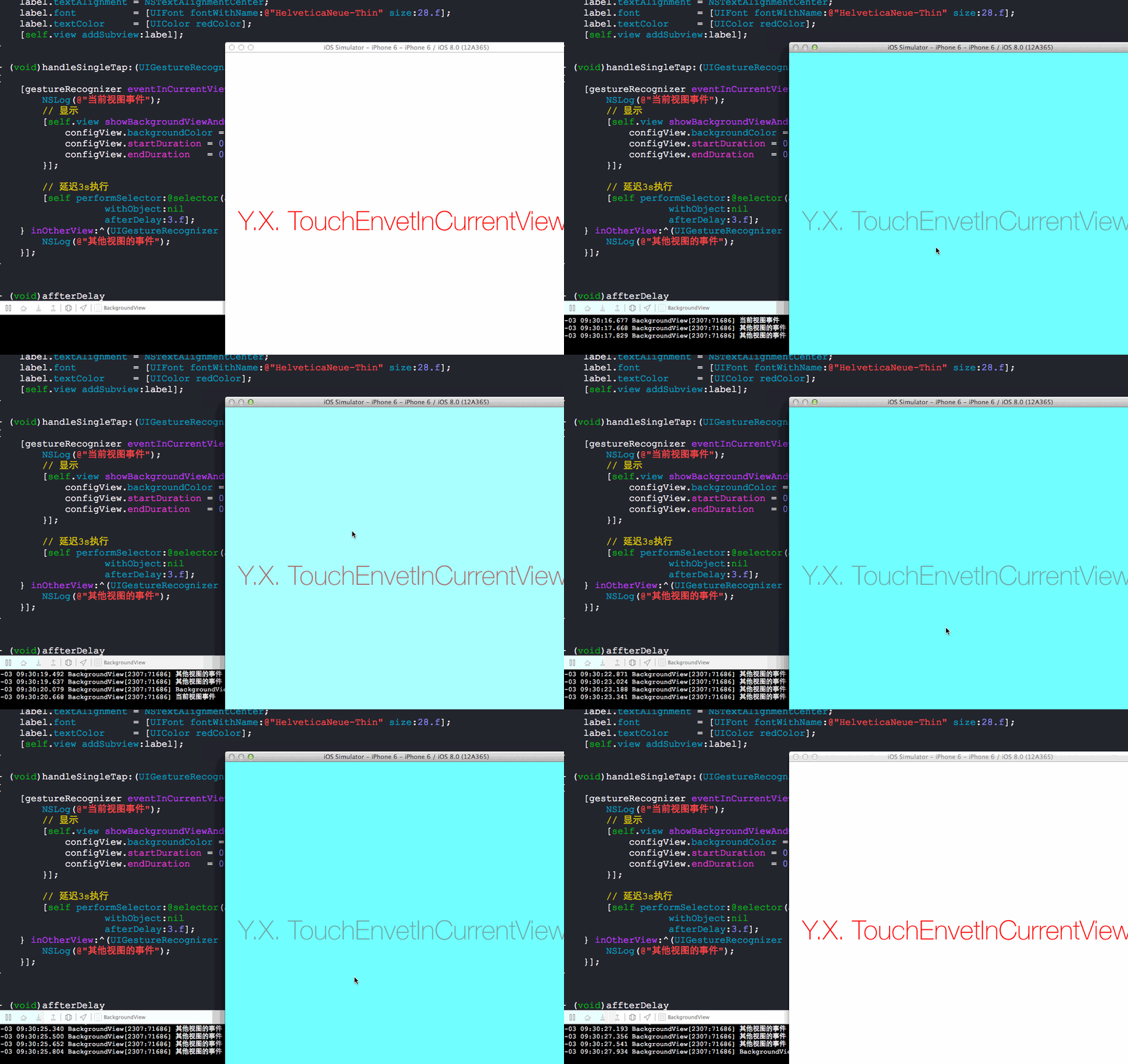
源码:
UIGestureRecognizer+EnvetInCurrentView.h 与 UIGestureRecognizer+EnvetInCurrentView.m
//

//  UIGestureRecognizer+EnvetInCurrentView.h

//  BackgroundView

//

//  Created by YouXianMing on 14-10-3.

//  Copyright (c) 2014年 YouXianMing. All rights reserved.

//

#import <UIKit/UIKit.h>

typedef void (^CurrentViewBlock)(UIGestureRecognizer *gesture);

typedef void (^OtherViewBlock)(UIGestureRecognizer *gesture);

@interface UIGestureRecognizer (EnvetInCurrentView)

- (void)eventInCurrentView:(CurrentViewBlock)currentViewBlock

               inOtherView:(OtherViewBlock)otherViewBlock;

@end
//

//  UIGestureRecognizer+EnvetInCurrentView.m

//  BackgroundView

//

//  Created by YouXianMing on 14-10-3.

//  Copyright (c) 2014年 YouXianMing. All rights reserved.

//

#import "UIGestureRecognizer+EnvetInCurrentView.h"

@implementation UIGestureRecognizer (EnvetInCurrentView)

- (void)eventInCurrentView:(CurrentViewBlock)currentViewBlock

               inOtherView:(OtherViewBlock)otherViewBlock

{

    UIEvent *event = [[UIEvent alloc] init];

    CGPoint location = [self locationInView:self.view];

    //check actually view you hit via hitTest

    UIView *view = [self.view hitTest:location withEvent:event];

    if ([view.gestureRecognizers containsObject:self]) {

        currentViewBlock(self);

    } else {

        otherViewBlock(self);

    }

}

@end
使用时候的源码:
//

//  ViewController.m

//  BackgroundView

//

//  Created by YouXianMing on 14-10-3.

//  Copyright (c) 2014年 YouXianMing. All rights reserved.

//

#import "ViewController.h"

#import "UIView+BackgroundView.h"

#import "UIGestureRecognizer+EnvetInCurrentView.h"

@interface ViewController ()

@end

@implementation ViewController

- (void)viewDidLoad {

    [super viewDidLoad];

    // 添加手势

    UITapGestureRecognizer *tap = [[UITapGestureRecognizer alloc] initWithTarget:self

                                                                          action:@selector(handleSingleTap:)];

    [self.view addGestureRecognizer:tap];

    UILabel *label      = [[UILabel alloc] initWithFrame:self.view.bounds];

    label.text          = @"Y.X. Touch Test";

    label.textAlignment = NSTextAlignmentCenter;

    label.font          = [UIFont fontWithName:@"HelveticaNeue-Thin" size:.f];

    label.textColor     = [UIColor redColor];

    [self.view addSubview:label];

}

- (void)handleSingleTap:(UIGestureRecognizer *)gestureRecognizer

{

    [gestureRecognizer eventInCurrentView:^(UIGestureRecognizer *gesture) {

        NSLog(@"当前视图事件");

        // 显示

        [self.view showBackgroundViewAndConfig:^(BackgroundView *configView) {

            configView.backgroundColor = [[UIColor blackColor] colorWithAlphaComponent:0.6];

            configView.startDuration = 0.4f;

            configView.endDuration   = 0.4f;

        }];

        // 延迟3s执行

        [self performSelector:@selector(affterDelay)

                   withObject:nil

                   afterDelay:.f];

    } inOtherView:^(UIGestureRecognizer *gesture) {

        NSLog(@"其他视图的事件");

    }];

}

- (void)affterDelay

{

    // 隐藏

    [self.view removeBackgroundView];

}

@end
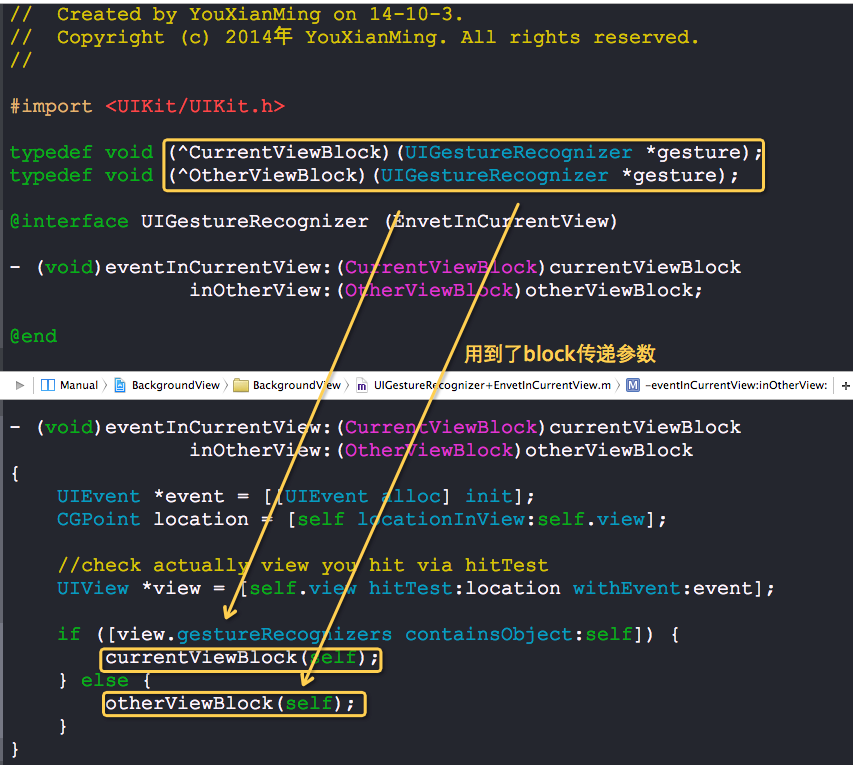
以下是需要注意的地方:
屏蔽响应事件继续向父视图传递的category的更多相关文章
- iOS--子视图如何穿透上层视图响应事件
一.使用方法:- (nullable UIView *)hitTest:(CGPoint)point withEvent:(nullable UIEvent *)event; 二.背景知识iOS系统检 ...
- 使用AppDelegate单例,解决子视图无法给父视图发送消息的问题
关于单例模式,我会在实验过后再开一个博客重点讲单例的使用,这里只是介绍我在PhotoForBingyan的照片滤镜的项目中使用AppDelegate单例的情况. 碰到的问题: 由于这个项目是个多视图的 ...
- 让超出父视图范围的子视图响应事件,在UIView范围外响应点击
/** * 在父视图中重写该方法,这样可使超出部分响应事件. */ - (UIView *)hitTest:(CGPoint)point withEvent:(UIEvent *)event { ...
- ios 怎么禁止点击子视图的时候不响应父视图的点击事件
方法一 可以在触发手势的方法里添加一个区域的判断,如果点击区域正好是子视图的区域,则过滤掉,不处理此时的手势,如果点击的区域没有被子视图覆盖则,处理手势的事件.具体的代码如下: if( CGRect ...
- IOS子视图超过父视图frame后,无法交互响应
确定第一响应者 当用户触发某一事件(触摸事件或运动事件)后,UIKit会创建一个事件对象(UIEvent),该对象包含一些处理事件所需要的信息.然后事件对象被放到一个事件队列中.这些事件按照先进先出的 ...
- vue子组件使用自定义事件向父组件传递数据
使用v-on绑定自定义事件可以让子组件向父组件传递数据,用到了this.$emit(‘自定义的事件名称’,传递给父组件的数据) <!DOCTYPE html> <html lang= ...
- 从uibutton的点击谈谈ios的响应事件
最近在做一个项目,接连遇到两个关于点击事件的问题. 1.点击button不能响应事件的. 2.子view的frame超出了父view的容器大小,也不能响应点击事件. 效果图如右: 1.第一张图中的弹出 ...
- 超出父视图无法点击问题hitTest
p.p1 { margin: 0.0px 0.0px 0.0px 0.0px; font: 18.0px Menlo; color: #c91b13 } p.p2 { margin: 0.0px 0. ...
- UIImageView中的UIButton不响应事件解决方案
如下: CGRect imageRect = (CGRect){, , , }; UIImageView *imageView = [[[UIImageView alloc] initWithFram ...
随机推荐
- [中英对照]Linux kernel coding style | Linux内核编码风格
Linux kernel coding style | Linux内核编码风格 This is a short document describing the preferred coding sty ...
- Node.js http服务器搭建和发送http的get、post请求
1.Node.js 搭建http服务器 1.1创建server.js var http = require('http'); var querystring = require('querystrin ...
- redis实战笔记(6)-第6章 使用 Redis构建应用程序组件
本章主要内容 1.构建两个前缀匹配自 动补全程序 2.通过构建分布式锁来提高性能 3.通过开发计数信号量来控制并发 4.构建两个不同用途的任务队列 5.通过消息拉取系统来实现延迟消息传递 6.学习 ...
- [PY3]——对iterator的处理(解析式、map、reduce、filter)
引言 对iterator一般可以用for in方法处理,但有时可以借助更高效.也更易读的方式去处理. 例如解析式(包括列表解析式.生成器解析式.集合解析式.字典解析式), 例如map( ).reduc ...
- VB里的 dim是什么意思?
Dim为Dimension的缩写,后面加上所需变量的名字As为变量指定类型程序运行时,Dim语句就根据变量类型为变量分配内存空间
- Angular建立待办事项应用
建立路由 接前一小节,在src/app/app.component.html把login组件去掉 第一步: 在src/index.html指定基准路径 浏览器会根据这个路径下载css,图像,js文件, ...
- Java中接口的特点
Java接口在1.8之后发生了重大变化.所以谈Java接口特点可以分为1.8版本之前和1.8版本之后. 1.8版本之前的特点: 接口里只能有静态全局常量和public修饰的抽象方法. 为了代码简洁,在 ...
- spring Controller 层注解获取 properties 里面的值
前言:最近在做一个项目,想要在 controller 层直接通过注解 @Value("")来获取 properties 里面配置的属性. 这个其实和 springmvc.sprin ...
- 使用CSS3改变文本选中的默认颜色——张鑫旭
关于浏览器文字选中颜色 以我的系统举例(xp 默认主题),浏览器上页面文字选中后默认的背景色是一种蓝色, 不同浏览器的颜色有些许差异,但大致相同,文字颜色也近乎白色,如下图所示,截自Firefox3. ...
- ajax获取富文本数据无法正常渲染到页面问题
有时候富文本渲染到页面的时候 会连带标签一起渲染出来. 解决办法: 首先引用 <script src="https://cdn.jsdelivr.net/npm/fuwenben ...