
源码编译安装lnmp环境(nginx-1.14.2 + mysql-5.6.43 + php-5.6.30 )------踩了无数坑,重装了十几次服务器才会的,不容易啊!
和LAMP不同的是,LNMP中的N指的是Nginx(类似于Apache的一种web服务软件),并且php是作为一个独立服务存在的,这个服务叫做php-fpm,Nginx直接处理静态请求,动态请求会转发给php-fpm。
目前LNMP环境的应用非常多。在静态页面的处理上,Nginx比Apache更强;但在动态页面的处理上,Nginx并不占优势。
安装顺序nginx -- php --- mysql
安装php-5.6.30:
1 环境准备
yum install gcc bison bison-devel zlib-devel libmcrypt-devel mcrypt mhash-devel openssl-devel libxml2-devel libcurl-devel bzip2-devel readline-devel libedit-devel sqlite-devel jemalloc jemalloc-devel
yum install libpng
yum install libpng-devel
yum -y install libjpeg-devel
yum install freetype-devel
cd /usr/local
mkdir php-fpm
cd /usr/local/src
wget http://cn2.php.net/distributions/php-5.6.30.tar.gz
tar zvxf php-5.6.30.tar.gz
cd php-5.6.30
groupadd www
useradd -g www -s /sbin/nologin www
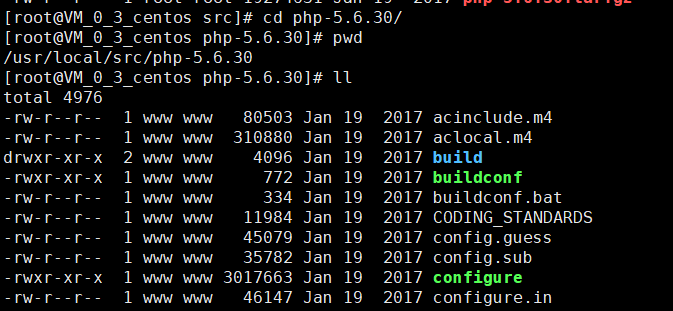
2 编译安装 (##编译参数)
./configure --prefix=/usr/local/php-fpm \
--with-config-file-path=/usr/local/php-fpm/etc \
--enable-inline-optimization --disable-debug \
--disable-rpath --enable-shared --enable-opcache \
--enable-fpm --with-fpm-user=www \
--with-png-dir \
--with-freetype-dir \
--with-jpeg-dir \
--with-gd \
--with-fpm-group=www \
--with-mysql=mysqlnd \
--with-mysqli=mysqlnd \
--with-pdo-mysql=mysqlnd \
--with-gettext \
--enable-mbstring \
--with-iconv \
--with-mcrypt \
--with-mhash \
--with-openssl \
--enable-bcmath \
--enable-soap \
--with-libxml-dir=/usr/ \
--enable-pcntl \
--enable-shmop \
--enable-sysvmsg \
--enable-sysvsem \
--enable-sysvshm \
--enable-sockets \
--with-curl --with-zlib \
--enable-zip \
--with-bz2 \
--with-readline
##参数解释
""" 安装路径 """--prefix=/usr/local/php56 \""" php.ini 配置文件路径 """--with-config-file-path=/usr/local/php56/etc \""" 优化选项 """--enable-inline-optimization \--disable-debug \--disable-rpath \--enable-shared \""" 启用 opcache,默认为 ZendOptimizer+(ZendOpcache) """--enable-opcache \""" FPM """--enable-fpm \--with-fpm-user=www \--with-fpm-group=www \""" MySQL """--with-mysql=mysqlnd \--with-mysqli=mysqlnd \--with-pdo-mysql=mysqlnd \""" 国际化与字符编码支持 """--with-gettext \--enable-mbstring \--with-iconv \""" 加密扩展 """--with-mcrypt \--with-mhash \--with-openssl \""" 数学扩展 """--enable-bcmath \""" Web 服务,soap 依赖 libxml """--enable-soap \--with-libxml-dir \""" 进程,信号及内存 """--enable-pcntl \--enable-shmop \--enable-sysvmsg \--enable-sysvsem \--enable-sysvshm \""" socket & curl """--enable-sockets \--with-curl \""" 压缩与归档 """--with-zlib \--enable-zip \--with-bz2 \""" GNU Readline 命令行快捷键绑定 """--with-readline3. 编译安装
make && make install
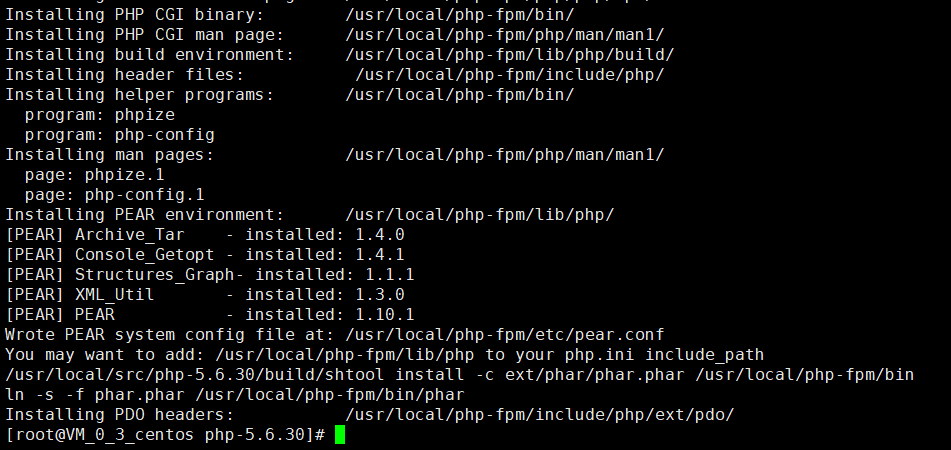
如下图 ,不抱任何错误
4.配置服务
配置文件
cp php.ini-development /usr/local/php-fpm/etc/php.ini
cp /usr/local/php-fpm/etc/php-fpm.conf.default /usr/local/php-fpm/etc/php-fpm.conf
5 .修改配置
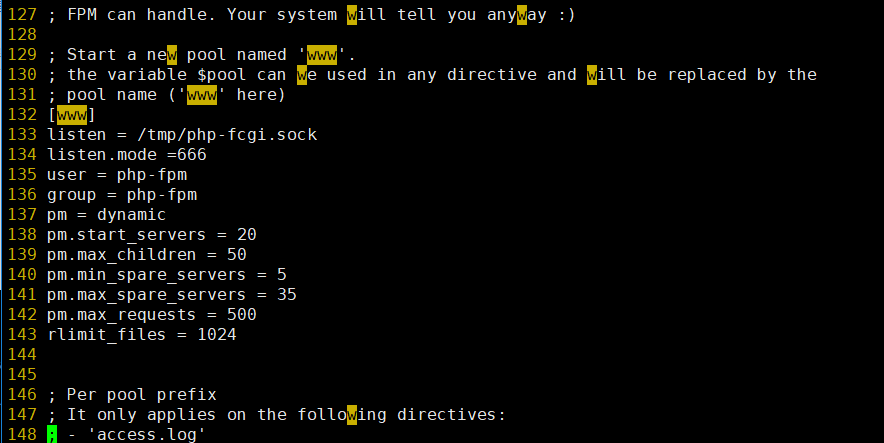
vim /usr/local/php-fpm/etc/php-fpm.conf
[global]
pid =/usr/local/php-fpm/var/run/php-fpm.pid
error_log = /usr/local/php-fpm/var/log/php-fpm.log
[www]

6. 保存配置文件后,检验配置是否正确的方法如下:
/usr/local/php-fpm/sbin/php-fpm -t
如果显示 "test is successful",说明配置没有问题,否则就要根据提示检查配置文件.

7.启动 php-fpm,命令如下:
cp /usr/local/src/php-5.6.30/sapi/fpm/init.d.php-fpm /etc/init.d/php-fpm
chmod 755 /etc/init.d/php-fpm
useradd -s /sbin/nologin php-fpm
service php-fpm start
设置php-fpm开启启动命令如下:
chkconfig php-fpm on
检测php-fpm是否启动的命令如下:
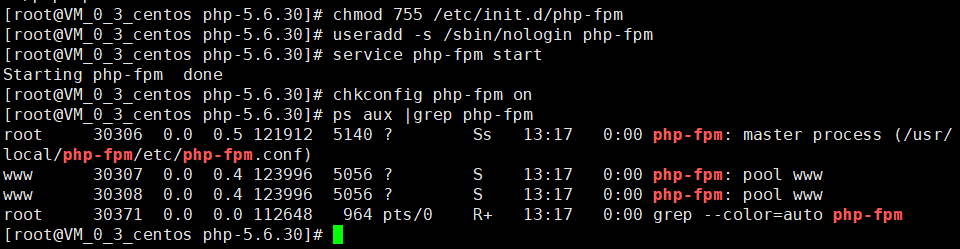
ps aux |grep php-fpm
执行这条命令,可以看见多个进程
安装nginx-1.14.2:
先不要急着安装,先确保它所依赖的库是否有,怎样查看软件是否安装(rpm -q xxx),如果没有安装依赖则进行安装(笔者一般安装依赖库直接使用yum 默认安装,这样在软件安装的时候就不需要知道依赖库的安装路径,省去不少麻烦)
需要安装的依赖包有 gcc expat-devel openssl-devel pcre pcre-devel

在src目录下 yum install gcc
yum install -y expat-devel
yum install openssl-devel
yum install -y pcre pcre-devel
yum install pcre-devel
1:在/usr/local下创建一个nginx目录
cd /usr/local
mkdir nginx
cd /usr/local/src
wget http://nginx.org/download/nginx-1.14.2.tar.gz
tar zxvf nginx-1.14.2.tar.gz
2.配置编译选项
cd nginx-1.14.2
./configure --prefix=/usr/local/nginx
3.编译和安装
make && make install
4.编写nginx启动脚本,并加入系统服务
vim /etc/init.d/nginx
#!/bin/bash

#chkconfig: - 30 21

#description: http service.

#Source Function Library

. /etc/init.d/functions

NGINX_SBIN="/usr/local/nginx/sbin/nginx"

NGINX_CONF="/usr/local/nginx/conf/nginx.conf"

NGINX_PID="/usr/local/nginx/logs/nginx.pid"

RETVAL=0

prog="Nginx"

start()

{

        echo -n $"Starting $prog: "

        mkdir -p /dev/shm/nginx_temp

        daemon $NGINX_SBIN -c $NGINX_CONF

        RETVAL = $?

        echo

        return $RETVAL

}

stop()

{

        echo -n $"Stopping $prog: "

        killproc -p $NGINX_PID $NGINX_SBIN -TERM

        rm -rf /dev/shm/nginx_temp

        RETVAL = $?

        echo

        return $RETVAL

}

reload()

{

        echo -n $"Reloading $prog: "

        killproc -p $NGINX_PID $NGINX_SBIN -HUP

        RETVAL = $?

        echo

        return $RETVAL

}

restart()

{

        stop

        start

}

configtest()

{

        $NGINX_SBIN -c $NGINX_CONF -t

        return 0

}

case "$1" in

        start)

                start

                ;;

        stop)

                stop

                ;;

        reload)

                reload

                ;;

        restart)

                restart

                ;;

        configtest)

                configtest

                ;;

        *)

                echo $"Usage: $0 {start|stop|reload|restart|configtest}"

                RETVAL=1

esac

exit $RETVAL
保存该脚本后更改权限,命令如下:
chmod 755 /etc/init.d/nginx
chkconfig --add nginx
如果想开启启动nginx,请执行命令如下:
chkconfig nginx on
5.更改nginx的配置文件:
> /usr/local/nginx/conf/nginx.conf
重定向符号>,单独使用时,可以吧一个文本文档快速清空
vim /usr/local/nginx/conf/nginx.conf //写入如下内容:
#vim  /usr/local/nginx/conf/nginx.conf

user nobody nobody;

worker_processes 2;

error_log /usr/local/nginx/logs/nginx_error.log crit;

pid /usr/local/nginx/logs/nginx.pid;

worker_rlimit_nofile 51200;

events

{

        use epoll;

        worker_connections 6000;

}

http

{

        include mime.types;

        default_type application/octet-stream;

        server_names_hash_bucket_size 3526;

        server_names_hash_max_size 4096;

        log_format combined_realip '$remote_addr $http_x_forwarded_for [$time_local]'

        ' $host "$request_uri" $status'

        ' "$http_referer" "$http_user_agent"';

        sendfile on;

        tcp_nopush on;

        keepalive_timeout 30;

        client_header_timeout 3m;

        client_body_timeout 3m;

        send_timeout 3m;

        connection_pool_size 256;

        client_header_buffer_size 1k;

        large_client_header_buffers 8 4k;

        output_buffers 4 32k;

        postpone_output 1460;

        client_max_body_size 10m;

        client_body_buffer_size 256k;

        client_body_temp_path /usr/local/nginx/client_body_temp;

        proxy_temp_path /usr/local/nginx/proxy_temp;

        fastcgi_temp_path /usr/local/nginx/fastcgi_temp;

        fastcgi_intercept_errors on;

        tcp_nodelay on;

        gzip on;

        gzip_min_length 1k;

        gzip_buffers 4 8k;

        gzip_comp_level 5;

        gzip_http_version 1.1;

        gzip_types text/plain application/x-javascript text/css text/htm

        application/xml;

        server

        {

                listen 80;

                server_name ax.xxx.xxb;

                index index.html index.htm index.php;

                root /usr/local/nginx/html;

                location ~ \.php$

                {

                        include fastcgi_params;

                        fastcgi_pass 127.0.0.1:9000;

                        fastcgi_index index.php;

                        fastcgi_param SCRIPT_FILENAME /usr/local/nginx/html$fastcgi_script_name;

                }

        }

}
6. 保存配置文件后,检验配置是否正确的方法如下:
/usr/local/nginx/sbin/nginx -t
如果显示 "test is successful",说明配置没有问题,否则就要根据提示检查配置文件.

7.启动nginx,命令如下:
service nginx start
重启 service nginx restart

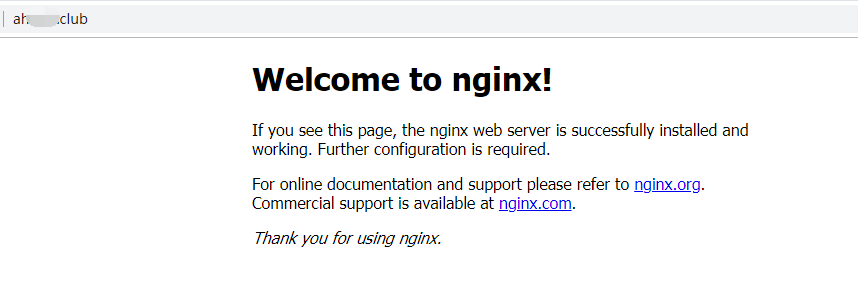
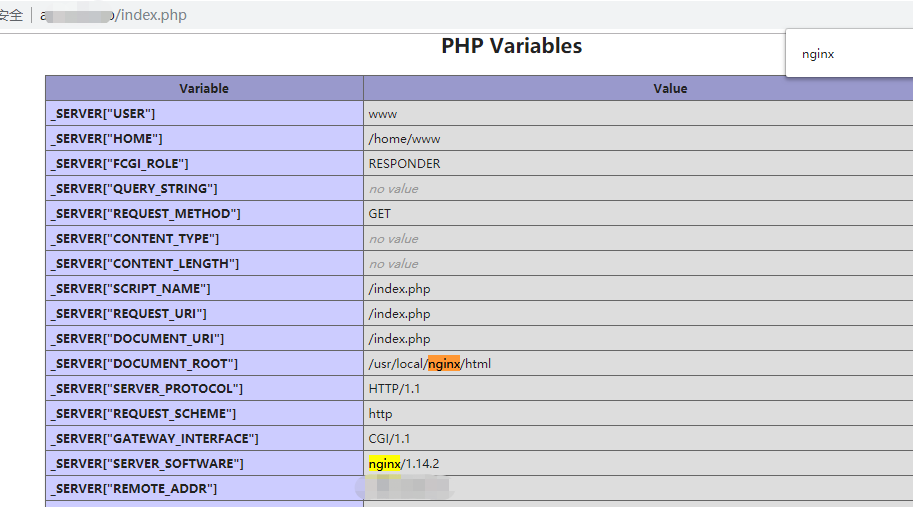
8.测试是否正确解析php
vim /usr/local/nginx/html/index.php
其内容如下
<?php
echo phpinfo();

安装mysql-5.6.43(与之前一模一样)
https://www.cnblogs.com/yehuisir/p/10061789.html
------------------------------------------------------------------------额外补充-----------------------------------------------------------------------------------
nginx.conf
#vim  /usr/local/nginx/conf/nginx.conf

user nobody nobody;

worker_processes 2;

error_log /usr/local/nginx/logs/nginx_error.log crit;

pid /usr/local/nginx/logs/nginx.pid;

worker_rlimit_nofile 51200;

events

{

    use epoll;

    worker_connections 6000;

}

http

{

    include mime.types;

    default_type application/octet-stream;

    server_names_hash_bucket_size 3526;

    server_names_hash_max_size 4096;

    log_format combined_realip '$remote_addr $http_x_forwarded_for [$time_local]'

    ' $host "$request_uri" $status'

    ' "$http_referer" "$http_user_agent"';

    sendfile on;

tcp_nopush on;

    keepalive_timeout 30;

    client_header_timeout 3m;

    client_body_timeout 3m;

    send_timeout 3m;

    connection_pool_size 256;

    client_header_buffer_size 1k;

    large_client_header_buffers 8 4k;

    output_buffers 4 32k;

    postpone_output 1460;

    client_max_body_size 10m;

    client_body_buffer_size 256k;

    client_body_temp_path /usr/local/nginx/client_body_temp;

    proxy_temp_path /usr/local/nginx/proxy_temp;

    fastcgi_temp_path /usr/local/nginx/fastcgi_temp;

    fastcgi_intercept_errors on;

    tcp_nodelay on;

    gzip on;

    gzip_min_length 1k;

    gzip_buffers 4 8k;

    gzip_comp_level 5;

    gzip_http_version 1.1;

    gzip_types text/plain application/x-javascript text/css text/htm

    application/xml;

    server

    {

        listen 80;

        server_name xxx.nxxx.cxx;

        index index.html index.htm index.php;

        root /usr/local/nginx/html;

        location ~ \.php$

        {

            include fastcgi_params;

            fastcgi_pass 127.0.0.1:9000;

            fastcgi_index index.php;

            fastcgi_param SCRIPT_FILENAME /usr/local/nginx/html$fastcgi_script_name;

        }

    }

    server

        {

                listen 80;

                server_name axxl.xxx.xxx;

                index index.html index.htm index.php;

                root /usr/local/nginx/html;

                location ~ \.php$

                {

                        include fastcgi_params;

                        fastcgi_pass 127.0.0.1:9000;

                        fastcgi_index index.php;

                        fastcgi_param SCRIPT_FILENAME /usr/local/nginx/html$fastcgi_script_name;

                }

        }

    server {

            listen       80;

            server_name  blxxx.xxx.xxx;

            root /usr/local/nginx/html/xxxg/public;

            index  index.html index.htm index.php;

            location / {

                if (!-e $request_filename) {

                    rewrite ^(.*)$ /index.php?s=$1 last;

                    break;

                }

            }

            error_page   500 502 503 504  /50x.html;

            location = /50x.html {

                root   html;

            }

            location ~ \.php$ {

               fastcgi_pass   127.0.0.1:9000;

               fastcgi_index index.php;

               include fastcgi_params;

               set $real_script_name $fastcgi_script_name;

               if ($fastcgi_script_name ~ "^(.+?\.php)(/.+)$") {

                   set $real_script_name $1;

                   set $path_info $2;

               }

               fastcgi_param SCRIPT_FILENAME $document_root$real_script_name;

               fastcgi_param SCRIPT_NAME $real_script_name;

               fastcgi_param PATH_INFO $path_info;

            }

            location ~ .*\.(gif|jpg|jpeg|png|bmp|swf|flv|ico)$ {

                expires 30d;

                access_log off;

            }

            location ~ .*\.(js|css)?$ {

                expires 7d;

                access_log off;

           }

    }

}
源码编译安装lnmp环境(nginx-1.14.2 + mysql-5.6.43 + php-5.6.30 )------踩了无数坑,重装了十几次服务器才会的,不容易啊!的更多相关文章
- 源码编译安装lnmp环境
一.源码编译安装步骤 首先说明源码安装的好处 速度快,可自定义路径 主要有三步:1.配置 进入源码安装包 ./configure --prefix=/uer/local/nginx 可指定参数 ...
- 源码编译安装LNMP环境及配置基于域名访问的多虚拟主机
实验环境及软件版本: CentOS版本: 6.6(2.6.32.-504.el6.x86_64) nginx版本: nginx-1.6.2 mysql版本: Mysql-5.6.23 php版本: ...
- centos6源码编译安装lnmp环境
操作系统 版本 64位 CentOS-6.6 10.0.0.20 安装环境所需依赖包 yum -y install gcc automake autoconf libtool make gcc- ...
- WordPress安装篇(5):源码编译安装LNMP并部署WordPress
与YUM方式安装相比,源码编译安装方式更灵活,安装过程中能自定义功能和参数,特别是在批量部署服务器又要求软件版本及配置一致时,源码编译安装的优势很明显.本文介绍如何通过源码编译方式安装Nginx1.1 ...
- 源码编译搭建LNMP环境
LNMP源码编译 1.LNMP介绍 LNMP=Linux Nginx Mysql PHP Nginx ("engine x") 是一个高性能的 HTTP 和 反向代理 服务器.Ng ...
- 源码编译安装LAMP环境及配置基于域名访问的多虚拟主机
实验环境及软件版本: CentOS版本: 6.6(2.6.32.-504.el6.x86_64) apache版本: apache2.2.27 mysql版本: Mysql-5.6.23 php版本 ...
- centos7源码编译安装LNMP+ZABBIX4.0LTS(1)——nginx
环境:192.168.117.132--zabbix server192.168.117.133--zabbix proxy 安装路径为/zabbix 安装nginx 1.安装包下载http://ng ...
- 年终福利,PHP7+Apache2.4+MySQL5.6 源码编译安装,环境配置,搭建你自己的LAMP环境
PHP7 都出来了,你还在玩PHP5吗? MySQL5.6 早都出来了,你还在玩MySql5.2吗? Apache2.4 早都出来了,你还在玩Apache2.2吗? 笔者不才,愿意亲自搭建环境,供搭建 ...
- 如何源码编译安装并控制nginx
安装nginx 注意 Linux操作系统需要2.6及其以上的内核(支持epoll) 使用nginx的必备软件 gcc编辑器 yum -y install gcc gcc-c++ pcre库(支持正则表 ...
随机推荐
- process_创建进程
import multiprocessingimport time#方式一def worker(interval): n = 5 while n > 0: print("The tim ...
- memcached centos启动笔记
root情况下命令行输入 apt-get install memcached 自动安装 不熟悉的情况下 可能找不到改程序所在目录 使用 find / -name memcached 从根目录开始寻找 ...
- 解决Android启动显示空白界面的问题
Android程序启动时,第一个看的界面并不是我们的指定的第一个Activity界面,而是显示了一个空白的界面,带标题栏的,但是界面什么内容都没有,这个界面只显示不到1秒左右的时间就会切换到我们的第一 ...
- Android无线调试_adbWireless
NC的ADB驱动是个很让人头疼的问题,纵使老玩家有时候也是反复装装不上,有时候就算装上了,换一个ROM就又不行了,真是让人扣心扣肺,欲哭无泪,欲罢不能啊...现在好了,有了adbWireless不但可 ...
- PetaPoco与SQLite
PetaPoco与SQLite. 对于精简版本的ORM,PetaPoco确实短小精悍,想做个WPF的Demo,然后将PetaPoco与SQLite集成一起使用,简单易用,是不错的选择. ()==数据库 ...
- Java中创建数组的几种方法
Java中创建数组的几种方法 public static void main(String[] args) { //创建数组的第一种方法 int[] arr=new int[6]; int intVa ...
- 2018.09.27 网络协议(tarjan)
描述 一些学校连接在一个计算机网络上.学校之间存在软件支援协议.每个学校都有它应支援的学校名单(学校 a 支援学校 b ,并不表示学校 b 一定支援学校 a ).当某校获得一个新软件时,无论是直接得到 ...
- 手机PC文件传输
QQ啥的现在直接无法全部退出,很纠结后台运行,时不时的来条消息,明明电脑QQ还开着,越来越流氓了. 服务端代码: <%@ Page Language="C#" %> & ...
- gj10 python socket编程
10.1 HTTP.Socket.TCP这几个概念 五层网络模型 socket 不属于任何协议,是一个API,通过socket 可以和传输层的打交道,然后在之上可以实现自己的功能和协议 10.2 cl ...
- Deployment failure on Tomcat 6.x. Could not copy all resources to D:\...\webapps\eptInfo. If a file is locked, you can wait until the lock times out to redeploy, or stop the server and redeploy, or ma
tomcat服务并没有启动.工程中之前引了一个包,后来这个包被删除了,但是因为已经发布过这个工程了,所以classpath中就有这个包名了,这样发布的时候也会去找这个包但是已经不存在了,所以无copy ...