
阿里云作为yum源操作
阿里云提供的yum镜像地址为:https://opsx.alibaba.com/mirror
找到自己的使用系统,点击帮助,可以查看更换说明
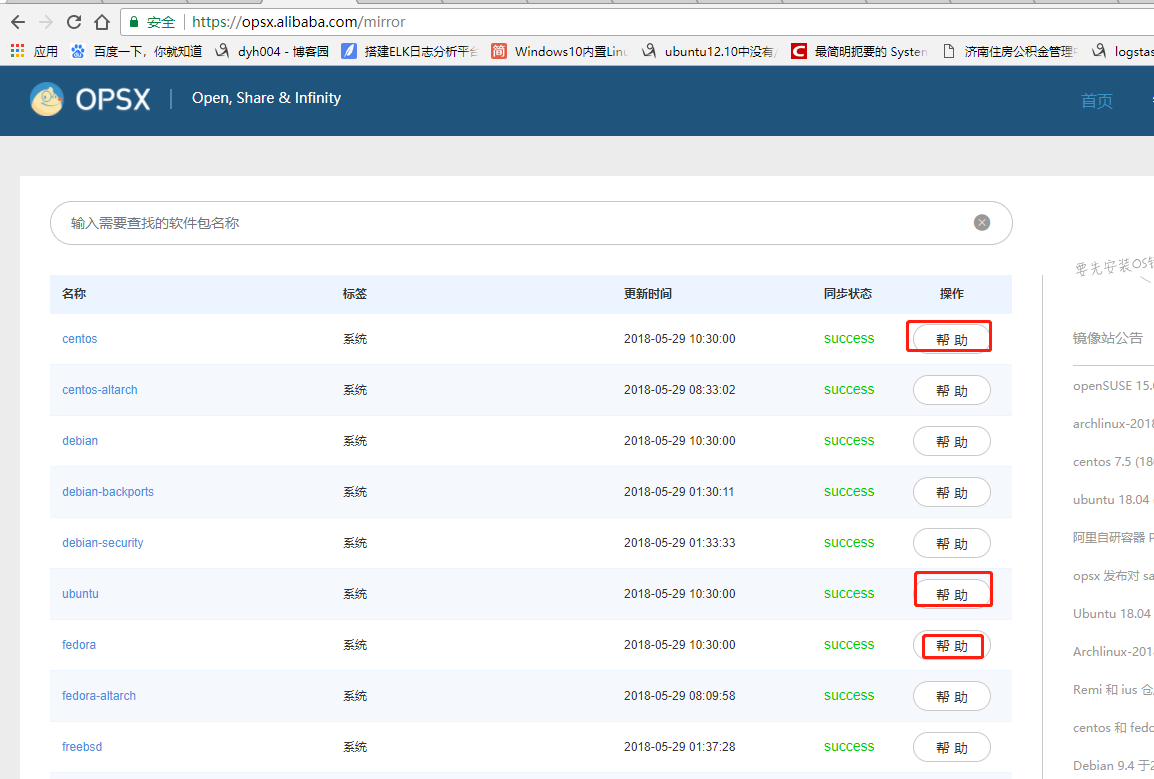
替换centOS的yum源,如下图
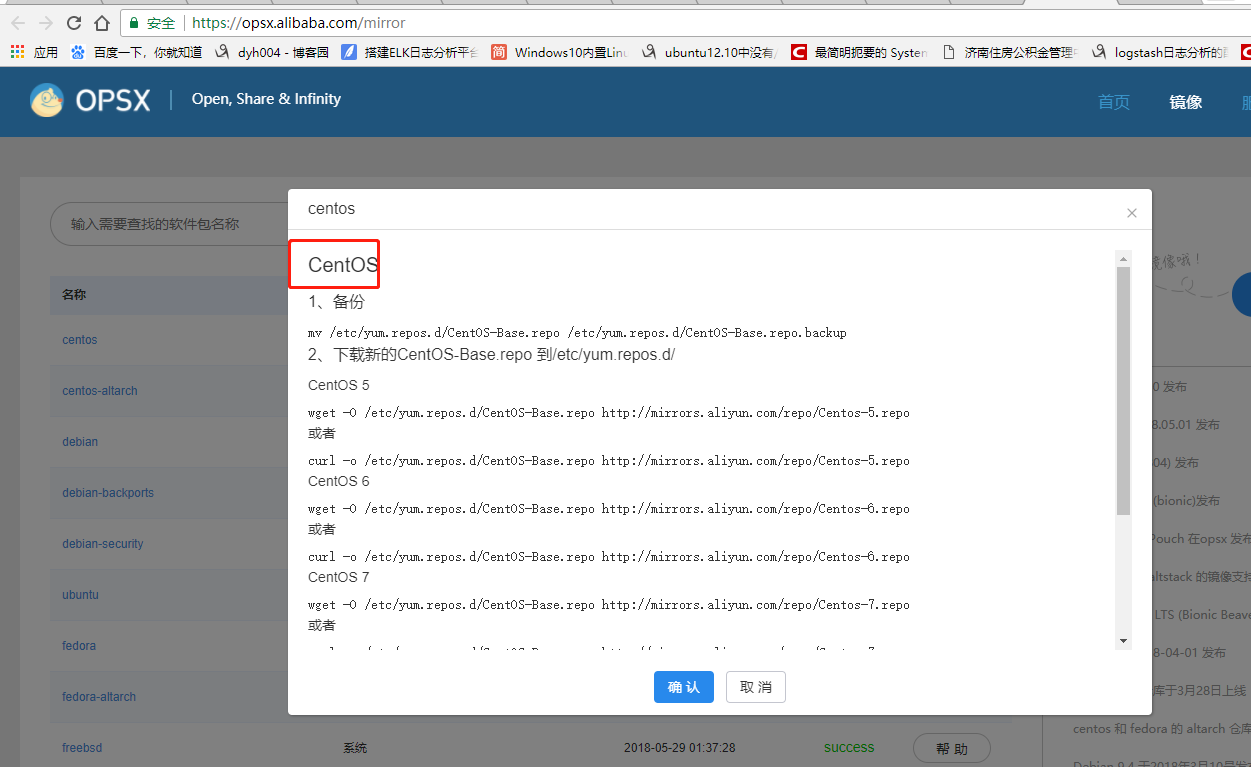
具体操作:
CentOS

、备份

mv /etc/yum.repos.d/CentOS-Base.repo /etc/yum.repos.d/CentOS-Base.repo.backup

、下载新的CentOS-Base.repo 到/etc/yum.repos.d/

CentOS

wget -O /etc/yum.repos.d/CentOS-Base.repo http://mirrors.aliyun.com/repo/Centos-5.repo

或者

curl -o /etc/yum.repos.d/CentOS-Base.repo http://mirrors.aliyun.com/repo/Centos-5.repo

CentOS

wget -O /etc/yum.repos.d/CentOS-Base.repo http://mirrors.aliyun.com/repo/Centos-6.repo

或者

curl -o /etc/yum.repos.d/CentOS-Base.repo http://mirrors.aliyun.com/repo/Centos-6.repo

CentOS

wget -O /etc/yum.repos.d/CentOS-Base.repo http://mirrors.aliyun.com/repo/Centos-7.repo

或者

curl -o /etc/yum.repos.d/CentOS-Base.repo http://mirrors.aliyun.com/repo/Centos-7.repo

、之后运行yum makecache生成缓存

相关链接

官方主页: http://www.centos.org/

邮件列表: http://www.centos.org/modules/tinycontent/index.php?id=16

论坛: http://www.centos.org/modules/newbb/

文档: http://www.centos.org/docs/

Wiki: http://wiki.centos.org/
替换fedora的yum源
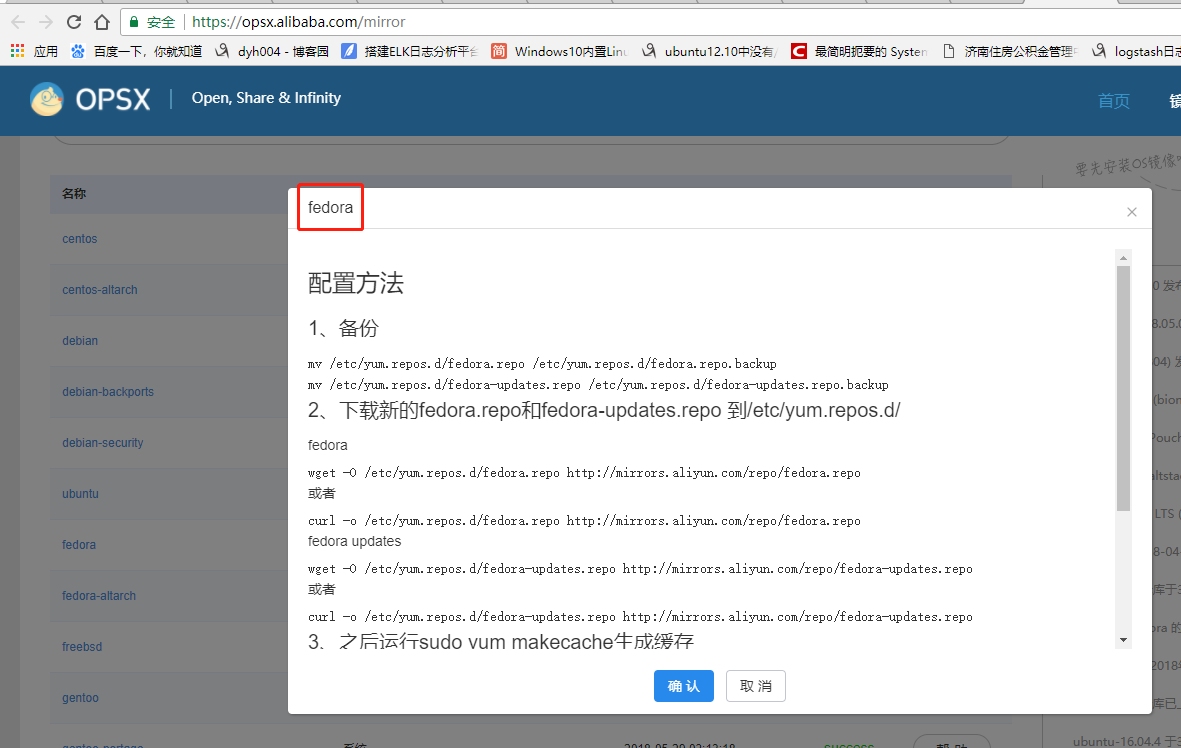
具体操作,如下:
配置方法

、备份

mv /etc/yum.repos.d/fedora.repo /etc/yum.repos.d/fedora.repo.backup

mv /etc/yum.repos.d/fedora-updates.repo /etc/yum.repos.d/fedora-updates.repo.backup

、下载新的fedora.repo和fedora-updates.repo 到/etc/yum.repos.d/

fedora

wget -O /etc/yum.repos.d/fedora.repo http://mirrors.aliyun.com/repo/fedora.repo

或者

curl -o /etc/yum.repos.d/fedora.repo http://mirrors.aliyun.com/repo/fedora.repo

fedora updates

wget -O /etc/yum.repos.d/fedora-updates.repo http://mirrors.aliyun.com/repo/fedora-updates.repo

或者

curl -o /etc/yum.repos.d/fedora-updates.repo http://mirrors.aliyun.com/repo/fedora-updates.repo

、之后运行sudo yum makecache生成缓存

相关链接

官方主页: http://fedoraproject.org/

邮件列表: http://fedoraproject.org/wiki/Communicate

论坛: http://forums.fedoraforum.org/

文档: http://docs.fedoraproject.org/

Wiki: http://fedoraproject.org/wiki/

镜像列表: http://mirrors.fedoraproject.org/publiclist
替换ubunt的yum源:
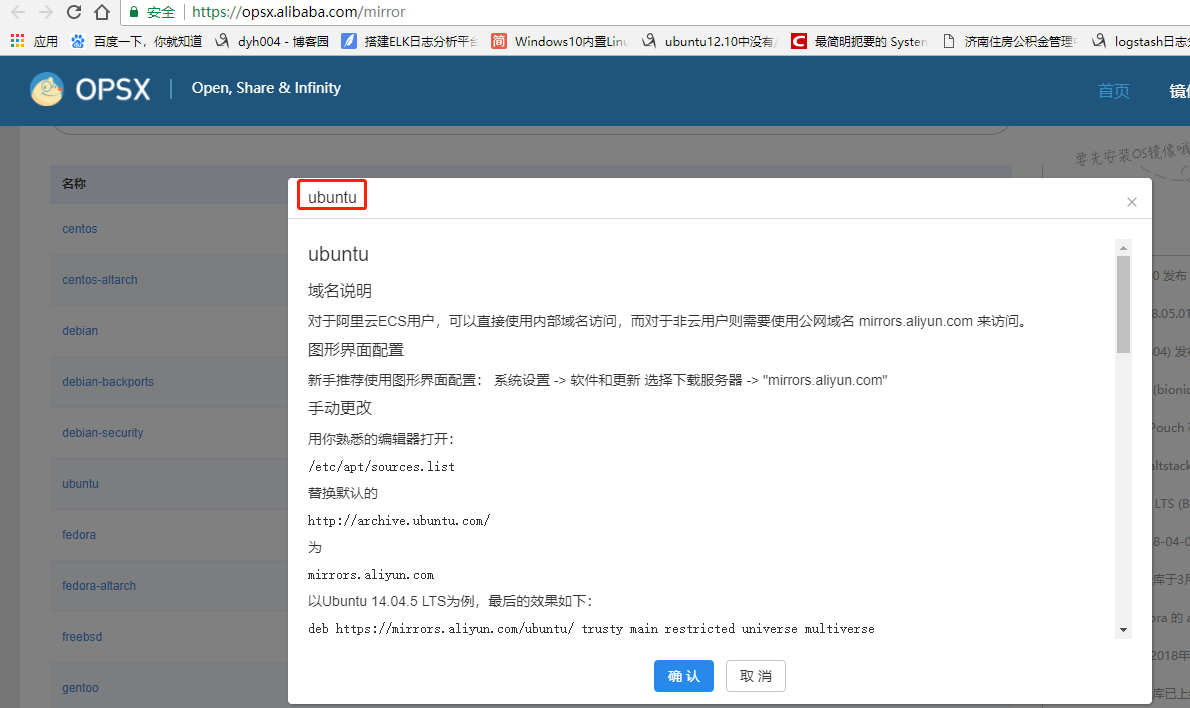
具体操作:
ubuntu

域名说明

对于阿里云ECS用户,可以直接使用内部域名访问,而对于非云用户则需要使用公网域名 mirrors.aliyun.com 来访问。

图形界面配置

新手推荐使用图形界面配置: 系统设置 -> 软件和更新 选择下载服务器 -> "mirrors.aliyun.com"

手动更改

用你熟悉的编辑器打开:

/etc/apt/sources.list

替换默认的

http://archive.ubuntu.com/

为

mirrors.aliyun.com

以Ubuntu 14.04. LTS为例,最后的效果如下:

deb https://mirrors.aliyun.com/ubuntu/ trusty main restricted universe multiverse

deb-src https://mirrors.aliyun.com/ubuntu/ trusty main restricted universe multiverse

deb https://mirrors.aliyun.com/ubuntu/ trusty-security main restricted universe multiverse

deb-src https://mirrors.aliyun.com/ubuntu/ trusty-security main restricted universe multiverse

deb https://mirrors.aliyun.com/ubuntu/ trusty-updates main restricted universe multiverse

deb-src https://mirrors.aliyun.com/ubuntu/ trusty-updates main restricted universe multiverse

deb https://mirrors.aliyun.com/ubuntu/ trusty-backports main restricted universe multiverse

deb-src https://mirrors.aliyun.com/ubuntu/ trusty-backports main restricted universe multiverse

## Not recommended

# deb https://mirrors.aliyun.com/ubuntu/ trusty-proposed main restricted universe multiverse

# deb-src https://mirrors.aliyun.com/ubuntu/ trusty-proposed main restricted universe multiverse

ubuntu 16.04 配置如下

deb http://mirrors.aliyun.com/ubuntu/ xenial main

deb-src http://mirrors.aliyun.com/ubuntu/ xenial main

deb http://mirrors.aliyun.com/ubuntu/ xenial-updates main

deb-src http://mirrors.aliyun.com/ubuntu/ xenial-updates main

deb http://mirrors.aliyun.com/ubuntu/ xenial universe

deb-src http://mirrors.aliyun.com/ubuntu/ xenial universe

deb http://mirrors.aliyun.com/ubuntu/ xenial-updates universe

deb-src http://mirrors.aliyun.com/ubuntu/ xenial-updates universe

deb http://mirrors.aliyun.com/ubuntu/ xenial-security main

deb-src http://mirrors.aliyun.com/ubuntu/ xenial-security main

deb http://mirrors.aliyun.com/ubuntu/ xenial-security universe

deb-src http://mirrors.aliyun.com/ubuntu/ xenial-security universe

ubuntu 18.04(bionic) 配置如下

deb http://mirrors.aliyun.com/ubuntu/ bionic main restricted universe multiverse

deb-src http://mirrors.aliyun.com/ubuntu/ bionic main restricted universe multiverse

deb http://mirrors.aliyun.com/ubuntu/ bionic-security main restricted universe multiverse

deb-src http://mirrors.aliyun.com/ubuntu/ bionic-security main restricted universe multiverse

deb http://mirrors.aliyun.com/ubuntu/ bionic-updates main restricted universe multiverse

deb-src http://mirrors.aliyun.com/ubuntu/ bionic-updates main restricted universe multiverse

deb http://mirrors.aliyun.com/ubuntu/ bionic-proposed main restricted universe multiverse

deb-src http://mirrors.aliyun.com/ubuntu/ bionic-proposed main restricted universe multiverse

deb http://mirrors.aliyun.com/ubuntu/ bionic-backports main restricted universe multiverse

deb-src http://mirrors.aliyun.com/ubuntu/ bionic-backports main restricted universe multiverse

参考链接

官方主页: http://www.ubuntu.com/

邮件列表: http://www.ubuntu.com/support/community/mailinglists

论坛: http://ubuntuforums.org/

中文论坛: http://forum.ubuntu.org.cn/

Wiki: https://wiki.ubuntu.com/

帮助: https://help.ubuntu.com/
同样的道理,替换其他系统yum源(阿里作为yum源的操作)
阿里云作为yum源操作的更多相关文章
- 更改yum网易 阿里云的yum源。
一,鉴于用国外的Yum源,速度比较慢,所以想到将国外的yum源,改为国内的Yum源,著名的有网易 阿里云源.如何更改呢? 二,更改yum源为网易的. 首先备份/etc/yum.repos.d/Cent ...
- CemtOS7更改yum网易 阿里云的yum源。
一,鉴于用国外的Yum源,速度比较慢,所以想到将国外的yum源,改为国内的Yum源,著名的有网易 阿里云源.如何更改呢? 二,更改yum源为网易的. 首先备份/etc/yum.repos.d/Cent ...
- 更改yum网易、阿里云的yum源
更改yum源为网易的. 首先备份/etc/yum.repos.d/CentOS-Base.repomv /etc/yum.repos.d/CentOS-Base.repo /etc/yum.repos ...
- CentOS7用阿里云Docker Yum源在线安装Docker 17.03.2
参考文档 安装步骤 删除已安装的Docker 配置阿里云Docker Yum源 安装指定版本 启动Docker服务 参考文档 官方Docker安装文档:https://docs.docker. ...
- CentOS7用阿里云Docker Yum源在线安装Docker
一.参考文档 官方Docker安装文档:https://docs.docker.com/install/linux/docker-ce/centos 阿里云Docker安装文档:https://yq. ...
- CentOS 7 配置阿里云本地yum源
删除原有的yum源: rm -f /etc/yum.repos.d/* 重新下载阿里云的yum源: wget -O /etc/yum.repos.d/CentOS-Base.repo http://m ...
- 如何在 Centos7 中使用阿里云的yum源
如何在 Centos7 中使用阿里云的yum源 1. 备份原来的yum源 mv /etc/yum.repos.d/CentOS-Base.repo /etc/yum.repos.d/CentOS-Ba ...
- centos配置ADSL拨号 配置阿里云的yum源
如果系统yum源有问题可以更改yum源配置阿里云的yum源1)下载repo文件 wget http://mirrors.aliyun.com/repo/Centos-7.repo(没有 wget命令可 ...
- CentOS7使用阿里云的yum源
替换成阿里云的yum源速度更快一些,替换很简单,简单记录一下步骤 1.备份原来的yum源 sudo cp /etc/yum.repos.d/CentOS-Base.repo /etc/yum.repo ...
随机推荐
- vi中的全局替换
一.基本语法 替换命令语法: :[addr]s/源字符串/目标字符串/[option] 全局替换: :%s/源字符串/目标字符串/g 参数说明: [addr]--表示检索范围,省略时表示当前行. &q ...
- 智能POS正餐主副机模式FAQ(无桌台或桌台模块)
1.无桌台 (1).如果是初次使用,首先检查是否是新建的机器号,新建的机器是默认关闭桌台的,需要到模块管理中开启. 2.无桌台模块 (1).是否在主副机开启连接上后重启主机与副机,且同步数据.
- Windows Server 2012更新补丁后导致Micosoft ODBC for Oracle出现问题
上周由于WannaCry勒索病毒肆虐全球,14号系统管理员更新了一系列补丁后,导致一Windows Server 2012服务器上面部署的一些老旧的应用无法使用Microsoft ODBC for O ...
- peewee基本操作
本文将简单的介绍Peewee,一览它的主要特点,主要涉及到: 模型定义 存储数据 检索数据 注意:如果你偏爱稍微高级一点的教程, peewee建立类似twitter应用 是一篇结合Flask框架与pe ...
- shell的while和until 的用法
shell while循环工作中使用的不多,一般适用于守护进程程序或始终循环执行场景,其他循环计算等. while条件句: 语法: while 条件 do 指令… done ok,我们测试一下: 测试 ...
- elixir mix 简介
概述 mix 是 elixir 工程的构建工具,利用 mix,可以快速方便的创建 elixir 工程,写单元测试,管理 elixir 包的依赖管理等等. 我觉得刚开始学习 elixir 的时候,先简单 ...
- win32gui.Findwindow(parm1,parm2)查找窗口的句柄方法
介绍之前先让大家了解一下win32gui的模块用法 和 获取窗口类名工具 使用Python时,有时也会要操作到系统窗口的一些东西,下面就介绍win32gui.Findwindow(param1,par ...
- 1.03-get_params2
import urllib.request import urllib.parse import string def get_params(): url = "http://www.bai ...
- 对tomcat7模拟并发请求及相关配置参数的含义
这里的并不是真正的并发请求,因为for循环是间隔10毫秒,并且线程初始化也需要时间的,到真正执行http请求的时刻是不确定的. tomcat 的运行状态可以在webapps下的manage项目查看, ...
- 转://Oracle A用户给B用户授权查询指定表或视图权限方案
用DNINMSV31账户登录数据库进行如下操作: CREATE USER NORTHBOUND IDENTIFIED BY NORTHBOUND DEFAULT TABLESPACE "TB ...