
【Android】android文件的写入与读取---简单的文本读写context.openFileInput() context.openFileOutput()
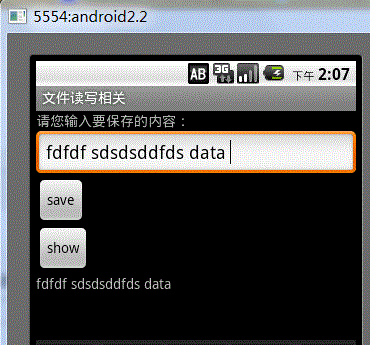
最终效果图,点击save会保存到文件中,点击show会从文件中读取出内容并显示。
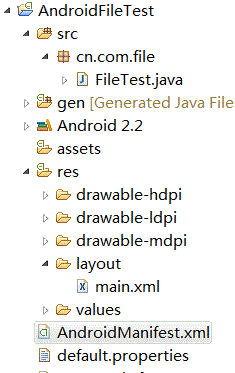
main.xml
<?xml version="1.0" encoding="utf-8"?>

<LinearLayout xmlns:android="http://schemas.android.com/apk/res/android"

    android:orientation="vertical"

    android:layout_width="fill_parent"

    android:layout_height="fill_parent"

    >

<TextView

    android:layout_width="fill_parent"

    android:layout_height="wrap_content"

    android:text="请您输入要保存的内容:"

    />

 <EditText

     android:id="@+id/addText"

     android:layout_width="fill_parent"

    android:layout_height="wrap_content"

    android:hint="请您在此处输入文件内容!"

 />

 <Button

     android:id="@+id/addButton"

     android:layout_width="wrap_content"

    android:layout_height="wrap_content"

     android:text="save"

 />

 <Button

     android:id="@+id/showButton"

     android:layout_width="wrap_content"

    android:layout_height="wrap_content"

    android:text="show"

 />

 <TextView

     android:id="@+id/showText"

    android:layout_width="fill_parent"

    android:layout_height="wrap_content"

    />

</LinearLayout>
activity代码
package cn.com.file;

import java.io.ByteArrayOutputStream;

import java.io.FileInputStream;

import java.io.FileNotFoundException;

import java.io.FileOutputStream;

import java.io.IOException;

import android.app.Activity;

import android.os.Bundle;

import android.view.View;

import android.view.View.OnClickListener;

import android.widget.Button;

import android.widget.EditText;

import android.widget.TextView;

import android.widget.Toast;

public class FileTest extends Activity {

    private EditText editText;

    private TextView showTextView;

    // 要保存的文件名

    private String fileName = "chenzheng_java.txt";

    @Override

    public void onCreate(Bundle savedInstanceState) {

        super.onCreate(savedInstanceState);

        setContentView(R.layout.main);

        // 获取页面中的组件

        editText = (EditText) findViewById(R.id.addText);

        showTextView = (TextView) findViewById(R.id.showText);

        Button addButton = (Button) this.findViewById(R.id.addButton);

        Button showButton = (Button) this.findViewById(R.id.showButton);

        // 绑定单击事件

        addButton.setOnClickListener(listener);

        showButton.setOnClickListener(listener);

    }

    // 声明监听器

    private View.OnClickListener listener = new OnClickListener() {

        public void onClick(View v) {

            Button view = (Button) v;

            switch (view.getId()) {

            case R.id.addButton:

                save();

                break;

            case R.id.showButton:

                read();

                break;

            }

        }

    };

    /**

     *@author chenzheng_Java

     *保存用户输入的内容到文件

     */

    private void save() {

        String content = editText.getText().toString();

        try {

            /* 根据用户提供的文件名,以及文件的应用模式,打开一个输出流.文件不存系统会为你创建一个的,

             * 至于为什么这个地方还有FileNotFoundException抛出,我也比较纳闷。在Context中是这样定义的

             *   public abstract FileOutputStream openFileOutput(String name, int mode)

             *   throws FileNotFoundException;

             * openFileOutput(String name, int mode);

             * 第一个参数,代表文件名称,注意这里的文件名称不能包括任何的/或者/这种分隔符,只能是文件名

             *          该文件会被保存在/data/data/应用名称/files/chenzheng_java.txt

             * 第二个参数,代表文件的操作模式

             *             MODE_PRIVATE 私有(只能创建它的应用访问) 重复写入时会文件覆盖

             *             MODE_APPEND  私有   重复写入时会在文件的末尾进行追加,而不是覆盖掉原来的文件

             *             MODE_WORLD_READABLE 公用  可读

             *             MODE_WORLD_WRITEABLE 公用 可读写

             *  */

            FileOutputStream outputStream = openFileOutput(fileName,

                    Activity.MODE_PRIVATE);

            outputStream.write(content.getBytes());

            outputStream.flush();

            outputStream.close();

            Toast.makeText(FileTest.this, "保存成功", Toast.LENGTH_LONG).show();

        } catch (FileNotFoundException e) {

            e.printStackTrace();

        } catch (IOException e) {

            e.printStackTrace();

        }

    }

    /**

     * @author chenzheng_java

     * 读取刚才用户保存的内容

     */

    private void read() {

        try {

            FileInputStream inputStream = this.openFileInput(fileName);

            byte[] bytes = new byte[1024];

            ByteArrayOutputStream arrayOutputStream = new ByteArrayOutputStream();

            while (inputStream.read(bytes) != -1) {

                arrayOutputStream.write(bytes, 0, bytes.length);

            }

            inputStream.close();

            arrayOutputStream.close();

            String content = new String(arrayOutputStream.toByteArray());

            showTextView.setText(content);

        } catch (FileNotFoundException e) {

            e.printStackTrace();

        } catch (IOException e) {

            e.printStackTrace();

        }

    }

}
其他的都为默认。
关于文件保存的路径可以通过ADT携带的File Explorer工具进行查看。如何调出File Explorer工具呢;我们可以通过Windows--showView--others-android下面看到File Explorer。这里是我的一个截图。
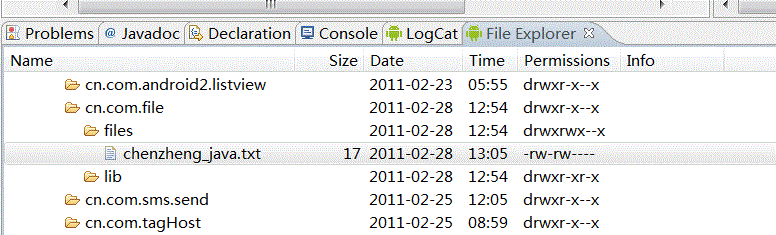
对于这个程序,基本上没什么难点,就是纯粹的java流知识。唯一不同的就是context为我们提供了两个方法来获取输入输出流。简单、方便、快捷啊。
文章转载,版权归原作者所有,尊重版权,支持原创
【Android】android文件的写入与读取---简单的文本读写context.openFileInput() context.openFileOutput()的更多相关文章
- android文件的写入与读取---简单的文本读写context.openFileInput() context.openFileOutput()
最终效果图,点击save会保存到文件中,点击show会从文件中读取出内容并显示. main.xml <?xml version="1.0" encoding=" ...
- Android 下载文件及写入SD卡
Android 下载文件及写入SD卡,实例代码 <?xml version="1.0" encoding="utf-8"?> <LinearL ...
- INI文件的写入与读取
INI文件的写入与读取 [节名] '[]中的节名对应此API的第一参数 Name=内容 'Nmae对应此API的第二参数 API的第三参数是没有取到匹配内容时返回的字符串; ...
- 装饰者模式的学习(c#) EF SaveChanges() 报错(转载) C# 四舍五入 保留两位小数(转载) DataGridView样式生成器使用说明 MSSQL如何将查询结果拼接成字符串 快递查询 C# 通过smtp直接发送邮件 C# 带参访问接口,WebClient方式 C# 发送手机短信 文件 日志 写入 与读取
装饰者模式的学习(c#) 案例转自https://www.cnblogs.com/stonefeng/p/5679638.html //主体基类 using System;using System.C ...
- JavaIO流——简单对文件的写入及读取(三)
已经讲了写入和读取了,那么想要把一个文件的内容复制到另一个文件呢 不说太多,直接见代码 public static void copyFile(String srcFilename, String d ...
- java 文件操作 写入和读取(小结一)
参考了这篇博客并优化,谢谢:http://blog.sina.com.cn/s/blog_99201d890101b4le.html 功能: 实现通过两个类完成先写入文件,再读取数据计算显示 pac ...
- [转]VC++中对文件的写入和读取
本文转自:http://blog.csdn.net/fanghb_1984/article/details/7425705 本文介绍两种方法对文件进行读取和写入操作:1.采用fstream类:2.采用 ...
- 第十七章,txt文件的写入和读取数据结合练习(C++)
#include <iostream> #include <fstream> int main(int argc, char** argv) { std::string str ...
- Java file文件的写入和读取及下载
File文件的写入 一.FileWriter 和BufferedWriter 结合写入文件 FileWriter是字符流写入字符到文件.默认情况下,它会使用新的内容代替文件原有的所有内容,但是,当指定 ...
随机推荐
- strncpy的用法
strncpy是C语言的库函数之一,来自C语言标准库,定义于string.h,函数原型是: char *strncpy(char* dest,char* src,size_t n); 把src所指向的 ...
- CreateDialog和DialogBox
原文地址:https://blog.csdn.net/aikker/article/details/5631412 INT_PTR DialogBox( HINSTANCE hIns ...
- locale and system laungues
In computing, a locale is a set of parameters that defines the user's language, region and any speci ...
- 进程、线程、GIL、同步、异步、并行、并发、互斥锁
- python元组,集合类型,及字典补充
一.元组 元组与列表基本相同,不同之处在于元组只能存不能取,当多个值没有改的需求时,用元组更合适 元组的基本操作 1.创建元组: t = (1, 2, 3, 4, 2,4,) t = (1,) #单个 ...
- 一篇文章教你读懂UI绘制流程
最近有好多人问我Android没信心去深造了,找不到好的工作,其实我以一个他们进行回复,发现他们主要是内心比较浮躁,要知道技术行业永远缺少的是高手.建议先阅读浅谈Android发展趋势分析,在工作中, ...
- ionic3 出现莫名广告
应用上线出现 有莫名其妙的广告弹出. 1,DNS被劫持 2,第三方包带广告 3,Http被劫持 wifi和4G网都出现了广告,所以可以直接排除DNS被劫持的问题 广告页只会在H5的页面出现,所以基本可 ...
- SpringMVC环境搭建
Spring MVC为展现层提供的基于MVC设计理念的优秀Web框架,是目前最主流的MVC框架之一. Spring 3.0之后完全超越Struts2,称为最优秀的MVC框架.学完SpringMVC之后 ...
- js中去除字符串中所有的html标签
对于获取了一大堆字符串但是又不想要里面的html标签怎么办? 特别是像博客园这个富文本框中,可以带样式的,取出来的文章内容也是带样式的. 但是在某些地方只要显示文本不想显示其他标签,只好这样做. &l ...
- 获取checkbox勾选的id
需求描述:做批量删除或者批量修改的时候需要获得多个id,根据checkbox勾选来获取对应的d 两种方法: //html代码<table id="table1"> &l ...