
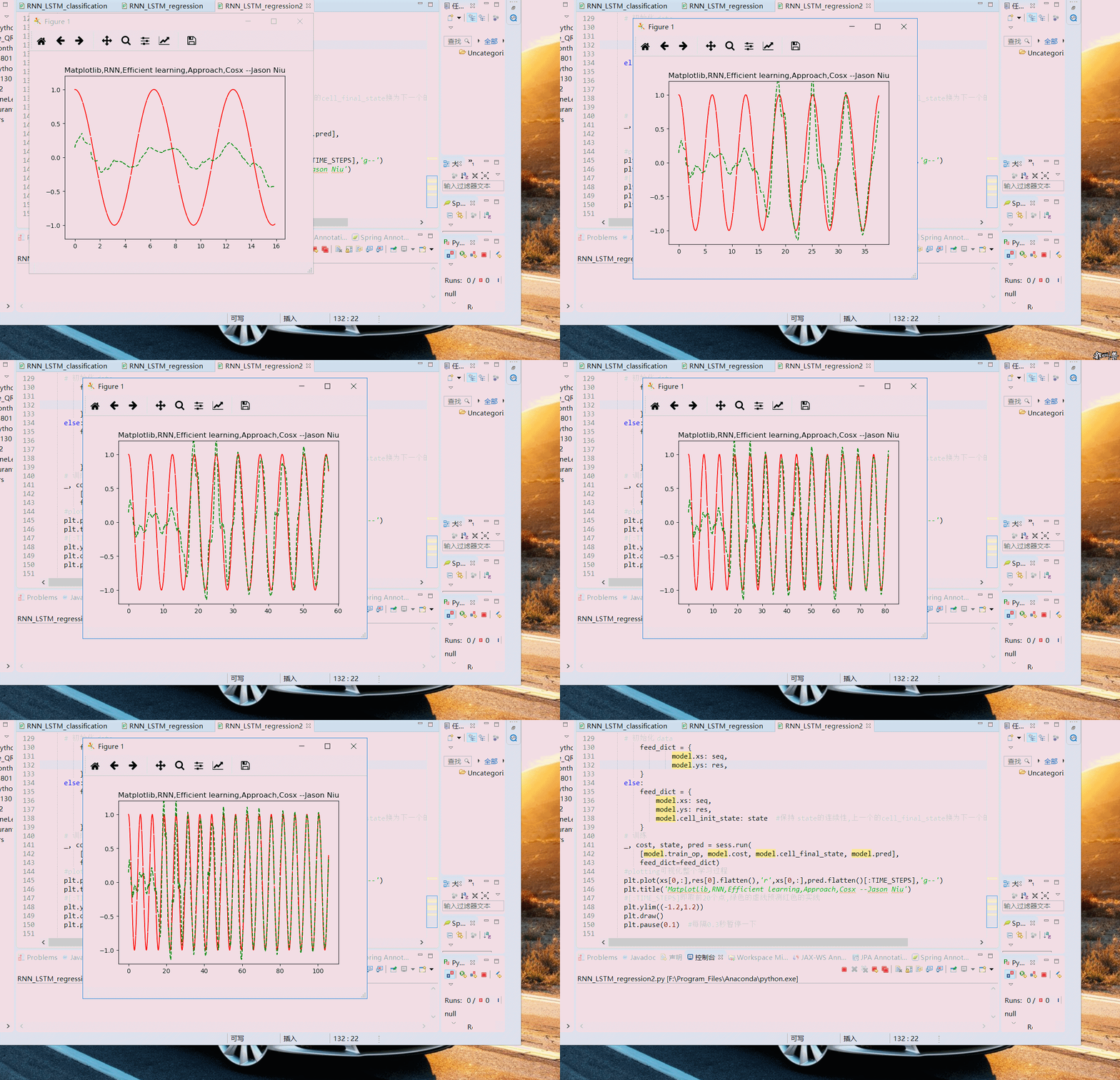
TF之RNN:matplotlib动态演示之基于顺序的RNN回归案例实现高效学习逐步逼近余弦曲线—Jason niu
import tensorflow as tf

import numpy as np

import matplotlib.pyplot as plt

BATCH_START = 0

TIME_STEPS = 20

BATCH_SIZE = 50

INPUT_SIZE = 1

OUTPUT_SIZE = 1

CELL_SIZE = 10

LR = 0.006

BATCH_START_TEST = 0

def get_batch():

    global BATCH_START, TIME_STEPS

    # xs shape (50batch, 20steps)

    xs = np.arange(BATCH_START, BATCH_START+TIME_STEPS*BATCH_SIZE).reshape((BATCH_SIZE, TIME_STEPS)) / (10*np.pi)

    seq = np.sin(xs)

    res = np.cos(xs)

    BATCH_START += TIME_STEPS

    return [seq[:, :, np.newaxis], res[:, :, np.newaxis], xs]

class LSTMRNN(object):

    def __init__(self, n_steps, input_size, output_size, cell_size, batch_size):

        self.n_steps = n_steps

        self.input_size = input_size

        self.output_size = output_size

        self.cell_size = cell_size

        self.batch_size = batch_size

        with tf.name_scope('inputs'):

            self.xs = tf.placeholder(tf.float32, [None, n_steps, input_size], name='xs')

            self.ys = tf.placeholder(tf.float32, [None, n_steps, output_size], name='ys')

        with tf.variable_scope('in_hidden'):

            self.add_input_layer()

        with tf.variable_scope('LSTM_cell'):

            self.add_cell()

        with tf.variable_scope('out_hidden'):

            self.add_output_layer()

        with tf.name_scope('cost'):

            self.compute_cost()

        with tf.name_scope('train'):

            self.train_op = tf.train.AdamOptimizer(LR).minimize(self.cost)

    def add_input_layer(self,):

        l_in_x = tf.reshape(self.xs, [-1, self.input_size], name='2_2D')

        Ws_in = self._weight_variable([self.input_size, self.cell_size])

        bs_in = self._bias_variable([self.cell_size,])

        with tf.name_scope('Wx_plus_b'):

            l_in_y = tf.matmul(l_in_x, Ws_in) + bs_in

        self.l_in_y = tf.reshape(l_in_y, [-1, self.n_steps, self.cell_size], name='2_3D')

    def add_cell(self):

        lstm_cell = tf.nn.rnn_cell.BasicLSTMCell(self.cell_size, forget_bias=1.0, state_is_tuple=True)

        with tf.name_scope('initial_state'):

            self.cell_init_state = lstm_cell.zero_state(self.batch_size, dtype=tf.float32)

        self.cell_outputs, self.cell_final_state = tf.nn.dynamic_rnn(

            lstm_cell, self.l_in_y, initial_state=self.cell_init_state, time_major=False)

    def add_output_layer(self):

        l_out_x = tf.reshape(self.cell_outputs, [-1, self.cell_size], name='2_2D')

        Ws_out = self._weight_variable([self.cell_size, self.output_size])

        bs_out = self._bias_variable([self.output_size, ])

        with tf.name_scope('Wx_plus_b'):

            self.pred = tf.matmul(l_out_x, Ws_out) + bs_out

    def compute_cost(self):

        losses = tf.contrib.legacy_seq2seq.sequence_loss_by_example(

            [tf.reshape(self.pred, [-1], name='reshape_pred')],

            [tf.reshape(self.ys, [-1], name='reshape_target')],

            [tf.ones([self.batch_size * self.n_steps], dtype=tf.float32)],

            average_across_timesteps=True,

            softmax_loss_function=self.ms_error,

            name='losses'

        )

        with tf.name_scope('average_cost'):

            self.cost = tf.div(

                tf.reduce_sum(losses, name='losses_sum'),

                self.batch_size,

                name='average_cost')

            tf.summary.scalar('cost', self.cost)

    def ms_error(self, y_target, y_pre):

        return tf.square(tf.sub(y_target, y_pre))

    def _weight_variable(self, shape, name='weights'):

        initializer = tf.random_normal_initializer(mean=0., stddev=1.,)

        return tf.get_variable(shape=shape, initializer=initializer, name=name)

    def _bias_variable(self, shape, name='biases'):

        initializer = tf.constant_initializer(0.1)

        return tf.get_variable(name=name, shape=shape, initializer=initializer)

if __name__ == '__main__':

    model = LSTMRNN(TIME_STEPS, INPUT_SIZE, OUTPUT_SIZE, CELL_SIZE, BATCH_SIZE)

    sess = tf.Session()

    merged=tf.summary.merge_all()

    writer=tf.summary.FileWriter("niu0127/logs0127",sess.graph)

    sess.run(tf.initialize_all_variables())

plt.ion()

plt.show()

for i in range(200):

      seq, res, xs = get_batch()

      if i == 0:

          feed_dict = {

                  model.xs: seq,

                  model.ys: res,

          }

      else:

          feed_dict = {

              model.xs: seq,

              model.ys: res,

              model.cell_init_state: state

          }

      _, cost, state, pred = sess.run(

          [model.train_op, model.cost, model.cell_final_state, model.pred],

          feed_dict=feed_dict)

      plt.plot(xs[0,:],res[0].flatten(),'r',xs[0,:],pred.flatten()[:TIME_STEPS],'g--')

      plt.title('Matplotlib,RNN,Efficient learning,Approach,Cosx --Jason Niu')

      plt.ylim((-1.2,1.2))

      plt.draw()

      plt.pause(0.1)
TF之RNN:matplotlib动态演示之基于顺序的RNN回归案例实现高效学习逐步逼近余弦曲线—Jason niu的更多相关文章
- TF之RNN:TensorBoard可视化之基于顺序的RNN回归案例实现蓝色正弦虚线预测红色余弦实线—Jason niu
import tensorflow as tf import numpy as np import matplotlib.pyplot as plt BATCH_START = 0 TIME_STEP ...
- TF之NN:matplotlib动态演示深度学习之tensorflow将神经网络系统自动学习并优化修正并且将输出结果可视化—Jason niu
import tensorflow as tf import numpy as np import matplotlib.pyplot as plt def add_layer(inputs, in_ ...
- TF之RNN:基于顺序的RNN分类案例对手写数字图片mnist数据集实现高精度预测—Jason niu
import tensorflow as tf from tensorflow.examples.tutorials.mnist import input_data mnist = input_dat ...
- TF:利用TF的train.Saver载入曾经训练好的variables(W、b)以供预测新的数据—Jason niu
import tensorflow as tf import numpy as np W = tf.Variable(np.arange(6).reshape((2, 3)), dtype=tf.fl ...
- TensorFlow RNN MNIST字符识别演示快速了解TF RNN核心框架
TensorFlow RNN MNIST字符识别演示快速了解TF RNN核心框架 http://blog.sina.com.cn/s/blog_4b0020f30102wv4l.html
- [Unity][Heap sort]用Unity动态演示堆排序的过程(How Heap Sort Works)
[Unity][Heap sort]用Unity动态演示堆排序的过程 How Heap Sort Works 最近做了一个用Unity3D动态演示堆排序过程的程序. I've made this ap ...
- 关于csdn博客中案例效果的动态演示
在曾经一篇博文中,网友评论说要是案例效果是动态演示的就好了,我认为说的非常是有道理.由于一个简单的截图不能非常好的展示案例效果.要是有一张gif图能动态的播放案例效果就再好只是了.在这里提供一个小软件 ...
- 【Java】代理模式,静态代理和动态代理(基于JDK或CGLib)
当我们需要在一个方法之前或之后添加一段逻辑时,自然会想到使用代理类.代理类帮我们代理了实际类的调用,然后可以在实际调用之前和之后添加一些逻辑,从而不浸入实际类. 拓展:由于代理类能在实际类调用之前和之 ...
- Java 动态代理是基于什么原理
动态代理 ①动态代理概念理解 动态代理是一种方便运行时动态构建代理.动态处理代理方法调用的机制,很多场景都利用类似机制做到的,比如用来包装RPC调用.面向切面的变成(AOP) 实现动态代理的方式很多, ...
随机推荐
- 基于ARM Cortex-M和Eclipse的SWO单总线输出
最近在MCU on Eclipse网站上看到Erich Styger所写的一篇有关通过SWD的跟踪接口SWO获取ARM Cortex-M相关信息的文章,文章结构明晰,讲解透彻,本人深受启发,特意将其翻 ...
- Confluence 6 配置验证码(Captcha)来防止垃圾
如果你的 Confluence 站点是对公众开放的(允许匿名用户使用,添加评论,创建页面等),你可能会发现你的站点会被自动创建很多垃圾页面,评论或者其他垃圾内容. 你可以配置让 Confluence ...
- Confluence 6 代理和 HTTPS 设置连接器
很多用户选择将 Confluence 运行在反向代理的后面,同时还启用了 HTTPS.将你的的 Confluence 反向代理配置正确就显得非常必要了,并且能够避免后期在使用 Confluence 遇 ...
- (七)STL适配器
1.适配器是稍微修改某些功能,比如三个参数改为两个参数,函数的名称改一下等等,可以出现在容器.迭代器和仿函数中. 2.适配器相当于对某个东西进行封装,例如A是B的适配器,则真正的功能实现是在B中,可以 ...
- LeetCode(117):填充同一层的兄弟节点 II
Medium! 题目描述: 给定一个二叉树 struct TreeLinkNode { TreeLinkNode *left; TreeLinkNode *right; TreeLinkNode *n ...
- LeetCode(107): 二叉树的层次遍历 II
Easy! 题目描述: 给定一个二叉树,返回其节点值自底向上的层次遍历. (即按从叶子节点所在层到根节点所在的层,逐层从左向右遍历) 例如:给定二叉树 [3,9,20,null,null,15,7], ...
- spring data jpa 全面解析(实践 + 源码分析)
前言 本文将从示例.原理.应用3个方面介绍spring data jpa. 以下分析基于spring boot 2.0 + spring 5.0.4版本源码 概述 JPA是什么? JPA (Java ...
- 右键菜单添加打开CMD选项
转载: https://www.cnblogs.com/mkdd/p/8649139.html#undefined 目前用的win7sp1系统,平时打开CMD窗口通常用三种方法:1.win+R然后输入 ...
- C++ Primer 笔记——const 限定符
1.因为const对象一旦创建后其值就不能再改变,所以const对象必须初始化. 2.默认情况下const对象只在文件内有效,如果想在多个文件之间共享const对象,必须在变量的定义之前添加exter ...
- win(64位)环境下oracle11g的安装方法
将压缩文件解压到一个目录中,该目录结构如下: 安装步骤(摘自网络): 1.进入数据库解压目录,双击其中的“setup.exe”文件,稍等片刻出现如下“配置安全更新“界面,取消“我希望通过My Orac ...