
Command `bundle` unrecognized. Make sure that you have run `npm install` and that you are inside a react-native project.
呃呃,在写下面的代码时出现的问题,解决办法是npm install或者yarn,如果yarn报错,再npm install就可以了
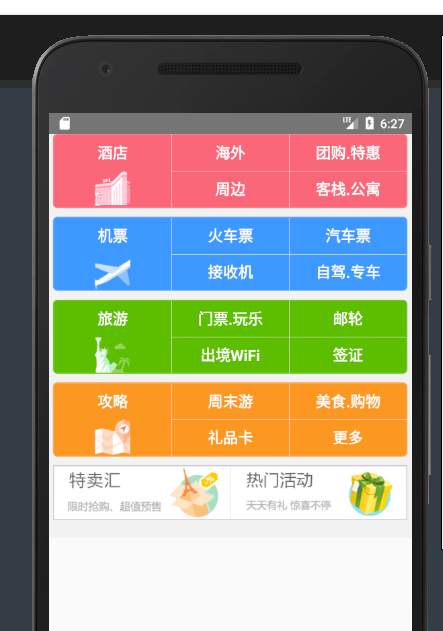
下面的是携程App首页的样式,有轮播,我没有实现出来
代码如下:
/**

 * Sample React Native App

 * https://github.com/facebook/react-native

 *

 * @format

 * @flow

 */

import React, {Component} from 'react';

import {Platform, StyleSheet, Text, View, Image,TouchableHighlight,ScrollView} from 'react-native';

// var Swiper= require('react-native-swipe');

// var sliderImgs = [

//     'http://images3.c-ctrip.com/SBU/apph5/201505/16/app_home_ad16_640_128.png',

//     'http://images3.c-ctrip.com/rk/apph5/C1/201505/app_home_ad49_640_128.png',

//     'http://images3.c-ctrip.com/rk/apph5/D1/201506/app_home_ad05_640_128.jpg'

//   ];

  var BUIcon = [

  'https://raw.githubusercontent.com/vczero/vczero.github.io/master/ctrip/%E6%9C%AA%E6%A0%87%E9%A2%98-1.png',

  'https://raw.githubusercontent.com/vczero/vczero.github.io/master/ctrip/feiji.png',

  'https://raw.githubusercontent.com/vczero/vczero.github.io/master/ctrip/lvyou.png',

  'https://raw.githubusercontent.com/vczero/vczero.github.io/master/ctrip/gonglue.png'

];

var Images = [

  'http://webresource.c-ctrip.com/ResCRMOnline/R5/html5/images/zzz_pic_salead01.png',

  'http://images3.c-ctrip.com/rk/apph5/B1/201505/app_home_ad06_310_120.jpg'

];

// var sliderImgs = [

//   'http://images3.c-ctrip.com/SBU/apph5/201505/16/app_home_ad16_640_128.png',

//   'http://images3.c-ctrip.com/rk/apph5/C1/201505/app_home_ad49_640_128.png',

//   'http://images3.c-ctrip.com/rk/apph5/D1/201506/app_home_ad05_640_128.jpg'

// ];

// class Slider extends Component {

//   rennder(){

//     return(

//        <Swiper style={styles.wrapper} showsButtons={false} autoplay={true} height={150} showsPagination={false}>

//           <Image style={[styles.slide,]} source={{uri: sliderImgs[0]}}></Image>

//           <Image style={[styles.slide,]} source={{uri: sliderImgs[1]}}></Image>

//           <Image style={[styles.slide,]} source={{uri: sliderImgs[2]}}></Image>

//         </Swiper>

//         );

//   }

// }

export default class App extends Component<Props> {

  render() {

    return (

      <ScrollView>

        <View style={styles.container}>

          <View style={[styles.sbu_view,styles.sub_red,]}>

              <View style={[styles.sbu_flex, styles.sbu_borderRight]}>

                <View style={[styles.sub_con_flex, styles.sub_text]}>

                  <Text style={[styles.font16]}>酒店</Text>

                </View>

                <View style={[styles.sub_con_flex]}>

                  <Image style={[styles.sbu_icon_img]} source={{uri:BUIcon[0]}}></Image>

                </View>

              </View>

            <View style={[styles.sbu_flex, styles.sbu_borderRight]}>

              <View style={[styles.sub_con_flex, styles.sub_text, styles.sbu_borderBottom]}>

                <Text style={[styles.font16]}>海外</Text>

              </View>

              <View style={[styles.sub_con_flex, styles.sub_text]}>

                <Text style={[styles.font16]}>周边</Text>

              </View>

            </View>

            <View style={[styles.sbu_flex]}>

              <View style={[styles.sub_con_flex, styles.sub_text, styles.sbu_borderBottom]}>

                <Text style={[styles.font16]}>团购.特惠</Text>

              </View>

              <View style={[styles.sub_con_flex, styles.sub_text]}>

                <Text style={[styles.font16]}>客栈.公寓</Text>

              </View>

            </View>

          </View>

          <View style={[styles.sbu_view, styles.sbu_blue]}>

            <View style={[styles.sbu_flex, styles.sbu_borderRight]}>

              <View style={[styles.sub_con_flex, styles.sub_text]}>

                <Text style={[styles.font16]}>机票</Text>

              </View>

              <View style={[styles.sub_con_flex]}>

                <Image style={[styles.sbu_icon_img]} source={{uri:BUIcon[1]}}></Image>

              </View>

            </View>

            <View style={[styles.sbu_flex, styles.sbu_borderRight]}>

              <View style={[styles.sub_con_flex, styles.sub_text, styles.sbu_borderBottom]}>

                <Text style={[styles.font16]}>火车票</Text>

              </View>

              <View style={[styles.sub_con_flex, styles.sub_text]}>

                <Text style={[styles.font16]}>接收机</Text>

              </View>

            </View>

            <View style={[styles.sbu_flex]}>

              <View style={[styles.sub_con_flex, styles.sub_text, styles.sbu_borderBottom]}>

                <Text style={[styles.font16]}>汽车票</Text>

              </View>

              <View style={[styles.sub_con_flex, styles.sub_text]}>

                <Text style={[styles.font16]}>自驾.专车</Text>

              </View>

            </View>

          </View>

          <View style={[styles.sbu_view, styles.sbu_green]}>

            <View style={[styles.sbu_flex, styles.sbu_borderRight]}>

              <View style={[styles.sub_con_flex, styles.sub_text]}>

                <Text style={[styles.font16]}>旅游</Text>

              </View>

              <View style={[styles.sub_con_flex]}>

                <Image style={[styles.sbu_icon_img]} source={{uri:BUIcon[2]}}></Image>

              </View>

            </View>

            <View style={[styles.sbu_flex, styles.sbu_borderRight]}>

              <View style={[styles.sub_con_flex, styles.sub_text, styles.sbu_borderBottom]}>

                <Text style={[styles.font16]}>门票.玩乐</Text>

              </View>

              <View style={[styles.sub_con_flex, styles.sub_text]}>

                <Text style={[styles.font16]}>出境WiFi</Text>

              </View>

            </View>

            <View style={[styles.sbu_flex]}>

              <View style={[styles.sub_con_flex, styles.sub_text, styles.sbu_borderBottom]}>

                <Text style={[styles.font16]}>邮轮</Text>

              </View>

              <View style={[styles.sub_con_flex, styles.sub_text]}>

                <Text style={[styles.font16]}>签证</Text>

              </View>

            </View>

          </View>

          <View style={[styles.sbu_view, styles.sbu_yellow]}>

            <View style={[styles.sbu_flex, styles.sbu_borderRight]}>

              <View style={[styles.sub_con_flex, styles.sub_text]}>

                <Text style={[styles.font16]}>攻略</Text>

              </View>

              <View style={[styles.sub_con_flex]}>

                <Image style={[styles.sbu_icon_img]} source={{uri:BUIcon[3]}}></Image>

              </View>

            </View>

            <View style={[styles.sbu_flex, styles.sbu_borderRight]}>

              <View style={[styles.sub_con_flex, styles.sub_text, styles.sbu_borderBottom]}>

                <Text style={[styles.font16]}>周末游</Text>

              </View>

              <View style={[styles.sub_con_flex, styles.sub_text]}>

                <Text style={[styles.font16]}>礼品卡</Text>

              </View>

            </View>

            <View style={[styles.sbu_flex]}>

              <View style={[styles.sub_con_flex, styles.sub_text, styles.sbu_borderBottom]}>

                <Text style={[styles.font16]}>美食.购物</Text>

              </View>

              <View style={[styles.sub_con_flex, styles.sub_text]}>

                <Text style={[styles.font16]}>更多</Text>

              </View>

            </View>

          </View>

          <View style={[styles.img_view]}>

            <View style={[styles.img_flex, {borderRightWidth:0.5}]}>

              <Image style={[styles.img_wh]} source={{uri:Images[0]}}></Image>

            </View>

            <View style={[styles.img_flex, {borderLeftWidth:0,}]}>

              <Image style={[styles.img_wh]} source={{uri:Images[1]}}></Image>

            </View>

          </View>

        </View>

        </ScrollView>

    );

  }

}

var styles=StyleSheet.create({

  container:{

    backgroundColor:'#F2F2F2',

    flex:1,

  },

  wrapper:{

    height:80,

    // resizeMode:Image.resizeMode.contain,

  },

  sbu_view:{

    height:84,

    marginLeft:5,

    marginRight:5,

    borderWidth:1,

    borderRadius:5,

    marginBottom:10,

    flexDirection:'row'

  },

  sub_red:{

    backgroundColor:'#FA6778',

    borderColor:'#FA6778',

    // marginTop:-70

  },

  sbu_blue:{

      backgroundColor: '#3D98FF',

      borderColor:'#3D98FF',

    },

    sbu_green:{

      backgroundColor: '#5EBE00',

      borderColor:'#5EBE00',

    },

    sbu_yellow:{

      backgroundColor: '#FC9720',

      borderColor:'#FC9720',

    },

    sbu_flex:{

      flex:1,

    },

    sbu_borderRight:{

      borderColor:'#fff',

      borderRightWidth: 0.5,

    },

    sbu_icon_img:{

      height:40,

      width:40,

      // resizeMode:Image.resizeMode.contain,

    },

    sub_con_flex:{

      flex:1,

      justifyContent: 'center',

      alignItems: 'center',

    },

    sub_text:{

      justifyContent:'center',

    },

    font16:{

      fontSize:17,

      color:'#FFF',

      fontWeight:'900',

    },

    sbu_borderBottom:{

      borderBottomWidth:0.5,

      borderBottomColor:'#fff',

    },

    img_view:{

      height:62,

      marginLeft:5,

      marginRight:5,

      flexDirection: 'row',

      marginBottom:20,

      backgroundColor:'#fff',

    },

    img_flex:{

      flex:1,

      borderWidth:1,

      borderColor:'#ccc',

    },

    img_wh: {

      height:59,

      borderRightWidth:0,

      // resizeMode:Image.resizeMode.contain,

    }

})
Command `bundle` unrecognized. Make sure that you have run `npm install` and that you are inside a react-native project.的更多相关文章
- react-native 引入某些低三方库时出现的Command `run-android` unrecognized,命令不识别错误
在使用第三方库时react-native-swiper,执行 npm install react-native-swiper --save 再次运行react-native run-android时直 ...
- React Native 开发环境安装和配置使用报错: -bash: react-native: command not found
[React Native 开发环境安装和配置:-bash: react-native: command not found 报错: 前提是安装homebrew,node.js ,npm ,watc ...
- 关于出现Not an editor command: Bundle '**/*.vim'的解决方案【转】
转自:https://blog.csdn.net/YHM07/article/details/49717933 操作系统: $ uname -r 2.6.32-573.7.1.el6.x86_64 $ ...
- Node.js log2: ERR when execute command >npm install
1.Node.js创建项目 项目microblog创建成功,提示:cd microblog& npm install 项目创建完成时的目录如下图所示: 2.Node.js错误 如题所言: E ...
- 解决React Native unable to load script from assets index.android.bundle on windows
React Native运行的时候,经常碰到React Native unable to load script from assets index.android.bundle on windows ...
- Mac解决:xcode-select: error: command line tools are already installed, use "Software Update" to install updates
1.因为node项目终端报错: No receipt for 'com.apple.pkg.CLTools_Executables' found at '/'. No receipt for 'com ...
- command failed: npm install --loglevel error --registry=https://registry.npm 用vue-cli 4.0 新建项目总是报错
昨天新买的本本,今天布环境,一安装vue-cli发现都4.0+的版本了,没管太多,就开始新建个项目感受哈,一切运行顺利,输入 "vue create app" 的时候,一切貌似进展 ...
- React Native: unable to load scripts from assets 'index.android.bundle' on real device
问题:重新建了一个项目后,运行react-native run-android报: unable to load scripts from assets 'index.android.bundle' ...
- react native中Unable to load script from assets 'index.android.bundle'解决方案
刚刚朋友问我,说是创建好一个项目,运行后报错:Unable to load script from assets 'index.android.bundle',以前好好的没出现这种现象,于是我找到一个 ...
随机推荐
- scala下划线
作为函数的参数 一个匿名的函数传递给一个方法或者函数的时候,scala会尽量推断出参数类型.例如一个完整的匿名函数作为参数可以写为 scala> def compute(f: (Double)= ...
- NLP的原理,框架及具体实例
1. 什么是NLP 所谓NLP就是自然语言处理,即计算机识别人的自然沟通语言,将人的语言转换成表达含义相同的文字.因为NLP的目的是将人和计算机通过自然语言沟通成为可能,而人最方便的沟通是通过语音发声 ...
- 使用javaWeb的二大(Listener、Filter)组件实现分IP统计访问次数
分析: 统计工作需要在所有资源之前都执行,那么就可以放到Filter中. 我们这个过滤器不打算做拦截操作!因为我们只是用来做统计 用什么东西来装载统计的数据.Map<String,Integer ...
- Directory of X:\EFI\Microsoft\Boot
Directory of X:\EFI\Microsoft\Boot 2017/06/21 15:14 <DIR> . 2017/06/21 15:14 <DIR> .. 20 ...
- 9.Pod控制器概念和基本操作2
利用一个简单的例子来启动一个deployment的Pod控制器 [root@master song]# cat deploy.yml apiVersion: apps/v1 kind: Deploym ...
- React 学习(七) ---- create-react-app
现在react 基础知识已经算是学完了,知道了React是做什么的,以及怎么使用,是时候学习一个webpack, babel 等现代化前端开发了,真正做项目的时候,我们不可能再使用babel 的线上编 ...
- poj-1459(网络流-最大流)
题意:给你n个点的电网系统,有一些点是电站,能提供p的电能,有些点是用户,能消耗c的电能,有些是过渡站,不消耗不产生(等于没用),然后m条电线(x,y,w),代表x可以向y运输w的电能,问你这个电网系 ...
- 在idea中设置记住git的用户名和密码
在idea中设置记住git的用户名和密码 1.在项目根目录下执行以下git命令: git config --global credential.helper store 2.执行上述命令后,在idea ...
- linux-内核参数优化参考指标
民间最全的Linux系统内核参数调优说 相信做运维的同仁,进行运维环境初建时,必须要考虑到操作系统内核参数的优化问题,本人经历数次的运维环境重建后,决定要自行收集一份比较完善的系统内核参数优化说明 ...
- Yahoo Programming Contest 2019 补题记录(DEF)
D - Ears 题目链接:D - Ears 大意:你在一个\(0-L\)的数轴上行走,从整数格出发,在整数格结束,可以在整数格转弯.每当你经过坐标为\(i-0.5\)的位置时(\(i\)是整数),在 ...