
C# Parallel并发执行相关问题
1、Parallel并发执行
using System;
using System.Collections.Generic;
using System.Linq;
using System.Text;
using System.Threading.Tasks;
using System.Diagnostics;
using System.Threading;
using System.Configuration;
using System.Collections.Concurrent;
namespace ConsoleApplication57
{
class Program
{
static void Main(string[] args)
{
ParallelDemo BingFa = new ParallelDemo();
BingFa.ParallelInvokemethod();
Console.ReadKey();
BingFa.ParallelForMethod();
Console.ReadKey();
BingFa.ParallelForMethod2();
BingFa.ParallelBreak();
}
}
public class ParallelDemo {
private Stopwatch stopWatch = new Stopwatch();
public void Run1() {
Thread.Sleep(2000);
Console.WriteLine("Task 1 is cost 2 sec");
}
public void Run2() {
Thread.Sleep(3000);
Console.WriteLine("Task 2 is cost 3 sec");
}
public void ParallelInvokemethod() {
stopWatch.Start();
Parallel.Invoke(Run1, Run2);
stopWatch.Stop();
Console.WriteLine("Parallel run" + stopWatch.ElapsedMilliseconds + "ms");
stopWatch.Restart();
Run1();
Run2();
stopWatch.Stop();
Console.WriteLine("Normall run"+stopWatch.ElapsedMilliseconds+"ms");
}
public void ParallelForMethod() {
stopWatch.Start();
for (int i = 0; i < 10000; i++) {
for (int j = 0; j < 60000; j++) {
int sum = 0;
sum += i;
}
}
stopWatch.Stop();
Console.WriteLine("Normalfor run" + stopWatch.ElapsedMilliseconds + "ms");
stopWatch.Reset();
stopWatch.Start();
Parallel.For(0, 10000, item =>
{
for (int j = 0; j < 60000; j++)
{
int sum = 0;
sum += item;
}
});
stopWatch.Stop();
Console.WriteLine("ParallelFor run" + stopWatch.ElapsedMilliseconds + "ms");
}
public void ParallelForMethod2() {
var obj = new Object();
long num = 0;
ConcurrentBag<long> bag = new ConcurrentBag<long>();
stopWatch.Start();
for (int i = 0; i < 10000; i++) {
for (int j = 0; j < 60000; j++)
{
num++;
}
}
stopWatch.Stop();
Console.WriteLine("NormalFor run"+stopWatch.ElapsedMilliseconds+"ms");
stopWatch.Reset();
stopWatch.Start();
Parallel.For(0,10000,item=>{
for(int j=0;j<60000;j++){
lock(obj){
num++;
}}});
stopWatch.Stop();
Console.WriteLine("ParallelFor run"+stopWatch.ElapsedMilliseconds+"ms");
Console.ReadKey();
}
public void ParallelBreak()
{
ConcurrentBag<int> bag = new ConcurrentBag<int>();
stopWatch.Start();
Parallel.For(0, 1000, (i, state) =>
{
if (bag.Count == 300)
{
state.Stop();
return;
}
bag.Add(i);
});
stopWatch.Stop();
Console.WriteLine("Bag count is {}{}", bag.Count, stopWatch.ElapsedMilliseconds+"ms");
}
//</long></long>
}
//public void ParallelForMethod{
//}
}

2 、使用Parallel来做循环
Parallel.For(0,100,i=>{
Console.writeLine(i+"\t");
}); #######从零到99,运行或输出的顺序不对,但是使用for循环的,并行执行的时候会初夏输出顺序不同的问题。
Parallel.Foreach和foreach很类似,
List<int> list=new List<int>();
list.Add(0);
Parallel.ForEach(list,item=>{
DoWork(item);
});
3、异常处理
由于执行的任务是并发的执行的,产生的异常回是多个,简单的Exception不能获取异常,使用AggregateException课可以捕获到一组异常
Task pt = new Task(() =>

{

    Task.Factory

        .StartNew(() =>

        {

            throw new Exception("ex 1");

        }, TaskCreationOptions.AttachedToParent);

    Task.Factory

        .StartNew(() =>

        {

            Task.Factory

                .StartNew(() =>

                {

                    throw new Exception("ex 2-1");

                }, TaskCreationOptions.AttachedToParent);

            throw new Exception("ex 2");

        }, TaskCreationOptions.AttachedToParent);

    throw new Exception("ex 3");

});
pt.Start()开始任务,异常不会抛出,但必须被处理,以下是若干种方法。
//方法1:

pt.ContinueWith(t =>

{

    t.Exception.Handle(ex =>

    {

        Console.WriteLine(ex.Message);

        return true;

    });

}, TaskContinuationOptions.OnlyOnFaulted);
//方法2:

pt.ContinueWith(t =>

{

    t.Exception.Handle(ex =>

    {

        Console.WriteLine(ex.GetBaseException().Message);

        return true;

    });

}, TaskContinuationOptions.OnlyOnFaulted);
//方法3:

pt.ContinueWith(t =>

{

    foreach (var ex in t.Exception.Flatten().InnerExceptions)

    {

        Console.WriteLine(ex.Message);

    }

}, TaskContinuationOptions.OnlyOnFaulted);
//方法4:

pt.ContinueWith(t =>

{

    foreach (var ex in t.Exception.InnerExceptions)

    {

        Console.WriteLine(ex.Message);

    }

}, TaskContinuationOptions.OnlyOnFaulted);
5、线程并行安全,如下执行的时候输出错误,这是因为List是非线程安全集合,所有的线程都可以修改他的值,造成线程的安全问题。
---------- namespace ConsoleApplication58
{
class Program
{
static void Main(string[] args)
{
PEnumberable Test = new PEnumberable();
Test.ListWithpallel();
Console.ReadKey();
}
}
public class PEnumberable {
public void ListWithpallel() {
List<int> list = new List<int>();
Parallel.For(0, 1000, item =>
{
list.Add(item);
});
Console.WriteLine("list count is{0}",list.Count());
} }}
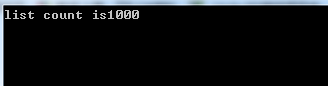
################
使用system.Collection.Concurrent, 实例ConcurrentBag泛型集合
public void ConcurrentBagwithPallel() {
ConcurrentBag<int> list = new ConcurrentBag<int>();
Parallel.For(0, 10000, item =>
{
list.Add(item);
});
Console.WriteLine("ConcurrentBag's count is{0}", list.Count());
}

现在我们看看 ConcurrentBag中的数据是怎么排列的
public void ConcurrentBagwithPallel() {
ConcurrentBag<int> list = new ConcurrentBag<int>();
Parallel.For(0, 10000, item =>
{
list.Add(item);
});
Console.WriteLine("ConcurrentBag's count is{0}", list.Count());
int n = 0;
foreach (int i in list) {
if (n > 10)
break;
n++; Console.WriteLine("Item{0}={1}", n, i);
}
Console.WriteLine("ConcurrentBag's max item is{0]", list.Max());
}

从上面的执行可窥看出ConcurentBag中的数据排序是乱序的,但是属性Max ,Frist ,Last等都可以使用,关于线程安全的问题还用 Dictionary 的ConcurrentDictionary还用 ConcurrentStack,ConcurrentQueue等
6、Parallel Linq 的用法
C# Parallel并发执行相关问题的更多相关文章
- CUDA编程接口:异步并发执行的概念和API
1.主机和设备间异步执行 为了易于使用主机和设备间的异步执行,一些函数是异步的:在设备完全完成任务前,控制已经返回给主机线程了.它们是: 内核发射; 设备间数据拷贝函数; 主机和设备内拷贝小于64KB ...
- SSIS Design3:并发执行
1,利用优先约束来并发处理数据,Data Flow Task 和 Data Flow Task 1 是并发执行的,而 Data Flow Task2 必须等到 Data Flow Task 和 Dat ...
- C#线程 在某一时间内,只有N个线程在并发执行,其余都在队列中的实现(转载)
具体的需求是 在某一时间点,只有N个线程在并发执行,如果有多余的线程,则排队等候~ 还真是费尽心思啊~最终还是被我攻克了~ 下面我就来说说具体的实现 C#提供了Mutex与Interlocked这两个 ...
- 使用pabot并发执行robotframework的testSuite
下载robotremoteserver-1.0.1.tar.gz.robotframework-pabot-0.22.tar.gz 执行以下命令,以安装pabot: pip install robot ...
- 多线程并发执行任务,取结果归集。终极总结:Future、FutureTask、CompletionService、CompletableFuture
目录 1.Futrue 2.FutureTask 3.CompletionService 4.CompletableFuture 5.总结 ================正文分割线========= ...
- linux shell并发执行命令
一般我们在linux上十一shell命令的批量执行操作,一般使用for或者while 循环进行操作,但是这样有一个问题,for或者while本质上是串行的,并不能,如果某一个命令执行耗费的时间比较长, ...
- Spring-statemachine Action不能并发执行的问题
Spring-statemachine版本:当前最新的1.2.3.RELEASE版本 这几天一直被Action是串行执行搞得很郁闷,写了一个demo专门用来测试: public static void ...
- concurrency parallel 并发 并行 parallelism
在传统的多道程序环境下,要使作业运行,必须为它创建一个或几个进程,并为之分配必要的资源.当进程运行结束时,立即撤销该进程,以便能及时回收该进程所占用的各类资源.进程控制的主要功能是为作业创建进程,撤销 ...
- (五)TestNG测试的并发执行详解
原文链接:https://blog.csdn.net/taiyangdao/article/details/52159065 TestNG在执行测试时,默认suitethreadpoolsize=1, ...
随机推荐
- 0326 iframe和video experience
今天的东西确实不少,很容易混淆,input下的属性太多,form下的属性也不少,内容多点,一时不能熟练掌握,晚上多拿出点时间练练 尤其是 form 和inpu那些属性格外别扭 下午的内嵌视频相对简单主 ...
- Nginx系列3:用Nginx搭建一个具备缓存功能的反向代理服务
反向代理的理解:https://www.cnblogs.com/zkfopen/p/10126105.html 我是在一台linux服务器上搭建了两个nginx服务器A和B,把静态资源文件甲放在A服务 ...
- CentOS 7 配置Maven
https://blog.csdn.net/wangyang163wy/article/details/75530872 CentOS 7 配置MavenMaven是一个高效的软件项目管理工具,通过M ...
- C# 事务 四种事务隔离级别
http://www.zsythink.net/archives/1233 不同隔离级别的问题 脏读(Dirty Read) 一个事务处理过程里读取了另一个未提交的事务中的数据 例子: 当一个事务 ...
- Netty实现简单私有协议
本文参考<Netty权威指南> 私有协议实现的功能: 1.基于Netty的NIO通信框架,提供高性能异步通信能力 2.提供消息的编码解码框架,实现POJO的序列化和反序列化 3.提供基于I ...
- Golang记录、计算函数执行耗时、运行时间的一个简单方法
// 写超时警告日志 通用方法 func TimeoutWarning(tag, detailed string, start time.Time, timeLimit float64) { ...
- valgrind简介以及在ARM上交叉编译运行【转】
转自:https://blog.csdn.net/dengcanjun6/article/details/54958359 版权声明:本文为博主原创文章,未经博主允许不得转载. https://blo ...
- Kafka管理工具介绍【转】
Kafka内部提供了许多管理脚本,这些脚本都放在$KAFKA_HOME/bin目录下,而这些类的实现都是放在源码的kafka/core/src/main/scala/kafka/tools/路径下. ...
- a标签中href属性引起的页面不跳转问题
先简单描述问题,今天在做一个简单的提交页面的时候,碰到了跳转不了的问题.其中a标签的形式<a href="" onclick="submit()"> ...
- jquery获取、设置、删除cookie
获取cookie: function getCookie(cname) { var name = cname + "="; var ca = document.cookie.spl ...