
spring cloud(学习笔记) Enreka服务治理
服务治理是微服务架构最为核心和基础的模块,主要用来实现各个微服务实例的自动化注册和发现。
记录一下服务注册中心的搭建以及高可用注册中心的实现
1.首先创建两个基础 的spring boot工程,spring boot创建工程的网站:http://start.spring.io/,创建界面如下

2.解压工程,用Maven的形式导入工程(File->new->project from Existing Soures,选择解压工程导入)
3.两个工程中都添加依赖(eureka)
 <properties>

         <project.build.sourceEncoding>UTF-8</project.build.sourceEncoding>

         <project.reporting.outputEncoding>UTF-8</project.reporting.outputEncoding>

         <java.version>1.8</java.version>

         <spring-cloud.version>Finchley.RELEASE</spring-cloud.version>

     </properties>

     <dependencies>

         <dependency>

             <groupId>org.springframework.boot</groupId>

             <artifactId>spring-boot-starter-web</artifactId>

         </dependency>

         <dependency>

             <groupId>org.springframework.cloud</groupId>

             <artifactId>spring-cloud-starter-netflix-eureka-server</artifactId>

         </dependency>

         <dependency>

             <groupId>org.springframework.boot</groupId>

             <artifactId>spring-boot-starter-test</artifactId>

             <scope>test</scope>

         </dependency>

     </dependencies>

     <dependencyManagement>

         <dependencies>

             <dependency>

                 <groupId>org.springframework.cloud</groupId>

                 <artifactId>spring-cloud-dependencies</artifactId>

                 <version>${spring-cloud.version}</version>

                 <type>pom</type>

                 <scope>import</scope>

             </dependency>

         </dependencies>

     </dependencyManagement>

     <build>

         <plugins>

             <plugin>

                 <groupId>org.springframework.boot</groupId>

                 <artifactId>spring-boot-maven-plugin</artifactId>

             </plugin>

         </plugins>

     </build>
4.在注册中心工程配置文件中添加服务
 server.port=9000

 spring.application.name=eureka-server

 spring.profiles.active=dev

 eureka.instance.hostname=localhost

 eureka.client.register-with-eureka=false

 eureka.client.fetch-registry=false

 eureka.server.enable-self-preservation=false
不知道这些参数的自己百度
5.在注册中心的入口类中加入注解@EnableEurekaServer
 package com.example.enrekaserver;

 import org.springframework.boot.SpringApplication;

 import org.springframework.boot.autoconfigure.SpringBootApplication;

 import org.springframework.cloud.netflix.eureka.server.EnableEurekaServer;

 @EnableEurekaServer

 @SpringBootApplication

 public class EnrekaServerApplication {

     public static void main(String[] args) {

         SpringApplication.run(EnrekaServerApplication.class, args);

     }

 }
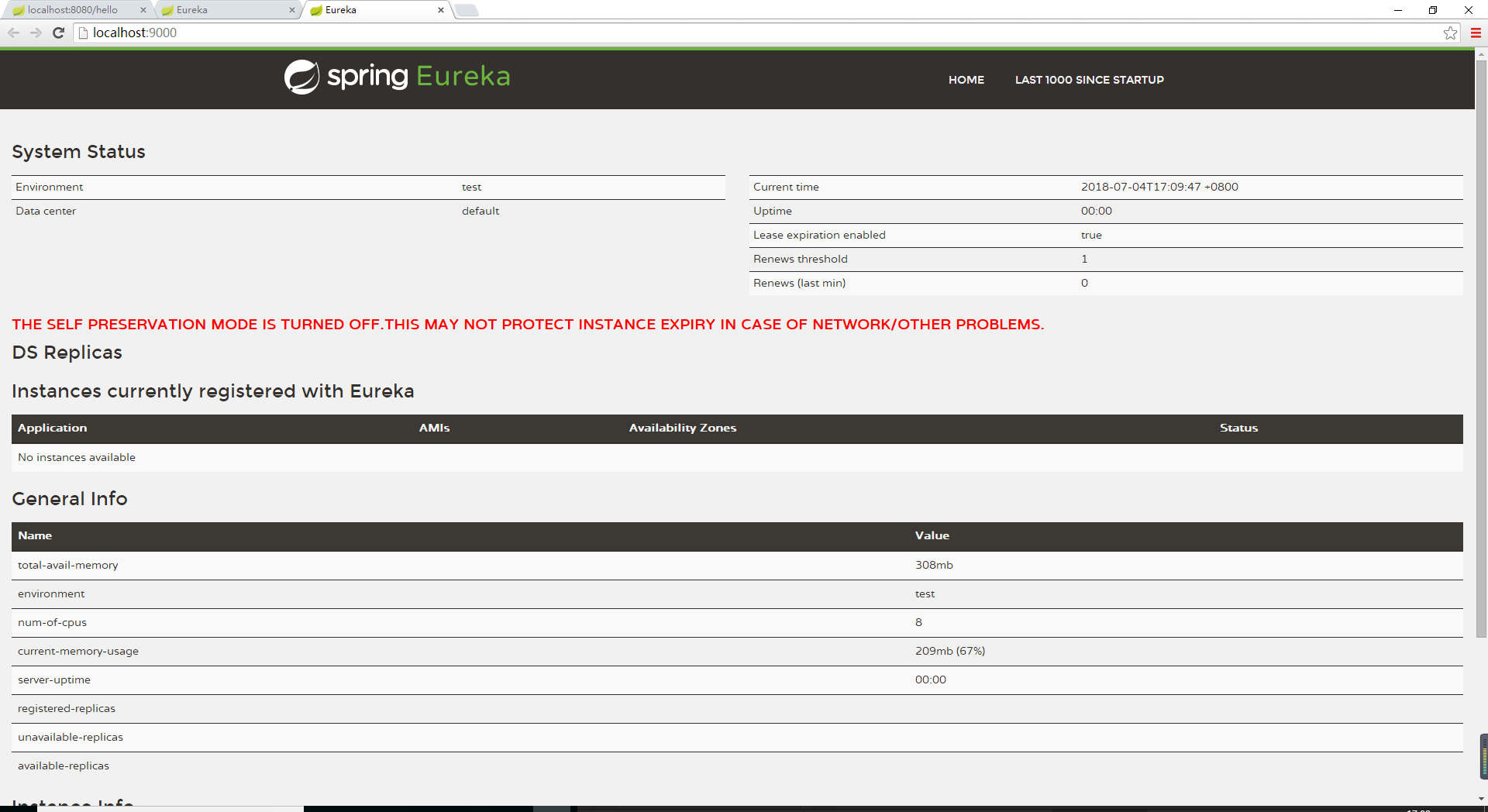
6.启动注册中心,在浏览器中访问,界面如下
7.在另一个工程中,加入注解 @EnableDiscoveryClient
 package com.example.demoOne;

 import org.springframework.boot.SpringApplication;

 import org.springframework.boot.autoconfigure.SpringBootApplication;

 import org.springframework.cloud.client.discovery.EnableDiscoveryClient;

 @EnableDiscoveryClient

 @SpringBootApplication

 public class DemoOneApplication {

     public static void main(String[] args) {

         SpringApplication.run(DemoOneApplication.class, args);

     }

 }
8.配置文件中加入配置,指定服务注册中心
 spring.application.name=demoOne-service

 spring.profiles.active=dev

 eureka.client.service-url.defaultZone=http://localhost:9000/eureka/
9.我们可以在需要注册是工程里添加一个类作为测试,并打印日志
 package com.example.demoOne.didispace;

 import org.springframework.beans.factory.annotation.Autowired;

 import org.springframework.cloud.client.ServiceInstance;

 import org.springframework.cloud.client.discovery.DiscoveryClient;

 import org.springframework.web.bind.annotation.RequestMapping;

 import org.springframework.web.bind.annotation.RequestMethod;

 import org.springframework.web.bind.annotation.RestController;

 import java.util.logging.Logger;

 @RestController

 public class HelloController {

     private  final Logger logger=Logger.getLogger(String.valueOf(getClass()));

     @Autowired

     private DiscoveryClient client;

     @RequestMapping(value = "/hello",method = RequestMethod.POST)

     public String index(){

         ServiceInstance instance = (ServiceInstance) client.getServices();

         logger.info("/hello,host:"+instance.getHost()+",service_id:"+instance.getServiceId());

         return "hello world";

     }

 }
10.启动工程,我们可以在服务注册中心看到我们注册的服务

注册中心搭建成功。可以测试一下试试
欢迎大家关注公众号,不定时干货,只做有价值的输出
作者:Dawnzhang
出处:https://www.cnblogs.com/clwydjgs/
版权:本文版权归作者
转载:欢迎转载,但未经作者同意,必须保留此段声明;必须在文章中给出原文连接;否则必究法律责任

spring cloud(学习笔记) Enreka服务治理的更多相关文章
- Spring Cloud 学习笔记(一)——入门、特征、配置
[TOC] 0 放在前面 0.1 参考文档 http://cloud.spring.io/spring-cloud-static/Brixton.SR7/ https://springcloud.cc ...
- Spring Cloud学习笔记-005
服务消费者 之前已经搭建好了微服务中的核心组件——服务注册中心(包括单节点模式和高可用模式).也有了服务提供者,接下来搭建一个服务消费者,它主要完成两个目标,发现服务以及消费服务.其中,服务发现的任务 ...
- Spring Cloud学习笔记【一】Eureka服务注册与发现
Spring Cloud Eureka 是 Spring Cloud Netflix 微服务套件的一部分,基于 Netflix Eureka 做了二次封装,主要负责完成微服务架构中的服务治理功能,服务 ...
- Spring Cloud学习笔记之微服务架构
目录 什么是微服务 架构优点 架构的挑战 设计原则 什么是微服务 微服务构架方法是以开发一种小型服务的方式,来开发一个独立的应用系统的. 其中每个小型服务都运行在自己的进程中,并经常采 ...
- Spring Cloud学习笔记【八】服务网关 Zuul(过滤器)
在上篇文章中我们了解了 Spring Cloud Zuul 作为网关所具备的最基本功能:路由(Router),下面我们将关注 Spring Cloud Zuul 的另一核心功能:过滤器(Filter) ...
- Spring Cloud学习笔记【七】服务网关 Zuul(路由)
Spring Cloud Zuul 路由是微服务架构的不可或缺的一部分,提供动态路由.监控.弹性.安全等的边缘服务.Zuul 是 Netflix 出品的一个基于 JVM 路由和服务端的负载均衡器. 准 ...
- spring cloud学习笔记五 网关服务zuul
网关服务是指,客户端发送的请求不用直接访问特定的微服务接口,而且是经过网关服务的接口进行交互,网关服务再去到特定的微服务中进行调用. 网关服务的路由功能和Nginx的反向代理一样,所有的服务都先会 ...
- Spring Cloud学习笔记--Spring Boot初次搭建
1. Spring Boot简介 初次接触Spring的时候,我感觉这是一个很难接触的框架,因为其庞杂的配置文件,我最不喜欢的就是xml文件,这种文件的可读性很不好.所以很久以来我的Spring学习都 ...
- Spring Cloud系列之Eureka服务治理
写在前面 Spring Cloud Eureka是基于Netflix Eureka做的二次封装.主要包含两部分: 服务注册中心 eureka server 服务提供者 eureka client ps ...
- Spring Cloud学习笔记-002
搭建Spring Cloud注册中心:Eureka 服务注册:在服务治理框架中,通常都会构建一个注册中心,每个服务单元向注册中心登记自己提供的服务,将主机与端口号.版本号.通信协议等一些附加信息告诉注 ...
随机推荐
- 洛谷P4769 冒泡排序
n <= 60w,∑n <= 200w,1s. 解:首先有个全排列 + 树状数组的暴力. 然后有个没有任何规律的状压...首先我想的是按照大小顺序来放数,可以分为确定绝对位置和相对位置两种 ...
- 用 Homebrew 带飞你的 Mac
文章目录 资料 安装 基本用法 源镜像 Homebrew也称brew,macOS下基于命令行的最强大软件包管理工具,使用Ruby语言开发.类似于CentOS的yum或者Ubuntu的apt-get,b ...
- Linux 多线程 - 线程异步与同步机制
Linux 多线程 - 线程异步与同步机制 I. 同步机制 线程间的同步机制主要包括三个: 互斥锁:以排他的方式,防止共享资源被并发访问:互斥锁为二元变量, 状态为0-开锁.1-上锁;开锁必须由上锁的 ...
- tcpdump高级过滤
一:查看帮助选项 tcpdump --help Usage: tcpdump [-aAbdDefhHIJKlLnNOpqStuUvxX#] [ -B size ] [ -c count ] [ -C ...
- angular中因异步问题产生的错误解决方法
方法一 private userTaskList(){ let auth = this.make_basic_auth("kermit","kermit"); ...
- 使用Linux搭建FTP服务器实现文件共享
使用Linux搭建FTP服务器实现文件共享... ---------------- Linux中的文件共享:FTPVSFTPDVSFTPD虚拟用户 FTP可以用在Linux与Linux 和Window ...
- 浅谈DP
DP是一个范围极广的一门重要的算法,它与其他算法不同的是,它并没一套固定的公式,而是通过一种特定的思路,来进行无后效性的转移.其本质是通过一个状态转移至另一状态,将问题从大化小,并找到这些小问题之间的 ...
- nfs环境搭建报错clnt_create: RPC: Program not registered
有时候搭建完成后,使用showmount -e ip检测服务端服务器情况的是,会出现clnt_create: RPC: Program not registered 这个错误,表示rpc程序为注册成功 ...
- JAVA-Proxy 代理
jdk静态代理 interface Dao { void save(); } class DaoImpl implements Dao { @Override public void save() { ...
- 3、JPA-API
Persistence Persistence 类用于获取 EntityManagerFactory 实例,该类包含一个名为 createEntityManagerFactory 的静态方法 . cr ...