
spring cloud(学习笔记) Enreka服务治理
服务治理是微服务架构最为核心和基础的模块,主要用来实现各个微服务实例的自动化注册和发现。
记录一下服务注册中心的搭建以及高可用注册中心的实现
1.首先创建两个基础 的spring boot工程,spring boot创建工程的网站:http://start.spring.io/,创建界面如下

2.解压工程,用Maven的形式导入工程(File->new->project from Existing Soures,选择解压工程导入)
3.两个工程中都添加依赖(eureka)
 <properties>

         <project.build.sourceEncoding>UTF-8</project.build.sourceEncoding>

         <project.reporting.outputEncoding>UTF-8</project.reporting.outputEncoding>

         <java.version>1.8</java.version>

         <spring-cloud.version>Finchley.RELEASE</spring-cloud.version>

     </properties>

     <dependencies>

         <dependency>

             <groupId>org.springframework.boot</groupId>

             <artifactId>spring-boot-starter-web</artifactId>

         </dependency>

         <dependency>

             <groupId>org.springframework.cloud</groupId>

             <artifactId>spring-cloud-starter-netflix-eureka-server</artifactId>

         </dependency>

         <dependency>

             <groupId>org.springframework.boot</groupId>

             <artifactId>spring-boot-starter-test</artifactId>

             <scope>test</scope>

         </dependency>

     </dependencies>

     <dependencyManagement>

         <dependencies>

             <dependency>

                 <groupId>org.springframework.cloud</groupId>

                 <artifactId>spring-cloud-dependencies</artifactId>

                 <version>${spring-cloud.version}</version>

                 <type>pom</type>

                 <scope>import</scope>

             </dependency>

         </dependencies>

     </dependencyManagement>

     <build>

         <plugins>

             <plugin>

                 <groupId>org.springframework.boot</groupId>

                 <artifactId>spring-boot-maven-plugin</artifactId>

             </plugin>

         </plugins>

     </build>
4.在注册中心工程配置文件中添加服务
 server.port=9000

 spring.application.name=eureka-server

 spring.profiles.active=dev

 eureka.instance.hostname=localhost

 eureka.client.register-with-eureka=false

 eureka.client.fetch-registry=false

 eureka.server.enable-self-preservation=false
不知道这些参数的自己百度
5.在注册中心的入口类中加入注解@EnableEurekaServer
 package com.example.enrekaserver;

 import org.springframework.boot.SpringApplication;

 import org.springframework.boot.autoconfigure.SpringBootApplication;

 import org.springframework.cloud.netflix.eureka.server.EnableEurekaServer;

 @EnableEurekaServer

 @SpringBootApplication

 public class EnrekaServerApplication {

     public static void main(String[] args) {

         SpringApplication.run(EnrekaServerApplication.class, args);

     }

 }
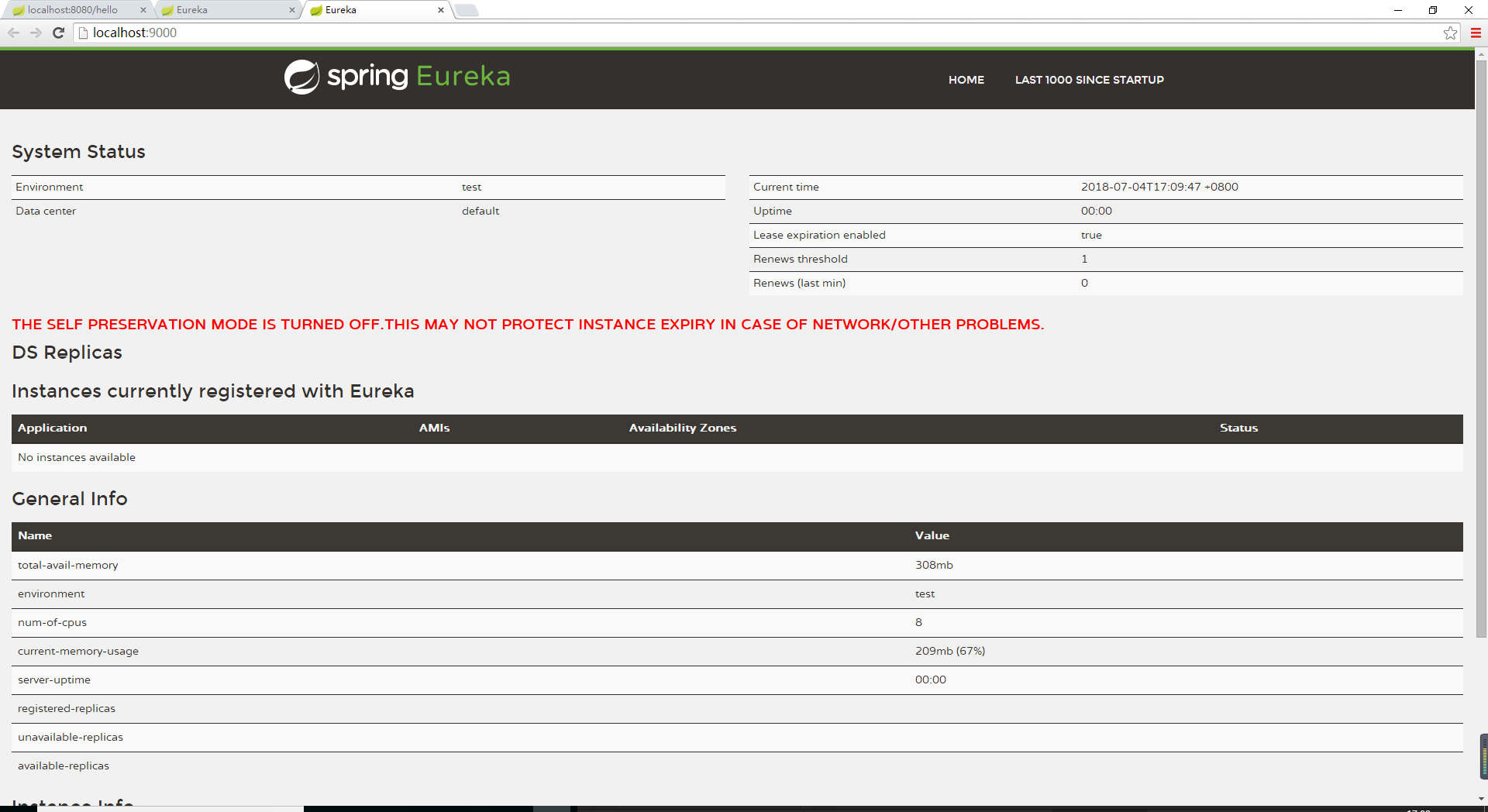
6.启动注册中心,在浏览器中访问,界面如下
7.在另一个工程中,加入注解 @EnableDiscoveryClient
 package com.example.demoOne;

 import org.springframework.boot.SpringApplication;

 import org.springframework.boot.autoconfigure.SpringBootApplication;

 import org.springframework.cloud.client.discovery.EnableDiscoveryClient;

 @EnableDiscoveryClient

 @SpringBootApplication

 public class DemoOneApplication {

     public static void main(String[] args) {

         SpringApplication.run(DemoOneApplication.class, args);

     }

 }
8.配置文件中加入配置,指定服务注册中心
 spring.application.name=demoOne-service

 spring.profiles.active=dev

 eureka.client.service-url.defaultZone=http://localhost:9000/eureka/
9.我们可以在需要注册是工程里添加一个类作为测试,并打印日志
 package com.example.demoOne.didispace;

 import org.springframework.beans.factory.annotation.Autowired;

 import org.springframework.cloud.client.ServiceInstance;

 import org.springframework.cloud.client.discovery.DiscoveryClient;

 import org.springframework.web.bind.annotation.RequestMapping;

 import org.springframework.web.bind.annotation.RequestMethod;

 import org.springframework.web.bind.annotation.RestController;

 import java.util.logging.Logger;

 @RestController

 public class HelloController {

     private  final Logger logger=Logger.getLogger(String.valueOf(getClass()));

     @Autowired

     private DiscoveryClient client;

     @RequestMapping(value = "/hello",method = RequestMethod.POST)

     public String index(){

         ServiceInstance instance = (ServiceInstance) client.getServices();

         logger.info("/hello,host:"+instance.getHost()+",service_id:"+instance.getServiceId());

         return "hello world";

     }

 }
10.启动工程,我们可以在服务注册中心看到我们注册的服务

注册中心搭建成功。可以测试一下试试
欢迎大家关注公众号,不定时干货,只做有价值的输出
作者:Dawnzhang
出处:https://www.cnblogs.com/clwydjgs/
版权:本文版权归作者
转载:欢迎转载,但未经作者同意,必须保留此段声明;必须在文章中给出原文连接;否则必究法律责任

spring cloud(学习笔记) Enreka服务治理的更多相关文章
- Spring Cloud 学习笔记(一)——入门、特征、配置
[TOC] 0 放在前面 0.1 参考文档 http://cloud.spring.io/spring-cloud-static/Brixton.SR7/ https://springcloud.cc ...
- Spring Cloud学习笔记-005
服务消费者 之前已经搭建好了微服务中的核心组件——服务注册中心(包括单节点模式和高可用模式).也有了服务提供者,接下来搭建一个服务消费者,它主要完成两个目标,发现服务以及消费服务.其中,服务发现的任务 ...
- Spring Cloud学习笔记【一】Eureka服务注册与发现
Spring Cloud Eureka 是 Spring Cloud Netflix 微服务套件的一部分,基于 Netflix Eureka 做了二次封装,主要负责完成微服务架构中的服务治理功能,服务 ...
- Spring Cloud学习笔记之微服务架构
目录 什么是微服务 架构优点 架构的挑战 设计原则 什么是微服务 微服务构架方法是以开发一种小型服务的方式,来开发一个独立的应用系统的. 其中每个小型服务都运行在自己的进程中,并经常采 ...
- Spring Cloud学习笔记【八】服务网关 Zuul(过滤器)
在上篇文章中我们了解了 Spring Cloud Zuul 作为网关所具备的最基本功能:路由(Router),下面我们将关注 Spring Cloud Zuul 的另一核心功能:过滤器(Filter) ...
- Spring Cloud学习笔记【七】服务网关 Zuul(路由)
Spring Cloud Zuul 路由是微服务架构的不可或缺的一部分,提供动态路由.监控.弹性.安全等的边缘服务.Zuul 是 Netflix 出品的一个基于 JVM 路由和服务端的负载均衡器. 准 ...
- spring cloud学习笔记五 网关服务zuul
网关服务是指,客户端发送的请求不用直接访问特定的微服务接口,而且是经过网关服务的接口进行交互,网关服务再去到特定的微服务中进行调用. 网关服务的路由功能和Nginx的反向代理一样,所有的服务都先会 ...
- Spring Cloud学习笔记--Spring Boot初次搭建
1. Spring Boot简介 初次接触Spring的时候,我感觉这是一个很难接触的框架,因为其庞杂的配置文件,我最不喜欢的就是xml文件,这种文件的可读性很不好.所以很久以来我的Spring学习都 ...
- Spring Cloud系列之Eureka服务治理
写在前面 Spring Cloud Eureka是基于Netflix Eureka做的二次封装.主要包含两部分: 服务注册中心 eureka server 服务提供者 eureka client ps ...
- Spring Cloud学习笔记-002
搭建Spring Cloud注册中心:Eureka 服务注册:在服务治理框架中,通常都会构建一个注册中心,每个服务单元向注册中心登记自己提供的服务,将主机与端口号.版本号.通信协议等一些附加信息告诉注 ...
随机推荐
- 洛谷P2704 炮兵阵地
本题过于经典...... 对于这种网格状压DP,套路一波刷表法DFS转移就没了. 三进制状压,0表示当前,上一个都没有.1表示当前无,上一个有.2表示当前有. 转移的条件就是上一行为0,当前不是山地, ...
- 【模板】2-SAT
题目大意:给定 N 个点的 M 条约束,约束形式为:\(a_i \lor a_j = 1\). 题解:拆点什么的就不说了,在求出一组解的时候,考虑到 Tarjan 找环的过程中,scc 染色是按照拓扑 ...
- linux系统调用之用户管理
getuid 获取用户标识号 setuid 设置用户标志号 getgid 获取组标识号 setgid 设置组标志号 getegid 获取有效组标识号 setegid 设置有效组标识号 geteuid ...
- Day25--Python--re,模块(regular expression)
一 . re 1. import re findall() 查找所有结果 finditer() 查找到的结果返回迭代器 search() 查找. 如果查找到第一个结果,就停止. 如果查找不到结果,返回 ...
- C实现读写文件
https://www.cnblogs.com/zhanghongfeng/p/7726199.html https://www.cnblogs.com/xudong-bupt/p/3478297.h ...
- socket编程以及select、epoll、poll示例详解
socket编程socket这个词可以表示很多概念,在TCP/IP协议中“IP地址 + TCP或UDP端口号”唯一标识网络通讯中的一个进程,“IP + 端口号”就称为socket.在TCP协议中,建立 ...
- PHP下安装memcached
tar xvf libevent-2.0.21-stable.tar.gzcd libevent./configure -prefix=/usr/local/libeventmake &&am ...
- Mac 软件专题:高效率工作和学习工具软件推荐
今天和大家分享软件专题:「高效率工作和学习工具」,简而言之就是提高你工作和学习效率的软件,这对于要天天使用Mac工作或学习的人来说太有帮助了,这里主要分享大家平时经常用的一些,欢迎留言补充. 本文图片 ...
- java开发常用的日期格式转换工具类
package com.ydtf.ipcc.sms.util; import java.sql.Timestamp; import java.text.SimpleDateFormat; import ...
- Linux记录-CPU指标介绍
在linux的系统维护中,可能需要经常查看cpu使用率,分析系统整体的运行情况.而监控CPU的性能一般包括以下3点:运行队列.CPU使用率和上下文切换. 对于每一个CPU来说运行队列最好不要超过3,例 ...