
纯CSS画的基本图形(圆形、三角形、多边形、爱心、八卦等)
1.圆形
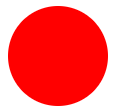
.circle {

 width: 100px;

 height: 100px;

 background: red;

 border-radius: 50px;

}
2.椭圆
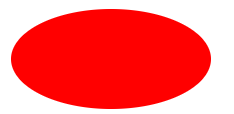
.oval {

  width: 200px;

  height: 100px;

  background: red;

  border-radius: 100px / 50px;

}
3.上三角
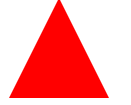
.triangle-up {

  width:;

  height:;

  border-left: 50px solid transparent;

  border-right: 50px solid transparent;

  border-bottom: 100px solid red;

}
4.左上三角

.triangle-topleft {

  width:;

  height:;

  border-top: 100px solid red;

  border-right: 100px solid transparent;

}
5.平行四边形

.parallelogram {

  width: 150px;

  height: 100px;

  margin-left:20px;

  transform: skew(20deg);

  background: red;

}
6.梯形
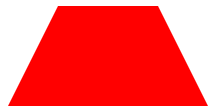
.trapezoid {

  border-bottom: 100px solid red;

  border-left: 50px solid transparent;

  border-right: 50px solid transparent;

  height:;

  width: 100px;

}
7.六角星

.star-six {

  position: relative;

  width:;

  height:;

  border-left: 50px solid transparent;

  border-right: 50px solid transparent;

  border-bottom: 100px solid red;

}

.star-six:after {

  content: "";

  position: absolute;

  top: 30px;

  left: -50px;

  width:;

  height:;

  border-left: 50px solid transparent;

  border-right: 50px solid transparent;

  border-top: 100px solid red;

}
8.五角星

.star-five {

  position: relative;

  margin: 50px 0;

  display: block;

  color: red;

  width: 0px;

  height: 0px;

  border-right: 100px solid transparent;

  border-bottom: 70px solid red;

  border-left: 100px solid transparent;

  transform: rotate(35deg);

}

.star-five:before {

  content: '';

  position: absolute;

  top: -45px;

  left: -65px;

  border-bottom: 80px solid red;

  border-left: 30px solid transparent;

  border-right: 30px solid transparent;

  height:;

  width:;

  display: block;

  transform: rotate(-35deg);

}

.star-five:after {

  content: '';

  position: absolute;

  display: block;

  color: red;

  top: 3px;

  left: -105px;

  width: 0px;

  height: 0px;

  border-right: 100px solid transparent;

  border-bottom: 70px solid red;

  border-left: 100px solid transparent;

  transform: rotate(-70deg);

}
9.五角大楼
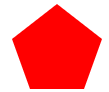
.pentagon {

  position: relative;

  width: 54px;

  border-width: 50px 18px 0;

  border-style: solid;

  border-color: red transparent;

}

.pentagon:before {

  content: "";

  position: absolute;

  height:;

  width:;

  top: -85px;

  left: -18px;

  border-width: 0 45px 35px;

  border-style: solid;

  border-color: transparent transparent red;

}
10.六边形

.hexagon {

  position: relative;

  width: 100px;

  height: 55px;

  background: red;

}

.hexagon:before {

  content: "";

  position: absolute;

  top: -25px;

  left:;

  width:;

  height:;

  border-left: 50px solid transparent;

  border-right: 50px solid transparent;

  border-bottom: 25px solid red;

}

.hexagon:after {

  content: "";

  position: absolute;

  bottom: -25px;

  left:;

  width:;

  height:;

  border-left: 50px solid transparent;

  border-right: 50px solid transparent;

  border-top: 25px solid red;

}
11.八角形
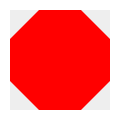
.octagon {

  position: relative;

  width: 100px;

  height: 100px;

  background: red;

}

.octagon:before {

  content: "";

  position: absolute;

  top:;

  left:;

  border-bottom: 29px solid red;

  border-left: 29px solid #eee;

  border-right: 29px solid #eee;

  width: 42px;

  height:;

}

.octagon:after {

  content: "";

  position: absolute;

  bottom:;

  left:;

  border-top: 29px solid red;

  border-left: 29px solid #eee;

  border-right: 29px solid #eee;

  width: 42px;

  height:;

}
12.爱心

.heart {

  position: relative;

  width: 100px;

  height: 90px;

}

.heart:before, .heart:after {

  position: absolute;

  content: "";

  left: 50px;

  top:;

  width: 50px;

  height: 80px;

  background: red;

  border-radius: 50px 50px 0 0;

  transform: rotate(-45deg);

  transform-origin: 0 100%;

}

.heart:after {

  left:;

  transform: rotate(45deg);

  transform-origin :100% 100%;

}
13.无穷大符号

.infinity {

  position: relative;

  width: 212px;

  height: 100px;

}

.infinity:before, .infinity:after {

  content: "";

  position: absolute;

  top:;

  left:;

  width: 60px;

  height: 60px;

  border: 20px solid red;

  border-radius: 50px 50px 0 50px;

  transform: rotate(-45deg);

}

.infinity:after {

  left: auto;

  right:;

  border-radius: 50px 50px 50px 0;

  transform: rotate(45deg);

}
14.鸡蛋
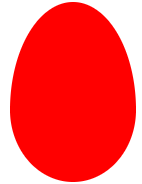
.egg {

  display:block;

  width: 126px;

  height: 180px;

  background-color: red;

  -webkit-border-radius: 63px 63px 63px 63px / 108px 108px 72px 72px;

  border-radius: 50% 50% 50% 50% / 60% 60% 40% 40%;

}
15.食逗人(Pac-Man)

.pacman {

  width: 0px;

  height: 0px;

  border-right: 60px solid transparent;

  border-top: 60px solid red;

  border-left: 60px solid red;

  border-bottom: 60px solid red;

  border-top-left-radius: 60px;

  border-top-right-radius: 60px;

  border-bottom-left-radius: 60px;

  border-bottom-right-radius: 60px;

}
16.提示对话框

.talkbubble {

  position: relative;

  width: 120px;

  height: 80px;

  background: red;

  border-radius: 10px;

}

.talkbubble:before {

  content:"";

  position: absolute;

  right: 100%;

  top: 26px;

  width:;

  height:;

  border-top: 13px solid transparent;

  border-right: 26px solid red;

  border-bottom: 13px solid transparent;

}
17. 12角星

.burst-12 {

  background: red;

  width: 80px;

  height: 80px;

  position: relative;

  text-align: center;

}

.burst-12:before, .burst-12:after {

  content: "";

  position: absolute;

  top:;

  left:;

  height: 80px;

  width: 80px;

  background: red;

}

.burst-12:before {

  transform: rotate(30deg);

}

.burst-12:after {

  transform: rotate(60deg);

}
18.钻石
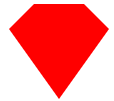
.cut-diamond {

  border-style: solid;

  border-color: transparent transparent red transparent;

  border-width: 0 25px 25px 25px;

  height:;

  width: 50px;

  position: relative;

  margin: 20px 0 50px 0;

}

.cut-diamond:after {

  content: "";

  position: absolute;

  top: 25px;

  left: -25px;

  width:;

  height:;

  border-style: solid;

  border-color: red transparent transparent transparent;

  border-width: 70px 50px 0 50px;

}
19. 阴阳八卦
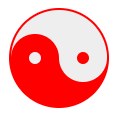
.yin-yang {

  position: relative;

  width: 96px;

  height: 48px;

  background: #eee;

  border-color: red;

  border-style: solid;

  border-width: 2px 2px 50px 2px;

  border-radius: 100%;

}

.yin-yang:before {

  content: "";

  position: absolute;

  top: 50%;

  left:;

  background: #eee;

  border: 18px solid red;

  border-radius: 100%;

  width: 12px;

  height: 12px;

}

.yin-yang:after {

  content: "";

  position: absolute;

  top: 50%;

  left: 50%;

  background: red;

  border: 18px solid #eee;

  border-radius:100%;

  width: 12px;

  height: 12px;

}
纯CSS画的基本图形(圆形、三角形、多边形、爱心、八卦等)的更多相关文章
- CSS之纯CSS画的基本图形(矩形、圆形、三角形、多边形、爱心、八卦等)
图形包括基本的矩形.圆形.椭圆.三角形.多边形,也包括稍微复杂一点的爱心.钻石.阴阳八卦等.当然有一些需要用到CSS3的属性,所以在你打开这篇文章的时候,我希望你用的是firefox或者chrome, ...
- 纯CSS画的基本图形
图形包括基本的矩形.圆形.椭圆.三角形.多边形,也包括稍微复杂一点的爱心.钻石.阴阳八卦等.当然有一些需要用到CSS3的属性,所以在你打开这篇文章的时候,我希望你用的是firefox或者chrome, ...
- 纯CSS画的基本图形(矩形、圆形、三角形、多边形、爱心、八卦
http://css-tricks.com/examples/ShapesOfCSS/
- 用纯css画个三角形
用纯css画个三角形以下是源代码: <!DOCTYPE html PUBLIC "-//W3C//DTD XHTML 1.0 Transitional//EN" " ...
- 纯css画三角形
纯css画三角形与border元素相关 设置border的属性 width: 100px; height: 100px; border-style: solid; border-width: 100p ...
- 用CSS画一个带阴影的三角形的示例代码
1. 思路 怎么用CSS3画一个带阴影的三角形呢 ? 有童鞋说, 这还不简单吗 网上有很多解决方案, 但其实大多都是实现不太完美的, 存在一些问题 假设我们做一个向下的三角形箭头 常见的方法大致有两种 ...
- 【原创】纯CSS画黄金梅丽号!
代码如下 <!DOCTYPE html> <!-- saved from url=(0055)http://jadyoap.bj.bcebos.com/ife%2FcssCatAni ...
- 用纯CSS画大白
纯CSS打造网页大白知识点: 首先要把大白分割,整体baymax中包含header(eye1,eye2,mouth),torso(heart),belly(cover),l-bigfinge ...
- 理解纯CSS画三角形
pure css draw a triangle code { display: inline-block; width: 300px; background-color: #E0E0E0 } .te ...
随机推荐
- Nginx三部曲(1)基础
我们会告诉你 Nginx 是如何工作的,其背后的概念有哪些,以及如何优化它以提升应用程序的性能.还会告诉你如何安装,如何启动.运行. 这个教程包括三节: 基础概念——你可以了解命令(directive ...
- rem 适配
postcss-pxtorem 是一款 postcss 插件,用于将单位转化为 rem lib-flexible 用于设置 rem 基准值 一.webpact postcss 插件将px转化为rem单 ...
- java集合迭代器
一.Java中有一个设计模式是迭代器模式 1.迭代器模式定义迭代器模式(Iterator),提供一种方法顺序访问一个聚合对象中的各种元素,而又不暴露该对象的内部表示. 2.迭代器模式概述Java集合框 ...
- [转帖]CentOS 6 服务器安全配置指南(通用)
CentOS 6 服务器安全配置指南(通用) http://seanlook.com/2014/09/07/linux-security-general-settings/ 发表于 2014-09- ...
- 重构客户注册-基于ActiveMQ实现短信验证码生产者
重构目标:将bos_fore项目中的CustomerAction作为短信消息生产者,将消息发给ActiveMQ,创建一个单独的SMS项目,作为短信息的消费者,从ActiveMQ获取短信消息,调用第三方 ...
- 剑指offer(18)二叉搜索树的后续遍历
题目: 输入一个整数数组,判断该数组是不是某二叉搜索树的后序遍历的结果.如果是则输出Yes,否则输出No.假设输入的数组的任意两个数字都互不相同. 思路: 以最后一个节点为根,从头往后找到第一个大于根 ...
- Linux基础学习笔记5-软件管理
包管理器 二进制应用程序的组成部分: 二进制文件.库文件.配置文件.帮助文件 程序包管理器: debian:deb文件.dpkg包管理器 redhat:rpm文件.rpm包管理器 rpm:Redhat ...
- Django restframework之Token验证的缺陷及jwt的简单使用
一.主要缺陷: 1.Token验证是放在一张表中,即authtoken_token中,key没有失效时间,永久有效,一旦泄露,后果不可想象,安全性极差. 2.不利于分布式部署或多个系统使用一套验证,a ...
- vscode git设置远程仓库码云
https://www.cnblogs.com/klsw/p/9080041.html
- SpringBoot之文件下载
package org.springboot.controller; import org.springboot.constant.Constant; import org.springframewo ...