
git 提交报错 : The file will have its original line endings in your working directory.
报错现象
git add . 的时候发现此报错
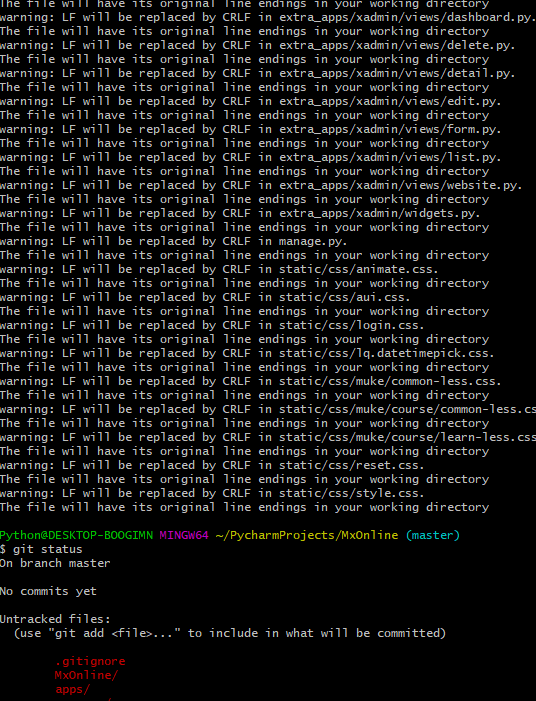
报错分析
看情况应该是不同系统对换行的识别不到位导致的
就常识来说文件是在windows下生成的所以换行和 linux 确实不同可能是因为这个导致的
报错解决
git config --global core.autocrlf false
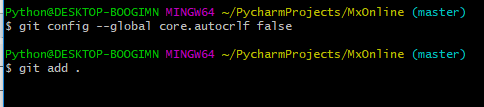
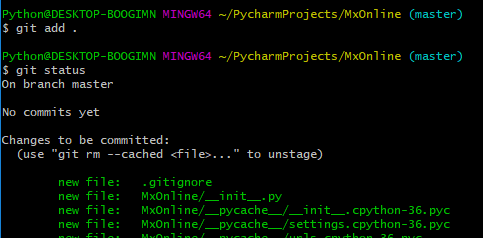
同理在 pycharm 中也要做相关操作
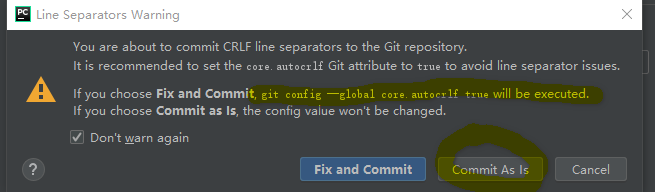
在pycharm 中进行操作的时候也会提示这个问题. 如果选择 fix and commit 就会设置为 True 会被转换
所以我们要选择 commit as ls 不做处理
额外补充
Git下处理“换行”(line ending)
core.autocrlf是git中负责处理line ending的变量,可以设置3个值:true,false,inout。
(1)设置为true【config --global core.autocrlf true】
当设置成true时,这意味着你在任何时候添加(add)文件到git仓库时,git都会视为它是一个文本文件(text file)。
它将把crlf变成LF。
(2)设置为false【config --global core.autocrlf false】
当设置成false时,line endings将不做转换操作。文本文件保持原来的样子。
(3)设置为input时,添加文件git仓库时,git把crlf编程lf。当有人Check代码时还是lf方式。因此在window操作系统下,不要使用这个设置。
git 提交报错 : The file will have its original line endings in your working directory.的更多相关文章
- Git提交时提示‘The file will have its original line endings in your working directory’
Git提交时提示'The file will have its original line endings in your working directory' Git出现错误 git add -A ...
- 解决git报错“The file will have its original line endings in your working directory”的方法
在执行命令 git commit --all -m '说明' 时报错“The file will have its original line endings in your working dir ...
- windows10下git报错warning: LF will be replaced by CRLF in readme.txt. The file will have its original line endings in your working directory.
window10下使用git时 报错如下: $ git add readme.txtwarning: LF will be replaced by CRLF in readme.txt.The fil ...
- [Git add . ] 遇到The file will have its original line endings in your working directory 解决办法
1.在新项目中使用[ git add . ]时出现: warning: LF will be replaced by CRLF in ...... The file will have its ori ...
- git出现“The file will have its original line endings in your working directory”错误
一.现象: git add *时出现如下现象: The file will have its original line endings in your working directory 解决: G ...
- The file will have its original line endings in your working directory.
在空仓库的情况下,add,出现一下问题 The file will have its original line endings in your working directory. 当报这个警告时是 ...
- 解决使用git出现 The file will have its original line endings in your working directory
执行以下命令即可解决 git rm -r --cached . git config core.autocrlf false git add . . 代表当前目录
- warning: LF will be replaced by CRLF in ***. The file will have its original line endings in your working directory.
git config --global core.autocrlf false
- 解决 The file will have its original line endings in your working directory
首先出现这个问题主要原因是:我们从别人github地址上通过git clone下载下来,而又想git push到我们自己的github上,那么就会出现上面提示的错误信息 此时需要执行如下代码: git ...
随机推荐
- nodejs图片处理工具gm用法
在做H5应用中,有时候会涉及到一些图片加工处理的操作,nodejs有一个很好的后台图片处理module,就是这里说的gm.gm有官方文档,但感觉写得太抽象,反而看不懂了.这里把一些常见的用法写下,供大 ...
- Python-递归初识-50
#递归函数 # 了解什么是递归 : 在函数中调用自身函数 # 最大递归深度默认是997/998 —— 是python从内存角度出发做得限制 # 能看懂递归 # 能知道递归的应用场景 # 初识递归 —— ...
- Mergeable Stack(链表实现栈)
C - Mergeable Stack ZOJ - 4016 一开始用stl中内置的栈来写,其中第三个操作,我先复制到一个数组,再将其倒给另一个栈 这个方法有两个错误的地方: 1.栈在内存很大需要扩容 ...
- beego 自定义控制器与路由
框架浅析 这是之前使用bee创建的webapp目录层级结构: ├── conf 配置文件 │ └── app.conf ├── controllers 控制器 │ └── default.go ├── ...
- 【学习总结】Git学习-参考廖雪峰老师教程九-使用码云
学习总结之Git学习-总 目录: 一.Git简介 二.安装Git 三.创建版本库 四.时光机穿梭 五.远程仓库 六.分支管理 七.标签管理 八.使用GitHub 九.使用码云 十.自定义Git 期末总 ...
- 使用jmeter来发送json/gzip格式数据 --------笔记
一.使用jmeter来发送gzip数据 有时候我们需要模拟在客户端将数据压缩后, 发送(post)到服务器端. 通常这种情况,会发生在移动终端上. 这样做的好处, 是可以节省流量. 当然, 服务器返 ...
- nodejs配置nginx 以后链接mongodb数据库
服务器 :windows server2008 R2 反向代理 :nginx 1.15.1 for window 64位 数据库:mongodb 4 64位 使用框架express 首先下载nodej ...
- 《Effective C++》资源管理:条款13-条款17
条款13:以对象管理资源 为了防止资源泄漏,请使用RAII(Resource Acquisition Is Initialization)对象,在构造函数里面获得资源,在析构函数里面释放资源 auto ...
- C# Note15:设置Window图标的正确方式
Windows Presentation Foundation(WPF)独立应用程序有两种类型的图标: 一个程序集(assembly) 图标,通过在应用程序的项目构建文件中使用<Applicat ...
- cookie,localStorage和sessionStorage区别
三者的异同 特性 Cookie localStorage sessionStorage 数据的生命期 一般由服务器生成,可设置失效时间.如果在浏览器端生成Cookie,默认是关闭浏览器后失效 除非被清 ...