
ASP.NET MVC - 多国语言的简单实现
定义一个类
public class Book

{

    public int ID { get; set; }

    public string Title { get; set; }

    public string Author { get; set; }

    public double Price { get; set; }

    public double Action { get; set; }

}
右击项目-添加ASP.NET文件夹-创建App_GlobalResources-右击此文件夹-添加-资源文件,命名为Resource1.resx。这个文件是一个以文件名为类名的类型,名称和值分别代表了Book模型的属性名字的存取键和属性名字的存取值,Book的属性们是以键值对的方式被添加到资源文件的。注意将资源文件类的访问修饰符设为public。
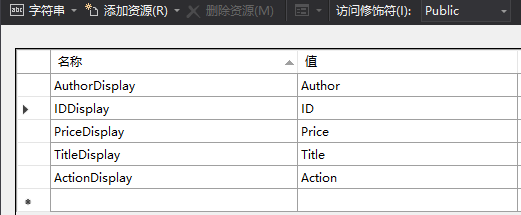
接下来再复制一份Resource1.resx,命名为Resource1.zh.resx,前一个表示默认的英文,后一个表示中文。
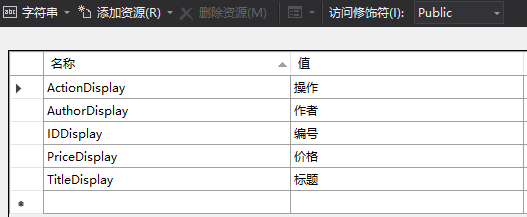
为Book的属性添加数据注解
public class Book

{

    [Display(Name = "IDDisplay", ResourceType = typeof(App_GlobalResources.Resource1))]

    public int ID { get; set; }

    [Display(Name = "TitleDisplay", ResourceType = typeof(App_GlobalResources.Resource1))]

    public string Title { get; set; }

    [Display(Name = "AuthorDisplay", ResourceType = typeof(App_GlobalResources.Resource1))]

    public string Author { get; set; }

    [Display(Name = "PriceDisplay", ResourceType = typeof(App_GlobalResources.Resource1))]

    public double Price { get; set; }

    [Display(Name = "ActionDisplay", ResourceType = typeof(App_GlobalResources.Resource1))]

    public double Action { get; set; }

}
接下来在Test方法中将默认显示的属性名绑定到ViewBag中,然后从客户端读取这些字段名称
public class DefaultController : Controller

{

    private List<Book> books = new List<Book>

    {

            new Book{  ID=, Title="寂静的春天", Author="xxx",Price=18.9 },

            new Book{  ID=, Title="此时此地", Author="xxx",Price=11.9 },

            new Book{  ID=, Title="无人生还", Author="xxx",Price=12.9 },

            new Book{  ID=, Title="万有引力之虹", Author="xxx",Price=15.9 },

            new Book{  ID=, Title="全球通史", Author="xxx",Price=18.9 },

            new Book{  ID=, Title="来自民间的叛逆", Author="xxx",Price=18.1 },

            new Book{  ID=, Title="雨天炎天", Author="xxx",Price=18.5 },

            new Book{  ID=, Title="荒凉天使", Author="xxx",Price=17.9 },

            new Book{  ID=, Title="精神分析引论", Author="xxx",Price=28.9 },

            new Book{  ID=, Title="伯罗奔尼撒战争史", Author="xxx",Price=48.9 }

        };

    //默认显示英语

    public ActionResult Test()

    {

        ViewBag.Title = App_GlobalResources.Resource1.TitleDisplay;

        ViewBag.Author = App_GlobalResources.Resource1.AuthorDisplay;

        ViewBag.Price = App_GlobalResources.Resource1.PriceDisplay;

        ViewBag.ID = App_GlobalResources.Resource1.IDDisplay;

        ViewBag.Action = App_GlobalResources.Resource1.ActionDisplay;

        return View(books);

    }

    //语言切换

    public ActionResult ChangeLanguage(string language)

    {

        Session["CurrentLanguage"] = new System.Globalization.CultureInfo(language);

        return Redirect("Test");

    }

}
在Global文件中创建Application_AcquireRequestState事件
protected void Application_AcquireRequestState(object sender, EventArgs e)

{

    if (HttpContext.Current.Session != null)

    {

        System.Globalization.CultureInfo ci = (System.Globalization.CultureInfo)this.Session["CurrentLanguage"];

        if (ci == null)

        {

            ci = new System.Globalization.CultureInfo("en");

            this.Session["CurrentLanguage"] = ci;

        }

        System.Threading.Thread.CurrentThread.CurrentUICulture = ci;

        System.Threading.Thread.CurrentThread.CurrentCulture = System.Globalization.CultureInfo.CreateSpecificCulture(ci.Name);

    }

}
在客户端读取数据
@model IEnumerable<WebErp.Controllers.Book>

<!DOCTYPE html>

<html>

<head>

    <meta name="viewport" content="width=device-width" />

    <title>Test</title>

    <style>

        #table-5 th { background:#7F66A0;color: #fff; border-bottom-width: ; }

        #table-5 td {color: #000; }

        #table-5 tr, #table-5 th{border-width: 1px; border-style: solid; border-color: #7F66A0; }

        #table-5 td, #table-5 th{ padding: 5px 10px; font-size: 12px;font-family: Verdana; font-weight: bold; }

    </style>

</head>

<body>

    @Html.ActionLink("English", "ChangeLanguage", new { language = "en" })

    @Html.ActionLink("Chinese", "ChangeLanguage",new { language="zh" })

    <table id="table-5" >

        <tr>

            <th>@ViewBag.ID</th>

            <th>

                @ViewBag.Title

            </th>

            <th>

                @ViewBag.Author

            </th>

            <th>

                @ViewBag.Price

            </th>


            <th>@ViewBag.Action</th>

        </tr>

        @foreach (var item in Model)

        {

            <tr>

                <td>@item.ID</td>

                <td>@Html.DisplayFor(list => item.Title)</td>

                <td>@Html.DisplayFor(list => item.Author)</td>

                <td>@Html.DisplayFor(list => item.Price)</td>

                <td>@Html.ActionLink("删除","delete?ID="+item.ID)</td>

            </tr>

        }

    </table>

</body>

</html>
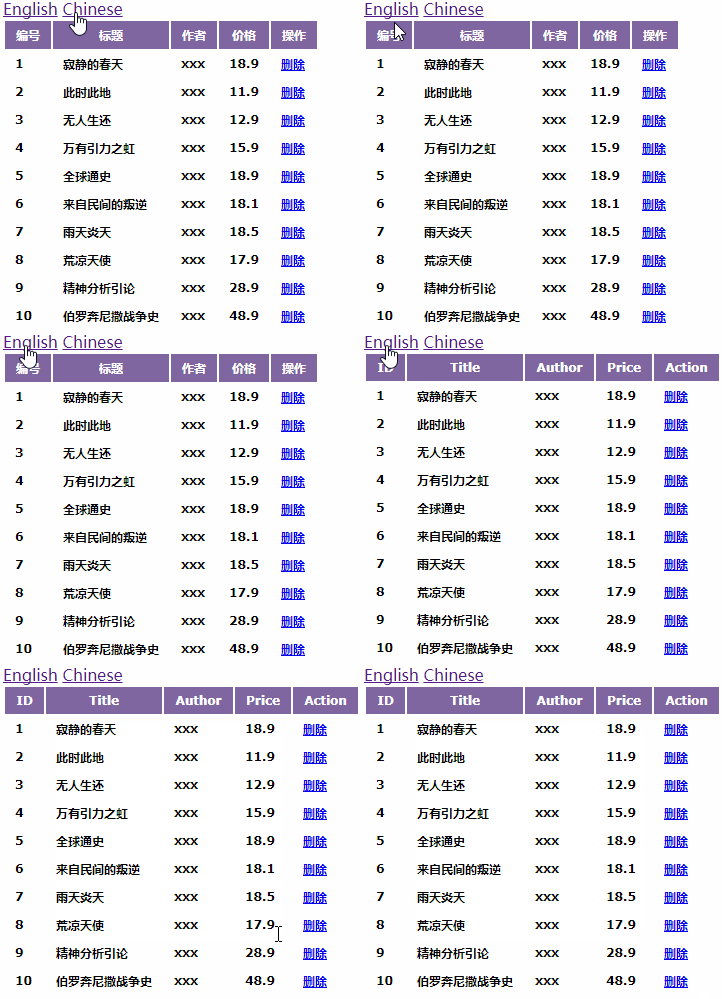
用过滤器实现切换多语言效果,参考:https://www.cnblogs.com/zoro-zero/p/6674442.html
ASP.NET MVC - 多国语言的简单实现的更多相关文章
- ASP.NET MVC:多语言的三种技术处理策略
ASP.NET MVC:多语言的三种技术处理策略 背景 本文介绍了多语言的三种技术处理策略,每种策略对应一种场景,这三种场景是: 多语言资源信息只被.NET使用. 多语言资源信息只被Javascrip ...
- Asp.Net MVC+BootStrap+EF6.0实现简单的用户角色权限管理
这是本人第一次写,写的不好的地方还忘包含.写这个的主要原因是想通过这个来学习下EF的CodeFirst模式,本来也想用AngularJs来玩玩的,但是自己只会普通的绑定,对指令这些不是很熟悉,所以就基 ...
- ASP.NET MVC 4 插件化架构简单实现-思路篇
用过和做过插件的都会了解插件的好处,园子里也有很多和讨论,但大都只些简单的加载程序集什么的,这里主要讨论的就是使用 ASP.NET MVC 4 来实现每个插件都可以完全从主站点剥离出来,即使只是一个插 ...
- ASP.NET MVC 4 插件化架构简单实现-实例篇
先回顾一下上篇决定的做法: 1.定义程序集搜索目录(临时目录). 2.将要使用的各种程序集(插件)复制到该目录. 3.加载临时目录中的程序集. 4.定义模板引擎的搜索路径. 5.在模板引擎的查找页面方 ...
- asp.net MVC 3多语言方案--再次写, 配源码
之前写了一篇asp.net MVC多语言方案,那次其实是为American Express银行开发的.有许多都是刚开始接触,对其也不太熟悉.现在再回过头去看,自己做一个小网站,完全用asp.net m ...
- 使用asp.net mvc + entityframework + sqlServer 搭建一个简单的code first项目
步骤: 1. 创建一个asp.net mvc 项目 1.1 项目创建好结构如下 2 通过vs安装EntityFramework框架 install-package entityframework 3. ...
- Asp.Net MVC+BootStrap+EF6.0实现简单的用户角色权限管理6
接下来先做角色这一板块的(增删改查),首先要新建一个Role控制器,在添加一个RoleList的视图.表格打算采用的是bootstrap的表格. using System; using System. ...
- Asp.Net MVC+BootStrap+EF6.0实现简单的用户角色权限管理8
接下来做的是对页面的增删改查与页面与页面按钮之间的联系.先上代码和页面效果 using AuthorDesign.Web.App_Start.Common; using System; using S ...
- Asp.Net MVC+BootStrap+EF6.0实现简单的用户角色权限管理10
今天把用户的菜单显示和页面的按钮显示都做好了,下面先来个效果图 接下来说下我实现的方法: 首先我在每个方法前面都加了这个属性, /// <summary> /// 表示当前Action请求 ...
随机推荐
- 解决access 导出 excel 字段截断错误的问题
解决方法:这个问题通过从EXCEL中导入外部数据,也就是ACCESS数据可以解决. 1.选择导入数据 2.点击选择数据源 选择需要导入的access数据源
- 7.Django
1.遍历数据 2.正则表达式匹配数字 ##url超链接 ##配置url ##POST请求需要设置csrf_token
- Vue.js 条件与循环
条件判断: v-if: 条件判断使用 v-if 指令: v-else-if:(其实和Java,c,js的语法差不多) v-show:
- Event Recommendation Engine Challenge分步解析第一步
一.简介 此项目来自kaggle:https://www.kaggle.com/c/event-recommendation-engine-challenge/ 数据集的下载需要账号,并且需要手机验证 ...
- 【英文文档】Solidifier for Windows Installation Guide
Page 1Solidifier for Windows Installation Guide Page 2McAfee, Inc.McAfee® Solidifier for Windows In ...
- bzoj千题计划314:bzoj3238: [Ahoi2013]差异(后缀数组+st表+单调栈)
https://www.lydsy.com/JudgeOnline/problem.php?id=3238 跟 bzoj3879 差不多 #include<cstdio> #include ...
- git多人协作式开发时分支管理策略
什么是 git-flow? Git Flow是一套使用Git进行源代码管理时的一套行为规范 主分支Master 首先,代码库应该有一个.且仅有一个主分支.所有提供给用户使用的正式版本,都在这个主分支上 ...
- [Windows] [VS] [C] [取得指针所指内存的二进制形式字符]
// 取得指针所指内存的十六进制形式字符串,size指定字节长度#define Mem_toString(address, size) _Mem_toString((PBYTE)address, si ...
- 经典文摘:饿了么的 PWA 升级实践(结合Vue.js)
自 Vue.js 官方推特第一次公开到现在,我们就一直在进行着将饿了么移动端网站升级为 Progressive Web App 的工作.直到近日在 Google I/O 2017 上登台亮相,才终于算 ...
- partial.js client-side routing(客户端路由-基于HTML5 SPA特性的历史API)
partial.js client-side routing https://github.com/petersirka/partial.js-clientside Framework support ...