
centos7 安装 redis4.0.8
1.安装lrzsz
yum install lrzsz -y
2.利用rz命令将window中从redis官网下载好的“redis-4.0.8.tar.gz” 拷贝到centos中
redis官网 :https://redis.io/
3.解压
mkdir tmp
cd tmp
tar -zvxf redis-4.0..tar.gz
4.将tmp中的解压文件复制到/usr/local/redis,并且重命名
[root@localhost tmp]# ll

总用量

drwxrwxr-x.  root root     2月    : redis-4.0.

-rw-r--r--.  root root  2月    : redis-4.0..tar.gz

[root@localhost ~]# mkdir usr

[root@localhost ~]# cd usr

[root@localhost usr]# mkdir local

[root@localhost usr]# cd /tmp

[root@localhost tmp]# mv redis-4.0. /usr/local/redis
4.安装gcc
yum install gcc gcc-c+ tcl tcl-devel -y
5.使用make编译源码
[root@localhost redis]# make -j
执行完后发现报错:
zmalloc.h:50:31: 致命错误:jemalloc/jemalloc.h:没有那个文件或目录
解决方案:
make clean

make MALLOC=libc
6.把编译完成的可执行文件添加到系统目录中,然后我们就可以正常访问了。
make install
参考资料:centOS6.3 安装redis make报错 zmalloc.h:50:31: 错误:jemalloc/jemalloc.h:没有那个文件或目录
7.配置文件
[root@localhost redis]# ll

总用量

-rw-rw-r--.   root root  2月    : -RELEASENOTES

-rw-rw-r--.   root root      2月    : BUGS

-rw-rw-r--.   root root    2月    : CONTRIBUTING

-rw-rw-r--.   root root    2月    : COPYING

drwxrwxr-x.   root root     2月   : deps

-rw-rw-r--.   root root      2月    : INSTALL

-rw-rw-r--.   root root     2月    : Makefile

-rw-rw-r--.   root root    2月    : MANIFESTO

-rw-rw-r--.   root root   2月    : README.md

-rw-rw-r--.   root root   2月    : redis.conf

-rwxrwxr-x.   root root     2月    : runtest

-rwxrwxr-x.   root root     2月    : runtest-cluster

-rwxrwxr-x.   root root     2月    : runtest-sentinel

-rw-rw-r--.   root root    2月    : sentinel.conf

drwxrwxr-x.   root root    2月   : src

drwxrwxr-x.  root root     2月    : tests

drwxrwxr-x.   root root    2月    : utils
其中的redis.conf后期需要重点从头到尾的研究一遍。
这里我们更改如下几个参数
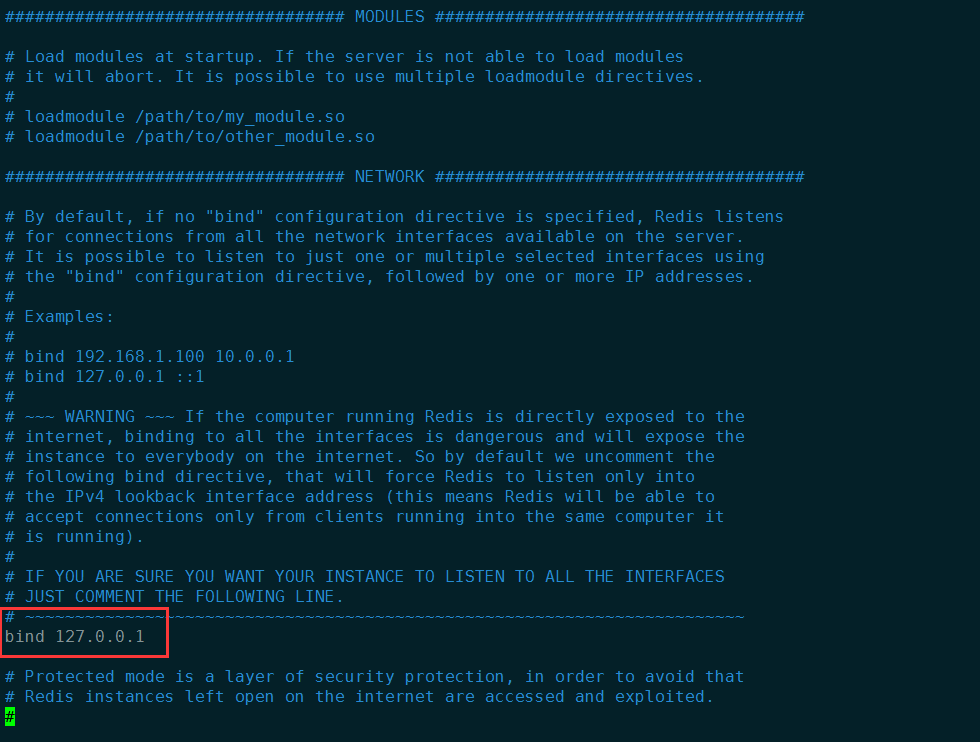
1) bind
这个参数的意思是允许哪个ip访问我的redis服务器
默认是127.0.0.1,也就是本机才能够访问
若系统是分布式的,则需要修改
把这个参数改成
bind 0.0.0.0
也就是任意一台服务器都能够访问。
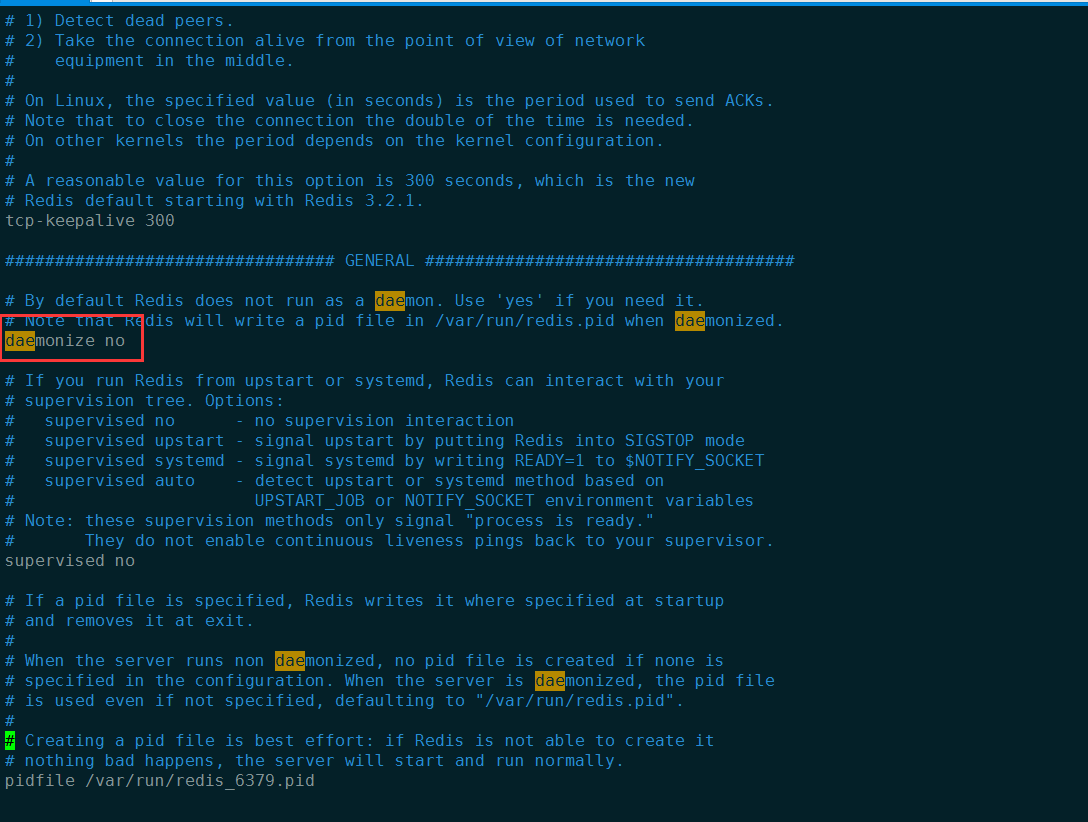
2)daemonize
允许后台执行
默认是no
这里设置成yes
参考资料:Redis daemonize介绍
8.启动redis
启动时指定配置文件
redis-server ./redis.conf

查看redis进程
ps -ef|grep redis

9.访问redis
redis-cli

10.设置密码
requirepass 123456
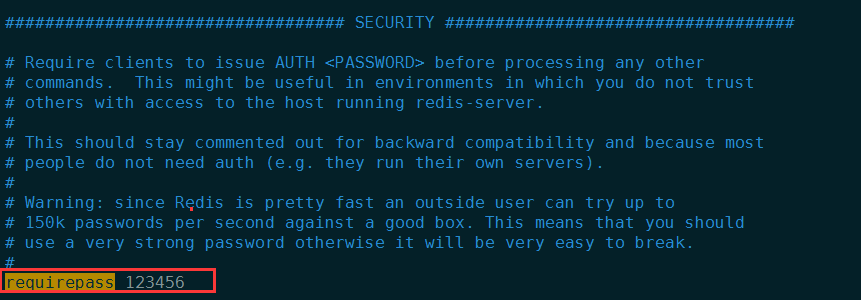
然后保存退出
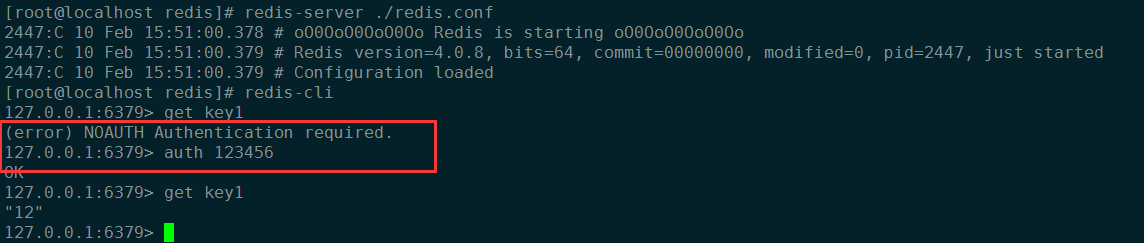
重启redis,执行如下
redis-cli

shutdown save

exit
重启redis后,get或者set等操作的时候必须授权密码
11.做成系统服务
cd cd utils/

ll

./install_server.sh

/usr/local/redis/redis.conf

/usr/local/redis/redis.log

/usr/local/redis/data
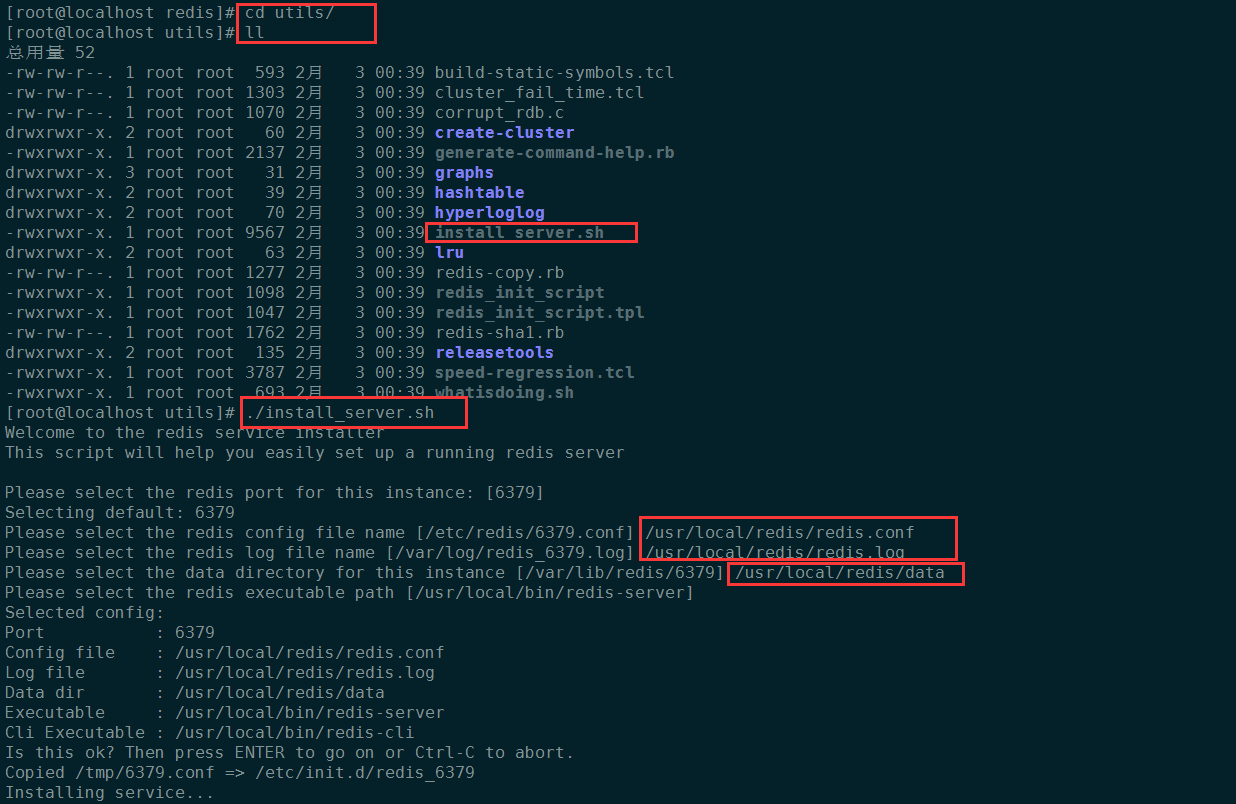

检查服务是否已经存在了
chkconfig --list|grep redis
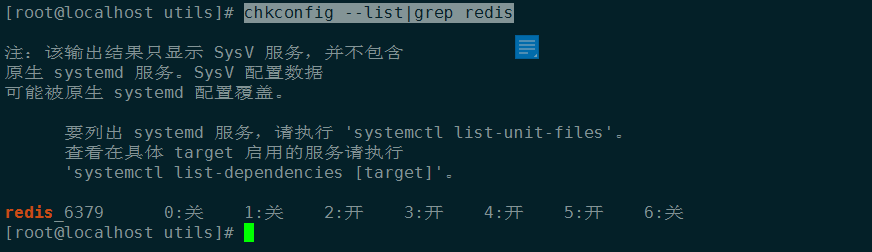
systemctl status redis_6379

systemctl stop redis_6379

systemctl start redis_6379

ps -ef|grep redis

vim /etc/init.d/redis_6379
centos7 安装 redis4.0.8的更多相关文章
- Redis(二)CentOS7安装Redis4.0.10与集群搭建
一 Redis单机安装 1 Redis下载安装 1.1 检查依赖环境(Redis是C语言开发,编译依赖gcc环境) [root@node21 redis-]$ gcc -v -bash: gcc: c ...
- centos7安装redis-4.0.1集群
试验机操作系统:CentOS Linux release 7.2.1511 (Core) 本文的目的是教会大家快速搭建redis集群,完了再深入学习. 试问如果不上手试验,看的资料再多有个毛用? 下载 ...
- Centos7安装Redis4.0.8
今天安装了CentOS7 1708 在安装redis时报错 make[1]: *** [adlist.o] 错误 127 因为Redis是C实现的,需要gcc来进行编译,所以原因是系统未安装gcc, ...
- centos7 安装 redis-4.0.9
下载地址:https://redis.io/download 下载 安装: $ wget http://download.redis.io/releases/redis-4.0.9.tar.gz $ ...
- 阿里云 CentOS7安装redis4.0.9并开启远程访问
1 安装redis编译的c环境 yum install gcc-c++ redis是c语言开发的,安装redis需要先将官网下载的源码进行编译,编译依赖gcc环境. 如果没有gcc环境,需要安装gcc ...
- centos7安装redis3.0和phpredis扩展详细教程(图文)
整理一下centos7安装redis3.0和phpredis扩展的过程,有需要的朋友可以拿去使用. 一.安装redis3.0 1.安装必要的包 yum install gcc 2.centos7安装r ...
- centos7安装zabbix3.0超详细步骤解析
centos7安装zabbix3.0超详细步骤解析 很详细,感谢作者 以下是我操作的history 622 java -version 623 javac -version 624 grep SELI ...
- Centos7安装Zabbix4.0步骤
点击返回:自学Zabbix之路 点击返回:自学Zabbix4.0之路 点击返回:自学zabbix集锦 Centos7安装Zabbix4.0步骤 官方搭建zabbix4.0的环境要求: 1. 环境搭建L ...
- Centos7 安装 MongoDB4.0
目录 安装包下载 MongoDB安装 启动数据库 补充 小结 诚邀访问我的个人博客:我在马路边 更好的阅读体验点击查看原文:Centos7安装MongoDB4.0 原创博客,转载请注明出处 @ 由于项 ...
随机推荐
- Vue 封装可向左向右查看图片列表的组件
<template> <div class="content-container"> <div class="content-contain ...
- intellij与eclipse默认快捷键对比
最近想用intellij,于是找找快捷键.用惯了eclipse,都不太适应intellij的快捷键.慢慢的就适应了常用的快捷键 Idea 与 Eclipse 快捷键的区别,上为Eclipse的快捷键, ...
- electron builder 打包错误 cannot unpack electron zip file 解决方案
npm run buildwin > study01@1.0.0 buildwin F:\Nodejs\electron\Test\study01> electron-builder -- ...
- java反射应用
package cn.sxt.TestClass; import java.lang.reflect.Field; import java.lang.reflect.InvocationTargetE ...
- orcal - 添加用户、授权
create user jy2 identified by jy2; grant dba to jy2;
- jquery调用iframe里面的方法
$(window.parent.document).contents().find("#iframename")[0].contentWindow.iframefunction() ...
- Python学习笔记---数 数据类型 运算
python的四种数类型: 整数 int 浮点型 float 布尔 boolen 复数 complex >>> type(5)<class 'int'>>>& ...
- 常用Docker命令
1.镜像操作 获取镜像 docker pull NAME[:TAG] #如果不显示指定TAG,默认选择latest标签 查看本地所有镜像 docker images 查看镜像详细信息 docker i ...
- WPF 学习笔记
依赖属性(Dependency Property) 相比较于普通属性,依赖属性有以下特点: 变化通知(change notification) 节省内存 使用某种带优先级决定策略(resolution ...
- 如何监控Redis性能指标(译)
Redis给人的印象是简单.很快,但是不代表它不需要关注它的性能指标,此文简单地介绍了一部分Redis性能指标.翻译过程中加入了自己延伸的一些疑问信息,仍然还有一些东西没有完全弄明白.原文中Metri ...