
linux 下安装ftp 并远程连接
1.确认是否已安装 ftp
|
1
|
pgrep vsftpd #查看ftp 服务进程 |
无结果如下图所示

2.执行安装
|
1
|
yum install vsftpd #安装ftp 服务 |
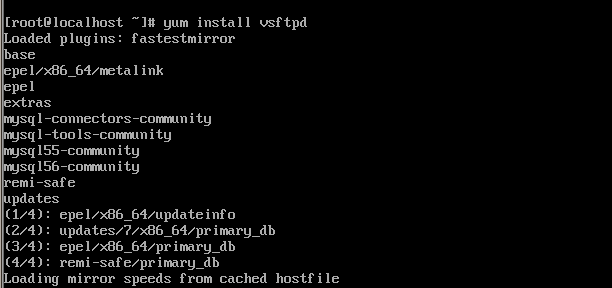
3.执行过程确认即可(输入y)
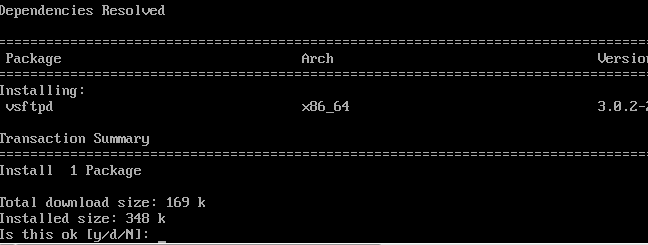
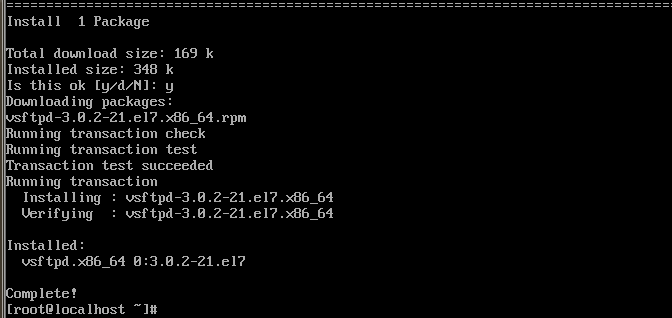
4.查看ftp 是否安装成功
|
1
|
systemctl status vsftpd.service #查看服务状态 |
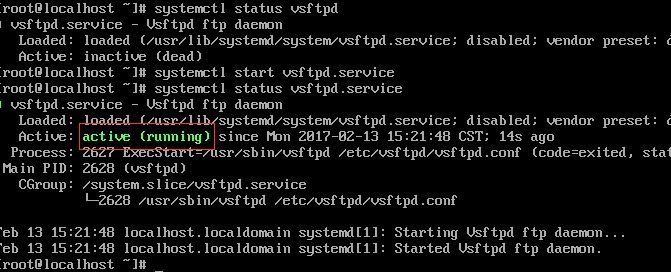
5.查看配置文件
|
1
|
cd /etc/vsftpd/vsftpd.conf |
|
1
2
3
4
5
6
7
8
9
10
11
12
13
14
15
16
17
18
19
20
21
22
23
24
25
26
27
28
29
30
31
32
33
34
35
36
37
38
39
40
41
42
43
44
45
46
47
48
49
50
51
52
53
54
55
56
57
58
59
60
61
62
63
64
65
66
67
68
69
70
71
72
73
74
75
76
77
78
79
80
81
82
83
84
85
86
87
88
89
90
91
92
93
94
95
96
97
98
99
100
101
102
103
104
105
106
107
108
109
110
111
112
113
114
115
116
117
118
119
120
121
122
123
124
125
126
127
128
129
130
131
132
133
|
# mple config file /etc/vsftpd/vsftpd.conf## The default compiled in settings are fairly paranoid. This sample file# loosens things up a bit, to make the ftp daemon more usable.# Please see vsftpd.conf.5 for all compiled in defaults.## READ THIS: This example file is NOT an exhaustive list of vsftpd options.# Please read the vsftpd.conf.5 manual page to get a full idea of vsftpd's# capabilities.## Allow anonymous FTP? (Beware - allowed by default if you comment this out).#anonymous_enable=YESanonymous_enable=NO## Uncomment this to allow local users to log in.# When SELinux is enforcing check for SE bool ftp_home_dirlocal_enable=YES## Uncomment this to enable any form of FTP write command.write_enable=YES## Default umask for local users is 077. You may wish to change this to 022,# if your users expect that (022 is used by most other ftpd's)local_umask=022## Uncomment this to allow the anonymous FTP user to upload files. This only# has an effect if the above global write enable is activated. Also, you will# obviously need to create a directory writable by the FTP user.# When SELinux is enforcing check for SE bool allow_ftpd_anon_write, allow_ftpd_full_access#anon_upload_enable=YES## Uncomment this if you want the anonymous FTP user to be able to create# new directories.#anon_mkdir_write_enable=YES## Activate directory messages - messages given to remote users when they# go into a certain directory.dirmessage_enable=YES## Activate logging of uploads/downloads.xferlog_enable=YES## Make sure PORT transfer connections originate from port 20 (ftp-data).connect_from_port_20=YES## If you want, you can arrange for uploaded anonymous files to be owned by# a different user. Note! Using "root" for uploaded files is not# recommended!#chown_uploads=YES#chown_username=whoever## You may override where the log file goes if you like. The default is shown# below.#xferlog_file=/var/log/xferlog## If you want, you can have your log file in standard ftpd xferlog format.# Note that the default log file location is /var/log/xferlog in this case.xferlog_std_format=YES## You may change the default value for timing out an idle session.#idle_session_timeout=600## You may change the default value for timing out a data connection.#data_connection_timeout=120## It is recommended that you define on your system a unique user which the# ftp server can use as a totally isolated and unprivileged user.#nopriv_user=ftpsecure## Enable this and the server will recognise asynchronous ABOR requests. Not# recommended for security (the code is non-trivial). Not enabling it,# however, may confuse older FTP clients.#async_abor_enable=YES## By default the server will pretend to allow ASCII mode but in fact ignore# the request. Turn on the below options to have the server actually do ASCII# mangling on files when in ASCII mode.# Beware that on some FTP servers, ASCII support allows a denial of service# attack (DoS) via the command "SIZE /big/file" in ASCII mode. vsftpd# predicted this attack and has always been safe, reporting the size of the# raw file.# ASCII mangling is a horrible feature of the protocol.#ascii_upload_enable=YES#ascii_download_enable=YES## You may fully customise the login banner string:#ftpd_banner=Welcome to FTP service.ftpd_banner=server.## You may specify a file of disallowed anonymous e-mail addresses. Apparently# useful for combatting certain DoS attacks.#deny_email_enable=YES# (default follows)#banned_email_file=/etc/vsftpd/banned_emails## You may specify an explicit list of local users to chroot() to their home# directory. If chroot_local_user is YES, then this list becomes a list of# users to NOT chroot().# (Warning! chroot'ing can be very dangerous. If using chroot, make sure that# the user does not have write access to the top level directory within the# chroot)#chroot_local_user=YES#chroot_list_enable=YES# (default follows)#chroot_list_file=/etc/vsftpd/chroot_list## You may activate the "-R" option to the builtin ls. This is disabled by# default to avoid remote users being able to cause excessive I/O on large# sites. However, some broken FTP clients such as "ncftp" and "mirror" assume# the presence of the "-R" option, so there is a strong case for enabling it.#ls_recurse_enable=YES## When "listen" directive is enabled, vsftpd runs in standalone mode and# listens on IPv4 sockets. This directive cannot be used in conjunction# with the listen_ipv6 directive.listen=YES## This directive enables listening on IPv6 sockets. By default, listening# on the IPv6 "any" address (::) will accept connections from both IPv6# and IPv4 clients. It is not necessary to listen on *both* IPv4 and IPv6# sockets. If you want that (perhaps because you want to listen on specific# addresses) then you must run two copies of vsftpd with two configuration# files.# Make sure, that one of the listen options is commented !!#listen_ipv6=YESpam_service_name=vsftpduserlist_enable=NOlocal_root=/var/www/htmltcp_wrappers=YESdual_log_enable=YESuse_localtime=YES |
上面配置文件是可用配置,相关选项请百度作用
6.关闭防火墙并禁止开机启动
|
1
2
|
systemctl stop firewalld.servicesystemctl disable firewalld.service |
7.设置selinux
|
1
2
3
4
|
vi /etc/selinux/config #SELINUX=enforcing #注释掉 #SELINUXTYPE=targeted #注释掉 SELINUX=disabled #增加 |
8.关闭selinux
|
1
|
setenforce 0 |
9.添加帐号
|
1
2
|
useradd 用户名passwd 用户名 密码 |
linux 下安装ftp 并远程连接的更多相关文章
- Linux下安装MySQL及远程连接MySQL
安装方式一:通过下载官方安装包安装 由于Linux安装MySQL会遇到各种依赖问题,本博文整理了下安装方放,避免遇到依赖问题 查看是否自带mariadbrpm -qa|grep mariadb然后卸载 ...
- linux 下安装ftp服务器
最后重启 # service vsftpd restart 1.查看是否安装vsftp rpm -qa | grep ftp 如果出现 vsftpd-2.0.5-16.el5_5.1 ...
- 操作笔记:linux下安装ftp
1,安装ftp [root@iZ945sgm0ugZ ~]# yum install vsftpd 安装成功的信息: [root@iZ945sgm0ugZ ~]# yum install vsftpd ...
- Linux下设置mysql允许远程连接
最近在Linux上安装了Mysql,然后在Windows环境下通过Navicat来连接时,出现报错:1045 Access denied for user 'root'@'XXX' (using pa ...
- linux下安装FTP详细
一:安装ftp 1.检查是否安装了 ftp :(下图是已安装的效果,没安装没有展示) rpm -qa|grep vsftpd 2.安装指令:(找一个 -y 指令) yum install -y v ...
- Linux下安装FTP
1.查询进程是否有ftp服务 ps -ef|grep vsftpd 查询是否安装vsftpd: rpm -qa |grep vsftpd (rpm的安装:apt-get install rpm) 2. ...
- Linux下开启MySQL的远程连接
今天在用客户端工具远程连接mysql的时候,连接不上,以为是防火墙,关了防火墙后依然打不开,后开在网上查了下原来mysql基于安全考虑root账户一般只能本地访问,但是在开发过程中可能需要打开root ...
- Ubuntu 16.04下安装MySQL及远程连接
最近因为要研究一个关于MySQL的漏洞,所以需要MySQL的环境,就用了近一个小时的时间搭建了一个,期间出了点问题,故记录于此. 1.首先是安装,在命令窗口中输入下面三条命令即可. sudo apt- ...
- Linux下安装FTP服务(Ubuntu)
在Ubuntu 14.04 上安装 FTP 服务 第一步>>更新库 linuxidc@linuxidc:~$ sudo apt-get update 第二步>>采用如下命令安装 ...
随机推荐
- 洛谷P2085最小函数值题解
题目 首先我们先分析一下题目范围,\(a,b,c\) 都是整数,因此我们可以得出它的函数值在\((0,+\infty )\)上是单调递增的,,然后我们可以根据函数的性质,将每个函数设置一个当前指向位置 ...
- SpringBoot添加CORS跨域
配置CORSConfiguration 添加CORS的配置信息,我们创建一个CORSConfiguration配置类重写如下方法,如图所示: @Override public void addCors ...
- BZOJ 4242: 水壶(Kruskal重构树 + Bfs)
题意 一块 \(h ∗ w\) 的区域,存在障碍.空地.\(n\) 个建筑,从一个建筑到另一个建筑的花费为:路径上最长的连续空地的长度. \(q\) 次询问:从建筑 \(s_i\) 到 \(t_i\) ...
- 自学Python4.4-装饰器的进阶
自学Python之路-Python基础+模块+面向对象自学Python之路-Python网络编程自学Python之路-Python并发编程+数据库+前端自学Python之路-django 自学Pyth ...
- 51nod 1105(第K大数 二分套二分)
题目链接:http://www.51nod.com/onlineJudge/submitDetail.html#!judgeId=620811 参考自:https://blog.csdn.net/f_ ...
- JAVA多线程之当一个线程在执行死循环时会影响另外一个线程吗?
一,问题描述 假设有两个线程在并发运行,一个线程执行的代码中含有一个死循环如:while(true)....当该线程在执行while(true)中代码时,另一个线程会有机会执行吗? 二,示例代码(代码 ...
- Java 验证代理ip
原文地址:http://www.cnblogs.com/junrong624/p/5416503.html 1 import java.io.IOException; import java.io.I ...
- A1057. Stack
Stack is one of the most fundamental data structures, which is based on the principle of Last In Fir ...
- 【CF1042D】Petya and Array 离散化+树状数组
题目大意:给定一个长度为 N 的序列,给定常数 t,求有多少个区间 [l,r] 满足 \(\sum\limits_{i=l}^{r}a_i<t\). 题解:先跑一边前缀和,问题等价于求有多少个数 ...
- 【洛谷P2127】序列排序
题目大意:给定一个长度为 N 的序列,序列中的数两两不相同,每次可以交换序列中任意两个数,代价为这两个数的和,问将序列调整为升序,最少的代价是多少. 题解:考虑这个问题的一个子问题,这个序列为 N 的 ...