
ActiveMQ详细入门使用教程
ActiveMQ介绍
MQ是消息中间件,是一种在分布式系统中应用程序借以传递消息的媒介,常用的有ActiveMQ,RabbitMQ,kafka。ActiveMQ是Apache下的开源项目,完全支持JMS1.1和J2EE1.4规范的JMS Provider实现。
特点:
1、支持多种语言编写客户端
2、对spring的支持,很容易和spring整合
3、支持多种传输协议:TCP,SSL,NIO,UDP等
4、支持AJAX
消息形式:
1、点对点(queue)
2、一对多(topic)
ActiveMQ安装
我这里提供一个安装好的虚拟机:http://download.csdn.net/download/liuyuanq123/10217892
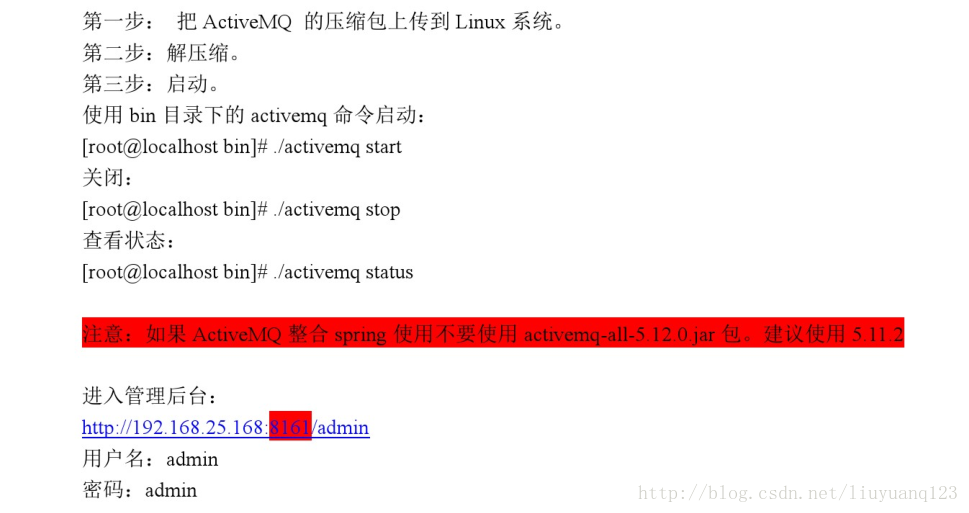
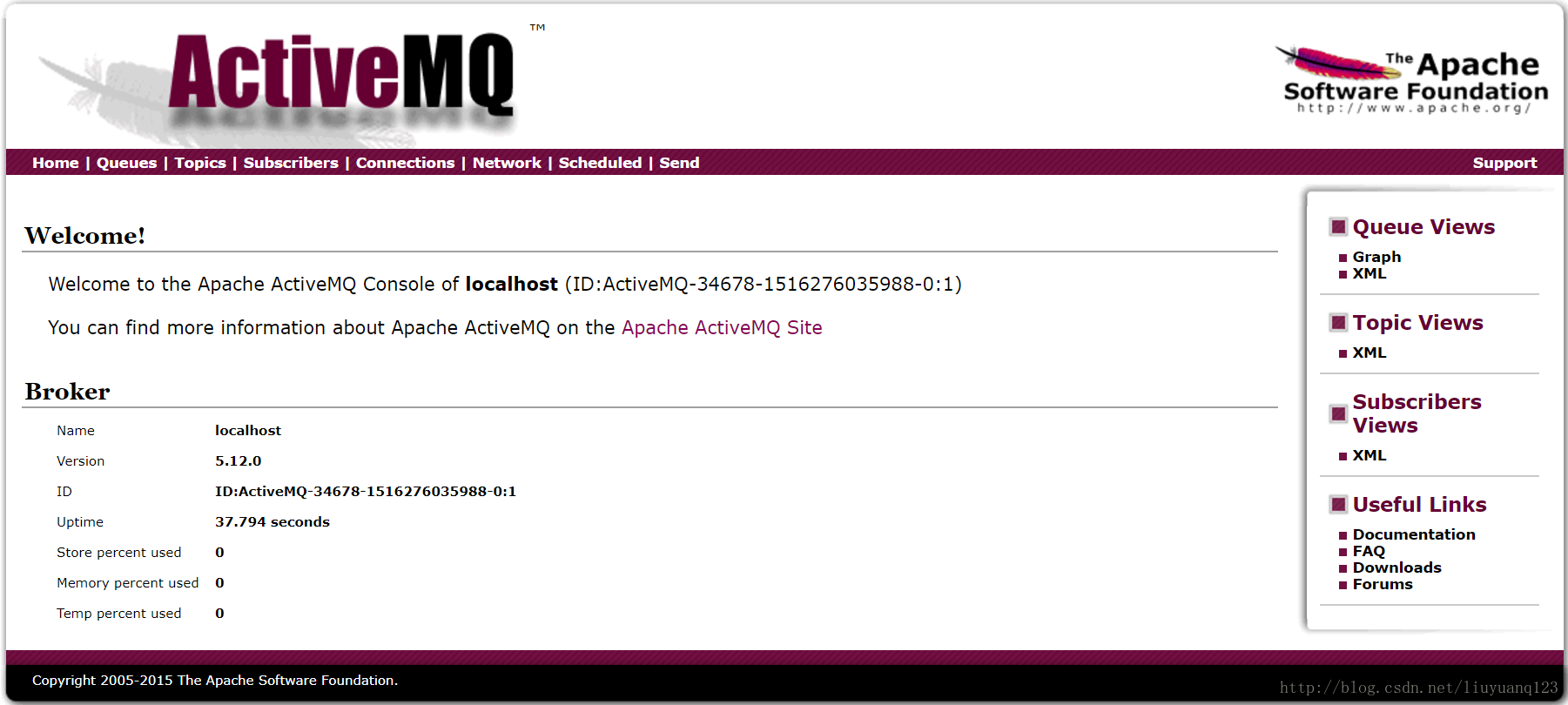
服务器运行后,我们可以直接访问到activeMQ的界面:
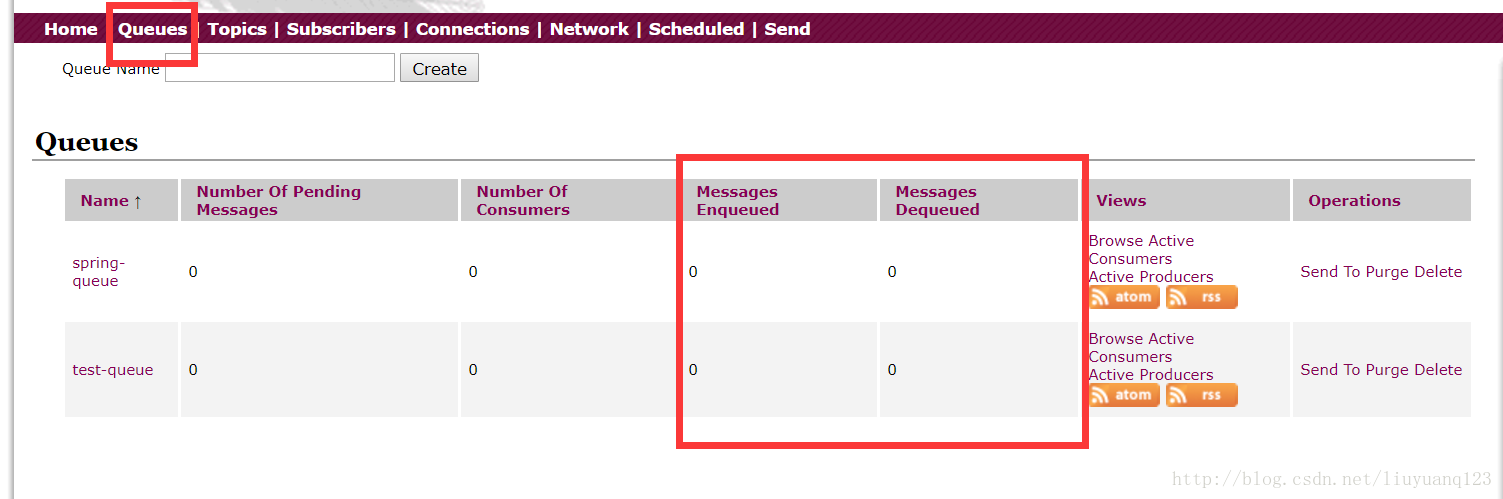
然后点击queues可以看到现在没有一条消息:
ActiveMQ测试
编写一个测试类对ActiveMQ进行测试,首先得向pom文件中添加ActiveMQ相关的jar包:
     <dependency>

         <groupId>org.apache.activemq</groupId>

         <artifactId>activemq-all</artifactId>

    </dependency>
queue的发送代码如下:
    public void testMQProducerQueue() throws Exception{

        //1、创建工厂连接对象,需要制定ip和端口号

        ConnectionFactory connectionFactory = new ActiveMQConnectionFactory("tcp://192.168.156.44:61616");

        //2、使用连接工厂创建一个连接对象

        Connection connection = connectionFactory.createConnection();

        //3、开启连接

        connection.start();

        //4、使用连接对象创建会话(session)对象

        Session session = connection.createSession(false, Session.AUTO_ACKNOWLEDGE);

        //5、使用会话对象创建目标对象,包含queue和topic(一对一和一对多)

        Queue queue = session.createQueue("test-queue");

        //6、使用会话对象创建生产者对象

        MessageProducer producer = session.createProducer(queue);

        //7、使用会话对象创建一个消息对象

        TextMessage textMessage = session.createTextMessage("hello!test-queue");

        //8、发送消息

        producer.send(textMessage);

        //9、关闭资源

        producer.close();

        session.close();

        connection.close();

    }
接收代码:
  public void TestMQConsumerQueue() throws Exception{

        //1、创建工厂连接对象,需要制定ip和端口号

        ConnectionFactory connectionFactory = new ActiveMQConnectionFactory("tcp://192.168.156.44:61616");

        //2、使用连接工厂创建一个连接对象

        Connection connection = connectionFactory.createConnection();

        //3、开启连接

        connection.start();

        //4、使用连接对象创建会话(session)对象

        Session session = connection.createSession(false, Session.AUTO_ACKNOWLEDGE);

        //5、使用会话对象创建目标对象,包含queue和topic(一对一和一对多)

        Queue queue = session.createQueue("test-queue");

        //6、使用会话对象创建生产者对象

        MessageConsumer consumer = session.createConsumer(queue);

        //7、向consumer对象中设置一个messageListener对象,用来接收消息

        consumer.setMessageListener(new MessageListener() {

            @Override

            public void onMessage(Message message) {

                // TODO Auto-generated method stub

                if(message instanceof TextMessage){

                    TextMessage textMessage = (TextMessage)message;

                    try {

                        System.out.println(textMessage.getText());

                    } catch (JMSException e) {

                        // TODO Auto-generated catch block

                        e.printStackTrace();

                    }

                }

            }

        });

        //8、程序等待接收用户消息

        System.in.read();

        //9、关闭资源

        consumer.close();

        session.close();

        connection.close();

    }
然后当我们运行queue发送的时候可以看到队列里已经有一条消息了,但没有发送出去:
然后在运行queue 的接收端,可以看到消息已经发出了:
接着对topic进行测试,发送代码如下:



public void TestTopicProducer() throws Exception{

        //1、创建工厂连接对象,需要制定ip和端口号

        ConnectionFactory connectionFactory = new ActiveMQConnectionFactory("tcp://192.168.156.44:61616");

        //2、使用连接工厂创建一个连接对象

        Connection connection = connectionFactory.createConnection();

        //3、开启连接

        connection.start();

        //4、使用连接对象创建会话(session)对象

        Session session = connection.createSession(false, Session.AUTO_ACKNOWLEDGE);

        //5、使用会话对象创建目标对象,包含queue和topic(一对一和一对多)

        Topic topic = session.createTopic("test-topic");

        //6、使用会话对象创建生产者对象

        MessageProducer producer = session.createProducer(topic);

        //7、使用会话对象创建一个消息对象

        TextMessage textMessage = session.createTextMessage("hello!test-topic");

        //8、发送消息

        producer.send(textMessage);

        //9、关闭资源

        producer.close();

        session.close();

        connection.close();

    }
接收代码:
    public void TestTopicConsumer() throws Exception{

        //1、创建工厂连接对象,需要制定ip和端口号

        ConnectionFactory connectionFactory = new ActiveMQConnectionFactory("tcp://192.168.156.44:61616");

        //2、使用连接工厂创建一个连接对象

        Connection connection = connectionFactory.createConnection();

        //3、开启连接

        connection.start();

        //4、使用连接对象创建会话(session)对象

        Session session = connection.createSession(false, Session.AUTO_ACKNOWLEDGE);

        //5、使用会话对象创建目标对象,包含queue和topic(一对一和一对多)

        Topic topic = session.createTopic("test-topic");

        //6、使用会话对象创建生产者对象

        MessageConsumer consumer = session.createConsumer(topic);

        //7、向consumer对象中设置一个messageListener对象,用来接收消息

        consumer.setMessageListener(new MessageListener() {

            @Override

            public void onMessage(Message message) {

                // TODO Auto-generated method stub

                if(message instanceof TextMessage){

                    TextMessage textMessage = (TextMessage)message;

                    try {

                        System.out.println(textMessage.getText());

                    } catch (JMSException e) {

                        // TODO Auto-generated catch block

                        e.printStackTrace();

                    }

                }

            }

        });

        //8、程序等待接收用户消息

        System.in.read();

        //9、关闭资源

        consumer.close();

        session.close();

        connection.close();

    }
然后运行topic发送:
可以看到消息已经发送出去。再运行topic接收:
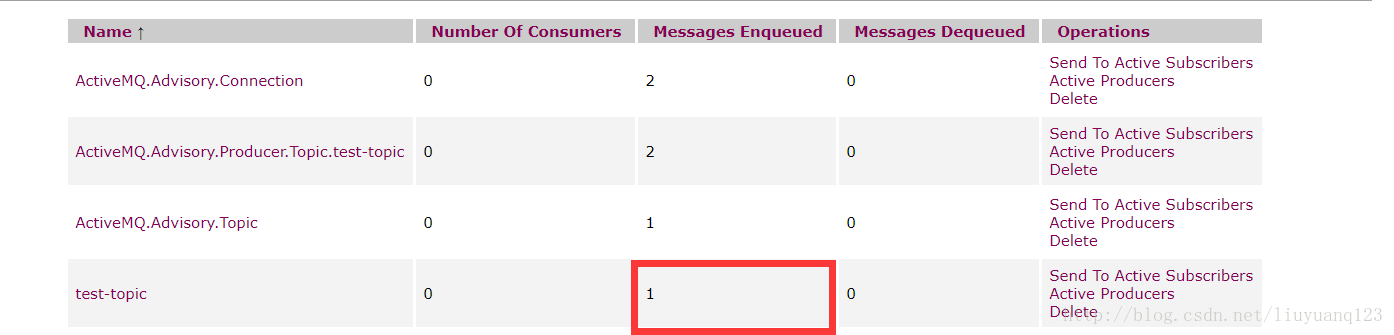
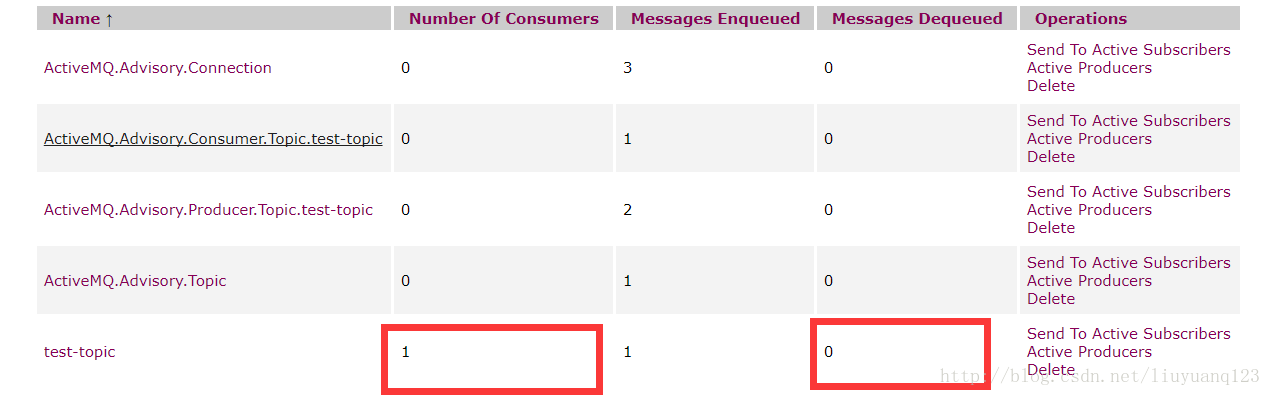
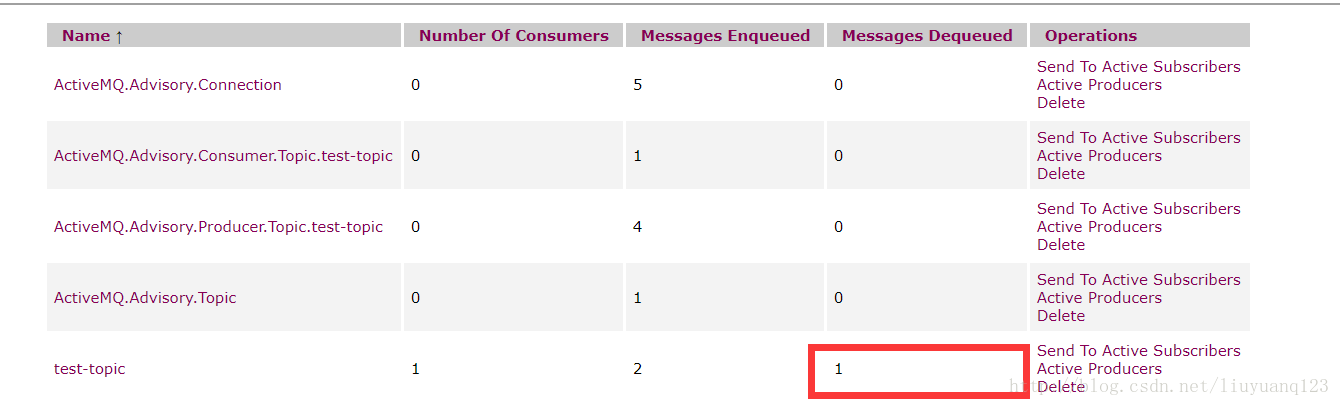
可以看到有了一个消费者,但是没有接收的消息,这是因为正常情况下我们的topic消息不会再服务器持久化,所以要先打开消费者,再打开生产者,这个时候我们再运行生产者发送一条消息看到消息已经接收到了:

ActiveMQ整合spring及项目中运用
activeMQ与spring看一整合到一起使用,除了添加ActiveMQ相关的jar包外,还需要添加spring的jar包:
    <dependency>

        <groupId>org.springframework</groupId>

        <artifactId>spring-context</artifactId>

    </dependency>
然后编写applicationContext-activemq.xml文件,
代码如下:
<?xml version="1.0" encoding="UTF-8"?>

<beans xmlns="http://www.springframework.org/schema/beans"

    xmlns:context="http://www.springframework.org/schema/context" xmlns:p="http://www.springframework.org/schema/p"

    xmlns:aop="http://www.springframework.org/schema/aop" xmlns:tx="http://www.springframework.org/schema/tx"

    xmlns:dubbo="http://code.alibabatech.com/schema/dubbo"

    xmlns:xsi="http://www.w3.org/2001/XMLSchema-instance"

    xsi:schemaLocation="http://www.springframework.org/schema/beans http://www.springframework.org/schema/beans/spring-beans-4.2.xsd

    http://www.springframework.org/schema/context http://www.springframework.org/schema/context/spring-context-4.2.xsd

    http://www.springframework.org/schema/aop http://www.springframework.org/schema/aop/spring-aop-4.2.xsd http://www.springframework.org/schema/tx http://www.springframework.org/schema/tx/spring-tx-4.2.xsd

    http://code.alibabatech.com/schema/dubbo http://code.alibabatech.com/schema/dubbo/dubbo.xsd

    http://www.springframework.org/schema/util http://www.springframework.org/schema/util/spring-util-4.2.xsd">

    <!-- 配置能够产生connection的connectionfactory,由JMS对应的服务厂商提供 -->

    <bean id="tagertConnectionFactory" class="org.apache.activemq.ActiveMQConnectionFactory">

        <constructor-arg name="brokerURL" value="tcp://192.168.156.44:61616"/>

    </bean>

    <!-- 配置spring管理真正connectionfactory的connectionfactory,相当于spring对connectionfactory的一层封装 -->

    <bean id="connectionFactory" class="org.springframework.jms.connection.SingleConnectionFactory">

        <property name="targetConnectionFactory" ref="tagertConnectionFactory"/>

    </bean>

    <!-- 配置生产者 -->

    <!-- Spring使用JMS工具类,可以用来发送和接收消息 -->

    <bean id="jmsTemplate" class="org.springframework.jms.core.JmsTemplate">

        <!-- 这里是配置的spring用来管理connectionfactory的connectionfactory -->

        <property name="connectionFactory" ref="connectionFactory"/>

    </bean>

    <!-- 配置destination -->

    <!-- 队列目的地 -->

    <bean id="queueDestination" class="org.apache.activemq.command.ActiveMQQueue">

        <constructor-arg value="spring-queue"/>

    </bean>

    <!-- 话题目的地 -->

    <bean id="itemAddTopic" class="org.apache.activemq.command.ActiveMQTopic">

        <constructor-arg value="item-add-topic"/>

    </bean>

</beans>
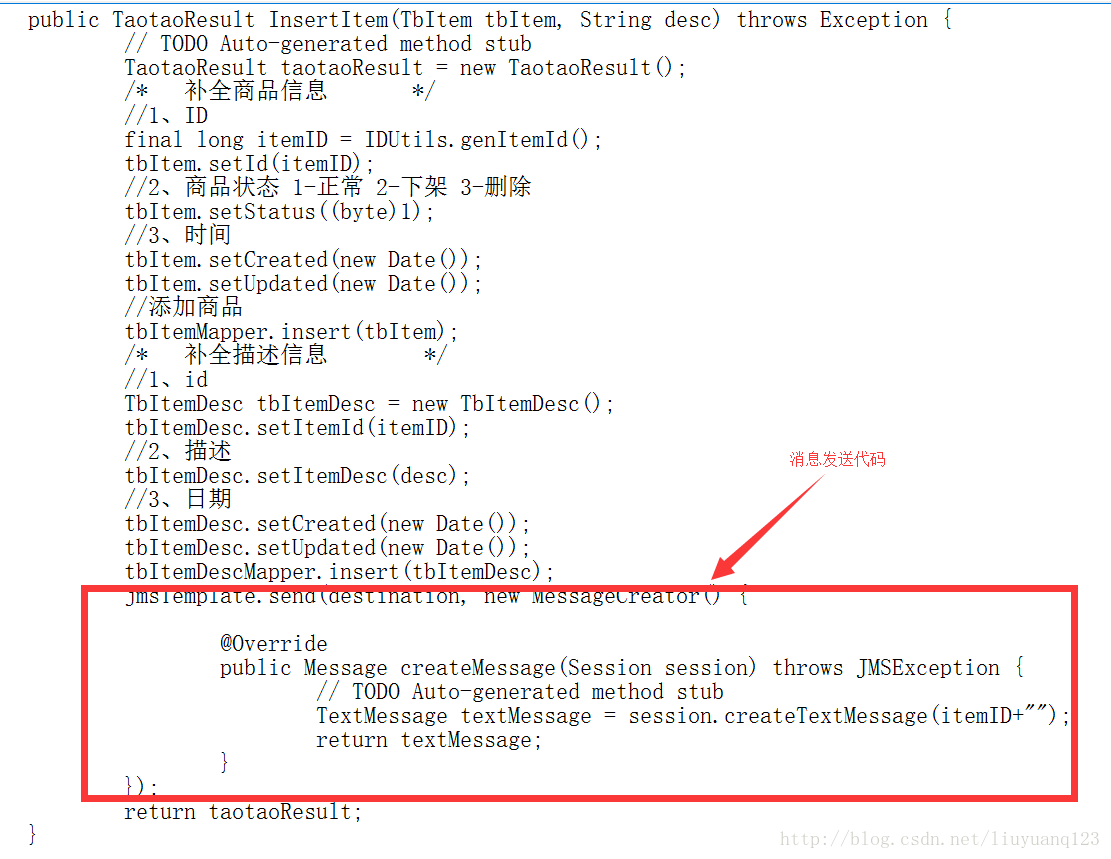
然后在我们淘淘商城中,商品添加到数据库的时候,对应也要添加数据到我们的solr索引中,所以生产者应该在插入数据后创建:
当然,在xml文件中配置好的jmstemplate和destination也要注入进来:
    @Autowired

    private JmsTemplate jmsTemplate;

    @Resource(name="itemAddTopic")

    private Destination destination;
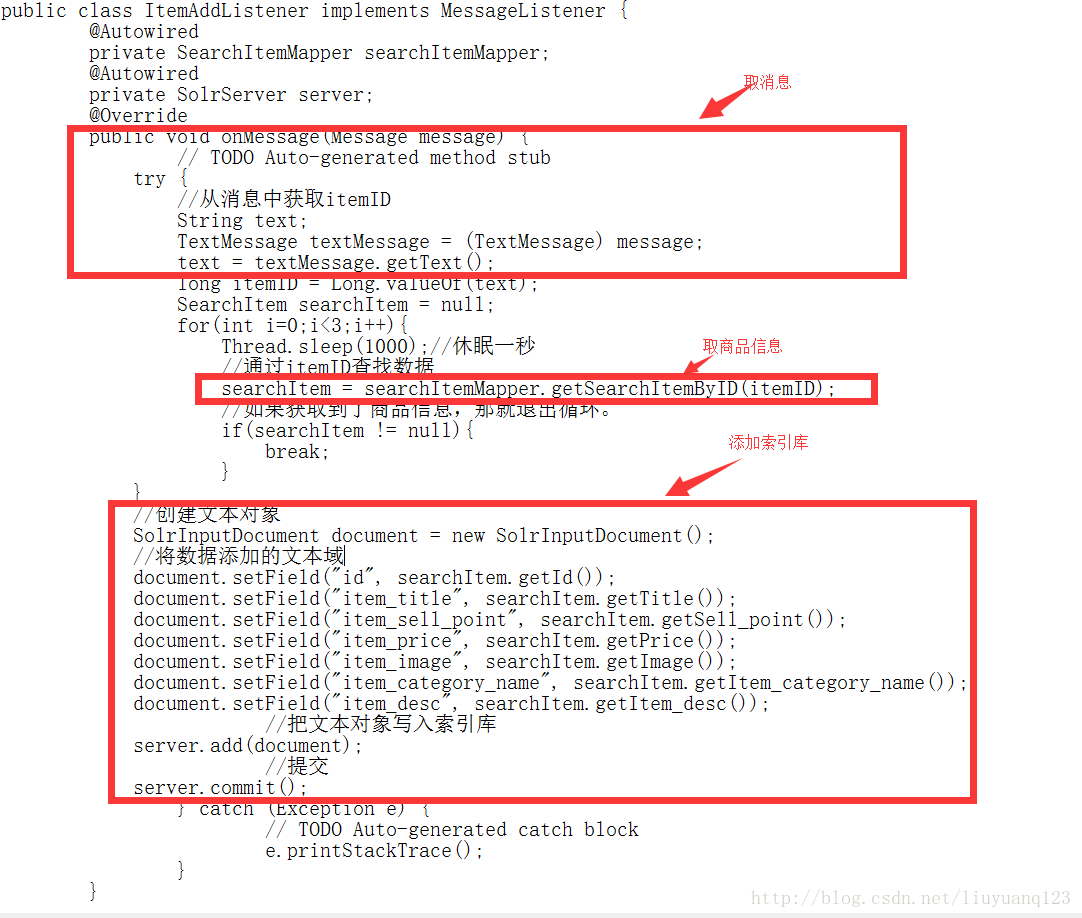
然后消费者应该写在我们的搜索工程中,首先添加spring和activeMQ的jar包,然后配置xml文件,再编写一个监听器,当接收到消息时,就讲数据存入索引库,xml文件代码如下:
<?xml version="1.0" encoding="UTF-8"?>

<beans xmlns="http://www.springframework.org/schema/beans"

    xmlns:context="http://www.springframework.org/schema/context" xmlns:p="http://www.springframework.org/schema/p"

    xmlns:aop="http://www.springframework.org/schema/aop" xmlns:tx="http://www.springframework.org/schema/tx"

    xmlns:dubbo="http://code.alibabatech.com/schema/dubbo"

    xmlns:xsi="http://www.w3.org/2001/XMLSchema-instance"

    xsi:schemaLocation="http://www.springframework.org/schema/beans http://www.springframework.org/schema/beans/spring-beans-4.2.xsd

    http://www.springframework.org/schema/context http://www.springframework.org/schema/context/spring-context-4.2.xsd

    http://www.springframework.org/schema/aop http://www.springframework.org/schema/aop/spring-aop-4.2.xsd http://www.springframework.org/schema/tx http://www.springframework.org/schema/tx/spring-tx-4.2.xsd

    http://code.alibabatech.com/schema/dubbo http://code.alibabatech.com/schema/dubbo/dubbo.xsd

    http://www.springframework.org/schema/util http://www.springframework.org/schema/util/spring-util-4.2.xsd">

    <!-- 配置能够产生connection的connectionfactory,由JMS对应的服务厂商提供 -->

    <bean id="tagertConnectionFactory" class="org.apache.activemq.ActiveMQConnectionFactory">

        <constructor-arg name="brokerURL" value="tcp://192.168.156.44:61616"/>

    </bean>

    <!-- 配置spring管理真正connectionfactory的connectionfactory,相当于spring对connectionfactory的一层封装 -->

    <bean id="connectionFactory" class="org.springframework.jms.connection.SingleConnectionFactory">

        <property name="targetConnectionFactory" ref="tagertConnectionFactory"/>

    </bean>

    <!-- 配置destination -->

    <!-- 队列目的地 -->

    <bean id="queueDestination" class="org.apache.activemq.command.ActiveMQQueue">

        <constructor-arg value="spring-queue"/>

    </bean>

    <!-- 话题目的地 -->

    <bean id="itemAddTopic" class="org.apache.activemq.command.ActiveMQTopic">

        <constructor-arg value="item-add-topic"/>

    </bean>

    <!-- 配置监听器 -->

    <bean id="myListener" class="com.taotao.search.listener.MyListener"/>

    <bean id="itemAddListener" class="com.taotao.search.listener.ItemAddListener"/>

    <!-- 系统监听器 -->

<!--    <bean class="org.springframework.jms.listener.DefaultMessageListenerContainer">

        <property name="connectionFactory" ref="connectionFactory"/>

        <property name="destination" ref="queueDestination"/>

        <property name="messageListener" ref="myListener"/>

    </bean> -->

    <bean class="org.springframework.jms.listener.DefaultMessageListenerContainer">

        <property name="connectionFactory" ref="connectionFactory"/>

        <property name="destination" ref="itemAddTopic"/>

        <property name="messageListener" ref="itemAddListener"/>

    </bean>

</beans>
接收消息代码:
最后同时打开测试即可。
转载地址:https://blog.csdn.net/liuyuanq123/article/details/79109218
ActiveMQ介绍
MQ是消息中间件,是一种在分布式系统中应用程序借以传递消息的媒介,常用的有ActiveMQ,RabbitMQ,kafka。ActiveMQ是Apache下的开源项目,完全支持JMS1.1和J2EE1.4规范的JMS Provider实现。
特点:
1、支持多种语言编写客户端
2、对spring的支持,很容易和spring整合
3、支持多种传输协议:TCP,SSL,NIO,UDP等
4、支持AJAX
消息形式:
1、点对点(queue)
2、一对多(topic)
ActiveMQ安装
我这里提供一个安装好的虚拟机:http://download.csdn.net/download/liuyuanq123/10217892
服务器运行后,我们可以直接访问到activeMQ的界面:
然后点击queues可以看到现在没有一条消息:
ActiveMQ测试
编写一个测试类对ActiveMQ进行测试,首先得向pom文件中添加ActiveMQ相关的jar包:
     <dependency>

         <groupId>org.apache.activemq</groupId>

         <artifactId>activemq-all</artifactId>

</dependency> - 1
- 2
- 3
- 4
queue的发送代码如下:
    public void testMQProducerQueue() throws Exception{

        //1、创建工厂连接对象,需要制定ip和端口号

        ConnectionFactory connectionFactory = new ActiveMQConnectionFactory("tcp://192.168.156.44:61616");

        //2、使用连接工厂创建一个连接对象

        Connection connection = connectionFactory.createConnection();

        //3、开启连接

        connection.start();

        //4、使用连接对象创建会话(session)对象

        Session session = connection.createSession(false, Session.AUTO_ACKNOWLEDGE);

        //5、使用会话对象创建目标对象,包含queue和topic(一对一和一对多)

        Queue queue = session.createQueue("test-queue");

        //6、使用会话对象创建生产者对象

        MessageProducer producer = session.createProducer(queue);

        //7、使用会话对象创建一个消息对象

        TextMessage textMessage = session.createTextMessage("hello!test-queue");

        //8、发送消息

        producer.send(textMessage);

        //9、关闭资源

        producer.close();

        session.close();

        connection.close();

}- 1
- 2
- 3
- 4
- 5
- 6
- 7
- 8
- 9
- 10
- 11
- 12
- 13
- 14
- 15
- 16
- 17
- 18
- 19
- 20
- 21
- 22
接收代码:
    public void TestMQConsumerQueue() throws Exception{

        //1、创建工厂连接对象,需要制定ip和端口号

        ConnectionFactory connectionFactory = new ActiveMQConnectionFactory("tcp://192.168.156.44:61616");

        //2、使用连接工厂创建一个连接对象

        Connection connection = connectionFactory.createConnection();

        //3、开启连接

        connection.start();

        //4、使用连接对象创建会话(session)对象

        Session session = connection.createSession(false, Session.AUTO_ACKNOWLEDGE);

        //5、使用会话对象创建目标对象,包含queue和topic(一对一和一对多)

        Queue queue = session.createQueue("test-queue");

        //6、使用会话对象创建生产者对象

        MessageConsumer consumer = session.createConsumer(queue);

        //7、向consumer对象中设置一个messageListener对象,用来接收消息

        consumer.setMessageListener(new MessageListener() {

            @Override

            public void onMessage(Message message) {

                // TODO Auto-generated method stub

                if(message instanceof TextMessage){

                    TextMessage textMessage = (TextMessage)message;

                    try {

                        System.out.println(textMessage.getText());

                    } catch (JMSException e) {

                        // TODO Auto-generated catch block

                        e.printStackTrace();

                    }

                }

            }

        });

        //8、程序等待接收用户消息

        System.in.read();

        //9、关闭资源

        consumer.close();

        session.close();

        connection.close();

}- 1
- 2
- 3
- 4
- 5
- 6
- 7
- 8
- 9
- 10
- 11
- 12
- 13
- 14
- 15
- 16
- 17
- 18
- 19
- 20
- 21
- 22
- 23
- 24
- 25
- 26
- 27
- 28
- 29
- 30
- 31
- 32
- 33
- 34
- 35
- 36
- 37
然后当我们运行queue发送的时候可以看到队列里已经有一条消息了,但没有发送出去:
然后在运行queue 的接收端,可以看到消息已经发出了:
接着对topic进行测试,发送代码如下:
    public void TestTopicProducer() throws Exception{

        //1、创建工厂连接对象,需要制定ip和端口号

        ConnectionFactory connectionFactory = new ActiveMQConnectionFactory("tcp://192.168.156.44:61616");

        //2、使用连接工厂创建一个连接对象

        Connection connection = connectionFactory.createConnection();

        //3、开启连接

        connection.start();

        //4、使用连接对象创建会话(session)对象

        Session session = connection.createSession(false, Session.AUTO_ACKNOWLEDGE);

        //5、使用会话对象创建目标对象,包含queue和topic(一对一和一对多)

        Topic topic = session.createTopic("test-topic");

        //6、使用会话对象创建生产者对象

        MessageProducer producer = session.createProducer(topic);

        //7、使用会话对象创建一个消息对象

        TextMessage textMessage = session.createTextMessage("hello!test-topic");

        //8、发送消息

        producer.send(textMessage);

        //9、关闭资源

        producer.close();

        session.close();

        connection.close();

}- 1
- 2
- 3
- 4
- 5
- 6
- 7
- 8
- 9
- 10
- 11
- 12
- 13
- 14
- 15
- 16
- 17
- 18
- 19
- 20
- 21
- 22
接收代码:
    public void TestTopicConsumer() throws Exception{

        //1、创建工厂连接对象,需要制定ip和端口号

        ConnectionFactory connectionFactory = new ActiveMQConnectionFactory("tcp://192.168.156.44:61616");

        //2、使用连接工厂创建一个连接对象

        Connection connection = connectionFactory.createConnection();

        //3、开启连接

        connection.start();

        //4、使用连接对象创建会话(session)对象

        Session session = connection.createSession(false, Session.AUTO_ACKNOWLEDGE);

        //5、使用会话对象创建目标对象,包含queue和topic(一对一和一对多)

        Topic topic = session.createTopic("test-topic");

        //6、使用会话对象创建生产者对象

        MessageConsumer consumer = session.createConsumer(topic);

        //7、向consumer对象中设置一个messageListener对象,用来接收消息

        consumer.setMessageListener(new MessageListener() {

            @Override

            public void onMessage(Message message) {

                // TODO Auto-generated method stub

                if(message instanceof TextMessage){

                    TextMessage textMessage = (TextMessage)message;

                    try {

                        System.out.println(textMessage.getText());

                    } catch (JMSException e) {

                        // TODO Auto-generated catch block

                        e.printStackTrace();

                    }

                }

            }

        });

        //8、程序等待接收用户消息

        System.in.read();

        //9、关闭资源

        consumer.close();

        session.close();

        connection.close();

}- 1
- 2
- 3
- 4
- 5
- 6
- 7
- 8
- 9
- 10
- 11
- 12
- 13
- 14
- 15
- 16
- 17
- 18
- 19
- 20
- 21
- 22
- 23
- 24
- 25
- 26
- 27
- 28
- 29
- 30
- 31
- 32
- 33
- 34
- 35
- 36
- 37
然后运行topic发送:
可以看到消息已经发送出去。再运行topic接收:
可以看到有了一个消费者,但是没有接收的消息,这是因为正常情况下我们的topic消息不会再服务器持久化,所以要先打开消费者,再打开生产者,这个时候我们再运行生产者发送一条消息看到消息已经接收到了:
ActiveMQ整合spring及项目中运用
activeMQ与spring看一整合到一起使用,除了添加ActiveMQ相关的jar包外,还需要添加spring的jar包:
    <dependency>

        <groupId>org.springframework</groupId>

        <artifactId>spring-context</artifactId>

</dependency> - 1
- 2
- 3
- 4
然后编写applicationContext-activemq.xml文件,
代码如下:
<?xml version="1.0" encoding="UTF-8"?>

<beans xmlns="http://www.springframework.org/schema/beans"

    xmlns:context="http://www.springframework.org/schema/context" xmlns:p="http://www.springframework.org/schema/p"

    xmlns:aop="http://www.springframework.org/schema/aop" xmlns:tx="http://www.springframework.org/schema/tx"

    xmlns:dubbo="http://code.alibabatech.com/schema/dubbo"

    xmlns:xsi="http://www.w3.org/2001/XMLSchema-instance"

    xsi:schemaLocation="http://www.springframework.org/schema/beans http://www.springframework.org/schema/beans/spring-beans-4.2.xsd

    http://www.springframework.org/schema/context http://www.springframework.org/schema/context/spring-context-4.2.xsd

    http://www.springframework.org/schema/aop http://www.springframework.org/schema/aop/spring-aop-4.2.xsd http://www.springframework.org/schema/tx http://www.springframework.org/schema/tx/spring-tx-4.2.xsd

    http://code.alibabatech.com/schema/dubbo http://code.alibabatech.com/schema/dubbo/dubbo.xsd

    http://www.springframework.org/schema/util http://www.springframework.org/schema/util/spring-util-4.2.xsd">

    <!-- 配置能够产生connection的connectionfactory,由JMS对应的服务厂商提供 -->

    <bean id="tagertConnectionFactory" class="org.apache.activemq.ActiveMQConnectionFactory">

        <constructor-arg name="brokerURL" value="tcp://192.168.156.44:61616"/>

    </bean>

    <!-- 配置spring管理真正connectionfactory的connectionfactory,相当于spring对connectionfactory的一层封装 -->

    <bean id="connectionFactory" class="org.springframework.jms.connection.SingleConnectionFactory">

        <property name="targetConnectionFactory" ref="tagertConnectionFactory"/>

    </bean>

    <!-- 配置生产者 -->

    <!-- Spring使用JMS工具类,可以用来发送和接收消息 -->

    <bean id="jmsTemplate" class="org.springframework.jms.core.JmsTemplate">

        <!-- 这里是配置的spring用来管理connectionfactory的connectionfactory -->

        <property name="connectionFactory" ref="connectionFactory"/>

    </bean>

    <!-- 配置destination -->

    <!-- 队列目的地 -->

    <bean id="queueDestination" class="org.apache.activemq.command.ActiveMQQueue">

        <constructor-arg value="spring-queue"/>

    </bean>

    <!-- 话题目的地 -->

    <bean id="itemAddTopic" class="org.apache.activemq.command.ActiveMQTopic">

        <constructor-arg value="item-add-topic"/>

    </bean>

</beans> - 1
- 2
- 3
- 4
- 5
- 6
- 7
- 8
- 9
- 10
- 11
- 12
- 13
- 14
- 15
- 16
- 17
- 18
- 19
- 20
- 21
- 22
- 23
- 24
- 25
- 26
- 27
- 28
- 29
- 30
- 31
- 32
- 33
- 34
- 35
- 36
然后在我们淘淘商城中,商品添加到数据库的时候,对应也要添加数据到我们的solr索引中,所以生产者应该在插入数据后创建:
当然,在xml文件中配置好的jmstemplate和destination也要注入进来:
    @Autowired

    private JmsTemplate jmsTemplate;

    @Resource(name="itemAddTopic")

private Destination destination;- 1
- 2
- 3
- 4
然后消费者应该写在我们的搜索工程中,首先添加spring和activeMQ的jar包,然后配置xml文件,再编写一个监听器,当接收到消息时,就讲数据存入索引库,xml文件代码如下:
<?xml version="1.0" encoding="UTF-8"?>

<beans xmlns="http://www.springframework.org/schema/beans"

    xmlns:context="http://www.springframework.org/schema/context" xmlns:p="http://www.springframework.org/schema/p"

    xmlns:aop="http://www.springframework.org/schema/aop" xmlns:tx="http://www.springframework.org/schema/tx"

    xmlns:dubbo="http://code.alibabatech.com/schema/dubbo"

    xmlns:xsi="http://www.w3.org/2001/XMLSchema-instance"

    xsi:schemaLocation="http://www.springframework.org/schema/beans http://www.springframework.org/schema/beans/spring-beans-4.2.xsd

    http://www.springframework.org/schema/context http://www.springframework.org/schema/context/spring-context-4.2.xsd

    http://www.springframework.org/schema/aop http://www.springframework.org/schema/aop/spring-aop-4.2.xsd http://www.springframework.org/schema/tx http://www.springframework.org/schema/tx/spring-tx-4.2.xsd

    http://code.alibabatech.com/schema/dubbo http://code.alibabatech.com/schema/dubbo/dubbo.xsd

    http://www.springframework.org/schema/util http://www.springframework.org/schema/util/spring-util-4.2.xsd">

    <!-- 配置能够产生connection的connectionfactory,由JMS对应的服务厂商提供 -->

    <bean id="tagertConnectionFactory" class="org.apache.activemq.ActiveMQConnectionFactory">

        <constructor-arg name="brokerURL" value="tcp://192.168.156.44:61616"/>

    </bean>

    <!-- 配置spring管理真正connectionfactory的connectionfactory,相当于spring对connectionfactory的一层封装 -->

    <bean id="connectionFactory" class="org.springframework.jms.connection.SingleConnectionFactory">

        <property name="targetConnectionFactory" ref="tagertConnectionFactory"/>

    </bean>

    <!-- 配置destination -->

    <!-- 队列目的地 -->

    <bean id="queueDestination" class="org.apache.activemq.command.ActiveMQQueue">

        <constructor-arg value="spring-queue"/>

    </bean>

    <!-- 话题目的地 -->

    <bean id="itemAddTopic" class="org.apache.activemq.command.ActiveMQTopic">

        <constructor-arg value="item-add-topic"/>

    </bean>

    <!-- 配置监听器 -->

    <bean id="myListener" class="com.taotao.search.listener.MyListener"/>

    <bean id="itemAddListener" class="com.taotao.search.listener.ItemAddListener"/>

    <!-- 系统监听器 -->

<!--    <bean class="org.springframework.jms.listener.DefaultMessageListenerContainer">

        <property name="connectionFactory" ref="connectionFactory"/>

        <property name="destination" ref="queueDestination"/>

        <property name="messageListener" ref="myListener"/>

    </bean> -->

    <bean class="org.springframework.jms.listener.DefaultMessageListenerContainer">

        <property name="connectionFactory" ref="connectionFactory"/>

        <property name="destination" ref="itemAddTopic"/>

        <property name="messageListener" ref="itemAddListener"/>

    </bean>

</beans> - 1
- 2
- 3
- 4
- 5
- 6
- 7
- 8
- 9
- 10
- 11
- 12
- 13
- 14
- 15
- 16
- 17
- 18
- 19
- 20
- 21
- 22
- 23
- 24
- 25
- 26
- 27
- 28
- 29
- 30
- 31
- 32
- 33
- 34
- 35
- 36
- 37
- 38
- 39
- 40
- 41
- 42
- 43
- 44
接收消息代码:
最后同时打开测试即可。
ActiveMQ详细入门使用教程的更多相关文章
- ActiveMQ详细入门教程系列(一)
一.什么是消息中间件 两个系统或两个客户端之间进行消息传送,利用高效可靠的消息传递机制进行平台无关的数据交流,并基于数据通信来进行分布式系统的集成.通过提供消息传递和消息排队模型,它可以在分布式环境下 ...
- gulp详细入门教程
本文链接:http://www.ydcss.com/archives/18 gulp详细入门教程 简介: gulp是前端开发过程中对代码进行构建的工具,是自动化项目的构建利器:她不仅能对网站资源进行优 ...
- ant使用指南详细入门教程
这篇文章主要介绍了ant使用指南详细入门教程,本文详细的讲解了安装.验证安装.使用方法.使用实例.ant命令等内容,需要的朋友可以参考下 一.概述 ant 是一个将软件编译.测试.部署等步骤联系在一起 ...
- gulp详细入门教程(转载)
本文转载自: gulp详细入门教程
- Step by Step 真正从零开始,TensorFlow详细安装入门图文教程!帮你完成那个最难的从0到1
摘要: Step by Step 真正从零开始,TensorFlow详细安装入门图文教程!帮你完成那个最难的从0到1 安装遇到问题请文末留言. 悦动智能公众号:aibbtcom AI这个概念好像突然就 ...
- <转载>ant使用指南详细入门教程 http://www.jb51.net/article/67041.htm
这篇文章主要介绍了ant使用指南详细入门教程,本文详细的讲解了安装.验证安装.使用方法.使用实例.ant命令等内容,需要的朋友可以参考下 一.概述 ant 是一个将软件编译.测试.部署等步骤联系在一起 ...
- SVN入门图解教程(超详细)
SVN入门图解教程(超详细) 一.总结 一句话总结: 二.SVN入门教程 1. 什么是SVN SVN全名Subversion,即版本控制系统.SVN与CVS一样,是一个跨平台的软件,支持大多数常见的操 ...
- Docker最详细入门教程
Docker原理.详细入门教程 https://blog.csdn.net/deng624796905/article/details/86493330 阮一峰Docker入门讲解 http://ww ...
- Kibana详细入门教程
Kibana详细入门教程 目录 一.Kibana是什么 二.如何安装 三.如何加载自定义索引 四.如何搜索数据 五.如何切换中文 六.如何使用控制台 七.如何使用可视化 八.如何使用仪表盘 一.K ...
随机推荐
- HDU4864 Task(算竞进阶习题)
贪心 比较巧妙的贪心..先把所有机器和任务按时间是第一关键字,等级为第二关键字排序. 然后用机器去匹配每一个任务. 排序之后,在时间上满足当前任务的机器,必定也在时间上满足后面的机器,所以我们每次把时 ...
- Bomb Game HDU - 3622(二分最小值最大化)
题意: 就是给出n对坐标,每对只能选一个,以选出来的点为圆心,半径自定义,画圆,而这些圆不能覆盖,求半径最小的圆的最大值 解析: 看到最x值最x化,那二分变为判定性问题,然后...然后我就没想到... ...
- 【BZOJ4325】【NOIP2015】斗地主 搜索
题目描述 就是给你一副牌,问你最少几次能出完. 详细规则见规则 \(n\leq 23\) 题解 NOIP的数据非常水,错误一大堆的程序都能AC. 因为顺子对答案的影响最大,所以先枚举顺子进行搜索. 接 ...
- html块、含样式的标签
html块 1.div标签 块元素,表示一块内容,没有具体的语义. 2.span标签 行内元素,表示一行中的一小段内容,没有具体的语义. 含样式和语义的标签 1.em标签 行内元素,表示语气中的强调词 ...
- [BJWC2018]Border 的四种求法(后缀自动机+链分治+线段树合并)
题目描述 给一个小写字母字符串 S ,q 次询问每次给出 l,r ,求 s[l..r] 的 Border . Border: 对于给定的串 s ,最大的 i 使得 s[1..i] = s[|s|-i+ ...
- NOI2010能量采集(数学)
栋栋有一块长方形的地,他在地上种了一种能量植物,这种植物可以采集太阳光的能量.在这些植物采集能量后,栋栋再使用一个能量汇集机器把这些植物采集到的能量汇集到一起. 栋栋的植物种得非常整齐,一共有n列,每 ...
- Python学习day1 初识python&环境安装
day1 环境安装-计算机基础 环境安装参见 https://blog.csdn.net/ling_mochen/article/details/79314118 1.markdown基本语法 htt ...
- 关于angular1与angular2的应用区别
angular1.0的这些繁杂的api,还有它的执行速度,运行效率,学习曲线,都被人吐槽,最近一直在用ng1,实在很想吐槽. 最近写ng2的项目,写了一些ng2基础的应用(包括angular-cli, ...
- Spring 整合 Hibernate 时启用二级缓存实例详解
写在前面: 1. 本例使用 Hibernate3 + Spring3: 2. 本例的查询使用了 HibernateTemplate: 1. 导入 ehcache-x.x.x.jar 包: 2. 在 a ...
- Building Microservices with Spring Boot and Apache Thrift. Part 1 with servlet
https://dzone.com/articles/building-microservices-spring In the modern world of microservices it's i ...