
nginx 实践配置
nginx.conf文件
user  root;

worker_processes  1;

error_log  logs/error.log crit;

#error_log  logs/error.log  notice;

#error_log  logs/error.log  info;

pid        logs/nginx.pid;

events {

        use epoll;

    worker_connections  1024;

}

http {

    include       mime.types;

    include                ccproxy.conf;

    default_type  application/octet-stream;

    log_format  main  '$remote_addr - $remote_user [$time_local] "$request" '

                      '$status $body_bytes_sent "$http_referer" '

                      '"$http_user_agent" "$http_x_forwarded_for"';

    access_log  logs/access.log  main;

        server_names_hash_bucket_size     256;

        client_body_buffer_size      128k;

        client_header_buffer_size    8k;

        client_max_body_size            50m;

        client_header_timeout        1m;

        client_body_timeout                1m;

        large_client_header_buffers 4 8k;

        send_timeout        3m;

    sendfile        on;

    tcp_nopush     on;

    #keepalive_timeout  0;

    keepalive_timeout  120;

        tcp_nodelay                    on;

    gzip  on;

    gzip_min_length        1k;

    gzip_buffers            4 16k;

    gzip_http_version    1.1;

    gzip_comp_level        2;

    gzip_types    text/plain application/x-javascript text/css application/xml;

    gzip_vary on;

        upstream cctest1.com {

            server 127.0.0.1:8080 weight=5;

            server 127.0.0.1:9080 weight=5;

        }

    server {

        listen       80;

        server_name  ccserver1;

        #charset koi8-r;

        access_log  logs/host.access.log  main;

                index index.html index.htm index.jsp;

                root /usr/common/apache-tomcat-7.0.78_1/webapps/ROOT/;

                location ~* ^/arch1/.*\.(jpg|jpeg|gif|png|swf|ico)$ {

                    root /usr/common/apache-tomcat-7.0.78_1/webapps;

                }

                location ~* ^/arch1/.*\.(html|htm|js|css)$ {

                    root /usr/common/apache-tomcat-7.0.78_1/webapps;

                }

                location ~* .*\.(jpg|jpeg|gif|png|swf|ico)$ {

                    if (-f $request_filename) {

                        #expires   15d;

                        break;

                    }

                }

                location ~* .*\.(html|htm|js|css)$ {

                    if (-f $request_filename) {

                        #expires   1d;

                    }

                }

        location / {

                proxy_pass    http://cctest1.com;

        }

        #error_page  404              /404.html;

        # redirect server error pages to the static page /50x.html

        #

        error_page   500 502 503 504  /50x.html;

        location = /50x.html {

            internal;

            root errors/html;

        }

        # proxy the PHP scripts to Apache listening on 127.0.0.1:80

        #

        #location ~ \.php$ {

        #    proxy_pass   http://127.0.0.1;

        #}

        # pass the PHP scripts to FastCGI server listening on 127.0.0.1:9000

        #

        #location ~ \.php$ {

        #    root           html;

        #    fastcgi_pass   127.0.0.1:9000;

        #    fastcgi_index  index.php;

        #    fastcgi_param  SCRIPT_FILENAME  /scripts$fastcgi_script_name;

        #    include        fastcgi_params;

        #}

        # deny access to .htaccess files, if Apache's document root

        # concurs with nginx's one

        #

        #location ~ /\.ht {

        #    deny  all;

        #}

    }

    # another virtual host using mix of IP-, name-, and port-based configuration

    #

    #server {

    #    listen       8000;

    #    listen       somename:8080;

    #    server_name  somename  alias  another.alias;

    #    location / {

    #        root   html;

    #        index  index.html index.htm;

    #    }

    #}

    # HTTPS server

    #

    #server {

    #    listen       443 ssl;

    #    server_name  localhost;

    #    ssl_certificate      cert.pem;

    #    ssl_certificate_key  cert.key;

    #    ssl_session_cache    shared:SSL:1m;

    #    ssl_session_timeout  5m;

    #    ssl_ciphers  HIGH:!aNULL:!MD5;

    #    ssl_prefer_server_ciphers  on;

    #    location / {

    #        root   html;

    #        index  index.html index.htm;

    #    }

    #}

}
mime.types文件
types {

    text/html                             html htm shtml;

    text/css                              css;

    text/xml                              xml;

    image/gif                             gif;

    image/jpeg                            jpeg jpg;

    application/javascript                js;

    application/atom+xml                  atom;

    application/rss+xml                   rss;

    text/mathml                           mml;

    text/plain                            txt;

    text/vnd.sun.j2me.app-descriptor      jad;

    text/vnd.wap.wml                      wml;

    text/x-component                      htc;

    image/png                             png;

    image/tiff                            tif tiff;

    image/vnd.wap.wbmp                    wbmp;

    image/x-icon                          ico;

    image/x-jng                           jng;

    image/x-ms-bmp                        bmp;

    image/svg+xml                         svg svgz;

    image/webp                            webp;

    application/font-woff                 woff;

    application/java-archive              jar war ear;

    application/json                      json;

    application/mac-binhex40              hqx;

    application/msword                    doc;

    application/pdf                       pdf;

    application/postscript                ps eps ai;

    application/rtf                       rtf;

    application/vnd.ms-excel              xls;

    application/vnd.ms-powerpoint         ppt;

    application/vnd.wap.wmlc              wmlc;

    application/vnd.google-earth.kml+xml  kml;

    application/vnd.google-earth.kmz      kmz;

    application/x-7z-compressed           7z;

    application/x-cocoa                   cco;

    application/x-java-archive-diff       jardiff;

    application/x-java-jnlp-file          jnlp;

    application/x-makeself                run;

    application/x-perl                    pl pm;

    application/x-pilot                   prc pdb;

    application/x-rar-compressed          rar;

    application/x-redhat-package-manager  rpm;

    application/x-sea                     sea;

    application/x-shockwave-flash         swf;

    application/x-stuffit                 sit;

    application/x-tcl                     tcl tk;

    application/x-x509-ca-cert            der pem crt;

    application/x-xpinstall               xpi;

    application/xhtml+xml                 xhtml;

    application/zip                       zip;

    application/octet-stream              bin exe dll;

    application/octet-stream              deb;

    application/octet-stream              dmg;

    application/octet-stream              eot;

    application/octet-stream              iso img;

    application/octet-stream              msi msp msm;

    application/vnd.openxmlformats-officedocument.wordprocessingml.document    docx;

    application/vnd.openxmlformats-officedocument.spreadsheetml.sheet          xlsx;

    application/vnd.openxmlformats-officedocument.presentationml.presentation  pptx;

    audio/midi                            mid midi kar;

    audio/mpeg                            mp3;

    audio/ogg                             ogg;

    audio/x-m4a                           m4a;

    audio/x-realaudio                     ra;

    video/3gpp                            3gpp 3gp;

    video/mp4                             mp4;

    video/mpeg                            mpeg mpg;

    video/quicktime                       mov;

    video/webm                            webm;

    video/x-flv                           flv;

    video/x-m4v                           m4v;

    video/x-mng                           mng;

    video/x-ms-asf                        asx asf;

    video/x-ms-wmv                        wmv;

    video/x-msvideo                       avi;

}
ccproxy.conf文件
#!proxy.conf

proxy_redirect  off;

proxy_set_header  Host $host;

proxy_set_header    X-Real-IP $remote_addr; #获取真实ip

proxy_set_header  X-Forward-For $Proxy_add_x_forwarded_for;#获取代理者的真实IP

proxy_next_upstream error timeout invalid_header http_500 http_502 http_503 http_504;

proxy_connect_timeout 90;

proxy_send_timeout        90;

proxy_read_timeout        90;

proxy_buffer_size            4k;

proxy_buffers                    4 64k;

proxy_busy_buffers_size     128k;

proxy_temp_file_write_size    64k;
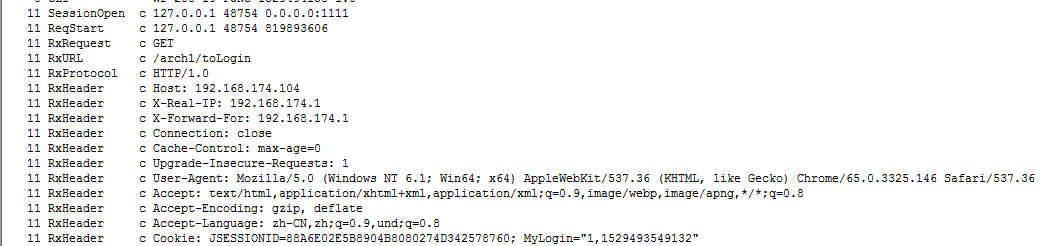
动态代理 请求header
nginx 实践配置的更多相关文章
- 《深入理解Nginx》阅读与实践(一):Nginx安装配置与HelloWorld
最近在读陶辉的<深入理解Nginx:模块开发与架构解析>,一是想跟着大牛练练阅读和编写开源代码的能力,二是想学学Nginx优秀的架构设计,三是想找一个点深入下Linux下网络编程的细节.侯 ...
- 学习nginx从入门到实践(四) 基础知识之nginx基本配置语法
nginx基本配置语法 1.http相关 展示每次请求的请求头: curl -v http://www.baidu.com 2.nginx日志类型 error.log. access.log log_ ...
- nginx服务配置---php服务接入
前言: 最近要搭建一个内部的wiki系统, 网上搜了一圈, 也从知乎上搜集了一些大神的评价和推荐. 重点找了几个开源的wiki系统, 不过发现他们都是采用php来实现的. 于是乎需要配置php环境, ...
- Nginx安装配置与HelloWorld
<深入理解Nginx>阅读与实践(一):Nginx安装配置与HelloWorld 最近在读陶辉的<深入理解Nginx:模块开发与架构解析>,一是想跟着大牛练练阅读和编写开源代码 ...
- linux环境手动编译安装Nginx实践过程 附异常解决
1.下载nginx源码包并解压 可在http://nginx.org/en/download.html下载.tar.gz的源码包,如(nginx-1.4.7.tar.gz) 或者使用云盘下载 ht ...
- 大规模网站sesson会话保持思路及实践配置
1.需求: 请教个问题:我用lvs的rr模式,(考虑过 ipvsadm -p,但是这样就失去了负载均衡的意义感觉),后端有10台web,用一台memcached专门用于存储session文件,但是现在 ...
- nginx syslog 配置
以下是一个简单的实践,主要是打算测试nginx 与graylog 的集成,为了简单都是使用容器运行的,同时也测试了 nginx 对于配置多个access_log 的处理 环境准备 docker-com ...
- 如何在Nginx下配置PHP程序环境
1.nginx与PHP的关系 首先来看nginx与php的关系, FastCGI的关系(而不是像apache那样安装成nginx的模块) FastCGI的意思是, 快速的通用网关接口:CGI Comm ...
- 从零开始学 Java - CentOS 下 Nginx + Tomcat 配置负载均衡
为什么现在有非常多的聪明人都在致力于互联网? 最近在读埃隆·马斯克传记,他说「我认为现在有非常多的聪明人都在致力于互联网」. 仔细一想,好像真的是这样的. 我问了自己一个问题:如果你不敲代码了,你能做 ...
随机推荐
- Java并发指南12:深度解读 java 线程池设计思想及源码实现
深度解读 java 线程池设计思想及源码实现 转自 https://javadoop.com/2017/09/05/java-thread-pool/hmsr=toutiao.io&utm_ ...
- 重读APUE(8)-进程、进程组、会话
进程: 是系统中一段程序执行的实体,也是资源分配和调度的基本单位: 进程组: 为了方便管理多个进程,可以将多个进程加入到一个进程组内: 每个进程都属于一个进程组,但是同一个进程组内可以有多个进程: 每 ...
- tp5 回滚事务记录,其中一条语句报错,全部回滚
#################################### 测试事务 // 启动事务 Db::startTrans(); try { //插入行为表 $data = [ 'userId' ...
- Linux 下基础命令
Linux:开源 Ubuntu Centos Deepin Debian Linux mint ... 1.省钱 2.省资源 Linux由unix演化而来 Linux:开源 Unix: 闭源 sola ...
- Linux学习:Makefile简介及模板
一.基本概念介绍: Makefile 文件就是告诉make命令需要怎么样的去编译和链接程序. 编写Makefile的基本规则: 1.如果这个工程没有编译过,那么我们的所有C文件都要编译并被链接. 2. ...
- Android检测服务是否运行
直接上代码: /** * 判断服务是否后台运行 * * @param context * Context * @param className * 判断的服务名字 * @return true 在运行 ...
- 阶段5 3.微服务项目【学成在线】_day05 消息中间件RabbitMQ_11.RabbitMQ研究-工作模式-路由工作模式测试
先常见生产者 复制02的代码 先改一下交换机的名称 还需要制定routingKey.因为是两个消息 所以指定了两个routingKey 这里修改为当前指定的交换机名称 交换机和队列在绑定的时候指定我们 ...
- linux简单命令7--管道符和通配符
”&&“和管道符“|”不一样. ---------------------------------------------------------通配符---------------- ...
- String字符串的截取
根据某个字段将字符串分割成绩部分 String str = "string number one 1/9/0"; //将字符串由/ 截取成绩部分 String[] strs = s ...
- 公钥加密-DES-RSA
公理 双方使用同一规则加密---------密钥(对称加密算法DES)data encryption standard 最大问题 双方一起制定--------办法:密钥交换算法,不用直接传递密钥--- ...