
安装mistral
1.安装mistral安装包
yum -y install openstack-mistral-api.noarch openstack-mistral-engine.noarch openstack-mistral-executor.noarch openstack-mistral-ui.noarch
2.创建mistral数据库
mysql -uroot -p
CREATE DATABASE mistral;
GRANT ALL PRIVILEGES ON mistral.* TO 'mistral'@'localhost' IDENTIFIED BY 'P1ssw0rd';
GRANT ALL PRIVILEGES ON mistral.* TO 'mistral'@'%' IDENTIFIED BY 'P1ssw0rd';
#核实:
select * from information_schema.SCHEMATA where SCHEMA_NAME="mistral";
show grants for mistral\G
select user,host from mysql.user where user="mistral";
3.创建用户,并将用户加入到service项目中,并赋予admin权限
openstack user create --domain default --password-prompt mistral
openstack role add --project service --user mistral admin
#密码是:P@ssw0rd
4.创建 mistral 服务实体.
openstack service create --name mistral --description 'OpenStack Workflow service' workflowv2
openstack endpoint create --region RegionOne workflowv2 public http://controller:8989/v2
openstack endpoint create --region RegionOne workflowv2 internal http://controller:8989/v2
openstack endpoint create --region RegionOne workflowv2 admin http://controller:8989/v2
5.编辑mistral配置文件
openstack-config --set /etc/mistral/mistral.conf DEFAULT transport_url rabbit://openstack:openstack@controller
openstack-config --set /etc/mistral/mistral.conf DEFAULT auth_type keystone
openstack-config --set /etc/mistral/mistral.conf DEFAULT rpc_backend rabbit
openstack-config --set /etc/mistral/mistral.conf database connection mysql+pymysql://mistral:P1ssw0rd@controller/mistral
openstack-config --set /etc/mistral/mistral.conf keystone_authtoken auth_uri http://controller:5000
openstack-config --set /etc/mistral/mistral.conf keystone_authtoken auth_url http://controller:35357/v3
openstack-config --set /etc/mistral/mistral.conf keystone_authtoken memcached_servers controller:11211
openstack-config --set /etc/mistral/mistral.conf keystone_authtoken auth_type password
openstack-config --set /etc/mistral/mistral.conf keystone_authtoken auth_version 3
openstack-config --set /etc/mistral/mistral.conf keystone_authtoken project_domain_name Default
openstack-config --set /etc/mistral/mistral.conf keystone_authtoken user_domain_name Default
openstack-config --set /etc/mistral/mistral.conf keystone_authtoken project_name service
openstack-config --set /etc/mistral/mistral.conf keystone_authtoken username mistral
openstack-config --set /etc/mistral/mistral.conf keystone_authtoken password P@ssw0rd
openstack-config --set /etc/mistral/mistral.conf pecan auth_enable false
或者下面这样,参考:https://blog.csdn.net/timego/article/details/92796561
openstack-config --set /etc/mistral/mistral.conf DEFAULT transport_url rabbit://openstack:openstack@controller
openstack-config --set /etc/mistral/mistral.conf database connection mysql+pymysql://mistral:P1ssw0rd@controller/mistral
openstack-config --set /etc/mistral/mistral.conf keystone_authtoken auth_uri http://controller:5000/v3
openstack-config --set /etc/mistral/mistral.conf keystone_authtoken auth_url http://controller:35357
openstack-config --set /etc/mistral/mistral.conf keystone_authtoken memcached_servers controller:11211
openstack-config --set /etc/mistral/mistral.conf keystone_authtoken auth_version v3
openstack-config --set /etc/mistral/mistral.conf keystone_authtoken admin_tenant_name service
openstack-config --set /etc/mistral/mistral.conf keystone_authtoken admin_user admin
openstack-config --set /etc/mistral/mistral.conf keystone_authtoken admin_password P@ssw0rd
openstack-config --set /etc/mistral/mistral.conf pecan auth_enable false
6.初始化mistral的数据库
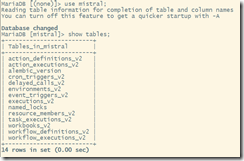
mistral-db-manage --config-file /etc/mistral/mistral.conf upgrade head
#添加缺省的mistral actions (报错请无视)
mistral-db-manage --config-file /etc/mistral/mistral.conf populate
7.启动服务
systemctl enable openstack-mistral-api.service openstack-mistral-engine.service openstack-mistral-executor.service
systemctl start openstack-mistral-api.service openstack-mistral-engine.service openstack-mistral-executor.service
systemctl status openstack-mistral-api.service openstack-mistral-engine.service openstack-mistral-executor.service
8.测试
mistral workbook-list
mistral action-list
mistral task-list
安装mistral的更多相关文章
- 手动安装OpenStack Mistral
Prepare packages: $ sudo apt-get install python-dev python-setuptools python-pip libffi-dev libxslt1 ...
- 安装tacker
安全服务链编排系统安装部署文档 本系统基于OpenStack Pike版本安装,在安装tacker之前,请确保以下模块都已正确安装部署:keystone,mistral,barbican,horizo ...
- docker——容器安装tomcat
写在前面: 继续docker的学习,学习了docker的基本常用命令之后,我在docker上安装jdk,tomcat两个基本的java web工具,这里对操作流程记录一下. 软件准备: 1.jdk-7 ...
- 网络原因导致 npm 软件包 node-sass / gulp-sass 安装失败的处理办法
如果你正在构建一个基于 gulp 的前端自动化开发环境,那么极有可能会用到 gulp-sass ,由于网络原因你可能会安装失败,因为安装过程中部分细节会到亚马逊云服务器上获取文件.本文主要讨论在不变更 ...
- Sublime Text3安装JsHint
介绍 Sublime Text3使用jshint依赖Nodejs,SublimeLinter和Sublimelinter-jshint. NodeJs的安装省略. 安装SublimeLinter Su ...
- Fabio 安装和简单使用
Fabio(Go 语言):https://github.com/eBay/fabio Fabio 是一个快速.现代.zero-conf 负载均衡 HTTP(S) 路由器,用于部署 Consul 管理的 ...
- gentoo 安装
加载完光驱后 1进行ping命令查看网络是否通畅 2设置硬盘的标识为GPT(主要用于64位且启动模式为UEFI,还有一个是MBR,主要用于32位且启动模式为bois) parted -a optima ...
- Linux平台 Oracle 10gR2(10.2.0.5)RAC安装 Part3:db安装和升级
Linux平台 Oracle 10gR2(10.2.0.5)RAC安装 Part3:db安装和升级 环境:OEL 5.7 + Oracle 10.2.0.5 RAC 5.安装Database软件 5. ...
- Linux平台 Oracle 10gR2(10.2.0.5)RAC安装 Part1:准备工作
Linux平台 Oracle 10gR2(10.2.0.5)RAC安装 Part1:准备工作 环境:OEL 5.7 + Oracle 10.2.0.5 RAC 1.实施前准备工作 1.1 服务器安装操 ...
随机推荐
- golang mysql 模糊查询
db.SqlDB.Query("SELECT id,name FROM test_table where title name like CONCAT('%',?,'%');", ...
- IDEA 安装与破解(亲测有效)
本文转载:https://blog.csdn.net/g_blue_wind/article/details/74380483 根据以下的流程,顺利安装了最新版本的idea企业版. IDEA 全称 I ...
- Sqlserver on linux 高可用集群搭建
一.环境准备 1 部署环境: 服务器数量:3台 Ip地址:192.168.1.191(主) 192.168.1.192(从) 192.168.1.193(从) 操作系统:CentOS Linux re ...
- AtCoder Beginner Contest 137 D题【贪心】
[题意]一共有N个任务和M天,一个人一天只能做一个任务,做完任务之后可以在这一天之后的(Ai-1)天拿到Bi的工资,问M天内最多可以拿到多少工资. 链接:https://atcoder.jp/cont ...
- encodeURI()、encodeURIComponent()、escape()
URI的通用格式如下: /*** 协议://用户名:密码@子域名.域名.顶级域名:端口号/目录/文件名.文件后缀?参数1=值1&参数2=值2+值3#标志 **/ /*** http://use ...
- 请求返回模板定制,@RestControllerAdvice
- 自动上传本地图片和word图片(word图片需使用从word粘贴功能)
在之前在工作中遇到在富文本编辑器中粘贴图片不能展示的问题,于是各种网上扒拉,终于找到解决方案,在这里感谢一下知乎中众大神以及TheViper. 通过知乎提供的思路找到粘贴的原理,通过TheViper找 ...
- 【线性代数】2-2:消元(Eliminate)
title: [线性代数]2-2:消元(Eliminate) toc: true categories: Mathematic Linear Algebra date: 2017-08-31 16:1 ...
- C# Socket 编程 Sample
使用Socket通信的服务器端编程,熟悉了服务器端和客户端的通信流程,实现了收发信息.文件传送以及震动功能 服务器端先创建Socket,然后将其和本地ip地址以及端口号连接,也就是使用Bind方法,然 ...
- 使用Camtasia 9 录制屏幕软件
Camtasia 9 录制屏幕软件,并且有丰富的专业剪辑功能.