
JAVA记事本的图形用户界面应用程序
JAVA记事本的图形用户界面应用程序
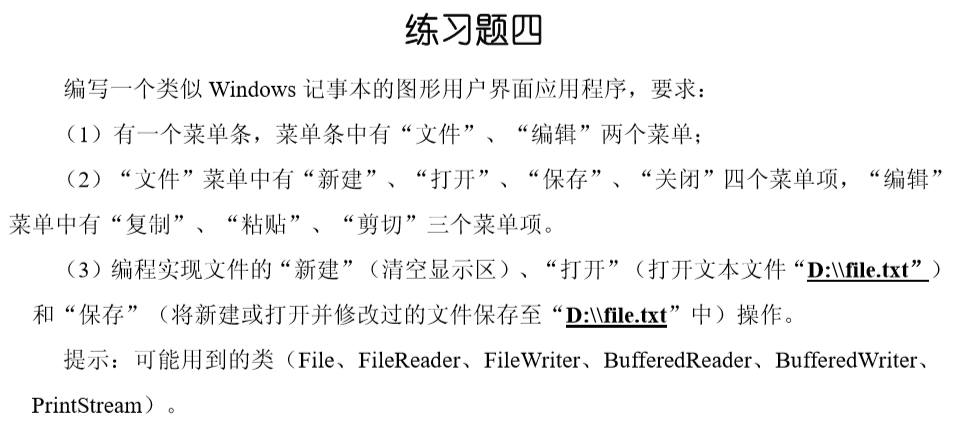
整体分析:

代码实现:
import java.awt.EventQueue;

import java.awt.event.ActionEvent;

import java.awt.event.ActionListener;

import java.io.BufferedReader;

import java.io.BufferedWriter;

import java.io.File;

import java.io.FileReader;

import java.io.FileWriter;

import java.io.IOException;

import javax.swing.JFrame;

import javax.swing.JMenuBar;

import javax.swing.JMenu;

import javax.swing.JMenuItem;

import javax.swing.JSeparator;

import javax.swing.JTextArea;

import java.awt.BorderLayout;

import java.awt.Font;

/**记事本的图形用户界面应用程序

 * @author 李祖林

 * 2017-6-22

 */

public class Note1 implements ActionListener{

    private JFrame frame;

    JMenuItem New, Open, Save, Close; /*

                                         * New为新建,

                                         * Open为打开

                                         * Save为保存

                                         * Close为关闭

                                         */

    JTextArea textArea;

    File fileName = new File("D:\\file.txt");    //默认打开文件路径

    public static void main(String[] args) {

        EventQueue.invokeLater(new Runnable() {

            public void run() {

                try {

                    Note1 window = new Note1();

                    window.frame.setVisible(true);

                } catch (Exception e) {

                    e.printStackTrace();

                }

            }

        });

    }

    public Note1() {

        frame = new JFrame();

        frame.setFont(new Font("Dialog", Font.BOLD, 18));

        frame.setBounds(100, 100, 629, 412);

        frame.setDefaultCloseOperation(JFrame.EXIT_ON_CLOSE);

        JMenuBar menuBar = new JMenuBar();

        frame.setJMenuBar(menuBar);

        JMenu menu = new JMenu("\u6587\u4EF6");

        menu.setFont(new Font("黑体", Font.BOLD, 18));

        menuBar.add(menu);

        New = new JMenuItem("\u65B0\u5EFA");

        New.setFont(new Font("黑体", Font.BOLD, 18));

        menu.add(New);New.addActionListener(this);

        Open = new JMenuItem("\u6253\u5F00");

        Open.setFont(new Font("黑体", Font.BOLD, 18));

        menu.add(Open);Open.addActionListener(this);

        Save = new JMenuItem("\u4FDD\u5B58");

        Save.setFont(new Font("黑体", Font.BOLD, 18));

        menu.add(Save);Save.addActionListener(this);

        JSeparator separator = new JSeparator();

        menu.add(separator);

        Close = new JMenuItem("\u5173\u95ED");

        Close.setFont(new Font("黑体", Font.BOLD, 18));

        menu.add(Close);Close.addActionListener(this);

        JMenu menu_1 = new JMenu("\u7F16\u8F91");

        menu_1.setFont(new Font("黑体", Font.BOLD, 18));

        menuBar.add(menu_1);

        JMenuItem menuItem_4 = new JMenuItem("\u590D\u5236");

        menu_1.add(menuItem_4);

        JMenuItem menuItem_5 = new JMenuItem("\u7C98\u8D34");

        menu_1.add(menuItem_5);

        JMenuItem menuItem_6 = new JMenuItem("\u526A\u5207");

        menu_1.add(menuItem_6);

        textArea = new JTextArea();

        frame.getContentPane().add(textArea, BorderLayout.CENTER);

    }

    public void actionPerformed(ActionEvent e) {

        if(e.getSource()==Close){

            System.exit(0);

        }

        else if (e.getSource()==Save) {

            saveFile();

        }else if (e.getSource()==Open){

            readFile();

        }else{

            textArea.setText("");

        }

    }

    /*打开文件函数*/

    public void readFile(){

        try{

            BufferedReader bufferedReader = new BufferedReader(new FileReader(fileName));    //缓存字符流

            StringBuffer buffer = new StringBuffer();

            String text;

            while((text = bufferedReader.readLine()) != null){

//                buffer.append(text+"\n");

                textArea.append(text+"\n");

            }

//            textArea.setText(buffer.toString());

            bufferedReader.close();

        }catch (IOException e) {

            System.err.println("读入文件发生错误!");

        }

    }

    /*保存文件函数*/

    public void saveFile(){

        try{

            BufferedWriter bufferedWriter = new BufferedWriter(new FileWriter(fileName));

            String string = textArea.getText();

            bufferedWriter.write(string);

            bufferedWriter.close();

        }catch (IOException e) {

            System.err.println("保存文件发生错误!");

        }

    }

}
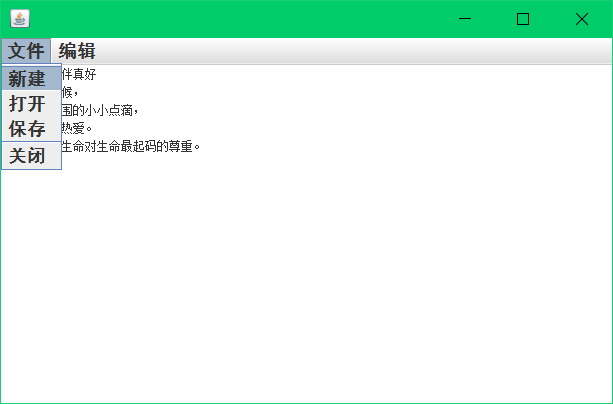
实验结果:
JAVA记事本的图形用户界面应用程序的更多相关文章
- JAVA记事本的图形用户界面应用程序含过滤
JAVA记事本的图形用户界面应用程序 过滤 题目简介: 整体分析: 实验代码: package note; import java.awt.EventQueue; import java.awt.ev ...
- JAVA记事本的图形用户界面应用程序含加密
JAVA记事本的图形用户界面应用程序 加密 题目简介: 整体分析: 实验代码: import java.awt.EventQueue; import java.awt.event.ActionEven ...
- Java计算器的图形界面应用程序
JAVA计算器的图形界面应用程序 题目简介: 整体分析: 实验代码: /*部分使用插件做界面*/ import java.awt.EventQueue; import javax.swing.JB ...
- 《Java并发编程实战》第九章 图形用户界面应用程序界面 读书笔记
一.为什么GUI是单线程化 传统的GUI应用程序通常都是单线程的. 1. 在代码的各个位置都须要调用poll方法来获得输入事件(这样的方式将给代码带来极大的混乱) 2. 通过一个"主事件循环 ...
- java 实验5 图形用户界面设计试验
常用布局 1).流布局: FlowLayout 从左到右,自上而下方式在容器中排列,控件的大小不会随容器大小变化. 容器.setLayout(new FlowLayout(FlowLayout.LEF ...
- java 实验6 图形用户界面设计试验(2)
共两大题 窗体实现(略去测试类即 实例化自定义窗体) 小结: 1. JRadioButton 单选按钮 ButtonGroup 按钮集合(加入单选按钮) 清空选项需让ButtonGroup调用clea ...
- 抽象窗口工具包AWT (Abstract Window Toolkit) 是 API为Java 程序提供的建立 图形用户界面
抽象窗口工具包AWT (Abstract Window Toolkit) 是 API为Java 程序提供的建立 图形用户界面GUI (Graphics User Interface)工具集,AWT可用 ...
- AWT是Java基础类 (JFC)的一部分,为Java程序提供图形用户界面(GUI)的标准API
抽象窗口工具包 (Abstract Windowing Toolkit) (AWT)是Java的平台独立的窗口系统,图形和用户界面器件工具包. AWT是Java基础类 (JFC)的一部分,为Java程 ...
- 黑马程序员——【Java基础】——GUI(图形用户界面)
---------- android培训.java培训.期待与您交流! ---------- 一.概述 1.GUI(GraphicalUser Interface):又称图形用户界面,是计算机用户与计 ...
随机推荐
- PotPlayer直播源分享
添加直播源方法: 央视CCTV1综合HD-1,rtsp://113.136.42.45:554/PLTV/88888888/224/3221226087/10000100000000060000000 ...
- blucesun 解决npm报错:Module build failed: TypeError: this.getResolve is not a function
1.sass-loader的版本过高导致的编译错误,当前最高版本是8.x,需要退回到7.3.1 运行: npm uninstall sass-loader(卸载当前版本) npm install sa ...
- while 循环 及 and or not
一 while 循环 语法: while 条件: 结果 如果条件为真,则直接执行结果,然后再次判断条件,直到条件是假,停止循环 结束循环: 1.改变条件 2.break 二 流程控制 break 和 ...
- deepin禁用笔记本自带键盘
参考命令: sudo apt install xinput xinput xinput list-props 'AT Translated Set 2 keyboard' xinput set-pro ...
- Google Chrome Keyboard Shortcuts
Navigation To do this Press this Open a new window Ctrl + N Open a new tab Ctrl + T Open a new windo ...
- [CEOI1999]Sightseeing trip(Floyed)
[CEOI1999]Sightseeing trip Description There is a travel agency in Adelton town on Zanzibar island. ...
- nginx信号
ps aux | grep nginx #查看nginx进程,要查看nginx的pid,就得使用这个命令查看*********************nginx信号****************** ...
- The Semantics of Constructors(拷贝构造函数之编译背后的行为)
本文是 Inside The C++ Object Model's Chapter 2 的部分读书笔记. 有三种情况,需要拷贝构造函数: 1)object直接为另外一个object的初始值 2)ob ...
- nginx 入门实战
nginx入门实战 nginx 安装与卸载 下载安装 进入 http://nginx.org/en/download.html 下载自己想要的版本,我选择的stable版本 tar -zxvf ngi ...
- java中jsp的EL的定义以及使用
1.定义: EL(Expression Language) 是为了使JSP写起来更加简单.表达式语言的灵感来自于 ECMAScript 和 XPath 表达式语言,它提供了在 JSP 中简化表达式的方 ...