
ansible模块文件操作
Ansible常用模块文件操作
[root@tiandong etc]# ansible-doc -l 列出ansible所支持的模块
[root@tiandong ~]# ansible-doc -s ping(模块名) 可以查看模块的详细信息

Ping模块
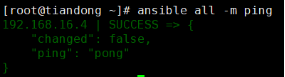
[root@tiandong ~]# ansible all -m ping
Fetch模块。
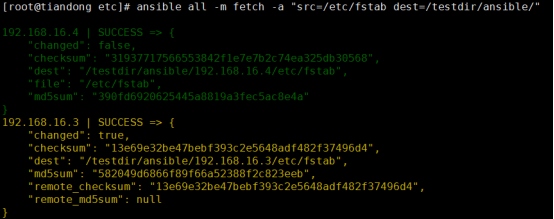
从远程主机拉去文件到ansible
[root@tiandong etc]# ansible all -m fetch -a "src=/etc/fstab dest=/testdir/ansible/"
表示调用fetch模块 -a选项用于传递模块所需要的参数
Copy模块
复制ansible上的文件文件到远程主机。
[root@tiandong ansible]# ansible all -m copy -a "src=/testdir/copy dest=/tmp/"
在远程主机/tmp目录下面生成文件copy
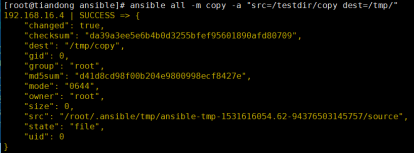
[root@tiandong ansible]# ansible all -m copy -a "src=/testdir/copy dest=/tmp/ force=no"
当远程主机已经存在复制的文件时,不会执行任何操作
当返回信息为绿色,’changed’为false,表示ansible没有进行任何操作

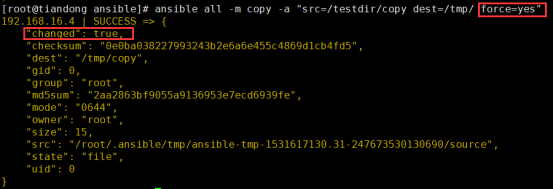
[root@tiandong ansible]# ansible all -m copy -a "src=/testdir/copy dest=/tmp/ force=yes"
若force为yes的话会执行操作覆盖之前的文件
[root@tiandong ansible]# ansible all -m copy -a "src=/testdir/copy dest=/tmp/ backup=yes"
在拷贝之前会将源文件重命名已做备份,然后进行复制。
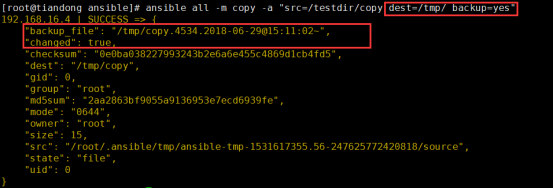
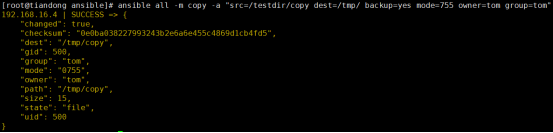
[root@tiandong ansible]# ansible all -m copy -a "src=/testdir/copy dest=/tmp/ backup=yes mode=755 owner=tom group=tom"
拷贝文件时制定文件的属主、属组、权限
[root@tiandong ansible]# ansible all -m copy -a "content='welcom to beijing' dest=/tmp/test"
在远程主机上生成文件test,内容为'welcom to beijing'
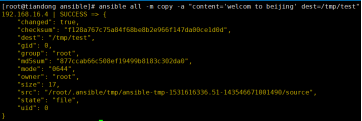
在远程主机上查看文件:

File模块
可以进行文件的基本操作,创建(删除)文件或者目录、修改文件权限
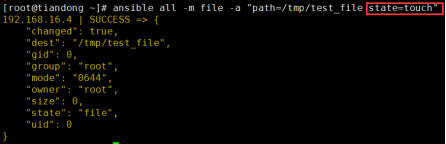
[root@tiandong ~]# ansible all -m file -a "path=/tmp/test_file state=touch"
在远程主机上创建test_file的文件。若文件存在会更新文件的时间戳
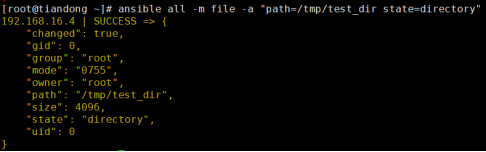
[root@tiandong ~]# ansible all -m file -a "path=/tmp/test_dir state=directory"
在远程主机上创建test_dir的目录,若目录存在不进行任何操作。
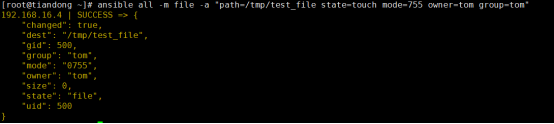
[root@tiandong ~]# ansible all -m file -a "path=/tmp/test_file state=touch mode=755 owner=tom group=tom"
在远程主机上创建文件指定权限或者,修改属主或者属组
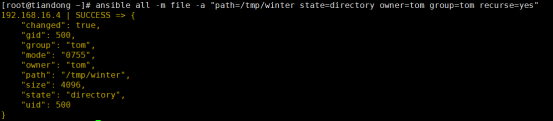
[root@tiandong ~]# ansible all -m file -a "path=/tmp/winter state=directory owner=tom group=tom recurse=yes"
操作远程主机的目录时,递归的将目录中的文件的属主属组设置为tom
[root@tiandong ~]# ansible all -m file -a "path=/tmp/test_file state=absent"
删除远程主机端的文件或者目录

Blockinfile模块:
[root@tiandong ~]# ansible all -m blockinfile -a "path=/tmp/rc.local block='service restart sshd\nservice restart httpd'"
在文件末尾插入两行

在远程主机上查看:
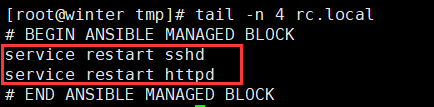
# BEGIN ANSIBLE MANAGED BLOCK # END ANSIBLE MANAGED BLOCK是blockinfile模块自动添加的文本快标记。
[root@tiandong ~]# ansible all -m blockinfile -a "path=/tmp/rc.local block='service restart iptables' marker='#{mark} service to restart'"
使用marker可以自定义文本快标记。
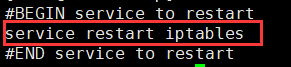
当#{mark} service to restart这个标记已经存在于文本中:
block对应的内容与之前的内容不同,这样对应的文本块内容会被更新而不是插入在末尾。
Block对应的内容为空,删除对应的文本块。

[root@tiandong ~]# ansible all -m blockinfile -a "path=/tmp/rc.local marker='#{mark} service to restart' state=absent" 这样依然可以删除对应的文本块

使用将state的值设置为absent,删除对应的文本块。
默认文本块是插入在文件末尾的,可以将文件块插入指定的位置
[root@tiandong ~]# ansible all -m blockinfile -a "path=/tmp/rc.local block='###blockinfile test###' marker='#{mark} test' insertbefore=BOF"
在文件的开头插入。

[root@tiandong ~]# ansible all -m blockinfile -a "path=/tmp/rc.local block='###blockinfile test reg###' marker='#{mark} test reg' insertbefore='^touch /var/lock/subsys/local'"
根据正则表达式插入
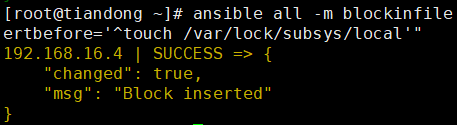
[root@tiandong ~]# ansible all -m blockinfile -a "path=/tmp/rc.local marker='#{mark} test' state=absent backup=yes"
使用backup参数,在删除模块的时候先进行备份在进行删除。

[root@tiandong ~]# ansible all -m blockinfile -a "path=/tmp/create_test block='create test' marker='#{mark} test' create=yes"
使用create参数,当文件不存在时进行创建

Lineinfile模块
[root@tiandong ~]# ansible all -m lineinfile -a "path=/tmp/lineinfile_test line='I come to beijing for qq'"
当文件中存在这行时不行任何操作,不存在时在末尾插入
此时不存在,在文件末尾插入该行。

再次插入时就不进行如何操作。

[root@tiandong ~]# ansible all -m lineinfile -a "path=/tmp/lineinfile_test line='tiandong' insertafter='I come to beijing for qq'"
在'I come to beijing for qq'之后插入line的内容

[root@tiandong ~]# ansible all -m lineinfile -a "path=/tmp/lineinfile_test line='thunder' insertafter='^tian'"
也可以使用正则表达式插入行的内容

[root@tiandong ~]# ansible all -m lineinfile -a "path=/tmp/lineinfile_test regexp='^beijing' line='xian'"
根据正则表达式替换某一行,如果有多行匹配到的话只修改最后一个匹配到的行,若是没有匹配到的话line中的内容就添加到文件的末尾,若是有backrefs=yes这个参数,没有匹配到的话就不做任何操作

在远程主机上查看只修改了最后一处被匹配到的地方。
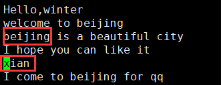
[root@tiandong ~]# ansible all -m lineinfile -a "path=/tmp/lineinfile_test regexp='^thunder' line='tiandong' backrefs=yes"
[root@tiandong ~]# ansible all -m lineinfile -a "path=/tmp/lineinfile_test regexp='^thunder' line='tiandong'"

[root@tiandong ~]# ansible all -m lineinfile -a "path=/tmp/lineinfile_test regexp='^beijing' state=absent"
正则表达式匹配到的行进行删除。

line内容一样的进行删除。

Replace模块
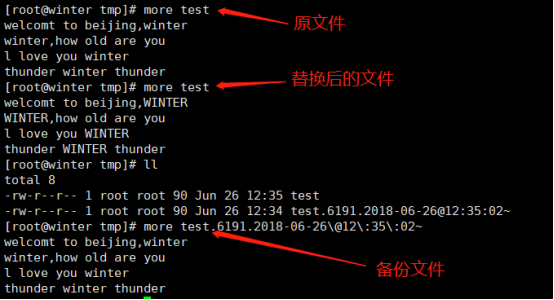
根据指定的正则表达式替换文件中的字符串,所有匹配到的都会被替换
[root@tiandong ansible]# ansible all -m replace -a 'path=/tmp/test regexp="winter" replace=WINTER'

查看被控制端的文件:
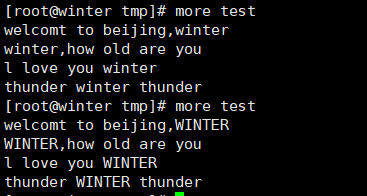
[root@tiandong ansible]# ansible all -m replace -a 'path=/tmp/test regexp="winter" replace=WINTER backup=yes' 该参数在替换之前进行备份

查看被控制端:
ansible模块文件操作的更多相关文章
- OS模块文件操作一
1 文件操作 1.1 OS模块 l import os #引入os模块 l import os.path #引入os下的path子模块 l os ...
- os模块 文件操作
下面的方法可以在python程序里直接生成文件到系统路径(windows环境下测试): <<<<<<要注意字符串前面要加字母r>>>>> ...
- python os模块 文件操作
Python内置的os模块可以通过调用操作系统提供的接口函数来对文件和目录进行操作 os模块的基本功能: >>> import os >>> os.name 'po ...
- nodejs - fs模块 - 文件操作
1, fs.stat 检测是文件还是目录 2, fs.mkdir 创建目录 var fs = require('fs') fs.mkdir('./dir',function(err){ if(err ...
- Python档案袋( 命令行操作 及 Os与Shutil文件操作补充 )
调用系统命令 import os #调用系统命令,输出只能输出到屏幕上,不能用变量接收 os.system("ipconfig") #调用系统命令,并把执行结果存到变量中 res= ...
- 【python】文件操作
基本语法 open("文件名","访问方式") # 1. 打开文件 file = open("README.txt") # 2. 读取文件内 ...
- ansible笔记(5):常用模块之文件操作(二)
ansible笔记():常用模块之文件操作(二) 文件操作类模块 find模块 find模块可以帮助我们在远程主机中查找符合条件的文件,就像find命令一样. 此处我们介绍一些find模块的常用参数, ...
- ansible对文件内容操作
ansible lineinfile 简介 lineinfile该模块是操作文件中的每一行内容,他是按照行为单位的,和下面的replace模块并不冲突. 修改匹配行,如果不存在就会添加 tasks: ...
- Python::OS 模块 -- 文件和目录操作
os模块的简介参看 Python::OS 模块 -- 简介 os模块的进程管理 Python::OS 模块 -- 进程管理 os模块的进程参数 Python::OS 模块 -- 进程参数 os模块中包 ...
随机推荐
- IntelliJ IDEA Spring boot devtools 实现热部署
一.spring-boot-devtools是一个为开发者服务的一个模块,其中最重要的功能就是自动部署新代码. 二.原理 使用了两个ClassLoader,一个ClassLoader用来加载那些不会变 ...
- eclipse 创建Java web项目 Cannot change version of project facet Dynamic web module to xxx
问题描述: 用Eclipse创建Java web项目时选择的Artifact Id为maven-artchetype-webapp,由于这个archetype比较老,用的servlet还是2.3的. ...
- git、github常用操作
1.将github项目拷贝到本地 $ git clone https://github.com/jim2500/miaosha_project.git 2.修改本地项目上传到github T470s@ ...
- ES6入门一:块级作用域(let&const)、spread展开、rest收集
let声明 const声明 块级作用域 spread/rest 一.let声明与块作用域 在ES6之前,JavaScript中的作用域基本单元就是function.现在有了let就可以创建任意块的声明 ...
- c语言测试芯片好坏
问题描述有n个(2<n<20)芯片,好的或坏的,并且有比坏的芯片更多的已知的好的芯片.每个芯片都可以用来测试其他芯片.当用一个好的芯片测试其他芯片时,它可以正确地给出被测芯片是好是坏.当用 ...
- Java学习笔记【四、类、对象、接口】
编程语言的发展 机器语言 过程语言 面向对象编程--封装.继承.多态 关键字 extends implements override overload super this static abstra ...
- jQuery获取表单全部数据
iQuery如何获取表单的全部数据,用于ajax提交 var formData = {}; var t = $('#Form').serializeArray(); $.each(t, functio ...
- html标签被div嵌套页面字体变大的解决办法
html标签被div嵌套页面字体变大的解决办法 <div> <html> <head> <title></title> </head& ...
- Python 学习第一天(二)python 入门
1.第一个python程序 1.1 直接打印输出 打开cmd,输入python进入到python交互式环境:(看到>>>是在Python交互式环境下:) 在python交互环境下输入 ...
- C++ SQLite的使用总结
SQLite3简介 SQLite3只是一个轻型的嵌入式数据库引擎,占用资源非常低,处理速度比Mysql还快,专门用于移动设备上进行适量的数据存取,它只是一个文件,不需要服务器进程. SQL语句是SQL ...