
gulp-prompt入个了门
gulp-prompt版本:0.4.1
源码:gulp-prompt演示代码
一、gulp-prompt的简介
gulp-prompt 是一个基于gulp的命令行提示。
我们可以用它来完成命令行中互动功能。
二、gulp-prompt的使用
1.confirm([options])
第一种使用:
confirm中没填入任何值的时候,默认显示Are you sure?
gulp.src('demo.js')

        .pipe(prompt.confirm())

        .pipe(gulp.dest('dest'));
显示效果:
[14:14:04] Using gulpfile /study/gulpTest/gulpfile.js

[14:14:04] Starting 'confirm:test01'...

[14:14:04] Finished 'confirm:test01' after 8.19 ms

? Are you sure? (y/N)
解释:如果Yes,则执行pipe(gulp.dest('dest')),如果No,则return。(以下含义一样)
第二种使用:
confirm中添加字符串就会替换提示的文字。
gulp.src('demo.js')

        .pipe(prompt.confirm('Are you ready for Gulp?'))

        .pipe(gulp.dest('dest'));
显示效果:
[14:15:00] Using gulpfile /study/gulpTest/gulpfile.js

[14:15:00] Starting 'confirm:test02'...

[14:15:00] Finished 'confirm:test02' after 9.17 ms

? Are you ready for Gulp? (y/N)
第三种使用:
confirm中写入一个对象,包括message和default两个字段
- message:显示的文字
- default: 设置不填写时候的默认状态
gulp.src('demo.js')

        .pipe(prompt.confirm({

          message: 'Continue?',

          default: true

        }))

        .pipe(gulp.dest('dest'));
显示效果:
[14:22:24] Using gulpfile /study/gulpTest/gulpfile.js

[14:22:24] Starting 'confirm:test03'...

[14:22:24] Finished 'confirm:test03' after 8.49 ms

? Continue? (Y/n)
2.prompt(questions, callback)
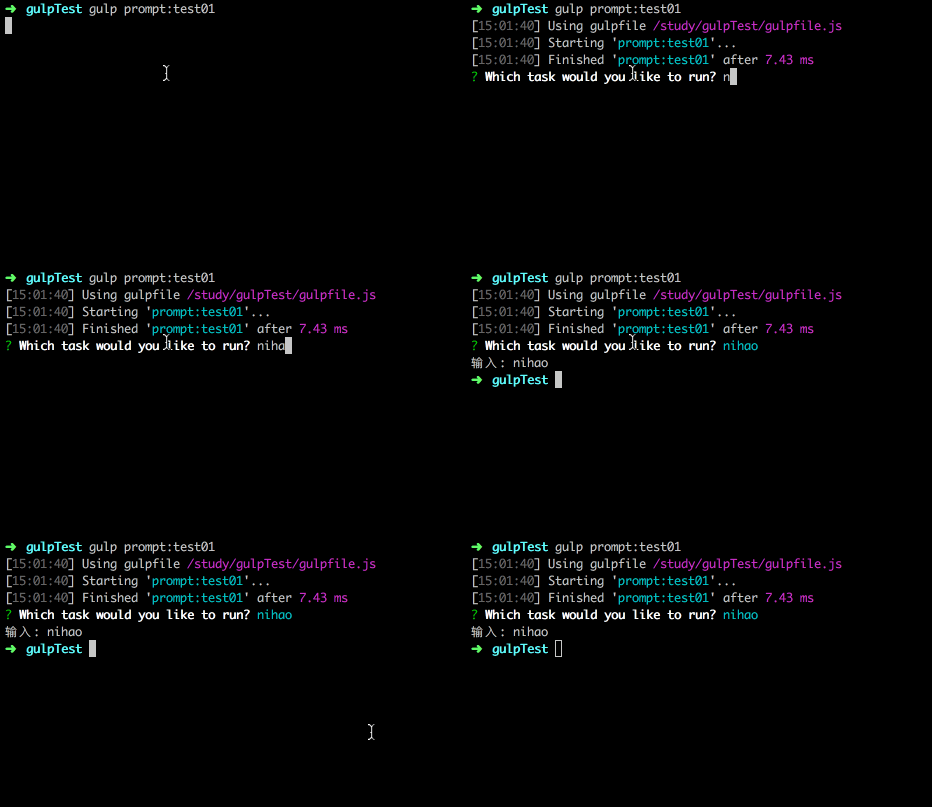
input模式:自定义输入信息
gulp.src('demo.js')

          .pipe(prompt.prompt({

            type: 'input',

            name: 'task',

            message: 'Which task would you like to run?'

          }, function(res){

            //value is in res.task (the name option gives the key)

            console.log('输入:', res.task);

          }));
显示效果:
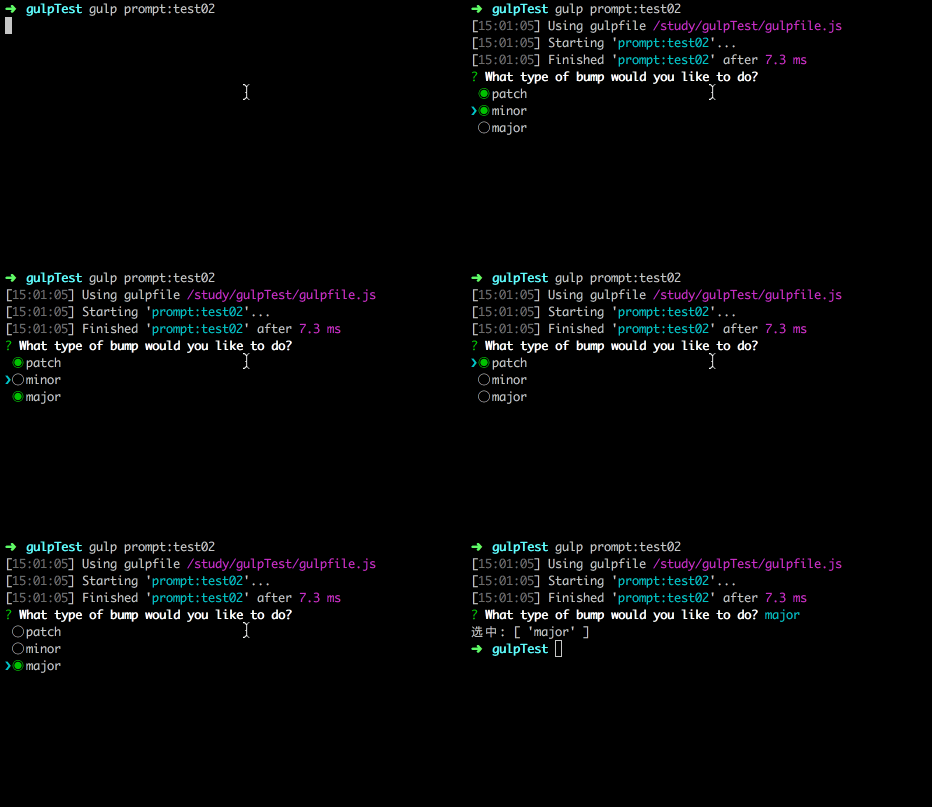
checkbox模式:通过空格勾选
gulp.src('demo.js')

          .pipe(prompt.prompt({

            type: 'checkbox',

            name: 'bump',

            message: 'What type of bump would you like to do?',

            choices: ['patch', 'minor', 'major']

          }, function(res){

            //value is in res.bump (as an array)

            console.log('选中:', res.bump);

          }));
显示效果:
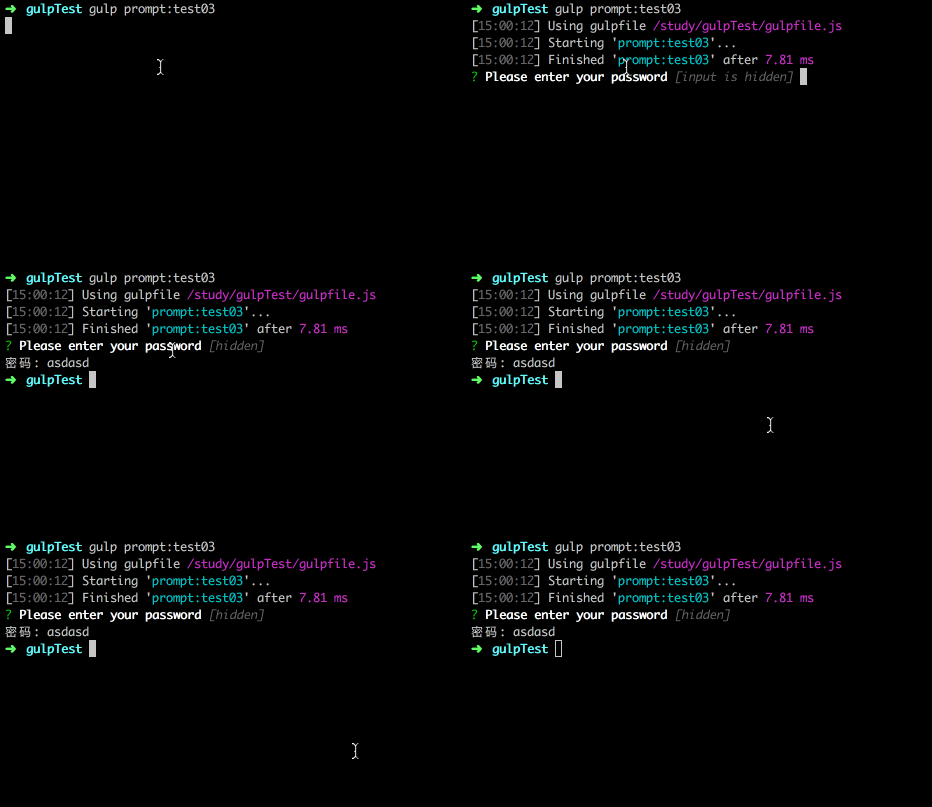
password模式:输入部分隐藏看不见
gulp.src('demo.js')

          .pipe(prompt.prompt({

            type: 'password',

            name: 'pass',

            message: 'Please enter your password'

          }, function(res){

            //value is in res.pass

            console.log('密码:', res.pass);

          }));
显示效果:
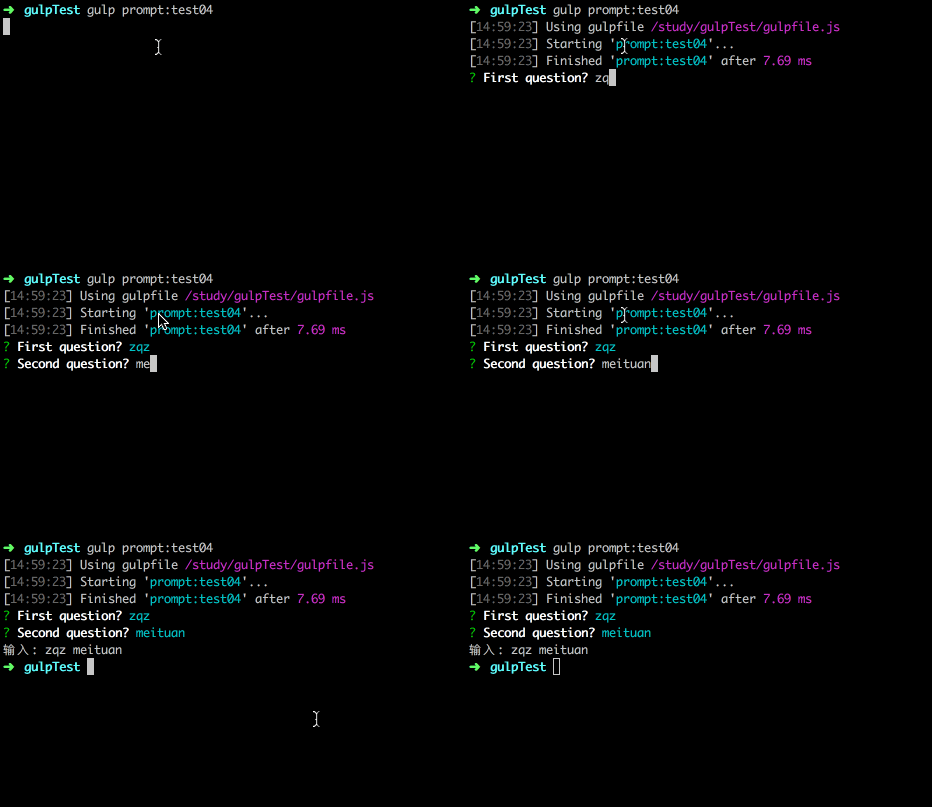
多层级输入模式:类似一个问题接着一个问题
gulp.src('demo.js')

          .pipe(prompt.prompt([{

            type: 'input',

            name: 'first',

            message: 'First question?'

          },

          {

            type: 'input',

            name: 'second',

            message: 'Second question?'

          }], function(res){

            //value is in res.first and res.second

            console.log('输入:', res.first, res.second);

          }));
显示效果:
验证:对输入或者选中的值进行验证
gulp.src('demo.js')

          .pipe(prompt.prompt({

            type: 'input',

            name: 'inputName',

            message: 'Please enter your name',

            validate: function(inputName){

              if(pass !== 'zqz'){

                return false;

              }

              return true;

            }

          }, function(res){

            //value is in res.pass

            console.log('输入:', res.pass);

          }));
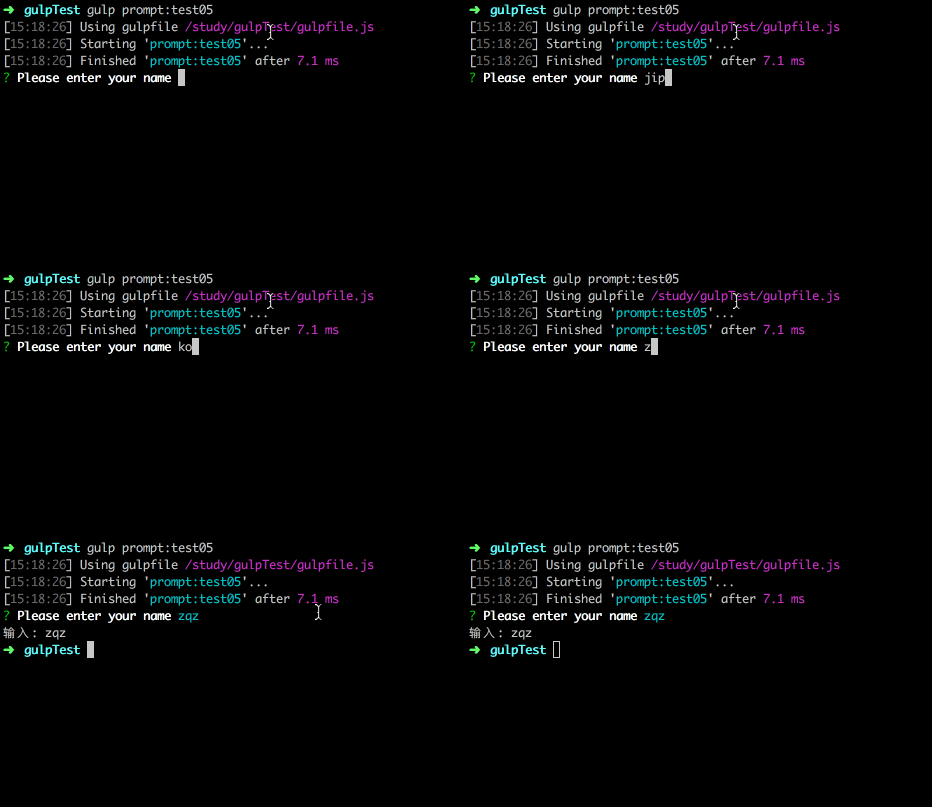
显示效果:
gulp-prompt入个了门的更多相关文章
- Java魔法堂:类加载器入了个门
一.前言 <Java魔法堂:类加载机制入了个门>中提及整个类加载流程中只有加载阶段作为码农的我们可以入手干预,其余均由JVM处理.本文将记录加载阶段的核心组件——类加载器的相关信息,以便日 ...
- 前端构建:Less入了个门
一.前言 说到前端构建怎能缺少CSS预处理器呢!其实CSS的预处理器有很多啦,比较出名的有Scss.Sass.Stylus和Less.(最近还听说出现了Autoprefixer等CSS后处理器,可 ...
- Java魔法堂:类加载机制入了个门
一.前言 当在CMD/SHELL中输入 $ java Main<CR><LF> 后,Main程序就开始运行了,但在运行之前总得先把Main.class及其所依赖的类加载到JVM ...
- Node魔法堂:NPM入了个门
一.前言 NPM作为Node的模块管理和发布工具,作用与Ruby的gem.Python的pypl或setuptools.PHP的pear和.Net的Nuget一样.在当前前端工程化极速狂奔的年代,即使 ...
- 初入AngularJS基础门
作为mvvm 框架过重 不适用于性能比较高的移动端的web栈, ui组建性对复杂,不利于重用 AngularJS 构建一个CRUD ( create retrieve update delete )的 ...
- 看完此文,妈妈还会担心你docker入不了门?
本文在个人技术博客不同步发布,详情可猛戳 亦可扫描屏幕右侧二维码关注个人公众号,公众号内有个人联系方式,等你来撩... 上周对象突然心血来潮说想养个小宠物,我问想养啥她又说随便,你看着办!!!这我 ...
- 关于Gulp
Gulp & webpack 配置详解http://www.jianshu.com/p/2d9ed1fe3e8c 使用 Gulphttp://hwaphon.site/?p=439 前端构建工 ...
- Linux系统调用(转载)
目录: 1. Linux系统调用原理 2. 系统调用的实现 3. Linux系统调用分类及列表 4.系统调用.用户编程接口(API).系统命令和内核函数的关系 5. Linux系统调用实例 6. Li ...
- Redux初见
说到redux可能我们都先知道了react,但我发现,关于react相关的学习资料很多,也有各种各样的种类,但是关于redux简单易懂的资料却比较少. 这里记录一下自己的学习理解,希望可以简洁易懂,入 ...
随机推荐
- Java中的流程控制
1.Java中有几种流程控制?分别是什么? 答:有三种流程控制,分别是顺序流程,分支流程和循环流程 2.分支语句if/else有哪三种形式?分别如何使用? 答:if/if-else-/if-else ...
- CSS3 box-sizing属性的应用
在一个文档中,每个元素都被表示为一个矩形的盒子.盒子模型具有4个属性['外边距(margin)','边框(border)','内边距(padding)','内容(content)']. 我们要设置某个 ...
- 【Python学习笔记之二】浅谈Python的yield用法
在上篇[Python学习笔记之一]Python关键字及其总结中我提到了yield,本篇文章我将会重点说明yield的用法 在介绍yield前有必要先说明下Python中的迭代器(iterator)和生 ...
- Oracle的trim( )、ltrim( )、rtrim( )三个函数的用法及注意事项
学习一下用法整理trim().ltrim().rtrim()的用法 trim().ltrim().rtrim()三个函数有两个作用,分别是: 一.去除字符串前后空格(基本用法) trim(string ...
- noip的一些模板(参考了神牛的博客)
一.图论 1.单源最短路 洛谷P3371 (1)spfa 已加SLF优化 419ms #include <iostream> #include <cstdio> #includ ...
- Writing Science 笔记 6.20
1.写作的六个要素:S: Simple 简单的 U: Unexpected 出人意料的 C: Concrete 具体的 C: Credible 可信的 E: Emotional S: Storie ...
- windows7下MongoDB(V3.4)的使用及仓储设计
简单的介绍一下,我使用MongoDB的场景. 我们现在的物联网环境下,有部分数据,采样频率为2000条记录/分钟,这样下来一天24*60*2000=2880000约等于300万条数据,以后必然还会增加 ...
- 网页meta标签总结
文章摘抄自网络. 参考文章:http://www.cnblogs.com/lpt1229/p/5628631.html http://blog.csdn.net/aiolos1111/article/ ...
- Linux入门(7) 脚本
1.宣告使用的shell为何 2.注明创建者 编写作用等 3.注释每一个功能函数 执行脚本 1.修改可执行权限 chmod 755 file.sh 2.sh file.sh 可以直接运行脚本 #!/b ...
- WPF布局控件与子控件的HorizontalAlignment/VerticalAlignment属性之间的关系
WPF布局控件与子控件的HorizontalAlignment/VerticalAlignment属性之间的关系: 1.Canvas/WrapPanel控件: 其子控件的HorizontalAlign ...