
TensorFlow学习笔记2——数据类型及简单运算
0. 小试牛刀
首先,激活tensorflow环境( source activate tensorflow ),随后在ipython里:
 import tensorflow as tf
 sess = tf.Session()
创建常量格式如下:
tf.constant(value, dtype=None, shape=None, name='Const', verify_shape=False)
例1:
 node1 = tf.constant(3.0, dtype=tf.float32)
 node2 = tf.constant(4.0)
 print(sess.run([node1, node2]))
输出:
[3.0, 4.0]
例2:
 a = tf.constant([2, 2], name="vector")
 print(sess.run(a))
输出:
[2 2]
拓展:http://web.stanford.edu/class/cs20si/lectures/notes_02.pdf
1. 张量(Tensor)
1.1 基本概念
在TensorFlow里,张量这种数据类型用来表示一切数据,我们可以把它看成n维数组或列表。我们通常用Ranks, Shapes, and Types来描述张量。
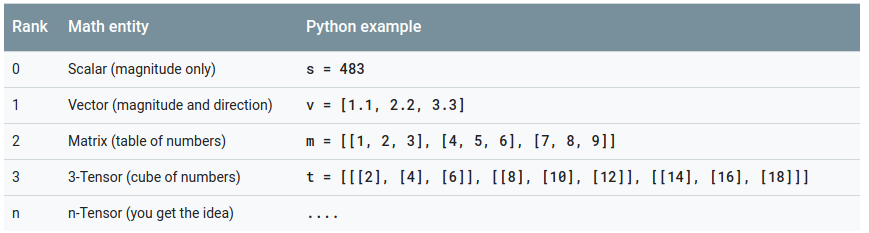
(a) Ranks
Ranks用来表示张量的维度。
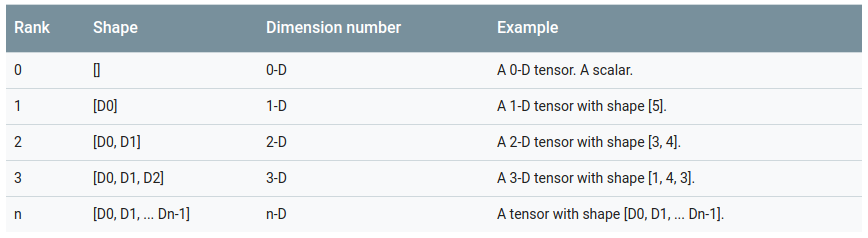
(b) Shape
Shape也用来表示维度,下表展示了Shape和Rank的联系。
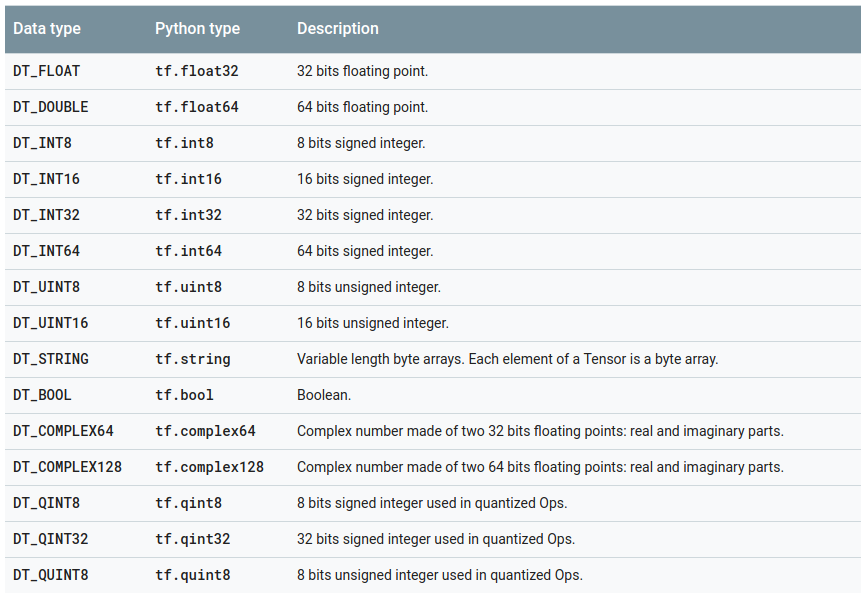
(c) Data types
1.2 常量 (Constants)
0. 小试牛刀里便是创建常量形式的张量,这个比较简单,就参见本文的第0节吧!如果想了解更多,就请点击第0节拓展里的链接。
1.3 变量 (Variables)
变量这个就有点小小复杂了。。。。
Anyway,Let's go!!!
1.3.1 创建
 # Create two variables.
 weights = tf.Variable(tf.random_normal([784, 200], stddev=0.35),
                       name="weights")
 biases = tf.Variable(tf.zeros([200]), name="biases")
创建张量时需要指明张量的Shape,当然,TensorFlow存在更改Shape的机制(这个嘛,以后再聊)
仅仅是创建完还不行哦,还需要初始化!
1.3.2 初始化
初始化的命令为: tf.global_variables_initializer()
 # Create two variables.
 weights = tf.Variable(tf.random_normal([784, 200], stddev=0.35),
                       name="weights")
 biases = tf.Variable(tf.zeros([200]), name="biases")
 ...
 # Add an op to initialize the variables.
 init_op = tf.global_variables_initializer()

 # Later, when launching the model
 with tf.Session() as sess:
   # Run the init operation.
   sess.run(init_op)
   ...
   # Use the model
   ...
你有时候会需要用另一个变量的初始化值给当前变量初始化。由于 tf.initialize_all_variables() 是并行地初始化所有变量,所以在有这种需求的情况下需要小心。
用其它变量的值初始化一个新的变量时,可以使用其它变量的 initialized_value() 属性。你可以直接把已初始化的值作为新变量的初始值,或者把它当做 tensor 计算得到一个值赋予新变量。
 # Create a variable with a random value.
 weights = tf.Variable(tf.random_normal([784, 200], stddev=0.35),
                       name="weights")
 # Create another variable with the same value as 'weights'.
 w2 = tf.Variable(weights.initialized_value(), name="w2")
 # Create another variable with twice the value of 'weights'
 w_twice = tf.Variable(weights.initialized_value() * 2.0, name="w_twice")
2. 简单数学运算
 a = tf.constant([3, 6])
 b = tf.constant([2, 2])
 tf.add(a, b) # >> [5 8]
 tf.add_n([a, b, b]) # >> [7 10]. Equivalent to a + b + b
 tf.mul(a, b) # >> [6 12] because mul is element wise
 tf.matmul(a, b) # >> ValueError
 tf.matmul(tf.reshape(a, shape=[1, 2]), tf.reshape(b, shape=[2, 1])) # >> [[18]]
 tf.div(a, b) # >> [1 3]
 tf.mod(a, b) # >> [1 0]
TensorFlow学习笔记2——数据类型及简单运算的更多相关文章
- tensorflow学习笔记——使用TensorFlow操作MNIST数据(1)
续集请点击我:tensorflow学习笔记——使用TensorFlow操作MNIST数据(2) 本节开始学习使用tensorflow教程,当然从最简单的MNIST开始.这怎么说呢,就好比编程入门有He ...
- tensorflow学习笔记二:入门基础 好教程 可用
http://www.cnblogs.com/denny402/p/5852083.html tensorflow学习笔记二:入门基础 TensorFlow用张量这种数据结构来表示所有的数据.用一 ...
- Tensorflow学习笔记2019.01.22
tensorflow学习笔记2 edit by Strangewx 2019.01.04 4.1 机器学习基础 4.1.1 一般结构: 初始化模型参数:通常随机赋值,简单模型赋值0 训练数据:一般打乱 ...
- 深度学习-tensorflow学习笔记(1)-MNIST手写字体识别预备知识
深度学习-tensorflow学习笔记(1)-MNIST手写字体识别预备知识 在tf第一个例子的时候需要很多预备知识. tf基本知识 香农熵 交叉熵代价函数cross-entropy 卷积神经网络 s ...
- tensorflow学习笔记(1)-基本语法和前向传播
tensorflow学习笔记(1) (1)tf中的图 图中就是一个计算图,一个计算过程. 图中的constant是个常量 计 ...
- tensorflow学习笔记——使用TensorFlow操作MNIST数据(2)
tensorflow学习笔记——使用TensorFlow操作MNIST数据(1) 一:神经网络知识点整理 1.1,多层:使用多层权重,例如多层全连接方式 以下定义了三个隐藏层的全连接方式的神经网络样例 ...
- TensorFlow学习笔记——LeNet-5(训练自己的数据集)
在之前的TensorFlow学习笔记——图像识别与卷积神经网络(链接:请点击我)中了解了一下经典的卷积神经网络模型LeNet模型.那其实之前学习了别人的代码实现了LeNet网络对MNIST数据集的训练 ...
- tensorflow学习笔记——VGGNet
2014年,牛津大学计算机视觉组(Visual Geometry Group)和 Google DeepMind 公司的研究员一起研发了新的深度卷积神经网络:VGGNet ,并取得了ILSVRC201 ...
- TensorFlow学习笔记10-卷积网络
卷积网络 卷积神经网络(Convolutional Neural Network,CNN)专门处理具有类似网格结构的数据的神经网络.如: 时间序列数据(在时间轴上有规律地采样形成的一维网格): 图像数 ...
随机推荐
- 一个"Median Maintenance"问题
题目要求: Download the text file here. The goal of this problem is to implement the "Median Mainten ...
- JAVA基础——数组详解
学习JAVA中数组的使用 一.什么是数组? 问:编写代码保存 4 名学生的考试成绩. 答:简单啊,定义 4 个变量呗 问:那"计算全年级 400 名学生的考试成绩",肿么办 答: ...
- 如何连接新浪sae共享数据库
网上找了很久,太杂了,下文介绍如何连接新浪sae共享数据库,方便有效 1.首先贴出官方文档: 以下是一些和共享MySQL数据库服务相关的预定义常量,你可以直接引用这些参数来连接数据库: 用户名 : S ...
- H5学习第二周
怎么说,在各种感觉中h5学习的第二周已经过来了,先总结一下,感觉学习h5是一件让我爱恨交加的事,学会一些新的知识并把它成功运行出来的时候是非常激动和兴奋的,但是有时候搞不懂一个标签或者属性的时候,就有 ...
- Centos 6.x 部署pptp VPN
安装 系统检测不到PPTP的时候 使用一下方法安装PPTP 下载地址:http://poptop.sourceforge.net/yum/stable/packages rpm -ivh http: ...
- [Splay伸展树]splay树入门级教程
首先声明,本教程的对象是完全没有接触过splay的OIer,大牛请右上角.. 首先引入一下splay的概念,他的中文名是伸展树,意思差不多就是可以随意翻转的二叉树 PS:百度百科中伸展树读作:BoGa ...
- usaco training 4.2.2 The Perfect Stall 最佳牛栏 题解
The Perfect Stall题解 Hal Burch Farmer John completed his new barn just last week, complete with all t ...
- 【ALB学习笔记】基于事件触发方式的串行通信接口数据接收案例
基于事件触发方式的串行通信接口数据接收案例 广东职业技术学院 欧浩源 一.案例背景 之前写过一篇<基于多线程方式的串行通信接口数据接收案例>的博文,讨论了采用轮询方式接收串口数据的情况. ...
- pc端的企业网站(IT修真院test8)详解1-2
今天接着说test8的页面还原. 头部header和尾部footer 我一开始是想直接使用bootstrap的栅格系统来实现的.但是内容的定位出了不少麻烦. 那么就索性用原生html+css来还原页面 ...
- 关于启动文件分析的(MDK-ARM) 【转】
;******************** (C) COPYRIGHT 2010 STMicroelectronics ******************** ;* File Name : star ...