
五、bootstrap-Table Treegrid
一、bootstrap-Table Treegrid
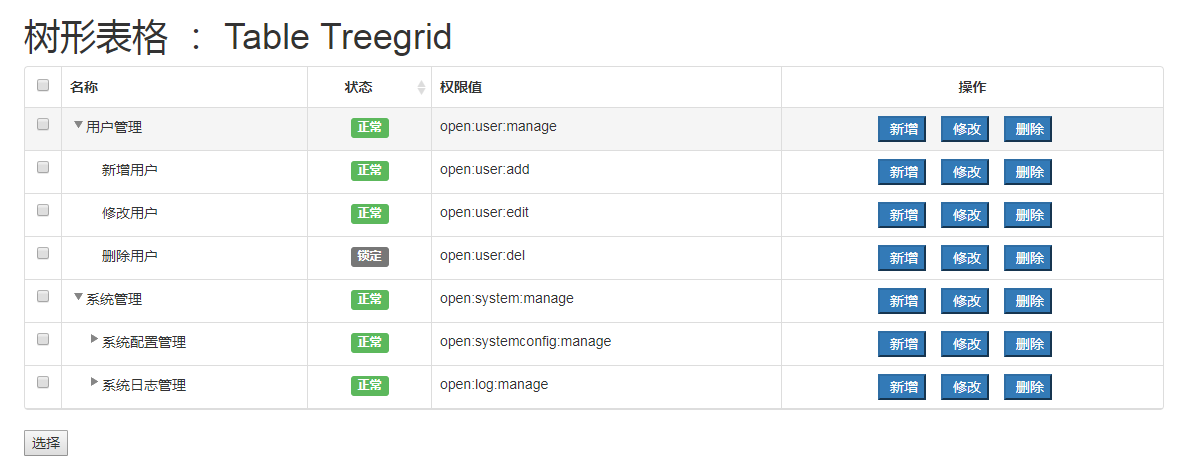
<!DOCTYPE HTML>

<html lang="zh-cn">

<head>

    <meta charset="utf-8" />

    <meta http-equiv="X-UA-Compatible" content="IE=edge">

    <meta content="width=device-width,initial-scale=1.0" name="viewport">

    <meta content="yes" name="apple-mobile-web-app-capable">

    <meta content="black" name="apple-mobile-web-app-status-bar-style">

    <meta content="telephone=no" name="format-detection">

    <meta content="email=no" name="format-detection">

    <title>系统管理</title>

    <link href="https://cdn.bootcss.com/bootstrap/3.3.7/css/bootstrap.min.css" rel="stylesheet">

    <link href="https://cdn.bootcss.com/bootstrap-table/1.11.1/bootstrap-table.min.css" rel="stylesheet">

    <link rel="stylesheet" href="https://cdn.bootcss.com/jquery-treegrid/0.2.0/css/jquery.treegrid.min.css">

</head>

<body>

<div class="container">

    <h1>树形表格 : Table Treegrid</h1>

    <table id="table"></table>

    <br/>

    <button onclick="test()">选择</button>

</div>

</body>

<script src="https://cdn.bootcss.com/jquery/3.1.1/jquery.min.js"></script>

<script src="https://cdn.bootcss.com/bootstrap-table/1.12.1/bootstrap-table.min.js"></script>

<script src="https://cdn.bootcss.com/bootstrap-table/1.12.0/extensions/treegrid/bootstrap-table-treegrid.js"></script>

<script src="https://cdn.bootcss.com/jquery-treegrid/0.2.0/js/jquery.treegrid.min.js"></script>

<script type="text/javascript">

    var $table = $('#table');

    var data = JSON.parse(

        '[{"id":1,"pid":0,"status":1,"name":"用户管理","permissionValue":"open:user:manage"},' +

        '{"id":2,"pid":0,"status":1,"name":"系统管理","permissionValue":"open:system:manage"},' +

        '{"id":3,"pid":1,"status":1,"name":"新增用户","permissionValue":"open:user:add"},' +

        '{"id":4,"pid":1,"status":1,"name":"修改用户","permissionValue":"open:user:edit"},' +

        '{"id":5,"pid":1,"status":0,"name":"删除用户","permissionValue":"open:user:del"},' +

        '{"id":6,"pid":2,"status":1,"name":"系统配置管理","permissionValue":"open:systemconfig:manage"},' +

        '{"id":7,"pid":6,"status":1,"name":"新增配置","permissionValue":"open:systemconfig:add"},' +

        '{"id":8,"pid":6,"status":1,"name":"修改配置","permissionValue":"open:systemconfig:edit"},' +

        '{"id":9,"pid":6,"status":0,"name":"删除配置","permissionValue":"open:systemconfig:del"},' +

        '{"id":10,"pid":2,"status":1,"name":"系统日志管理","permissionValue":"open:log:manage"},' +

        '{"id":11,"pid":10,"status":1,"name":"新增日志","permissionValue":"open:log:add"},' +

        '{"id":12,"pid":10,"status":1,"name":"修改日志","permissionValue":"open:log:edit"},' +

        '{"id":13,"pid":10,"status":0,"name":"删除日志","permissionValue":"open:log:del"}]');

    $(function() {

        //控制台输出一下数据

        console.log(data);

        $table.bootstrapTable({

            data:data,

            idField: 'id',

            dataType:'jsonp',

            columns: [

                { field: 'check',  checkbox: true, formatter: function (value, row, index) {

                        if (row.check == true) {

                           // console.log(row.serverName);

                            //设置选中

                            return {  checked: true };

                        }

                    }

                },

                { field: 'name',  title: '名称' },

               // {field: 'id', title: '编号', sortable: true, align: 'center'},

               // {field: 'pid', title: '所属上级'},

                { field: 'status',  title: '状态', sortable: true,  align: 'center', formatter: 'statusFormatter'  },

                { field: 'permissionValue', title: '权限值'  },

                { field: 'operate', title: '操作', align: 'center', events : operateEvents, formatter: 'operateFormatter' },

            ],

            // bootstrap-table-treegrid.js 插件配置 -- start

            //在哪一列展开树形

            treeShowField: 'name',

            //指定父id列

            parentIdField: 'pid',

            onResetView: function(data) {

                //console.log('load');

                $table.treegrid({

                    initialState: 'collapsed',// 所有节点都折叠

                    // initialState: 'expanded',// 所有节点都展开,默认展开

                    treeColumn: 1,

                    // expanderExpandedClass: 'glyphicon glyphicon-minus',  //图标样式

                    // expanderCollapsedClass: 'glyphicon glyphicon-plus',

                    onChange: function() {

                        $table.bootstrapTable('resetWidth');

                    }

                });

                //只展开树形的第一级节点

                $table.treegrid('getRootNodes').treegrid('expand');

            },

            onCheck:function(row){

                var datas = $table.bootstrapTable('getData');

                // 勾选子类

                selectChilds(datas,row,"id","pid",true);

                // 勾选父类

                selectParentChecked(datas,row,"id","pid")

                // 刷新数据

                $table.bootstrapTable('load', datas);

            },

            onUncheck:function(row){

                var datas = $table.bootstrapTable('getData');

                selectChilds(datas,row,"id","pid",false);

                $table.bootstrapTable('load', datas);

            },

            // bootstrap-table-treetreegrid.js 插件配置 -- end

        });

    });

    // 格式化按钮

    function operateFormatter(value, row, index) {

        return [

            '<button type="button" class="RoleOfadd btn-small  btn-primary" style="margin-right:15px;"><i class="fa fa-plus" ></i> 新增</button>',

            '<button type="button" class="RoleOfedit btn-small   btn-primary" style="margin-right:15px;"><i class="fa fa-pencil-square-o" ></i> 修改</button>',

            '<button type="button" class="RoleOfdelete btn-small   btn-primary" style="margin-right:15px;"><i class="fa fa-trash-o" ></i> 删除</button>'

        ].join('');

    }

    // 格式化类型

    function typeFormatter(value, row, index) {

        if (value === 'menu') {  return '菜单';  }

        if (value === 'button') {  return '按钮'; }

        if (value === 'api') {  return '接口'; }

        return '-';

    }

    // 格式化状态

    function statusFormatter(value, row, index) {

        if (value === 1) {

            return '<span class="label label-success">正常</span>';

        } else {

            return '<span class="label label-default">锁定</span>';

        }

    }

    //初始化操作按钮的方法

    window.operateEvents = {

        'click .RoleOfadd': function (e, value, row, index) {

            add(row.id);

        },

        'click .RoleOfdelete': function (e, value, row, index) {

            del(row.id);

        },

        'click .RoleOfedit': function (e, value, row, index) {

            update(row.id);

        }

    };

</script>

<script>

    /**

     * 选中父项时,同时选中子项

     * @param datas 所有的数据

     * @param row 当前数据

     * @param id id 字段名

     * @param pid 父id字段名

     */

    function selectChilds(datas,row,id,pid,checked) {

        for(var i in datas){

            if(datas[i][pid] == row[id]){

                datas[i].check=checked;

                selectChilds(datas,datas[i],id,pid,checked);

            };

        }

    }

    function selectParentChecked(datas,row,id,pid){

        for(var i in datas){

            if(datas[i][id] == row[pid]){

                datas[i].check=true;

                selectParentChecked(datas,datas[i],id,pid);

            };

        }

    }

    function test() {

        var selRows = $table.bootstrapTable("getSelections");

        if(selRows.length == 0){

            alert("请至少选择一行");

            return;

        }

        var postData = "";

        $.each(selRows,function(i) {

            postData +=  this.id;

            if (i < selRows.length - 1) {

                postData += ", ";

            }

        });

        alert("你选中行的 id 为:"+postData);

    }

    function add(id) {

        alert("add 方法 , id = " + id);

    }

    function del(id) {

        alert("del 方法 , id = " + id);

    }

    function update(id) {

        alert("update 方法 , id = " + id);

    }

</script>

</html>
五、bootstrap-Table Treegrid的更多相关文章
- ABP+AdminLTE+Bootstrap Table权限管理系统第五节--WBEAPI及SwaggerUI
一,Web API ABP的动态WebApi实现了直接对服务层的调用(其实病没有跨过ApiController,只是将ApiController公共化,对于这一点的处理类似于MVC,对服务端的 调用没 ...
- ABP module-zero +AdminLTE+Bootstrap Table+jQuery权限管理系统第十五节--缓存小结与ABP框架项目中 Redis Cache的实现
返回总目录:ABP+AdminLTE+Bootstrap Table权限管理系统一期 缓存 为什么要用缓存 为什么要用缓存呢,说缓存之前先说使用缓存的优点. 减少寄宿服务器的往返调用(round-tr ...
- JS组件系列——表格组件神器:bootstrap table
前言:之前一直在忙着各种什么效果,殊不知最基础的Bootstrap Table用法都没有涉及,罪过,罪过.今天补起来吧.上午博主由零开始自己从头到尾使用了一遍Bootstrap Table ,遇到不少 ...
- JS组件系列——表格组件神器:bootstrap table(二:父子表和行列调序)
前言:上篇 JS组件系列——表格组件神器:bootstrap table 简单介绍了下Bootstrap Table的基础用法,没想到讨论还挺热烈的.有园友在评论中提到了父子表的用法,今天就结合Boo ...
- JS组件系列——表格组件神器:bootstrap table(三:终结篇,最后的干货福利)
前言:前面介绍了两篇关于bootstrap table的基础用法,这章我们继续来看看它比较常用的一些功能,来个终结篇吧,毛爷爷告诉我们做事要有始有终~~bootstrap table这东西要想所有功能 ...
- JS组件系列——Bootstrap Table 表格行拖拽(二:多行拖拽)
前言:前天刚写了篇JS组件系列——Bootstrap Table 表格行拖拽,今天接到新的需要,需要在之前表格行拖拽的基础上能够同时拖拽选中的多行.博主用了半天时间研究了下,效果是出来了,但是感觉不尽 ...
- 后台系统组件:一丶bootstrap table
http://www.cnblogs.com/landeanfen/p/4976838.html (bootstrap table) http://www.cnblogs.com/landeanfen ...
- ABP+AdminLTE+Bootstrap Table权限管理系统一期
学而时习之,不亦说乎,温顾温知新,可以为师矣. 这也是算是一种学习的方法和态度吧,经常去学习和总结,在博客园看了很多大神的文章,写下一点对于ABP(ABP是“ASP.NET Boilerplat ...
- ABP+AdminLTE+Bootstrap Table权限管理系统第六节--abp控制器扩展及json封装
一,控制器AbpController 说完了Swagger ui 我们再来说一下abp对控制器的处理和json的封装. 首先我们定义一个控制器,在新增控制器的时候,控制器会自动继承自AbpContro ...
- ABP module-zero +AdminLTE+Bootstrap Table+jQuery权限管理系统第十三节--RBAC模式及ABP权限管理(附送福利)
ABP+AdminLTE+Bootstrap Table权限管理系统一期 Github:https://github.com/Jimmey-Jiang/ABP-ASP.NET-Boilerplate- ...
随机推荐
- Notepad++安装Zen Codingt插件
Zen Coding介绍 Zen Coding是一套面向文本编辑器的插件,它允许通过IDE工具的联想功能(内容辅助)高速度的编辑HTML.XML.XSL和其他结构化的代码格式. Zen Coding由 ...
- 【串线篇】spring boot配置文件大全【下】
一.配置文件占位符 1.1.随机数 ${random.value}.${random.int}.${random.long} ${random.int(10)}.${random.int[1024,6 ...
- 12.整合neo4j
neo4j 官网下载: https://neo4j.com/download-center/#community 教程: http://neo4j.com.cn/public/cypher/defau ...
- thread 类详解
java.lang.Thread类详解 一.前言 位于java.lang包下的Thread类是非常重要的线程类,它实现了Runnable接口,今天我们来学习一下Thread类,在学习Thread类之前 ...
- 【leetcode】623. Add One Row to Tree
题目如下: Given the root of a binary tree, then value v and depth d, you need to add a row of nodes with ...
- spring+springMVC+mybatis框架整合——配置文件说明
如下图 web.xml配置说明: spring配置文件说明-1: spring配置文件说明-2: spring配置助记: 扫注(base) 读配(loc) 数据源(和comb(使用c3p0数据源)) ...
- 数据挖掘:周期性分析SMCA算法
数据挖掘:周期性分析SMCA算法 原文地址:http://ieeexplore.ieee.org/stamp/stamp.jsp?arnumber=1423978 算法介绍 以时间顺序挖掘周期性的模式 ...
- VMware vSphere(虚拟化平台)
VMware vSphere 是业界领先且最可靠的虚拟化平台.vSphere将应用程序和操作系统从底层硬件分离出来,从而简化了 IT操作.您现有的应用程序可以看到专有资源,而您的服务器则可以作为资源池 ...
- jmeter添加自定义扩展函数之小写转换大写
1,打开eclipse,新建maven工程,在pom中引用jmeter核心jar包,具体请看---https://www.cnblogs.com/guanyf/p/10863033.html---,这 ...
- jq与js获取值操作
jq与js获取值操作 <!DOCTYPE html> <html> <head> <meta charset="UTF-8"> &l ...