
jmeter添加自定义扩展函数之图片base64
原文连接:---------https://www.cnblogs.com/qiaoyeye/p/7218770.html-----------
打开eclipse,新建maven工程,在pom中引用jmeter核心jar包:
<!-- https://mvnrepository.com/artifact/org.apache.jmeter/ApacheJMeter_core -->

<dependency>

    <groupId>org.apache.jmeter</groupId>

    <artifactId>ApacheJMeter_core</artifactId>

    <version>3.2</version>

</dependency>

<!-- https://mvnrepository.com/artifact/org.apache.jmeter/ApacheJMeter_functions -->

<dependency>

    <groupId>org.apache.jmeter</groupId>

    <artifactId>ApacheJMeter_functions</artifactId>

    <version>3.2</version>

</dependency>
1,新建一个包com.mytest.functions,包名要包含functions,因为jmeter.properties对这块有配置,可见该文件的classfinder.functions.contain=.functions
2,在该包下新建一个类并继承AbstractFunction,重写该类的所有方法,具体如下:
package com.mytest.functions;

import java.io.FileInputStream;

import java.io.InputStream;

import java.util.Collection;

import java.util.LinkedList;

import java.util.List;

import org.apache.jmeter.engine.util.CompoundVariable;

import org.apache.jmeter.functions.AbstractFunction;

import org.apache.jmeter.functions.InvalidVariableException;

import org.apache.jmeter.samplers.SampleResult;

import org.apache.jmeter.samplers.Sampler;

import org.apache.jmeter.threads.JMeterVariables;

import sun.misc.BASE64Encoder;

public class MyBase64 extends AbstractFunction{

    //自定义function的描述

    private static final List<String> desc = new LinkedList<String>();

    static {

        desc.add("图片路径");

    }

    static {

        desc.add("图片base64后存放变量");

    }

    private static final String KEY = "__MyBase64";

    //存放传入参数的值的变量

    private Object[] values;

    //描述参数

    public List<String> getArgumentDesc() {

        // TODO Auto-generated method stub

        return desc;

    }

    @Override

    //函数的执行

    public synchronized String execute(SampleResult arg0, Sampler arg1) throws InvalidVariableException {

        // TODO Auto-generated method stub

        JMeterVariables localJMeterVariables = getVariables();

        String str1 = ((CompoundVariable)this.values[]).execute();

        String str2 = getImgBase64(str1);

        if ((localJMeterVariables != null) && (this.values.length > )) {

          String str3 = ((CompoundVariable)this.values[]).execute().trim();

          localJMeterVariables.put(str3, str2);

        }

        return str2;

    }

    @Override

    public String getReferenceKey() {

        // TODO Auto-generated method stub

        //提供jmeter函数助手显示的名称

        return KEY;

    }

    @Override

    public synchronized void setParameters(Collection<CompoundVariable> arg0) throws InvalidVariableException {

        // TODO Auto-generated method stub

        //检查参数的个数,支持的方法有2个,具体用法参加api:

        /**

         * protected void checkParameterCount(Collection<CompoundVariable> parameters,

                                   int count)

                            throws InvalidVariableException

            Utility method to check parameter counts.

            Parameters:

            parameters - collection of parameters

            count - number of parameters expected

         * */

        //-----------------

        /**

         *

         * protected void checkParameterCount(Collection<CompoundVariable> parameters,

                                   int min,

                                   int max)

                            throws InvalidVariableException

            Utility method to check parameter counts.

            Parameters:

            parameters - collection of parameters

            min - minimum number of parameters allowed

            max - maximum number of parameters allowed

         * */

        //checkParameterCount(arg0, 1);

        checkParameterCount(arg0, , );

        //将参数值存入变量中

        this.values = arg0.toArray();

    }

    public String getImgBase64(String filePath) {

        InputStream in = null;

        byte[] data = null;

        String result = null;

        try {

            in = new FileInputStream(filePath);

            data = new byte[in.available()];

            in.read(data);

            in.close();

            BASE64Encoder encoder = new BASE64Encoder();

            result = encoder.encode(data);

        } catch (Exception e) {

            // TODO Auto-generated catch block

            e.printStackTrace();

        }

        return result;

    }

}
3,由于我写的类没有依赖第三方jar包,引入的jmeter核心包都是jmeter自带的,所以直接导出上面的类为一个jar包,
并把这个jar放在jmeter安装目录的apache-jmeter-3.2\lib\ext下面

4,
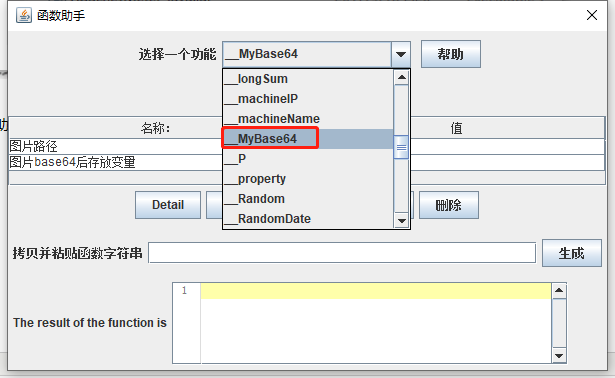
重启jmeter,打开函数助手,可看见如下图:
5,下面我们测试一下这个函数是否能使用,新建一个用户定义的变量分别添加${__MyBase64(C:\\Users\\test\\Desktop\\20190416173622.jpg,imgresult)}<实际应用中使用第一个就可以>和${imgresult}如下图,注意${__MyBase64(C:\\Users\\test\\Desktop\\20190416173622.jpg,imgresult)}一定要在上面
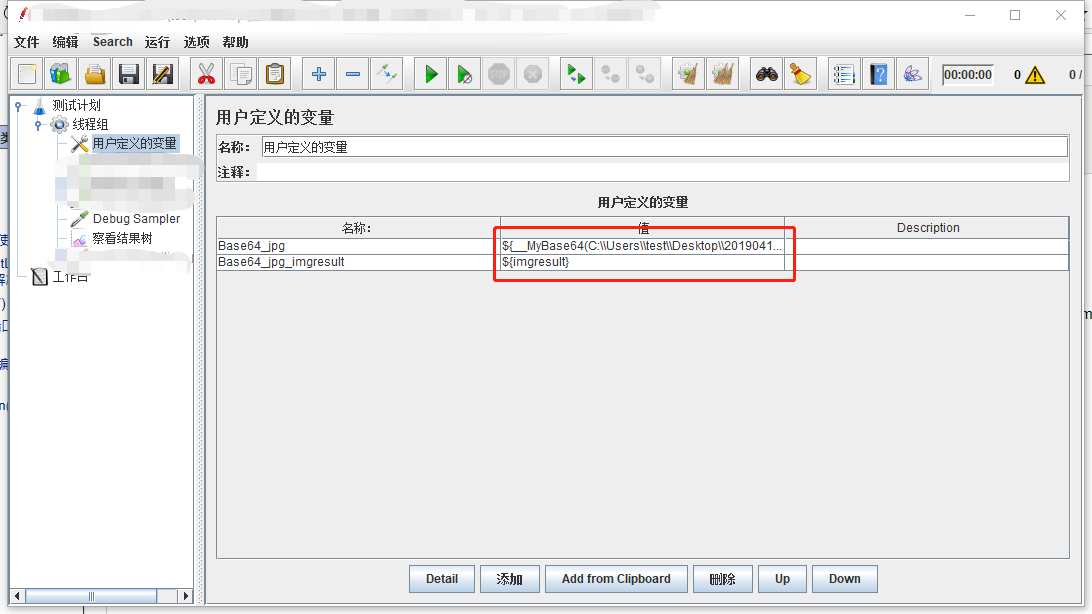
6,运行后可以看到已经成功

7,接口报错分析:
发送接口时,提示500,使用网络生成的base64与之对比,发现得到的字符串有空格问题,<java制动换行引起>,因此要使用jmeter中的BeanShell Sampler对得到的结果进行处理,删除空格。
String Base64_get = vars.get("Base64_jpg");  // 获取用户定义的变量的值

String Base64_get = Base64_get.replaceAll("\\s","");  // /s去除空格

log.info("name:"+Base64_get);  //log打印

vars.put("Base64_get",Base64_get.toString()); //输出Base64_get,用来调用
如果自己无法生成jar,请留言留下联系方式,
同时感谢:作者乔叶叶的代码分享,博主地址:http://www.cnblogs.com/qiaoyeye/
jmeter添加自定义扩展函数之图片base64的更多相关文章
- jmeter添加自定义扩展函数之图片base64编码
打开eclipse,新建maven工程,在pom中引入jmeter核心jar包: <!-- https://mvnrepository.com/artifact/org.apache.jmete ...
- jmeter添加自定义扩展函数之Strng---base64解密
1,打开eclipse,新建maven工程,在pom中引用jmeter核心jar包,具体请看---https://www.cnblogs.com/guanyf/p/10863033.html---,这 ...
- jmeter添加自定义扩展函数之String---base64加密
1,打开eclipse,新建maven工程,在pom中引用jmeter核心jar包,具体请看---https://www.cnblogs.com/guanyf/p/10863033.html---,这 ...
- jmeter添加自定义扩展函数之DoubleSum
1,打开eclipse,新建maven工程,在pom中引用jmeter核心jar包,具体请看---https://www.cnblogs.com/guanyf/p/10863033.html---,这 ...
- jmeter添加自定义扩展函数之if判断
1,打开eclipse,新建maven工程,在pom中引用jmeter核心jar包,具体请看---https://www.cnblogs.com/guanyf/p/10863033.html---,这 ...
- jmeter添加自定义扩展函数之小写转换大写
1,打开eclipse,新建maven工程,在pom中引用jmeter核心jar包,具体请看---https://www.cnblogs.com/guanyf/p/10863033.html---,这 ...
- jmeter添加自定义扩展函数之大写转换小写
1,打开eclipse,新建maven工程,在pom中引用jmeter核心jar包,具体请看---https://www.cnblogs.com/guanyf/p/10863033.html---,这 ...
- jmeter添加自定义扩展函数之MD5加密
1,打开eclipse,新建maven工程,在pom中引用jmeter核心jar包,具体请看---https://www.cnblogs.com/guanyf/p/10863033.html---,这 ...
- js压缩图片base64长度
var myCanvas=$('.img-container > img').cropper('getCroppedCanvas'); (function (base64){ var image ...
随机推荐
- Selenium+Java环境搭建
1. 安装JDK URL:http://www.oracle.com/technetwork/java/javase/downloads/ 2. 配置环境变量 JAVA_HOME = E:\Java\ ...
- 06:(h5*)Vue第六天
目录 1:iView 2: element 3: vuex 正文 1:i-view 1:装包 npm install view-design --save 2:导包 import ViewUI f ...
- jmeter:清除本地指定目录下的所有类型文件
1,创建一个sampler 2,要在本地有一个目录的文件 3,直接上代码 String path = "C:\\临时文件\\test111" ; File file ...
- java_第一年_JavaWeb(1)
注:此系列javaweb的知识是我在一位“孤傲苍狼”的园友学习后记下来的笔记,并非原创^_^ Web开发的基本概念 web应用程序——提供浏览器访问的程序,也成为web应用,包含静态或动态资源:所谓的 ...
- Codeforces - 1191C - Tokitsukaze and Discard Items - 模拟
https://codeforces.com/contest/1191/problem/C 一开始想象了一下,既然每次删除都是往前面靠,那么好像就是页数*页容量+空位数=最多容纳到的坐标. 至于为什么 ...
- hadoop工作流调度系统
常见工作流调度系统 Oozie, Azkaban, Cascading, Hamake 各种调度工具特性对比 特性 Hamake Oozie Azkaban Cascading 工作流描述语言 XML ...
- 【学习总结】Python-3-字符串函数split()的妙用
参考: 菜鸟教程-Python3-Python字符串-split() 语法: str.split(str="", num=string.count(str)) 参数 str -- ...
- 常见前端HTML5面试题
1.H5新标签新特性 新标签:header,nav,footer,aside,article,section,Canvas,audio,video 新特性:localStorag, sessionSt ...
- 四、附加到进程调试(.NET Core)
1.安装.net core windows server托管工具包: 1.下载https://dotnet.microsoft.com/download/thank-you/dotnet-runtim ...
- 转载:PhpExcel使用方法
下面是总结的几个使用方法 include 'PHPExcel.php'; include 'PHPExcel/Writer/Excel2007.php'; //或者include 'PHPExcel/ ...