
React-Native 之 GD (十三)数据持久化(realm) 及 公共Cell
1.数据持久化
数据持久化是移动端的一个重要部分,刚发现 Realm 原来已经支持 React-Native 了
步骤一: 引入 realm
$ npm install realm --save
步骤二: 添加 Realm 与 工程的链接
react-native >= 0.31.0
react-native link realm
react-native < 0.31.0
rnpm link realm
首先,在为了方便使用,也为了减少第三方框架对工程的 “污染”,我们需要对框架进行一次 基础 的封装。
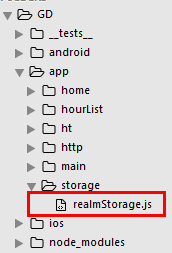
realmStorage.js
/**

 * 数据持久化

 * 本地数据存储

 */

// 提供变量,便于外部调用

var RealmBase = {};

import Realm from 'realm';

// 创建数据表(首页)

const HomeSchame = {

    name:'HomeData',

    properties:{

        id:'int',

        title:'string',

        image:'string',

        mall:'string', // 商城平台

        pubtime:'string',

        fromsite:'string',

    }

};

// 创建数据表(海淘)

const HTSchame = {

    name:'HTData',

    properties:{

        id:'int',

        title:'string',

        image:'string',

        mall:'string',

        pubtime:'string',

        fromsite:'string',

    }

};

// 初始化realm

let realm = new Realm({schema:[HomeSchame, HTSchame]});

// 增加

RealmBase.create = function (schame, data) {

    realm.write(() => {

        for (let i = 0; i<data.length; i++) {

            let temp = data[i];

            realm.create(schame, {id:temp.id, title:temp.title, image:temp.image, mall:temp.mall, pubtime:temp.pubtime, fromsite:temp.fromsite});

        }

    })

}

// 查询全部数据

RealmBase.loadAll = function (schame) {

    return realm.objects(schame);

}

// 条件查询

RealmBase.filtered = function (schame, filtered) {

    // 获取对象

    let objects = realm.objects(schame);

    // 筛选

    let object = objects.filtered(filtered);

    if (object) {   // 有对象

        return object;

    }else {

        return '未找到数据';

    }

}

// 删除所有数据

RealmBase.removeAllData = function (schame) {

    realm.write(() => {

        // 获取对象

        let objects = realm.objects(schame);

        // 删除表

        realm.delete(objects);

    })

}

global.RealmBase = RealmBase;
GDMain.js 调用
// 引入 HTTP封装组件

import HTTP from '../http/HTTPBase';

// 引入 本地数据存储封装组件 (数据持久化)

import RealmStorage from '../storage/realmStorage';
GDHome.js
/**

 * 首页

 */

import React, { Component } from 'react';

import {

    StyleSheet,

    Text,

    View,

    TouchableOpacity,

    Image,

    ListView,

    Dimensions,

    ActivityIndicator,

    Modal, // 模态

    AsyncStorage, // 缓存数据库(数据持久化)

} from 'react-native';

// 引入 下拉刷新组件

import {PullList} from 'react-native-pull';

// 导航器

import CustomerComponents, {

    Navigator

} from 'react-native-deprecated-custom-components';

// 获取屏幕宽高

const {width, height} = Dimensions.get('window');

// 引入自定义导航栏组件

import CommunalNavBar from '../main/GDCommunalNavBar';

// 引入 近半小时热门组件

import HalfHourHot from './GDHalfHourHot';

// 引入 搜索页面组件

import Search from '../main/GDSearch';

// 引入 cell

import CommunalHotCell from '../main/GDCommunalHotCell';

// 引入 详情页 组件

import CommunalDetail from '../main/GDCommunalDetail';

// 引入 空白页组件

import NoDataView from '../main/GDNoDataView';

export default class GDHome extends Component {

    // 构造

    constructor(props) {

        super(props);

        // 初始状态

        this.state = {

            dataSource: new ListView.DataSource({rowHasChanged:(r1, r2) => r1 !== r2}), // 数据源 优化

            loaded: false, // 用于判断是否显示空白页

            isModal: false, // 用于判断模态的可见性

        };

        // 全局定义一个空数组用于存储列表数据

        this.data = [];

        // 绑定

        this.loadData = this.loadData.bind(this);

        this.loadMore = this.loadMore.bind(this);

    }

    // 加载最新数据网络请求

    loadData(resolve) {

        let params = {"count" : 10 };

        HTTPBase.get('https://guangdiu.com/api/getlist.php', params)

            .then((responseData) => {

                // 情况数组(刷新时)

                this.data = [];

                // 拼接数据

                this.data = this.data.concat(responseData.data);

                // 重新渲染

                this.setState({

                    dataSource: this.state.dataSource.cloneWithRows(this.data),

                    loaded:true,

                });

                // 关闭刷新动画

                if (resolve !== undefined){

                    setTimeout(() => {

                        resolve();

                    }, 1000);

                }

                // 存储数组中最后一个元素的id

                let cnlastID = responseData.data[responseData.data.length - 1].id;

                AsyncStorage.setItem('cnlastID', cnlastID.toString());  // 只能存储字符或字符串

                // 首页存储数组中第一个元素的id

                let cnfirstID = responseData.data[0].id;

                AsyncStorage.setItem('cnfirstID', cnfirstID.toString());

                 // 清除本地存储的数据

                RealmBase.removeAllData('HomeData');

                // 存储数据到本地

                RealmBase.create('HomeData', responseData.data); // 向数据表存储数据

            })

            .catch((error) => {

                // 数据加载失败,拿到本地存储的数据,展示出来,如果没有存储,那就显示无数据页面

                this.data = RealmBase.loadAll('HomeData'); // 从数据表提取数据

                // 重新渲染

                this.setState({

                    dataSource: this.state.dataSource.cloneWithRows(this.data),

                    loaded:true,

                });

            })

    }

    // 加载更多数据的网络请求

    loadMoreData(value) {

        let params = {

            "count" : 10,

            "sinceid" : value

        };

        HTTPBase.get('https://guangdiu.com/api/getlist.php', params)

            .then((responseData) => {

                // 拼接数据

                this.data = this.data.concat(responseData.data);

                // 重新渲染

                this.setState({

                    dataSource: this.state.dataSource.cloneWithRows(this.data),

                    loaded:true,

                });

                // 存储数组中最后一个元素的id

                let cnlastID = responseData.data[responseData.data.length - 1].id;

                AsyncStorage.setItem('cnlastID', cnlastID.toString());  // 只能存储字符或字符串

            })

            .catch((error) => {

            })

    }

    // 加载更多数据操作

    loadMore() {

        // 读取存储的id

        AsyncStorage.getItem('cnlastID')

            .then((value) => {

                // 数据加载操作

                this.loadMoreData(value);

            })

    }

    // 模态到近半小时热门

    pushToHalfHourHot() {

        this.setState({

            isModal: true

        })

    }

    // 跳转到搜索页面

    pushToSearch() {

        this.props.navigator.push({

            component: Search,

        })

    }

    // 安卓模态销毁模态

    onRequestClose() {

        this.setState({

            isModal: false

        })

    }

    // 关闭模态

    closeModal(data) {

        this.setState({

            isModal:data

        })

    }

    // 返回左边按钮

    renderLeftItem() {

        // 将组件返回出去

        return(

            <TouchableOpacity

                onPress={() => {this.pushToHalfHourHot()}}

            >

                <Image source={{uri:'hot_icon_20x20'}} style={styles.navbarLeftItemStyle} />

            </TouchableOpacity>

        );

    }

    // 返回中间按钮

    renderTitleItem() {

        return(

            <TouchableOpacity>

                <Image source={{uri:'navtitle_home_down_66x20'}} style={styles.navbarTitleItemStyle} />

            </TouchableOpacity>

        );

    }

    // 返回右边按钮

    renderRightItem() {

        return(

            <TouchableOpacity

                // 跳转搜索页面

                onPress={() => {this.pushToSearch()}}

            >

                <Image source={{uri:'search_icon_20x20'}} style={styles.navbarRightItemStyle} />

            </TouchableOpacity>

        );

    }

    // ListView尾部

    renderFooter() {

        return (

            <View style={{height: 100}}>

                <ActivityIndicator />

            </View>

        );

    }

    // 根据网络状态决定是否渲染 listView

    renderListView() {

        if(this.state.loaded === false) {

            // 显示空白页

            return(

                <NoDataView />

            );

        }else{

            return(

                <PullList   // 将ListView 改为 PullList

                    // 下拉刷新

                    onPullRelease={(resolve) => this.loadData(resolve)}

                    // 数据源 通过判断dataSource是否有变化,来判断是否要重新渲染

                    dataSource={this.state.dataSource}

                    renderRow={this.renderRow.bind(this)}

                    // 隐藏水平线

                    showsHorizontalScrollIndicator={false}

                    style={styles.listViewStyle}

                    initialListSize={5}

                    // 返回 listView 头部

                    renderHeader={this.renderHeader}

                    // 上拉加载更多

                    onEndReached={this.loadMore}

                    onEndReachedThreshold={60}

                    renderFooter={this.renderFooter}

                />

            );

        }

    }

    // 通过id 跳转详情页

    pushToDetail(value) {

        this.props.navigator.push({

            component:CommunalDetail,

            params: {

                url: 'https://guangdiu.com/api/showdetail.php' + '?' + 'id=' + value

            }

        })

    }

    // 返回每一行cell的样式

    renderRow(rowData) {

        // 使用cell组件

        return(

            <TouchableOpacity

                // 给每一个cell添加点击事件

                onPress={() => this.pushToDetail(rowData.id)}

            >

                <CommunalHotCell

                    image={rowData.image}

                    title={rowData.title}

                />

            </TouchableOpacity>

        );

    }

    // 生命周期 组件渲染完成 已经出现在dom文档里

    componentDidMount() {

        // 请求数据

        this.loadData();

    }

    render() {

        return (

            <View style={styles.container}>

                {/* 初始化模态 */}

                <Modal

                    animationType='slide'  // 动画 底部弹窗

                    transparent={false}  // 透明度

                    visible={this.state.isModal}  // 可见性

                    onRequestClose={() => this.onRequestClose()}  // 销毁

                >

                    <Navigator

                        initialRoute={{

                            name:'halfHourHot',

                            component:HalfHourHot

                        }}

                        renderScene={(route, navigator) => {

                            let Component = route.component;

                            return <Component

                                removeModal={(data) => this.closeModal(data)}

                                {...route.params}

                                navigator={navigator} />

                        }} />

                </Modal>

                {/* 导航栏样式 */}

                <CommunalNavBar

                    leftItem = {() => this.renderLeftItem()}

                    titleItem = {() => this.renderTitleItem()}

                    rightItem = {() => this.renderRightItem()}

                />

                {/* 根据网络状态决定是否渲染 listView */}

                {this.renderListView()}

            </View>

        );

    }

}

const styles = StyleSheet.create({

    container: {

        flex: 1,

        alignItems: 'center',

    },

    navbarLeftItemStyle: {

        width:20,

        height:20,

        marginLeft:15,

    },

    navbarTitleItemStyle: {

        width:66,

        height:20,

    },

    navbarRightItemStyle: {

        width:20,

        height:20,

        marginRight:15,

    },

    listViewStyle: {

        width:width,

    },

});
核心代码:
// 加载最新数据网络请求

    loadData(resolve) {

        let params = {"count" : 10 };

        HTTPBase.get('https://guangdiu.com/api/getlist.php', params)

            .then((responseData) => {

                // 情况数组(刷新时)

                this.data = [];

                // 拼接数据

                this.data = this.data.concat(responseData.data);

                // 重新渲染

                this.setState({

                    dataSource: this.state.dataSource.cloneWithRows(this.data),

                    loaded:true,

                });

                // 关闭刷新动画

                if (resolve !== undefined){

                    setTimeout(() => {

                        resolve();

                    }, 1000);

                }

                // 存储数组中最后一个元素的id

                let cnlastID = responseData.data[responseData.data.length - 1].id;

                AsyncStorage.setItem('cnlastID', cnlastID.toString());  // 只能存储字符或字符串

                // 首页存储数组中第一个元素的id

                let cnfirstID = responseData.data[0].id;

                AsyncStorage.setItem('cnfirstID', cnfirstID.toString());

                 // 清除本地存储的数据

                RealmBase.removeAllData('HomeData');

                // 存储数据到本地

                RealmBase.create('HomeData', responseData.data); // 向数据表存储数据

            })

            .catch((error) => {

                // 数据加载失败,拿到本地存储的数据,展示出来,如果没有存储,那就显示无数据页面

                this.data = RealmBase.loadAll('HomeData'); // 从数据表提取数据

                // 重新渲染

                this.setState({

                    dataSource: this.state.dataSource.cloneWithRows(this.data),

                    loaded:true,

                });

            })

    }
2.因为 realm 下载的内容过大,不易上传至 github 需要在 .gitignore 上设置 忽略
/node_modules/realm/*
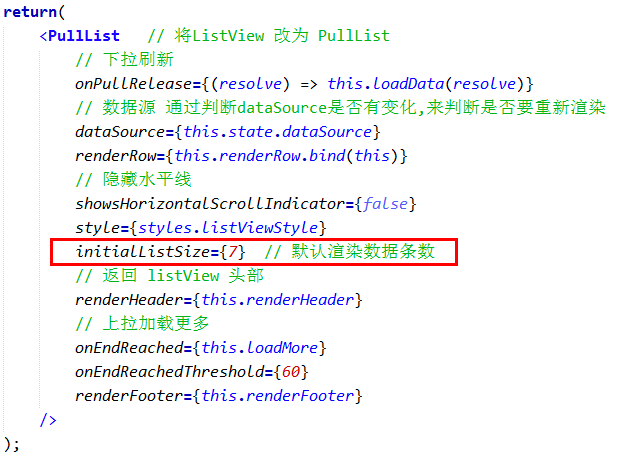
3.设置 ListView 默认显示条数,避免列表下出现空白
4.自定义详情cell
首先,还是一样,我们先来创建 GDCommunalCell 文件,并且我们将前面 自定义cell 里面的内容 copy 一下,放到这个文件中,并进行相应修改:
GDCommunalCell.js
/**

 * 公共 Cell

 */

import React, { Component, PropTypes } from 'react';

import {

    StyleSheet,

    Text,

    View,

    Dimensions,

    Platform,

    Image,

} from 'react-native';

// 获取屏幕宽高

const {width, height} = Dimensions.get('window');

export default class GDCommunalCell extends Component {

	// 定义成员属性

	static propTypes = {

        image:PropTypes.string,

        title:PropTypes.string,

        mall:PropTypes.string, // 平台

        pubTime:PropTypes.string, // 时间

        fromSite:PropTypes.string, // 来源

    };

    renderDate(pubTime, fromSite) {

        // 时间差的计算

        let minute = 1000 * 60;     // 1分钟

        let hour = minute * 60;     // 1小时

        let day = hour * 24;        // 1天

        let week = day * 7;         // 1周

        let month = day * 30;       // 1个月

        // 计算时间差

        let now = new Date().getTime();     // 获取当前时间

        let diffValue = now - Date.parse(pubTime.replace(/-/gi, "/"));

        if (diffValue < 0) return;

        let monthC = diffValue/month;   // 相差了几个月

        let weekC = diffValue/week;     // 相差几周

        let dayC = diffValue/day;       // 相差几天

        let hourC = diffValue/hour      // 相差几小时

        let minuteC = diffValue/minute; // 相差几分钟

        let result;

        if (monthC >= 1) {

            result = parseInt(monthC) + "月前";

        }else if (weekC >= 1) {

            result = parseInt(weekC) + "周前";

        }else if (dayC >= 1) {

            result = parseInt(dayC) + "天前";

        }else if (hourC >= 1) {

            result = parseInt(hourC) + "小时前";

        }else if (minuteC >= 1) {

            result = parseInt(minuteC) + "分钟前";

        }else result = "刚刚";

        return result + ' · ' + fromSite;

    }

    render() {

        return (

            <View style={styles.container}>

                {/* 左边图片 */}

                <Image source={{uri:this.props.image === '' ? 'defaullt_thumb_83x83' : this.props.image}} style={styles.imageStyle} />

                {/* 中间 */}

                <View style={styles.centerViewStyle}>

                    {/* 标题 */}

                    <View>

                        <Text numberOfLines={3} style={styles.titleStyle}>{this.props.title}</Text>

                    </View>

                    {/* 详情 */}

                    <View style={styles.detailViewStyle}>

                        {/* 平台 */}

                        <Text style={styles.detailMallStyle}>{this.props.mall}</Text>

                        {/* 时间 + 来源 */}

                        <Text style={styles.timeStyle}>{this.renderDate(this.props.pubTime, this.props.fromSite)}</Text>

                    </View>

                </View>

                {/* 右边的箭头 */}

                <Image source={{uri:'icon_cell_rightArrow'}} style={styles.arrowStyle} />

            </View>

        );

    }

}

const styles = StyleSheet.create({

    container: {

        flexDirection:'row',

        alignItems:'center',

        justifyContent:'space-between',

        backgroundColor:'white',

        height:100,

        width:width,

        borderBottomWidth:0.5,

        borderBottomColor:'gray',

        marginLeft:15

    },

    imageStyle: {

        width:70,

        height:70,

    },

    centerViewStyle: {

        height:70,

        justifyContent:'space-around',

    },

    titleStyle: {

        width:width * 0.65,

    },

    detailViewStyle: {

        flexDirection:'row',

        justifyContent:'space-between',

        alignItems:'center'

    },

    detailMallStyle: {

        fontSize:12,

        color:'green',

    },

    timeStyle: {

        fontSize:12,

        color:'gray',

    },

    arrowStyle: {

        width:10,

        height:10,

        marginRight:30,

    }

});
GDHome.js 及 GDHt.js 调用
// 引入 公共cell

import CommunalCell from '../main/GDCommunalCell';

GDHome.js
/**

 * 首页

 */

import React, { Component } from 'react';

import {

    StyleSheet,

    Text,

    View,

    TouchableOpacity,

    Image,

    ListView,

    Dimensions,

    ActivityIndicator,

    Modal, // 模态

    AsyncStorage, // 缓存数据库(数据持久化)

} from 'react-native';

// 引入 下拉刷新组件

import {PullList} from 'react-native-pull';

// 导航器

import CustomerComponents, {

    Navigator

} from 'react-native-deprecated-custom-components';

// 获取屏幕宽高

const {width, height} = Dimensions.get('window');

// 引入自定义导航栏组件

import CommunalNavBar from '../main/GDCommunalNavBar';

// 引入 近半小时热门组件

import HalfHourHot from './GDHalfHourHot';

// 引入 搜索页面组件

import Search from '../main/GDSearch';

// 引入 公共cell

import CommunalCell from '../main/GDCommunalCell';

// 引入 详情页 组件

import CommunalDetail from '../main/GDCommunalDetail';

// 引入 空白页组件

import NoDataView from '../main/GDNoDataView';

export default class GDHome extends Component {

    // 构造

    constructor(props) {

        super(props);

        // 初始状态

        this.state = {

            dataSource: new ListView.DataSource({rowHasChanged:(r1, r2) => r1 !== r2}), // 数据源 优化

            loaded: false, // 用于判断是否显示空白页

            isModal: false, // 用于判断模态的可见性

        };

        // 全局定义一个空数组用于存储列表数据

        this.data = [];

        // 绑定

        this.loadData = this.loadData.bind(this);

        this.loadMore = this.loadMore.bind(this);

    }

    // 加载最新数据网络请求

    loadData(resolve) {

        let params = {"count" : 10 };

        HTTPBase.get('https://guangdiu.com/api/getlist.php', params)

            .then((responseData) => {

                // 情况数组(刷新时)

                this.data = [];

                // 拼接数据

                this.data = this.data.concat(responseData.data);

                // 重新渲染

                this.setState({

                    dataSource: this.state.dataSource.cloneWithRows(this.data),

                    loaded:true,

                });

                // 关闭刷新动画

                if (resolve !== undefined){

                    setTimeout(() => {

                        resolve();

                    }, 1000);

                }

                // 存储数组中最后一个元素的id

                let cnlastID = responseData.data[responseData.data.length - 1].id;

                AsyncStorage.setItem('cnlastID', cnlastID.toString());  // 只能存储字符或字符串

                // 首页存储数组中第一个元素的id

                let cnfirstID = responseData.data[0].id;

                AsyncStorage.setItem('cnfirstID', cnfirstID.toString());

                // // 清除本地存储的数据

                // RealmBase.removeAllData('HomeData');

                // // 存储数据到本地

                // RealmBase.create('HomeData', responseData.data); // 向数据表存储数据

            })

            .catch((error) => {

                // // 数据加载失败,拿到本地存储的数据,展示出来,如果没有存储,那就显示无数据页面

                // this.data = RealmBase.loadAll('HomeData'); // 从数据表提取数据

                // // 重新渲染

                // this.setState({

                //     dataSource: this.state.dataSource.cloneWithRows(this.data),

                //     loaded:true,

                // });

            })

    }

    // 加载更多数据的网络请求

    loadMoreData(value) {

        let params = {

            "count" : 10,

            "sinceid" : value

        };

        HTTPBase.get('https://guangdiu.com/api/getlist.php', params)

            .then((responseData) => {

                // 拼接数据

                this.data = this.data.concat(responseData.data);

                // 重新渲染

                this.setState({

                    dataSource: this.state.dataSource.cloneWithRows(this.data),

                    loaded:true,

                });

                // 存储数组中最后一个元素的id

                let cnlastID = responseData.data[responseData.data.length - 1].id;

                AsyncStorage.setItem('cnlastID', cnlastID.toString());  // 只能存储字符或字符串

            })

            .catch((error) => {

            })

    }

    // 加载更多数据操作

    loadMore() {

        // 读取存储的id

        AsyncStorage.getItem('cnlastID')

            .then((value) => {

                // 数据加载操作

                this.loadMoreData(value);

            })

    }

    // 模态到近半小时热门

    pushToHalfHourHot() {

        this.setState({

            isModal: true

        })

    }

    // 跳转到搜索页面

    pushToSearch() {

        this.props.navigator.push({

            component: Search,

        })

    }

    // 安卓模态销毁模态

    onRequestClose() {

        this.setState({

            isModal: false

        })

    }

    // 关闭模态

    closeModal(data) {

        this.setState({

            isModal:data

        })

    }

    // 返回左边按钮

    renderLeftItem() {

        // 将组件返回出去

        return(

            <TouchableOpacity

                onPress={() => {this.pushToHalfHourHot()}}

            >

                <Image source={{uri:'hot_icon_20x20'}} style={styles.navbarLeftItemStyle} />

            </TouchableOpacity>

        );

    }

    // 返回中间按钮

    renderTitleItem() {

        return(

            <TouchableOpacity>

                <Image source={{uri:'navtitle_home_down_66x20'}} style={styles.navbarTitleItemStyle} />

            </TouchableOpacity>

        );

    }

    // 返回右边按钮

    renderRightItem() {

        return(

            <TouchableOpacity

                // 跳转搜索页面

                onPress={() => {this.pushToSearch()}}

            >

                <Image source={{uri:'search_icon_20x20'}} style={styles.navbarRightItemStyle} />

            </TouchableOpacity>

        );

    }

    // ListView尾部

    renderFooter() {

        return (

            <View style={{height: 100}}>

                <ActivityIndicator />

            </View>

        );

    }

    // 根据网络状态决定是否渲染 listView

    renderListView() {

        if(this.state.loaded === false) {

            // 显示空白页

            return(

                <NoDataView />

            );

        }else{

            return(

                <PullList   // 将ListView 改为 PullList

                    // 下拉刷新

                    onPullRelease={(resolve) => this.loadData(resolve)}

                    // 数据源 通过判断dataSource是否有变化,来判断是否要重新渲染

                    dataSource={this.state.dataSource}

                    renderRow={this.renderRow.bind(this)}

                    // 隐藏水平线

                    showsHorizontalScrollIndicator={false}

                    style={styles.listViewStyle}

                    initialListSize={7}  // 默认渲染数据条数

                    // 返回 listView 头部

                    renderHeader={this.renderHeader}

                    // 上拉加载更多

                    onEndReached={this.loadMore}

                    onEndReachedThreshold={60}

                    renderFooter={this.renderFooter}

                />

            );

        }

    }

    // 通过id 跳转详情页

    pushToDetail(value) {

        this.props.navigator.push({

            component:CommunalDetail,

            params: {

                url: 'https://guangdiu.com/api/showdetail.php' + '?' + 'id=' + value

            }

        })

    }

    // 返回每一行cell的样式

    renderRow(rowData) {

        // 使用cell组件

        return(

            <TouchableOpacity

                // 给每一个cell添加点击事件

                onPress={() => this.pushToDetail(rowData.id)}

            >

                <CommunalCell

                    image={rowData.image}

                    title={rowData.title}

                    mall={rowData.mall}  // 平台

                    pubTime={rowData.pubtime}  // 时间

                    fromSite={rowData.fromsite}  // 来源

                />

            </TouchableOpacity>

        );

    }

    // 生命周期 组件渲染完成 已经出现在dom文档里

    componentDidMount() {

        // 请求数据

        this.loadData();

    }

    render() {

        return (

            <View style={styles.container}>

                {/* 初始化模态 */}

                <Modal

                    animationType='slide'  // 动画 底部弹窗

                    transparent={false}  // 透明度

                    visible={this.state.isModal}  // 可见性

                    onRequestClose={() => this.onRequestClose()}  // 销毁

                >

                    <Navigator

                        initialRoute={{

                            name:'halfHourHot',

                            component:HalfHourHot

                        }}

                        renderScene={(route, navigator) => {

                            let Component = route.component;

                            return <Component

                                removeModal={(data) => this.closeModal(data)}

                                {...route.params}

                                navigator={navigator} />

                        }} />

                </Modal>

                {/* 导航栏样式 */}

                <CommunalNavBar

                    leftItem = {() => this.renderLeftItem()}

                    titleItem = {() => this.renderTitleItem()}

                    rightItem = {() => this.renderRightItem()}

                />

                {/* 根据网络状态决定是否渲染 listView */}

                {this.renderListView()}

            </View>

        );

    }

}

const styles = StyleSheet.create({

    container: {

        flex: 1,

        alignItems: 'center',

    },

    navbarLeftItemStyle: {

        width:20,

        height:20,

        marginLeft:15,

    },

    navbarTitleItemStyle: {

        width:66,

        height:20,

    },

    navbarRightItemStyle: {

        width:20,

        height:20,

        marginRight:15,

    },

    listViewStyle: {

        width:width,

    },

});
GDHt.js
/**

 * 海淘折扣

 */

import React, { Component } from 'react';

import {

    StyleSheet,

    Text,

    View,

    TouchableOpacity,

    Image,

    ListView,

    Dimensions,

    ActivityIndicator,

    Modal, // 模态

    AsyncStorage, // 缓存数据库(数据持久化)

} from 'react-native';

// 引入 下拉刷新组件

import {PullList} from 'react-native-pull';

// 导航器

import CustomerComponents, {

    Navigator

} from 'react-native-deprecated-custom-components';

// 获取屏幕宽高

const {width, height} = Dimensions.get('window');

// 引入自定义导航栏组件

import CommunalNavBar from '../main/GDCommunalNavBar';

// 引入 近半小时热门组件

import USHalfHourHot from './GDUSHalfHourHot';

// 引入 搜索页面组件

import Search from '../main/GDSearch';

// 引入 cell

import CommunalCell from '../main/GDCommunalCell';

// 引入 详情页 组件

import CommunalDetail from '../main/GDCommunalDetail';

// 引入 空白页组件

import NoDataView from '../main/GDNoDataView';

export default class GDHome extends Component {

    // 构造

    constructor(props) {

        super(props);

        // 初始状态

        this.state = {

            dataSource: new ListView.DataSource({rowHasChanged:(r1, r2) => r1 !== r2}), // 数据源 优化

            loaded: false, // 用于判断是否显示空白页

            isModal: false, // 用于判断模态的可见性

        };

        // 全局定义一个空数组用于存储列表数据

        this.data = [];

        // 绑定

        this.loadData = this.loadData.bind(this);

        this.loadMore = this.loadMore.bind(this);

    }

    // 加载最新数据网络请求

    loadData(resolve) {

        let params = {

            "count" : 10,

            "country" : "us"

        };

        HTTPBase.get('https://guangdiu.com/api/getlist.php', params)

            .then((responseData) => {

                // 清空数组(刷新时)

                this.data = [];

                // 拼接数据

                this.data = this.data.concat(responseData.data);

                // 重新渲染

                this.setState({

                    dataSource: this.state.dataSource.cloneWithRows(this.data),

                    loaded:true,

                });

                // 关闭刷新动画

                if (resolve !== undefined){

                    setTimeout(() => {

                        resolve();

                    }, 1000);

                }

                // 存储数组中最后一个元素的id

                let uslastID = responseData.data[responseData.data.length - 1].id;

                AsyncStorage.setItem('uslastID', uslastID.toString());  // 只能存储字符或字符串

                // 首页存储数组中第一个元素的id

                let usfirstID = responseData.data[0].id;

                AsyncStorage.setItem('usfirstID', usfirstID.toString());

                // // 清除本地存储的数据

                // RealmBase.removeAllData('HomeData');

                // // 存储数据到本地

                // RealmBase.create('HomeData', responseData.data); // 向数据表存储数据

            })

            .catch((error) => {

                // // 数据加载失败,拿到本地存储的数据,展示出来,如果没有存储,那就显示无数据页面

                // this.data = RealmBase.loadAll('HomeData'); // 从数据表提取数据

                // // 重新渲染

                // this.setState({

                //     dataSource: this.state.dataSource.cloneWithRows(this.data),

                //     loaded:true,

                // });

            })

    }

    // 加载更多数据的网络请求

    loadMoreData(value) {

        let params = {

            "count" : 10,

            "country" : "us",

            "sinceid" : value

        };

        HTTPBase.get('https://guangdiu.com/api/getlist.php', params)

            .then((responseData) => {

                // 拼接数据

                this.data = this.data.concat(responseData.data);

                // 重新渲染

                this.setState({

                    dataSource: this.state.dataSource.cloneWithRows(this.data),

                    loaded:true,

                });

                // 存储数组中最后一个元素的id

                let uslastID = responseData.data[responseData.data.length - 1].id;

                AsyncStorage.setItem('uslastID', uslastID.toString());  // 只能存储字符或字符串

            })

            .catch((error) => {

            })

    }

    // 加载更多数据操作

    loadMore() {

        // 读取存储的id

        AsyncStorage.getItem('uslastID')

            .then((value) => {

                // 数据加载操作

                this.loadMoreData(value);

            })

    }

    // 模态到近半小时热门

    pushToHalfHourHot() {

        this.setState({

            isModal: true

        })

    }

    // 跳转到搜索页面

    pushToSearch() {

        this.props.navigator.push({

            component: Search,

        })

    }

    // 安卓模态销毁模态

    onRequestClose() {

        this.setState({

            isModal: false

        })

    }

    // 关闭模态

    closeModal(data) {

        this.setState({

            isModal:data

        })

    }

    // 返回左边按钮

    renderLeftItem() {

        // 将组件返回出去

        return(

            <TouchableOpacity

                onPress={() => {this.pushToHalfHourHot()}}

            >

                <Image source={{uri:'hot_icon_20x20'}} style={styles.navbarLeftItemStyle} />

            </TouchableOpacity>

        );

    }

    // 返回中间按钮

    renderTitleItem() {

        return(

            <TouchableOpacity>

                <Image source={{uri:'navtitle_home_down_66x20'}} style={styles.navbarTitleItemStyle} />

            </TouchableOpacity>

        );

    }

    // 返回右边按钮

    renderRightItem() {

        return(

            <TouchableOpacity

                // 跳转搜索页面

                onPress={() => {this.pushToSearch()}}

            >

                <Image source={{uri:'search_icon_20x20'}} style={styles.navbarRightItemStyle} />

            </TouchableOpacity>

        );

    }

    // ListView尾部

    renderFooter() {

        return (

            <View style={{height: 100}}>

                <ActivityIndicator />

            </View>

        );

    }

    // 根据网络状态决定是否渲染 listView

    renderListView() {

        if(this.state.loaded === false) {

            // 显示空白页

            return(

                <NoDataView />

            );

        }else{

            return(

                <PullList   // 将ListView 改为 PullList

                    // 下拉刷新

                    onPullRelease={(resolve) => this.loadData(resolve)}

                    // 数据源 通过判断dataSource是否有变化,来判断是否要重新渲染

                    dataSource={this.state.dataSource}

                    renderRow={this.renderRow.bind(this)}

                    // 隐藏水平线

                    showsHorizontalScrollIndicator={false}

                    style={styles.listViewStyle}

                    initialListSize={7}

                    // 返回 listView 头部

                    renderHeader={this.renderHeader}

                    // 上拉加载更多

                    onEndReached={this.loadMore}

                    onEndReachedThreshold={60}

                    renderFooter={this.renderFooter}

                />

            );

        }

    }

    // 通过id 跳转详情页

    pushToDetail(value) {

        this.props.navigator.push({

            component:CommunalDetail,

            params: {

                url: 'https://guangdiu.com/api/showdetail.php' + '?' + 'id=' + value

            }

        })

    }

    // 返回每一行cell的样式

    renderRow(rowData) {

        // 使用cell组件

        return(

            <TouchableOpacity

                // 给每一个cell添加点击事件

                onPress={() => this.pushToDetail(rowData.id)}

            >

                <CommunalCell

                    image={rowData.image}

                    title={rowData.title}

                    mall={rowData.mall}  // 平台

                    pubTime={rowData.pubtime}  // 时间

                    fromSite={rowData.fromsite}  // 来源

                />

            </TouchableOpacity>

        );

    }

    // 生命周期 组件渲染完成 已经出现在dom文档里

    componentDidMount() {

        // 请求数据

        this.loadData();

    }

    render() {

        return (

            <View style={styles.container}>

                {/* 初始化模态 */}

                <Modal

                    animationType='slide'  // 动画 底部弹窗

                    transparent={false}  // 透明度

                    visible={this.state.isModal}  // 可见性

                    onRequestClose={() => this.onRequestClose()}  // 销毁

                >

                    <Navigator

                        initialRoute={{

                            name:'halfHourHot',

                            component:USHalfHourHot

                        }}

                        renderScene={(route, navigator) => {

                            let Component = route.component;

                            return <Component

                                removeModal={(data) => this.closeModal(data)}

                                {...route.params}

                                navigator={navigator} />

                        }} />

                </Modal>

                {/* 导航栏样式 */}

                <CommunalNavBar

                    leftItem = {() => this.renderLeftItem()}

                    titleItem = {() => this.renderTitleItem()}

                    rightItem = {() => this.renderRightItem()}

                />

                {/* 根据网络状态决定是否渲染 listView */}

                {this.renderListView()}

            </View>

        );

    }

}

const styles = StyleSheet.create({

    container: {

        flex: 1,

        alignItems: 'center',

    },

    navbarLeftItemStyle: {

        width:20,

        height:20,

        marginLeft:15,

    },

    navbarTitleItemStyle: {

        width:66,

        height:20,

    },

    navbarRightItemStyle: {

        width:20,

        height:20,

        marginRight:15,

    },

    listViewStyle: {

        width:width,

    },

});
.
React-Native 之 GD (十三)数据持久化(realm) 及 公共Cell的更多相关文章
- React Native之数据存储技术AsyncStorage
1. 如何将数据存储到本地? 数据存储是开发APP必不可少的一部分,比如页面缓存,从网络上获取数据的本地持久化等,那么在RN中如何进行数据存储呢? RN官方推荐我们在RN中使用AsyncStorage ...
- React Native专题-江清清
本React Native讲解专题:主要讲解了React Native开发,由基础环境搭建配置入门,基础,进阶相关讲解. 刚创建的React Native交流8群:533435865 欢迎各位大牛, ...
- React Native 常用插件案例
(二).基础入门: 1.React Native For Android环境配置以及第一个实例 2.React Native开发IDE安装及配置 3.React Native应用设备运行(Runnin ...
- React Native专题
转载注明出处:地址:http://www.lcode.org本文出自:[江清清的技术专栏]本React Native讲解专题:主要讲解了React Native开发,由基础环境搭建配置入门,基础,进阶 ...
- iOS程序员的React Native开发工具集
本文整理了React Native iOS开发过程中有用的工具.服务.测试.库以及网站等. 工具 你可以选择不同的开发环境:DECO.EXPO或者你可以使用Nuclide+Atom,目前我使用EXPO ...
- React Native应用实现步骤
React Native应用实现步骤 在整个应用设计中,始终按照自下而上的原则进行.在大型的项目中,自下而上的设计方式简单,可以并行工作,并且可以在构建的同时写测试用例. React Native设计 ...
- flutter和react native如何选择
[关于性能]跨平台开发第一个考虑的就是性能问题RN的效率由于是将View编译成了原生View,所以效率上要比基于Cordova的HTML5高很多,但是它也有效率问题,RN的渲染机制是基于前端框架的考虑 ...
- React Native 之 数据持久化
前言 因为 实战项目系列 涉及到数据持久化,这边就来补充一下. 如本文有错或理解偏差欢迎联系我,会尽快改正更新! 如有什么问题,也可直接通过邮箱 277511806@qq.com 联系我. demo链 ...
- 从零学React Native之13 持久化存储
数据持久化就是指应用程序将某些数据存储在手机存储空间中. 借助native存储 这种方式不言而喻,就是把内容传递给native层,通过原生API存储,详见从零学React Native之05混合开发 ...
随机推荐
- adb常用命令和抓取log的方法
一 adb常用的几个命令1. 查看设备adb devices这个命令是查看当前连接的设备, 连接到计算机的android设备或者模拟器将会列出显示 C:\Documents and Settings\ ...
- linux通信之信号
一. 信号介绍 1.1. 什么是信号 1.1.1. 信号是内容受限的一种异步通信机制 a. 之所以称之为受限是因为通信内容在OS已经规定,内容简单,单一(signal.h文件中定义好) b. 信号本质 ...
- 如何去完成一个html网页
其实我也是菜鸟一个,不过我还是想说说,昨晚看的视频好回忆回忆. 看到这样一个网页我们要怎么入手,这个就要像庖丁解牛一样,我们要对它的各个位置都要了解,分析出页面的结构,要有一个总体的把握,先把这个页面 ...
- W10: Warning: Changing a readonly file 解决办法
在linux上编辑文件的时候,明明是使用的root登录的,可是这种至高无上的权限在按下i的时候被那串红色错误亵渎了W10: Warning: Changing a readonly file. 困扰两 ...
- P3190 [HNOI2007]神奇游乐园
传送门 第一道插头 $dp$ 由于讲不清楚所以假装各位早就会插头 $dp$ 了 首先要的是一个闭合回路,所以可以用括号表示法表示状态,然后大力分类讨论 $1.$ 没有右插头和下插头 那么我们可以啥也不 ...
- 检验Excel中数据是否与数据库中数据重复
#region 记录Excel中的重复列 /// <summary> /// 记录Excel中的重复列 /// </summary> /// <param name=&q ...
- Animator通过按键切换动画不及时,动画延时切换问题
再unity3D版本为Unity 5.2.1f1 (64-bit),再设置动画切换时有一个Has Exit Time属性,由于勾上了这个的原因
- 判断用户输入YES或NO
#!bin/bash#作者:liusingbon#功能:判断用户输入的是 Yes 或 NOread -p "Are you sure?[y/n]:" surecase $sure ...
- STM32 时钟系统
1.在 STM32F4 中,有 5 个最重要的时钟源,为 HSI.HSE.LSI.LSE.PLL.其中 PLL 实际是分为两个时钟源,分别为主 PLL 和专用 PLL. 2. ①.LSI 是低速内 ...
- Linux架构之Nginx之HTTPS
第52章 Nginx之HTTPS 第52章 Nginx之HTTPS 1.HTTPS安全证书基本概述 1.1 模拟服务器篡改内容 1.1.1 配置目标网站nginx 1.1.2 配置网页 1.1.3 访 ...