
Git--03 git分支
Git分支
分支即是平行空间,假设你在为某个手机系统研发拍照功能,代码已经完成了80%,但如果将这不完整的代码直接提交到git仓库中,又有可能影响到其他人的工作,此时我们便可以在该软件的项目之上创建一个名叫"拍照功能"的分支,这种分支只会属于你自己,而其他人看不到,等代码编写完成后再与原来的项目主分支合并下即可,这样即能保证代码不丢失,又不影响其他人的工作。

一般在实际的项目开发中,我们要尽量保证master分支是非常稳定的,仅用于发布新版本,平时不要随便直接修改里面的数据文件,而工作的时候则可以创建不同的工作分支,等到工作完成后在合并到master分支上面,所以团队的合作分支看起来会像上面的图那样。
[root@git ~/git_data]# git log --oneline --decorate

ef16b0b (HEAD, master) add ddd        #默认分支指向你最后一次的提交 HEAD头、指针

6118c8d add bbb                    #HEAD 指针指向哪个分支、说明你当前在哪个分支下工作18c89e4 modified a

1a85735 rename a.txt

a64e0f41 commit a.txt

c6b0ac2 new file a
1.新建testing分支
[root@git ~/git_data]# git branch testing

# *号在哪里就说明当前在哪个分支上如下图所示:

[root@git ~/git_data]# git branch

* master

testing
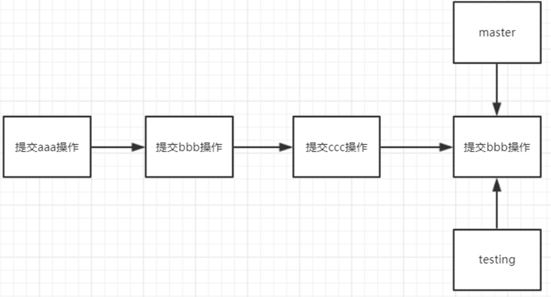
#通过命令查看分支指向

[root@git ~/git_data]# git log --oneline --decorate

ef16b0b (HEAD, testing, master) add ddd

6118c8d add bbb

18c89e4 modified a

1a85735 rename a.txt

a64e0f41 commit a.txt

c6b0ac2 new file a

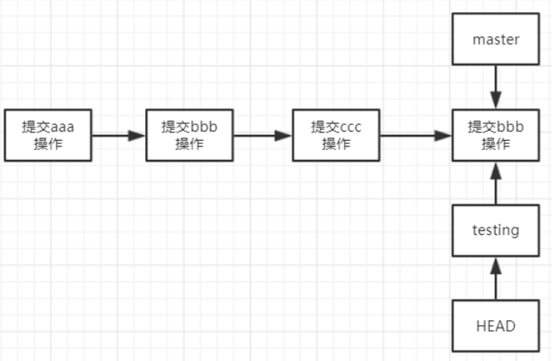
#切换到testing分支、对应的HEAD指针也指向了testing

[root@git ~/git_data]# git checkout testing

Switched to branch 'testing'

#HEAD指针指向了testing

[root@git ~/git_data]# git branch

master

* testing
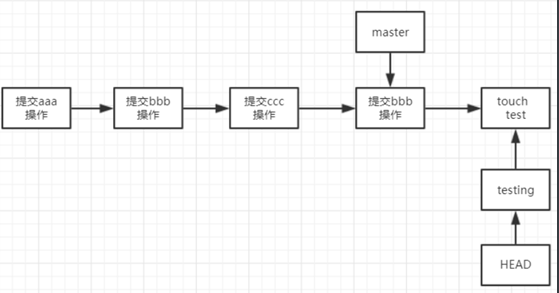
[root@git ~/git_data]# touch test

[root@git ~/git_data]# git add .

[root@git ~/git_data]# git commit -m 'commit test'

[testing 0924a70] commit test

1 file changed, 0 insertions(+), 0 deletions(-)

create mode 100644 test

[root@git ~/git_data]# git log --oneline --decorate

0924a70 (HEAD, testing) commit test

ef16b0b (master) add ddd

6118c8d add bbb

18c89e4 modified a

1a85735 rename a.txt a

64e0f41 commit a.txt

c6b0ac2 new file a
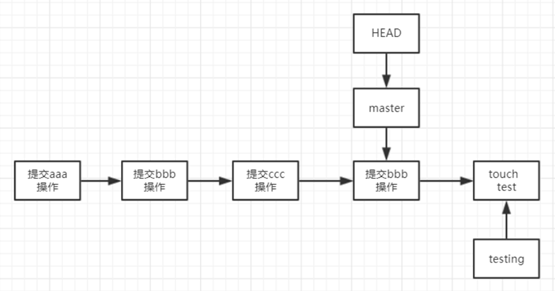
[root@git ~/git_data]# git checkout master

Switched to branch 'master'

[root@git ~/git_data]# git branch

* master

testing

[root@git ~/git_data]# ll    #正常情况下是没有test文件的、保证master分支是线上环境的total 4

-rw-r--r-- 1 root root 16 Oct 20 18:36 a
[root@git ~/git_data]# touch master

[root@git ~/git_data]# git add .

[root@git ~/git_data]# git commit -m "commit master"

[master 8efaada] commit master

1 file changed, 0 insertions(+), 0 deletions(-)

create mode 100644 master

[root@git ~/git_data]# ll

total 4

-rw-r--r-- 1 root root 16 Oct 20 18:36 a-rw-r--r-- 1 root root 0 Nov 16 12:21 master
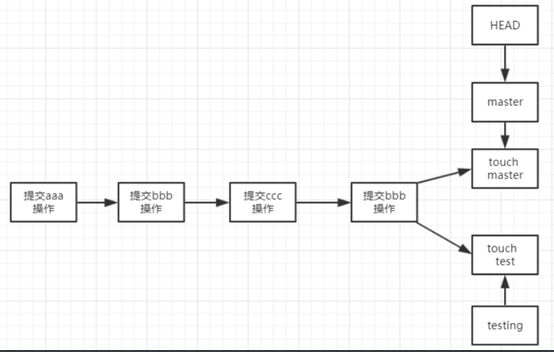
2.合并分支
[root@git ~/git_data]# git merge testing

Merge branch 'testing'

#Please enter a commit message to explain why this merge is necessary,

# especially if it merges an updated upstream into a topic branch.

#

# Lines starting with '#' will be ignored, and an empty message aborts

# the commit.

merge testing to master        #提示输入描述信息,相当于git的-m参数

#查看日志记录

[root@git ~/git_data]# git log --oneline --decorate

0fcf3ce (HEAD, master) Merge branch 'testing'

8efaada commit master

0924a70 (testing) commit teste

f16b0b add ddd

6118c8d add bbb

18c89e4 modified a

1a85735 rename a.txt

a64e0f41 commit a.txt

c6b0ac2 new file a

3.合并冲突
[root@git ~/git_data]# echo "master" >> a

[root@git ~/git_data]# git commit -am "modified a master"

[master a3d84f3] modified a master

1 file changed, 1 insertion(+)

[root@git ~/git_data]# git checkout testing

Switched to branch 'testing'

[root@git ~/git_data]# git branch

master

* testing

[root@git ~/git_data]# cat a

aaa

ccc

bbb

ddd

[root@git ~/git_data]# echo "testing" >>a

[root@git ~/git_data]# git commit -am "modified a on testing branch"

[testing 23dec52] modified a on testing branch

1 file changed, 1 insertion(+)

[root@git ~/git_data]# git checkout master

Switched to branch 'master'

[root@git ~/git_data]# git merge testing

Auto-merging a

CONFLICT (content): Merge conflict in a

Automatic merge failed; fix conflicts and then commit the result.

[root@git ~/git_data]# cat a     #冲突的文件自动标识到文件里,手动更改冲突要保留的代码

aaa

ccc

bbb

ddd

<<<<<<< HEAD

master

=======

testing

>>>>>>> testing

[root@git ~/git_data]# git commit -am "merge testing to master"    #提交

[master 5beb7bb] merge testing to master

[root@git ~/git_data]# git log --oneline --decorate

5beb7bb (HEAD, master) merge testing to master

23dec52 (testing) modified a on testing branch

a3d84f3 modified a master

0fcf3ce Merge branch 'testing'

8efaada commit master

0924a70 commit test

ef16b0b add ddd

6118c8d add bbb

18c89e4 modified a

1a85735 rename a.txt

a64e0f41 commit a.txt

c6b0ac2 new file a
4.删除分支
[root@git ~/git_data]# git branch -d testing

Deleted branch testing (was 23dec52).

[root@git ~/git_data]# git branch

* master
Git标签使用
标签也是指向了一次commit提交,是一个里程碑式的标签,回滚打标签直接加标签号,不加唯一字符串不好记
#-a指定标签名字 -m 指定说明文字

[root@git ~/git_data]# git tag -a v1.0 -m "aaa bbb master tesing version v1.0"
1.查看标签
[root@git ~/git_data]# git tag

v1.0

# 指定某一次的提交为标签

[root@git ~/git_data]# git tag -a v2.0 0924a70 -m "add bbb version v2.0"

# 查看v1.0的信息 git show 加标签查看

[root@git ~/git_data]# git reset --hard v2.0

HEAD is now at 0924a70 commit test

[root@git ~/git_data]# ll

total 4

-rw-r--r-- 1 root root 16 Nov 16 15:04 a

-rw-r--r-- 1 root root 0 Nov 16 12:22 test
02.删除标签
[root@git ~/git_data]# git tag -d v2.0

Deleted tag 'v2.0' (was b0b964c)

[root@git ~/git_data]# git tagv1.0
Git--03 git分支的更多相关文章
- Git - 03. git 工作空间
1. 概述 git 存放代码的地方 2. 创建 命令 # 1. 从无到有 > git init # 2. 从远程拉去现有的仓库 > git clone <url> 3. 文件生 ...
- git合并远端分支到本地分支的两种方式
作者:zhanhailiang 日期:2014-11-21 在使用版本号工具提交改动之前,都须要通过update先将本地代码更新到最新版本号.SVN通过svn update就能够实现,那么git怎样实 ...
- Git Pro - (2)分支
Git 保存的不是文件差异或者变化量,而只是一系列文件快照. 在 Git中提交时,会保存一个提交(commit)对象,它包含一个指向暂存内容快照的指针,作者和相关附属信息,以及一定数量(也可能没有)指 ...
- Git远程和分支管理
一.远程 Git是分布式版本控制系统,最重要的优点就是远程仓库托管代码.不用自己搭建一个服务器,在github上面注册一个账户就可免费获取远程仓库. 首先需要先在github上面 ...
- git 基于发布分支的开发
创建发布分支: (1) 软件hello-world的1.0发布版本库中有一个里程相对应. /home/jackluo/workspace/user1/workspace/hello-worldgit ...
- git 创建branch分支
开发者user1 负责用getopt 进行命令解析的功能,因为这个功能用到getopt 函数,于是将这个分支命名为user1/getopt.(1)确保是在开发者user1的工作区中cd /home/j ...
- git基础及分支
关于版本控制 git是一种分布版本控制系统,每一主机都保存了完整副本.必杀技是分支. 在Windows可安装git客户端msysgit. git基础 第一次看progit觉得有点不懂,不懂版本控制,一 ...
- git 创建branch分支【转】
转自:http://www.cnblogs.com/jackluo/p/3499731.html 开发者user1 负责用getopt 进行命令解析的功能,因为这个功能用到getopt 函数,于是将这 ...
- Git教程之分支管理之二
分支管理策略 通常,合并分支时,如果可能,Git会用Fast forward模式,但这种模式下,删除分支后,会丢掉分支信息.如果要强制禁用Fast forward模式,Git就会在merge时生成一个 ...
- Git教程之分支管理之一
分支在实际中有什么用呢? 你创建了一个属于你自己的分支,别人看不到,别人还继续在原来的分支上正常工作,而你在自己的分支上干活,想提交就提交,直到开发完毕后,再一次性合并到原来的分支上,这样,既安全,又 ...
随机推荐
- File类常用方法和枚举
新建一个file对象: File f = new File("F:\\01.JAVA基础300集\\05_常用类\\122.File类的使用.mp4"); (文件路径也可以用&qu ...
- python对象之__call__方法
先看示例,然后啥都明白了 class Student(): def __call__(self, *args, **kwargs): print('__call__方法被调用', *args) cla ...
- ht-7 treeSet特性
TreeSetTreeSet可以对set集合中的元素进行排序,默认按照asic码表的自然顺序排序,之所以treeset能排序是因为底层是二叉树,数据越多越慢,TreeSet是依靠TreeMap来实现的 ...
- mysql中各种连接的区别
现在有如下两个表: A表. B表. 一:使用笛卡尔连接 SELECT * FROM a,b 结果: 二:内连接 SELECT * FROM a INNER JOIN b on a.a_id=b.par ...
- logback-spring.xml配置文件
<?xml version="1.0" encoding="UTF-8"?> <configuration debug="false ...
- DVBS/S2功能
- 用redis实现队列实例
queue input #coding = utf-8__autor__ = 'litao'import redisimport timepool = redis.ConnectionPool(hos ...
- P1541乌龟棋
传送 这题咋做? 当然是爆搜了. 但是蒟蒻不会爆搜(TLE,WA两开花qwq),更不会记忆化搜索,所以我们换个思路. 注意这句话: 这肯定是有用的(洛咕还不会闲圈到给一句毛用都没有的话),那它有什么用 ...
- vue里面的this指向
this.$http.jsonp(api).then(function(response){ console.log(response); console.log(this); this.list=r ...
- 124、TensorFlow替换函数
# tf.device给你了很多可伸缩性在TensorFlow的计算图中选择放置你的单独的操作 # 在许多的情况下,有很多启发可以工作的很好 # 例如tf.train.replica_device_s ...