
python之reportlab生成PDF文件
项目需要,需要自动生成PDF测试报告。经过对比之后,选择使用了reportlab模块。
项目背景:开发一个测试平台,供测试维护测试用例,执行测试用例,并且生成测试报告(包含PDF和excel),将生成的测试报告以邮件的形式发送相关人。
reportlab生成PDF文件的代码如下:
from reportlab.platypus import SimpleDocTemplate, Paragraph, Spacer, Image, PageBreak, Table, TableStyle

from reportlab.lib.styles import ParagraphStyle, getSampleStyleSheet

from reportlab.lib.units import mm

from reportlab.lib import colors

from reportlab.lib.enums import TA_CENTER, TA_LEFT

from reportlab.pdfbase import pdfmetrics

from reportlab.pdfbase.ttfonts import TTFont

pdfmetrics.registerFont(TTFont('pingbold', 'PingBold.ttf'))

pdfmetrics.registerFont(TTFont('ping', 'ping.ttf'))

pdfmetrics.registerFont(TTFont('hv', 'Helvetica.ttf'))

# 生成PDF文件

class PDFGenerator:

    def __init__(self, filename):

        self.filename = filename

        self.file_path = '/xxx/xxx/xxx/xxx/'

        self.title_style = ParagraphStyle(name="TitleStyle", fontName="pingbold", fontSize=48, alignment=TA_LEFT,)

        self.sub_title_style = ParagraphStyle(name="SubTitleStyle", fontName="hv", fontSize=32,

                                              textColor=colors.HexColor(0x666666), alignment=TA_LEFT, )

        self.content_style = ParagraphStyle(name="ContentStyle", fontName="ping", fontSize=18, leading=25, spaceAfter=20,

                                            underlineWidth=1, alignment=TA_LEFT, )

        self.foot_style = ParagraphStyle(name="FootStyle", fontName="ping", fontSize=14, textColor=colors.HexColor(0xB4B4B4),

                                         leading=25, spaceAfter=20, alignment=TA_CENTER, )

        self.table_title_style = ParagraphStyle(name="TableTitleStyle", fontName="pingbold", fontSize=20, leading=25,

                                                spaceAfter=10, alignment=TA_LEFT, )

        self.sub_table_style = ParagraphStyle(name="SubTableTitleStyle", fontName="ping", fontSize=16, leading=25,

                                                spaceAfter=10, alignment=TA_LEFT, )

        self.basic_style = TableStyle([('FONTNAME', (0, 0), (-1, -1), 'ping'),

                                       ('FONTSIZE', (0, 0), (-1, -1), 12),

                                       ('ALIGN', (0, 0), (-1, -1), 'LEFT'),

                                       ('VALIGN', (0, 0), (-1, -1), 'MIDDLE'),

                                       ('BOTTOMPADDING', (0, 0), (-1, -1), 6),

                                       # 'SPAN' (列,行)坐标

                                       ('SPAN', (1, 0), (3, 0)),

                                       ('SPAN', (1, 1), (3, 1)),

                                       ('SPAN', (1, 2), (3, 2)),

                                       ('SPAN', (1, 5), (3, 5)),

                                       ('SPAN', (1, 6), (3, 6)),

                                       ('SPAN', (1, 7), (3, 7)),

                                       ('GRID', (0, 0), (-1, -1), 0.5, colors.black),

                                       ])

        self.common_style = TableStyle([('FONTNAME', (0, 0), (-1, -1), 'ping'),

                                      ('FONTSIZE', (0, 0), (-1, -1), 12),

                                      ('ALIGN', (0, 0), (-1, -1), 'LEFT'),

                                      ('VALIGN', (0, 0), (-1, -1), 'MIDDLE'),

                                      ('BOTTOMPADDING', (0, 0), (-1, -1), 6),

                                      ('GRID', (0, 0), (-1, -1), 0.5, colors.black),

                                     ])

    def genTaskPDF(self, home_data, task_data, basic_data, case_set_data, fail_case_data, p0_case_data):

        story = []

        # 首页内容

        story.append(Spacer(1, 20 * mm))

        img = Image('/xxx/xxx.png')

        img.drawHeight = 20 * mm

        img.drawWidth = 40 * mm

        img.hAlign = TA_LEFT

        story.append(img)

        story.append(Spacer(1, 10 * mm))

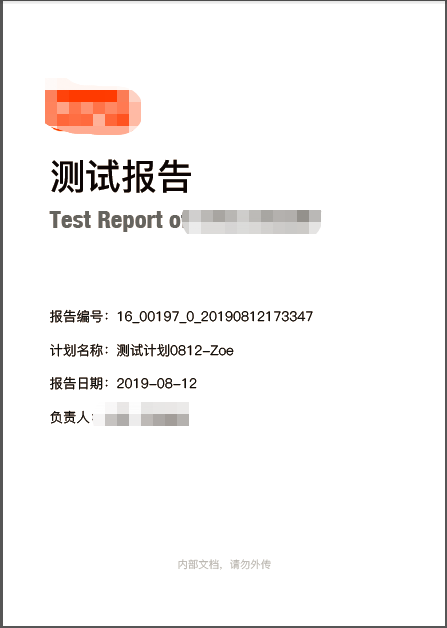
        story.append(Paragraph("测试报告", self.title_style))

        story.append(Spacer(1, 20 * mm))

        story.append(Paragraph("Test Report of XXX", self.sub_title_style))

        story.append(Spacer(1, 45 * mm))

        story.append(Paragraph("报告编号:" + home_data['report_code'], self.content_style))

        story.append(Paragraph("计划名称:" + home_data['task_name'], self.content_style))

        story.append(Paragraph("报告日期:" + home_data['report_date'], self.content_style))

        story.append(Paragraph(" 负责人:" + home_data['report_creator'], self.content_style))

        story.append(Spacer(1, 55 * mm))

        story.append(Paragraph("内部文档,请勿外传", self.foot_style))

        story.append(PageBreak())

        # 表格允许单元格内容自动换行格式设置

        stylesheet = getSampleStyleSheet()

        body_style = stylesheet["BodyText"]

        body_style.wordWrap = 'CJK'

        body_style.fontName = 'ping'

        body_style.fontSize = 12

        # 测试计划

        story.append(Paragraph("测试计划", self.table_title_style))

        story.append(Spacer(1, 3 * mm))

        task_table = Table(task_data, colWidths=[25 * mm, 141 * mm], rowHeights=12 * mm, style=self.common_style)

        story.append(task_table)

        story.append(Spacer(1, 10 * mm))

        # 基础参数

        story.append(Paragraph("基础参数", self.sub_table_style))

        basic_table = Table(basic_data, colWidths=[25*mm, 61*mm, 25*mm, 55*mm], rowHeights=12 * mm, style=self.basic_style)

        story.append(basic_table)

        story.append(Spacer(1, 10 * mm))

        # 测试用例集

        story.append(Paragraph("用例集参数", self.sub_table_style))

        case_set_table = Table(case_set_data, colWidths=[25 * mm, 141 * mm], rowHeights=12 * mm, style=self.common_style)

        story.append(case_set_table)

        # story.append(PageBreak())

        story.append(Spacer(1, 15 * mm))

        # 失败用例--使用可以自动换行的方式需要data里都是str类型的才OK

        story.append(Paragraph("失败用例", self.table_title_style))

        story.append(Spacer(1, 3 * mm))

        para_fail_case_data = [[Paragraph(cell, body_style) for cell in row] for row in fail_case_data]

        fail_case_table = Table(para_fail_case_data, colWidths=[20 * mm, 35 * mm, 91 * mm, 20 * mm])

        fail_case_table.setStyle(self.common_style)

        story.append(fail_case_table)

        story.append(Spacer(1, 15 * mm))

        # 基础用例(P0)

        story.append(Paragraph("基础用例(P0)", self.table_title_style))

        story.append(Spacer(1, 3 * mm))

        para_p0_case_data = [[Paragraph(cell, body_style) for cell in row] for row in p0_case_data]

        p0_case_table = Table(para_p0_case_data, colWidths=[20 * mm, 35 * mm, 91 * mm, 20 * mm])

        p0_case_table.setStyle(self.common_style)

        story.append(p0_case_table)

        doc = SimpleDocTemplate(self.file_path + self.filename + ".pdf",

                                leftMargin=20 * mm, rightMargin=20 * mm, topMargin=20 * mm, bottomMargin=20 * mm)

        doc.build(story)
生成样式:

需要说明的:
1.项目后台使用的是python2.7.5;
2.如果需要使用到特定的字体,需要将字体下载下来放到reportlab模块安装位置的font文件夹下,如:/xxx/python2.7/site-packages/reportlab/fonts/;
3.有官方的使用文档可以参考,如有不懂,可以下载官方说明文档查看;
4.支持表格中的中文依文字长度自动换行
代码中使用到的字体下载链接:
链接: https://pan.baidu.com/s/10p7YxZ0Z32d5z85O8puabg 提取码: sk8q
python之reportlab生成PDF文件的更多相关文章
- Python数据生成pdf文件
sklearn实战-乳腺癌细胞数据挖掘 https://study.163.com/course/introduction.htm?courseId=1005269003&utm_campai ...
- python从TXT创建PDF文件——reportlab
使用reportlab创建PDF文件电子书一般都是txt格式的,某些电子阅读器不能读取txt的文档,如DPT-RP1.因此本文从使用python实现txt到pdf的转换,并且支持生成目录,目录能够生成 ...
- django生成文件txt、pdf(在生成 PDF 文件之前,需要安装 ReportLab 库)
from django.http import HttpResponse def download_file(request): # Text file #response = HttpRespons ...
- 深入学习Python解析并解密PDF文件内容的方法
前面学习了解析PDF文档,并写入文档的知识,那篇文章的名字为深入学习Python解析并读取PDF文件内容的方法. 链接如下:https://www.cnblogs.com/wj-1314/p/9429 ...
- linux下编译bib、tex生成pdf文件
实验: 在linux环境下,编译(英文)*.bib和*.tex文件,生成pdf文件. 环境: fedora 20(uname -a : Linux localhost.localdomain 3.19 ...
- ThinkPHP3.2.3扩展之生成PDF文件(MPDF)
目前是PHP生成PDF文件最好的插件了,今天介绍下在ThinkPHP3.2.3里如何使用. 先安照路径放好如图. 下面是使用方法 public function pdf(){ //引入类库 Vendo ...
- [轉載]史上最强php生成pdf文件,html转pdf文件方法
之前有个客户需要把一些html页面生成pdf文件,然后我就找一些用php把html页面围成pdf文件的类.方法是可谓是找了很多很多,什么html2pdf,pdflib,FPDF这些都试过了,但是都没有 ...
- asp.net生成PDF文件 (1)
asp.net生成PDF文件 (1) 这个是例子是网上淘来的,哈哈,很有用的! 首先要到网上下载itextsharp.dll,然后添加引用,主程序如下: 1 2 3 4 5 6 7 8 9 10 11 ...
- 怎么用PHP在HTML中生成PDF文件
原文:Generate PDF from html using PHP 译文:使用PHP在html中生成PDF 译者:dwqs 利用PHP编码生成PDF文件是一个非常耗时的工作.在早期,开发者使用PH ...
随机推荐
- c++ 实现https网页上的图片爬取
一.主要的原理 我们通过发送一个http请求,获得目标网页的html源代码,然后通过正则表达式获取到图片的URL,把该网页的所有的图片都保存到一个文件夹,这就是整个软件的流程. 二.具体的实践 现在很 ...
- 测开常见面试题什么是redis
企业中redis是必备的性能优化中间件,也是常见面试题,首先Redis是由意大利人Salvatore Sanfilippo(网名:antirez)开发的一款内存高速缓存数据库.Redis全称为:Rem ...
- SQL truncate 、delete与drop区别(转)
相同点: 1.truncate和不带where子句的delete.以及drop都会删除表内的数据. 2.drop.truncate都是DDL语句(数据定义语言),执行后会自动提交. 不同点: 1. t ...
- 利用SAX解析读取XML文件
xml 这是我的第一个BLOG,今天在看<J2EE应用开发详解>一书,书中讲到XML编程,于是就按照书中的步骤自己测试了起来,可是怎么测试都不成功,后来自己查看了一遍源码,发现在读 ...
- linux负载均衡杂谈
假如架构中的主机拥有全量数据集,即使其中一台挂了,也不会导致离线,高可用(负载均衡集群) 假如架构中的各主机只拥有sharing,那我们谓之 分布式集群 硬件ctrix F5-BIG-IP(一台动辄2 ...
- Nginx解析PHP
刚安装完PHP后,nginx是无法解析的,如果输入地址会直接下载文件,需要进行如下的设置 步骤 修改/etc/nginx/sites-available/default和cat /etc/nginx/ ...
- GO 语言队列实现
队列(queue)是只允许在一端进行插入操作,而在另一端进行删除操作的线性表. 队列是一种先进先出的t(First In First Out)的线性表,简称FIFO.允许插入的一端为队尾,允许删除的一 ...
- 表空间及段区块的一些sql语句和视图
查询段情况的语句 select segment_name,blocks,extents,bytes,segment_type,tablespace_namefrom dba_segments wher ...
- C# DataGridView 更改类型 重绘
DataGridView 更改类型 需要用到重绘 DataGridViewTextBoxColumn aa01 = new DataGridViewTextBoxColumn(); aa00.Da ...
- Markdown 标记语言指北
这是班刊约稿的一篇文章. 全文约6000字, 预计需要 60 分钟读完. Markdown 标记语言指北 TOC 什么是 Markdown? Markdown 可以用来干什么? 第一步? 一些专业一点 ...