
pyhton接口自动化测试-requests.post()
一、方法定义
二、post方法简单使用
1、带数据的post
2、带header的post
3、带json的post
4、带参数的post
5、普通文件上传
6、定制化文件上传
7、多文件上传
一、方法定义:
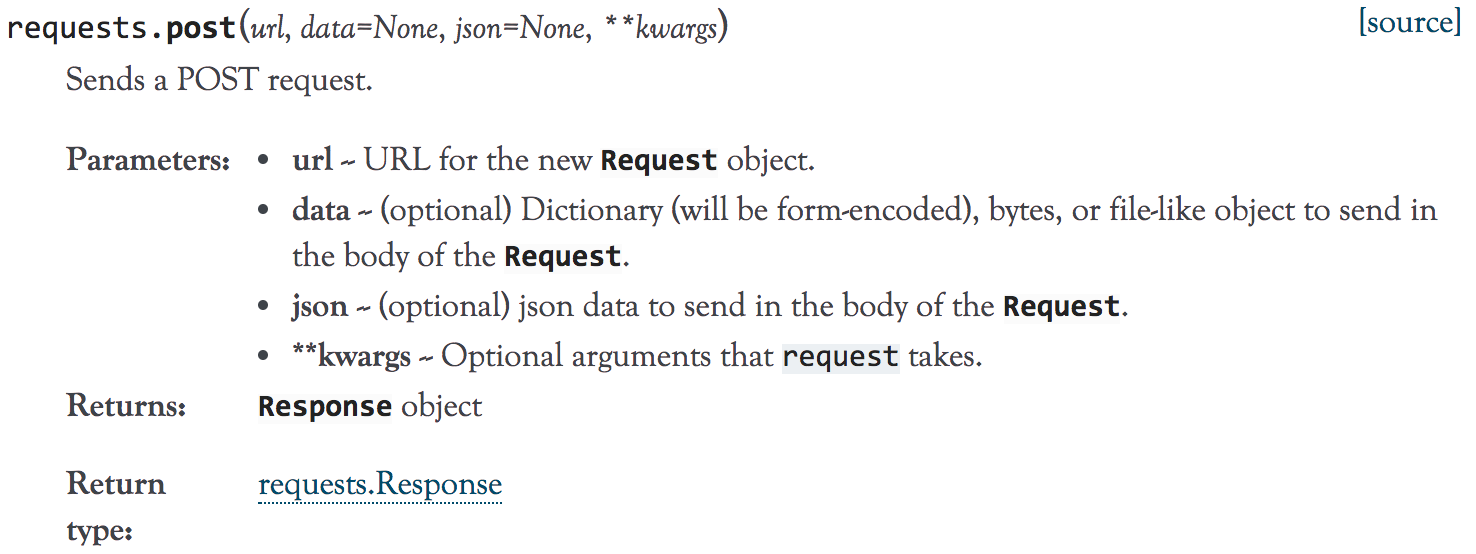
1、到官方文档去了下requests.post()方法的定义,如下:
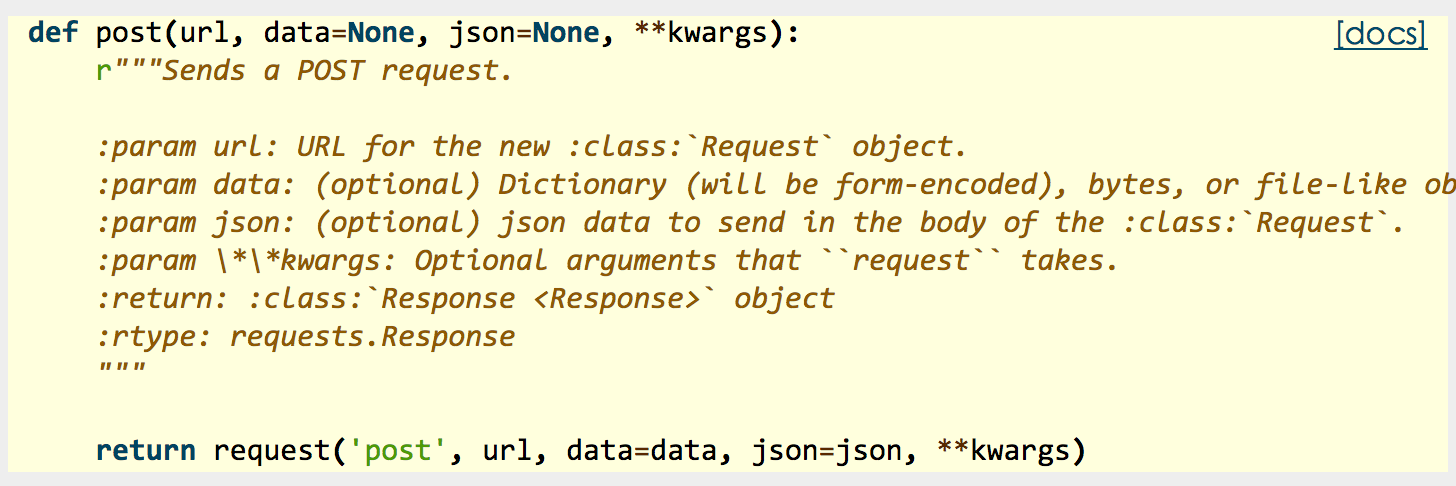
2、源码:
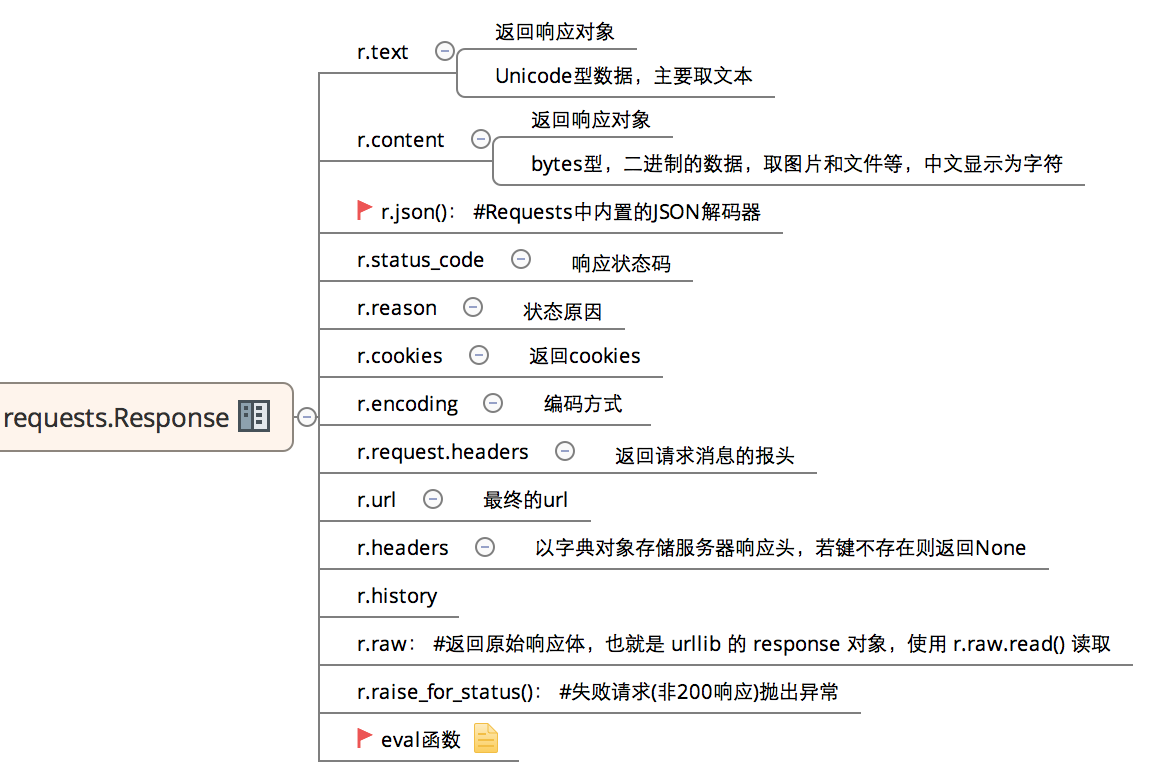
3、常用返回信息:
二、post方法简单使用:
1、带数据的post:
# -*- coding:utf-8 -*-

import requests

import json

host = "http://httpbin.org/"

endpoint = "post"

url = ''.join([host,endpoint])

data = {'key1':'value1','key2':'value2'}

r = requests.post(url,data=data)

#response = r.json()

print ((r.text))
输出:
{

  "args": {},

  "data": "",

  "files": {},

  "form": {

    "key1": "value1",

    "key2": "value2"

  },

  "headers": {

    "Accept": "*/*",

    "Accept-Encoding": "gzip, deflate",

    "Connection": "close",

    "Content-Length": "",

    "Content-Type": "application/x-www-form-urlencoded",

    "Host": "httpbin.org",

    "User-Agent": "python-requests/2.18.1"

  },

  "json": null,

  "origin": "183.14.133.88",

  "url": "http://httpbin.org/post"

}
2、带header的post:
# -*- coding:utf-8 -*-

import requests

import json

host = "http://httpbin.org/"

endpoint = "post"

url = ''.join([host,endpoint])

headers = {"User-Agent":"test request headers"}

# r = requests.post(url)

r = requests.post(url,headers=headers)

#response = r.json()
输出:
{

  "args": {},

  "data": "",

  "files": {},

  "form": {},

  "headers": {

    "Accept": "*/*",

    "Accept-Encoding": "gzip, deflate",

    "Connection": "close",

    "Content-Length": "",

    "Host": "httpbin.org",

    "User-Agent": "test request headers"

  },

  "json": null,

  "origin": "183.14.133.88",

  "url": "http://httpbin.org/post"
3、带json的post:
import requests

import json

host = "http://httpbin.org/"

endpoint = "post"

url = ''.join([host,endpoint])

data = {

    "sites": [

                { "name":"test" , "url":"www.test.com" },

                { "name":"google" , "url":"www.google.com" },

                { "name":"weibo" , "url":"www.weibo.com" }

    ]

}

r = requests.post(url,json=data)

# r = requests.post(url,data=json.dumps(data))

response = r.json()
输出:
{

  "args": {},

  "data": "{\"sites\": [{\"name\": \"test\", \"url\": \"www.test.com\"}, {\"name\": \"google\", \"url\": \"www.google.com\"}, {\"name\": \"weibo\", \"url\": \"www.weibo.com\"}]}",

  "files": {},

  "form": {},

  "headers": {

    "Accept": "*/*",

    "Accept-Encoding": "gzip, deflate",

    "Content-Length": "",

    "Content-Type": "application/json",

    "Host": "httpbin.org",

    "User-Agent": "python-requests/2.21.0"

  },

  "json": {

    "sites": [

      {

        "name": "test",

        "url": "www.test.com"

      },

      {

        "name": "google",

        "url": "www.google.com"

      },

      {

        "name": "weibo",

        "url": "www.weibo.com"

      }

    ]

  },

  "origin": "113.65.130.163, 113.65.130.163",

  "url": "https://httpbin.org/post"

}
4、带参数的post:
# -*- coding:utf-8 -*-

import requests

import json

host = "http://httpbin.org/"

endpoint = "post"

url = ''.join([host,endpoint])

params = {'key1':'params1','key2':'params2'}

# r = requests.post(url)

r = requests.post(url,params=params)

#response = r.json()

print (r.text)
输出:
{

  "args": {

    "key1": "params1",

    "key2": "params2"

  },

  "data": "",

  "files": {},

  "form": {},

  "headers": {

    "Accept": "*/*",

    "Accept-Encoding": "gzip, deflate",

    "Connection": "close",

    "Content-Length": "",

    "Host": "httpbin.org",

    "User-Agent": "python-requests/2.18.1"

  },

  "json": null,

  "origin": "183.14.133.88",

  "url": "http://httpbin.org/post?key2=params2&key1=params1"

}
5、普通文件上传:
# -*- coding:utf-8 -*-

import requests

import json

host = "http://httpbin.org/"

endpoint = "post"

url = ''.join([host,endpoint])

#普通上传

files = {

            'file':open('test.txt','rb')

        }

r = requests.post(url,files=files)

print (r.text)
输出:
{

  "args": {},

  "data": "",

  "files": {

    "file": "hello world!\n"

  },

  "form": {},

  "headers": {

    "Accept": "*/*",

    "Accept-Encoding": "gzip, deflate",

    "Connection": "close",

    "Content-Length": "",

    "Content-Type": "multipart/form-data; boundary=392865f79bf6431f8a53c9d56c62571e",

    "Host": "httpbin.org",

    "User-Agent": "python-requests/2.18.1"

  },

  "json": null,

  "origin": "183.14.133.88",

  "url": "http://httpbin.org/post"

}
6、定制化文件上传:
# -*- coding:utf-8 -*-

import requests

import json

host = "http://httpbin.org/"

endpoint = "post"

url = ''.join([host,endpoint])

#自定义文件名,文件类型、请求头

files = {

        'file':('test.png',open('test.png','rb'),'image/png')

}

r = requests.post(url,files=files)

print (r.text)heman793
7、多文件上传:
# -*- coding:utf-8 -*-

import requests

import json

host = "http://httpbin.org/"

endpoint = "post"

url = ''.join([host,endpoint])

#多文件上传

files = [

    ('file1',('test.txt',open('test.txt', 'rb'))),

    ('file2', ('test.png', open('test.png', 'rb')))

    ]

r = requests.post(url,files=files)

print (r.text)
8、流式上传:
# -*- coding:utf-8 -*-

import requests

import json

host = "http://httpbin.org/"

endpoint = "post"

url = ''.join([host,endpoint])

#流式上传

with open( 'test.txt' ) as f:

    r = requests.post(url,data = f)

print (r.text)
输出:
{

  "args": {},

  "data": "hello world!\n",

  "files": {},

  "form": {},

  "headers": {

    "Accept": "*/*",

    "Accept-Encoding": "gzip, deflate",

    "Connection": "close",

    "Content-Length": "",

    "Host": "httpbin.org",

    "User-Agent": "python-requests/2.18.1"

  },

  "json": null,

  "origin": "183.14.133.88",

  "url": "http://httpbin.org/post"

}
pyhton接口自动化测试-requests.post()的更多相关文章
- 记录python接口自动化测试--requests使用和基本方法封装(第一目)
之前学习了使用jmeter+ant做接口测试,并实现了接口的批量维护管理(大概500多条用例),对"接口"以及"接口测试"有了一个基础了解,最近找了一些用pyt ...
- python接口自动化测试 - requests库的post请求进行文件上传
前言 如果需要发送文件到服务器,比如上传图片.视频等,就需要发送二进制数据. 一般上传文件使用的都是 Content-Type: multipart/form-data; 数据类型,可以发送文件,也可 ...
- python接口自动化测试 - requests库的post请求进行文件下载
前言 之前讲了文件上传,当然就有文件下载啦 文件下载操作步骤 极其简单,将二进制格式的响应内容存进本地文件中,根据需要下载的文件的格式来写文件名即可 down_url = 'https://www.i ...
- python接口自动化测试 - requests库的基础使用
简单介绍 requests库简单易用的HTTP库 Get请求 格式: requests.get(url) 注意:若需要传请求参数,可直接在 url 最后的 ? 后面,也可以调用 get() 时多加一个 ...
- 使用python+requests+unittest实现接口自动化测试
这两天一直在找直接用python做接口自动化的方法,在网上也搜了一些博客参考,今天自己动手试了一下. 一.整体结构 上图是项目的目录结构,下面主要介绍下每个目录的作用. Common:公共方法:主要放 ...
- python3+requests+unittest:接口自动化测试(一)
转载请表明出处:https://www.cnblogs.com/shapeL/p/9179484.html 简单介绍框架的实现逻辑,参考代码的git地址: https://github.com/zha ...
- python3+requests:接口自动化测试(二)
转载请注明出处:https://www.cnblogs.com/shapeL/p/9188495.html 前言:上篇文章python3+requests+unittest:接口自动化测试(一):ht ...
- 【python3+request】python3+requests接口自动化测试框架实例详解教程
转自:https://my.oschina.net/u/3041656/blog/820023 [python3+request]python3+requests接口自动化测试框架实例详解教程 前段时 ...
- python+requests接口自动化测试
转自https://my.oschina.net/u/3041656/blog/820023 原来的web页面功能测试转变成接口测试,之前大多都是手工进行,利用postman和jmeter进行的接口测 ...
随机推荐
- html 行内元素和块级元素
行内元素一般是内容的容器,而块级元素一般是其他容器的容器.一般情况下,行内元素只能包含内容或者其它行内元素,宽度和长度依据内容而定,不可以设置,可以和其它元素和平共处于一行:而块级元素可以包含行内元素 ...
- express 模板 及 文件上传
express 的三大功能: 1. 提供了静态服务(所谓的根目录) let express = require("express"); let app = express(); a ...
- C# 防火墙操作之启用与关闭
通过代码操作防火墙的方式有两种:一是代码操作修改注册表启用或关闭防火墙:二是直接操作防火墙对象来启用或关闭防火墙.不论哪一种方式,都需要使用管理员权限,所以操作前需要判断程序是否具有管理员权限. 1. ...
- Git-Runoob:Git 查看提交历史
ylbtech-Git-Runoob:Git 查看提交历史 1.返回顶部 1. Git 查看提交历史 在使用 Git 提交了若干更新之后,又或者克隆了某个项目,想回顾下提交历史,我们可以使用 git ...
- Random Initialization for K-Means
K-Means的中心初始化惯用方式是随机初始化.也就是说:从training set中随机挑选出K个 作为中心,再进行下一步的K-Means算法. 这个方法很容易导致收敛到局部最优解,当簇个个数(K) ...
- Python解决数据样本类别分布不均衡问题
所谓不平衡指的是:不同类别的样本数量差异非常大. 数据规模上可以分为大数据分布不均衡和小数据分布不均衡.大数据分布不均衡:例如拥有1000万条记录的数据集中,其中占比50万条的少数分类样本便于属于这种 ...
- 【Python】格式化输出json
参考文档: Python JSON JSON 函数 使用 JSON 函数需要导入 json 库:import json. 函数 描述 json.dumps 将 Python 对象编码成 JSON 字 ...
- Python学习之GIL&进程池/线程池
8.6 GIL锁** Global interpreter Lock 全局解释器锁 实际就是一把解释器级的互斥锁 In CPython, the global interpreter lock, or ...
- 应用安全 - 中间件 - IIS - 漏洞 - 汇总
简介 支持协议 HTTP HTTP/2 HTTPS FTP FTPS SMTP NNTP等 支持操作系统 NT/2000/XP Professional/Server 2003及后续版本(XP Hom ...
- flask第一级
#从flask这个包中导入Flask这个类 #Flask这个类是项目的核心,以后很多操作都是基于这个类的对象 #注册url.注册蓝图等都是基于这个类的对象 from flask import Flas ...