
firewall&iptables
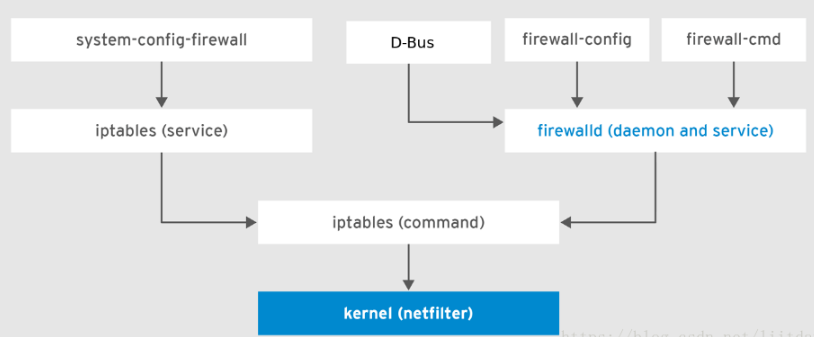
一、firewall
查看firewall状态
firewall-cmd --state
如果firewall为关闭状态,先启动firewall
systemctl start firewalld
添加firewall指令
firewall-cmd --permanent --add-rich-rule='rule family=ipv4 forward-port port=162 protocol=udp to-port=20162'
firewall-cmd --permanent --add-rich-rule='rule family=ipv4 forward-port port=161 protocol=udp to-port=20161'
firewall-cmd --permanent --add-rich-rule='rule family=ipv4 forward-port port=514 protocol=udp to-port=20514'
firewall-cmd --permanent --zone=public --add-port=8885/tcp
firewall-cmd --permanent --zone=public --add-port=9092/tcp
firewall-cmd --permanent --zone=public --add-port=161/tcp
firewall-cmd --permanent --zone=public --add-port=162/tcp
firewall-cmd --permanent --zone=public --add-port=514/udp
firewall-cmd --permanent --zone=public --add-port=20161/tcp
firewall-cmd --permanent --zone=public --add-port=20162/tcp
firewall-cmd --permanent --zone=public --add-port=20514/udp
firewall-cmd --permanent --zone=public --add-port=9996/udp
firewall-cmd --permanent --zone=public --add-port=8082/tcp删除指令
firewall-cmd --permanent --remove-rich-rule 'rule family="ipv4" forward-port="514" protocol="udp" tp-port="20514" '
重新加载firewall策略
firewall-cmd --reload
查看新策略是否生效
firewall-cmd --list-all
二、Iptables
- 安装iptables
yum install iptables-services - 启动iptables
service iptables restart - 查看iptables状态
systemctl status firewalld.service - 添加iptables端口转发策略
iptables -t nat -A PREROUTING -p udp -m udp --dport 162 -j REDIRECT --to-ports 20162
iptables -t nat -A PREROUTING -p udp -m udp --dport 161 -j REDIRECT --to-ports 20161
iptables -t nat -A PREROUTING -p udp -m udp --dport 514 -j REDIRECT --to-ports 20514
- 查看新策略是否生效
iptables -t nat -L -n --line-numbers
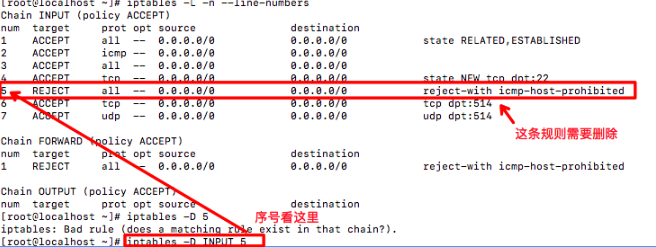
- 删除规则
iptables -L -n --line-numbers
firewall&iptables的更多相关文章
- firewall&iptables小记
一.firewall 查看firewall状态 firewall-cmd --state 防火墙开启: 防火墙关闭: 如果firewall为关闭状态,先启动firewall systemctl sta ...
- 防火墙 firewall iptables
firewalld FirewallD 使用服务service 和区域zone来代替 iptables 的规则rule和链chain,默认情况下,有以下的区域zone可用: drop – 丢弃所有传入 ...
- [Firewall] iptables Configuration
iptables usage: Add Rules: iptables -I INPUT -p tcp --dport -j ACCEPT iptables -I INPUT -p tcp --dpo ...
- Neutron 理解 (9): OpenStack 是如何实现 Neutron 网络 和 Nova虚机 防火墙的 [How Nova Implements Security Group and How Neutron Implements Virtual Firewall]
学习 Neutron 系列文章: (1)Neutron 所实现的虚拟化网络 (2)Neutron OpenvSwitch + VLAN 虚拟网络 (3)Neutron OpenvSwitch + GR ...
- iptables rule
和H3C中的acl很像,或者就是一会事,这就是不知道底层的缺陷,形式一变,所有的积累都浮云了 参考准确的说copy from http://www.ibm.com/developerworks/cn/ ...
- Linux: 20 Iptables Examples For New SysAdmins
Linux comes with a host based firewall called Netfilter. According to the official project site: net ...
- [转] XEN, KVM, Libvirt and IPTables
http://cooker.techsnail.com/index.php/XEN,_KVM,_Libvirt_and_IPTables XEN, KVM, Libvirt and IPTables ...
- Iptables 指南 1.1.19
Iptables 指南 1.1.19 Oskar Andreasson oan@frozentux.net Copyright © 2001-2003 by Oskar Andreasson 本文在符 ...
- ubuntu 中 iptables 和 ufw 的关系
我突然发现,自己平常使用的 iptables 和 ufw 到底是啥关系?平常其实iptables和ufw在配置防火墙,开启端口是,还是偶尔会使用到的. 没去思考过这两者是啥关系,哎...,这就不够好了 ...
随机推荐
- spring+JdbcTemplate简单使用(一)
目录 @ 1. 环境配置 maven(项目管理) idea(编译器) jdk1.8(Java环境) MySQL5.6(MySQL数据库) 2. 创建项目 在 idea 中创建普通的 maven 项目 ...
- RESTful再理解
目录 目录 前言 RESTful的目的 REST的含义 表现层 状态转化 无状态协议HTTP 最后 前言 这是在经过一段时间的积累后,对RESTFul框架的再一次更深入的理解.希望能够将零散的知识点连 ...
- vm虚拟机用批处理启动和关闭
title vmware 虚拟机开启中 cls&&echo 正在开启VMware虚拟机,请稍候... "D:\vmware\vmware.exe" -x " ...
- HTML--JS 多列求和
<html> <head> <title>多列求和</title> <script type="text/javascript" ...
- Python算法每日一题--002--求众数
给定一个大小为 n 的数组,找到其中的众数.众数是指在数组中出现次数大于 ⌊ n/2 ⌋ 的元素. 你可以假设数组是非空的,并且给定的数组总是存在众数. 示例 1: 输入: [3,2,3]输出: 3示 ...
- 查找idt table 所對應的page table in Linux
#include <linux/kernel.h> #include <linux/module.h> #include <linux/types.h> #incl ...
- 【转】sed命令的基本操作
原文链接 sed命令行格式为: sed [-option] ‘command’ 输入文本/文件 常用选项: -n∶取消默认的输出,使用安静(sile ...
- sig文件制作
一 配置环境变量 将link.exe,pcf.exe,sigmake.exe添加进PATH环境变量(选择“我的电脑” >“属性”>“高级” >“环境变量”>将文件地址添加进“p ...
- 各种设备在linux中的文件名
各种设备在linux中的文件名: 设备 设备在linux内的文件名 ide硬盘 /dev/ha[a-d] scs硬盘 /dev/sd[a-p] u盘 /dev/sd[a-p](与SAT ...
- vector中数据释放崩溃问题
struct LINE { char securityID[32]; /*!< 证券代码 */ int64_t dateTime; /*!< 日期时间(日期变化)YYYYMMDDhhmms ...