
【Spring-Mail】
需要的pom依赖:
<dependency>

    <groupId>org.springframework</groupId>

    <artifactId>spring-context</artifactId>

    <version>5.2.9.RELEASE</version>

</dependency>

<dependency>

    <groupId>org.springframework</groupId>

    <artifactId>spring-context-support</artifactId>

    <version>5.2.9.RELEASE</version>

</dependency>

<dependency>

    <groupId>org.springframework</groupId>

    <artifactId>spring-test</artifactId>

    <version>5.2.9.RELEASE</version>

</dependency>

<dependency>

    <groupId>com.sun.mail</groupId>

    <artifactId>javax.mail</artifactId>

    <version>1.6.2</version>

</dependency>

- - - - - - - - - - - - - - - - - - - - - - - - - - - - - - - - - - - - - - - - - - - - - - - -

<!-- https://mvnrepository.com/artifact/javax.mail/javax.mail-api -->

<dependency>

    <groupId>javax.mail</groupId>

    <artifactId>javax.mail-api</artifactId>

    <version>1.6.2</version>

</dependency>
一、普通邮件发送
编写配置信息【app.xml】
<?xml version="1.0" encoding="UTF-8"?>

<beans xmlns="http://www.springframework.org/schema/beans"

       xmlns:xsi="http://www.w3.org/2001/XMLSchema-instance"

       xmlns:context="http://www.springframework.org/schema/context"

       xsi:schemaLocation="http://www.springframework.org/schema/beans http://www.springframework.org/schema/beans/spring-beans.xsd http://www.springframework.org/schema/context https://www.springframework.org/schema/context/spring-context.xsd">

    <context:component-scan base-package="cn.zeal4j"/>

    <bean id="mailSender" class="org.springframework.mail.javamail.JavaMailSenderImpl">

        <property name="host" value="smtp.qq.com" />

        <property name="port" value="587" />

        <property name="username" value="zeal4j" />

        <property name="password" value="frcgbdjqjzptbegg" />

        <property name="defaultEncoding" value="utf-8"/>

    </bean>

    <bean id="mailMessage" class="org.springframework.mail.SimpleMailMessage">

        <property name="from" value="zeal4j@qq.com" />

        <property name="subject" value="spring-mail"/>

    </bean>

</beans>
管理器类:
package cn.zeal4j.util.springmail;

import org.springframework.beans.factory.annotation.Autowired;

import org.springframework.mail.MailMessage;

import org.springframework.mail.MailSender;

import org.springframework.mail.SimpleMailMessage;

import org.springframework.stereotype.Component;

/**

 * @author Administrator

 * @file IntelliJ IDEA Spring-Mail

 * @create 2020 09 22 12:38

 */

@Component

public class MailOrderManager implements OrderManager{

    @Autowired

    private MailSender mailSender;

    @Autowired

    private MailMessage mailMessage;

    public void placeOrder() {

        mailMessage.setTo("zeal4j@qq.com");

        mailMessage.setText("This message powered by Spring-Mail, 测试");

        mailSender.send((SimpleMailMessage) mailMessage);

    }

}
接口:
package cn.zeal4j.util.springmail;

/**

 * @author Administrator

 * @file IntelliJ IDEA Spring-Mail

 * @create 2020 09 22 12:39

 */

public interface OrderManager {

    void placeOrder();

}
测试:
    @Test

    public void sendSpringMail() {

        ApplicationContext applicationContext = new ClassPathXmlApplicationContext("app.xml");

        MailOrderManager mailOrderManager = applicationContext.getBean("mailOrderManager", MailOrderManager.class);

        mailOrderManager.placeOrder();

    }
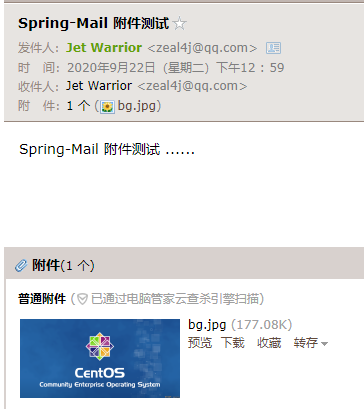
二、带附件邮件发送:
    @Test

    public void sendSpringMailWithAttachment() throws Exception{

        ApplicationContext applicationContext = new ClassPathXmlApplicationContext("app.xml");

        JavaMailSender mailSender = applicationContext.getBean("mailSender", JavaMailSender.class);

        MimeMessage mimeMessage = mailSender.createMimeMessage();

        mimeMessage.setSubject("Spring-Mail 附件测试");

        MimeMessageHelper mimeMessageHelper = new MimeMessageHelper(mimeMessage, true, "utf-8");

        mimeMessageHelper.setTo("zeal4j@qq.com");

        mimeMessageHelper.setFrom("zeal4j@qq.com");

        mimeMessageHelper.setText("Spring-Mail 附件测试 ......");

        File file = new File("D:\\picture\\collection\\bg.jpg");

        mimeMessageHelper.addAttachment(file.getName(), file);

        mailSender.send(mimeMessage);

    }
【Spring-Mail】的更多相关文章
- 【Spring实战】----开篇(包含系列目录链接)
[Spring实战]----开篇(包含系列目录链接) 置顶2016年11月10日 11:12:56 阅读数:3617 终于还是要对Spring进行解剖,接下来Spring实战篇系列会以应用了Sprin ...
- 【Spring开发】—— Spring Core
原文:[Spring开发]-- Spring Core 前言 最近由于一些工作的需要,还有自己知识的匮乏再次翻开spring.正好整理了一下相关的知识,弥补了之前对spring的一些错误认知.这一次学 ...
- 【Spring实战】Spring注解配置工作原理源码解析
一.背景知识 在[Spring实战]Spring容器初始化完成后执行初始化数据方法一文中说要分析其实现原理,于是就从源码中寻找答案,看源码容易跑偏,因此应当有个主线,或者带着问题.目标去看,这样才能最 ...
- 【Spring实战】Spring容器初始化完成后执行初始化数据方法
一.背景知识及需求 在做WEB项目时,经常在项目第一次启动时利用WEB容器的监听.Servlet加载初始化等切入点为数据库准备数据,这些初始化数据是系统开始运行前必须的数据,例如权限组.系统选项.默认 ...
- 【转】【Spring实战】Spring注解配置工作原理源码解析
一.背景知识 在[Spring实战]Spring容器初始化完成后执行初始化数据方法一文中说要分析其实现原理,于是就从源码中寻找答案,看源码容易跑偏,因此应当有个主线,或者带着问题.目标去看,这样才能最 ...
- 【spring boot】12.spring boot对多种不同类型数据库,多数据源配置使用
2天时间,终于把spring boot下配置连接多种不同类型数据库,配置多数据源实现! ======================================================== ...
- 【Spring Session】和 Redis 结合实现 Session 共享
[Spring Session]和 Redis 结合实现 Session 共享 参考官方文档 HttpSession with Redis Guide https://docs.spring.io/s ...
- 【Spring Boot】定时任务
[Spring Boot]定时任务 测试用业务Service package com.example.schedule.service; import org.springframework.ster ...
- 【spring boot】配置信息
======================================================================== 1.feign 超时配置 2.上传文件大小控制 3.J ...
- 【Spring MVC】Properties文件的加载
[Spring MVC]Properties文件的加载 转载:https://www.cnblogs.com/yangchongxing/p/10726885.html 参考:https://java ...
随机推荐
- NSSCTF——crypto
[鹤城杯 2021]easy_crypto [强网拟态 2021]拟态签到题 [SWPUCTF 2021 新生赛]crypto8[SWPUCTF 2021 新生赛]crypto7[SWPUCTF 20 ...
- 导出excel文件接口代码示例
导出excel文件接口代码示例 1.该导出接口,token不能通过请求头来传输,需要在get请求的参数中带出来2.验证token的方法除了在拦截器中统一拦截,针对get接口传参数的方式也需要单独在接口 ...
- 微信小程序自动化分析_包含执行设备及对应的微信版本
背景介绍: 微信小程序是基于腾讯自研 X5 内核,不是谷歌原生 webview. 实现方式: 1.小程序自动化sdk,使用自动化sdk,需要有小程序的开发者权限,以及参考的资料较少,2.选择采用app ...
- 支持TraceID、错误文件、错误行的第三方golang库:gerror
Gerr库简介 Golang第三方库 官方仓库:https://github.com/GuoFlight/gerror 特点: 兼容golang原生error库 gerror会自动生成traceID, ...
- 关于c指针的理解
1 #include<stdio.h> 2 { 3 int a= 100,b=10; 4 int *p1=&a,*p2=&b; 5 *p1=b; 6 *p2=a; 7 pr ...
- Linux Driver : gpio-keys
Linux Driver : gpio-keys的解析 背景 在阅读高通设备树配置一个按键的时候,没有找到按键是在什么时候进行处理的.因此根据仅有的线索gpio-key.c进行分析,发现根据之前的学习 ...
- Java模拟高并发测试
线程类,设置有一个公共资源 package cn.org.chris.concurrent; import java.util.concurrent.locks.Lock; import java.u ...
- 算法金 | Transformer,一个神奇的算法模型!!
大侠幸会,在下全网同名「算法金」 0 基础转 AI 上岸,多个算法赛 Top 「日更万日,让更多人享受智能乐趣」 抱个拳,送个礼 在现代自然语言处理(NLP)领域,Transformer 模型的出现带 ...
- 【Hive报错】java.lang.NoSuchMethodError(com.facebook.fb303.FacebookService$Client.sendBaseOneway
Hive2.3版本 Hadoop2.7版本 执行hive命令报错: 报错内容: CONSOLE#21/03/24 17:32:54 ERROR ql.Driver: FAILED: Hive Inte ...
- windows下rust环境的安装(现在是2023年5月份)
在自己家电脑上安装一下rust,还是遇到一些问题,这里记录一下,免得后面再踩坑. 官方网站 获取主要信息还得靠官网,比如安装软件:) 地址是 https://www.rust-lang.org/zh- ...