
【Spring-Mail】
需要的pom依赖:
<dependency>

    <groupId>org.springframework</groupId>

    <artifactId>spring-context</artifactId>

    <version>5.2.9.RELEASE</version>

</dependency>

<dependency>

    <groupId>org.springframework</groupId>

    <artifactId>spring-context-support</artifactId>

    <version>5.2.9.RELEASE</version>

</dependency>

<dependency>

    <groupId>org.springframework</groupId>

    <artifactId>spring-test</artifactId>

    <version>5.2.9.RELEASE</version>

</dependency>

<dependency>

    <groupId>com.sun.mail</groupId>

    <artifactId>javax.mail</artifactId>

    <version>1.6.2</version>

</dependency>

- - - - - - - - - - - - - - - - - - - - - - - - - - - - - - - - - - - - - - - - - - - - - - - -

<!-- https://mvnrepository.com/artifact/javax.mail/javax.mail-api -->

<dependency>

    <groupId>javax.mail</groupId>

    <artifactId>javax.mail-api</artifactId>

    <version>1.6.2</version>

</dependency>
一、普通邮件发送
编写配置信息【app.xml】
<?xml version="1.0" encoding="UTF-8"?>

<beans xmlns="http://www.springframework.org/schema/beans"

       xmlns:xsi="http://www.w3.org/2001/XMLSchema-instance"

       xmlns:context="http://www.springframework.org/schema/context"

       xsi:schemaLocation="http://www.springframework.org/schema/beans http://www.springframework.org/schema/beans/spring-beans.xsd http://www.springframework.org/schema/context https://www.springframework.org/schema/context/spring-context.xsd">

    <context:component-scan base-package="cn.zeal4j"/>

    <bean id="mailSender" class="org.springframework.mail.javamail.JavaMailSenderImpl">

        <property name="host" value="smtp.qq.com" />

        <property name="port" value="587" />

        <property name="username" value="zeal4j" />

        <property name="password" value="frcgbdjqjzptbegg" />

        <property name="defaultEncoding" value="utf-8"/>

    </bean>

    <bean id="mailMessage" class="org.springframework.mail.SimpleMailMessage">

        <property name="from" value="zeal4j@qq.com" />

        <property name="subject" value="spring-mail"/>

    </bean>

</beans>
管理器类:
package cn.zeal4j.util.springmail;

import org.springframework.beans.factory.annotation.Autowired;

import org.springframework.mail.MailMessage;

import org.springframework.mail.MailSender;

import org.springframework.mail.SimpleMailMessage;

import org.springframework.stereotype.Component;

/**

 * @author Administrator

 * @file IntelliJ IDEA Spring-Mail

 * @create 2020 09 22 12:38

 */

@Component

public class MailOrderManager implements OrderManager{

    @Autowired

    private MailSender mailSender;

    @Autowired

    private MailMessage mailMessage;

    public void placeOrder() {

        mailMessage.setTo("zeal4j@qq.com");

        mailMessage.setText("This message powered by Spring-Mail, 测试");

        mailSender.send((SimpleMailMessage) mailMessage);

    }

}
接口:
package cn.zeal4j.util.springmail;

/**

 * @author Administrator

 * @file IntelliJ IDEA Spring-Mail

 * @create 2020 09 22 12:39

 */

public interface OrderManager {

    void placeOrder();

}
测试:
    @Test

    public void sendSpringMail() {

        ApplicationContext applicationContext = new ClassPathXmlApplicationContext("app.xml");

        MailOrderManager mailOrderManager = applicationContext.getBean("mailOrderManager", MailOrderManager.class);

        mailOrderManager.placeOrder();

    }
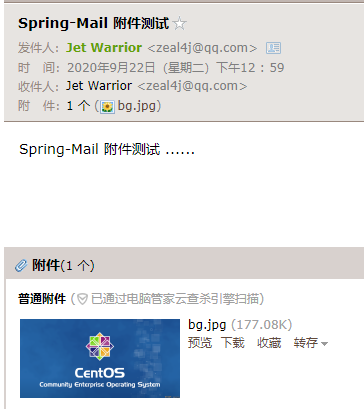
二、带附件邮件发送:
    @Test

    public void sendSpringMailWithAttachment() throws Exception{

        ApplicationContext applicationContext = new ClassPathXmlApplicationContext("app.xml");

        JavaMailSender mailSender = applicationContext.getBean("mailSender", JavaMailSender.class);

        MimeMessage mimeMessage = mailSender.createMimeMessage();

        mimeMessage.setSubject("Spring-Mail 附件测试");

        MimeMessageHelper mimeMessageHelper = new MimeMessageHelper(mimeMessage, true, "utf-8");

        mimeMessageHelper.setTo("zeal4j@qq.com");

        mimeMessageHelper.setFrom("zeal4j@qq.com");

        mimeMessageHelper.setText("Spring-Mail 附件测试 ......");

        File file = new File("D:\\picture\\collection\\bg.jpg");

        mimeMessageHelper.addAttachment(file.getName(), file);

        mailSender.send(mimeMessage);

    }
【Spring-Mail】的更多相关文章
- 【Spring实战】----开篇(包含系列目录链接)
[Spring实战]----开篇(包含系列目录链接) 置顶2016年11月10日 11:12:56 阅读数:3617 终于还是要对Spring进行解剖,接下来Spring实战篇系列会以应用了Sprin ...
- 【Spring开发】—— Spring Core
原文:[Spring开发]-- Spring Core 前言 最近由于一些工作的需要,还有自己知识的匮乏再次翻开spring.正好整理了一下相关的知识,弥补了之前对spring的一些错误认知.这一次学 ...
- 【Spring实战】Spring注解配置工作原理源码解析
一.背景知识 在[Spring实战]Spring容器初始化完成后执行初始化数据方法一文中说要分析其实现原理,于是就从源码中寻找答案,看源码容易跑偏,因此应当有个主线,或者带着问题.目标去看,这样才能最 ...
- 【Spring实战】Spring容器初始化完成后执行初始化数据方法
一.背景知识及需求 在做WEB项目时,经常在项目第一次启动时利用WEB容器的监听.Servlet加载初始化等切入点为数据库准备数据,这些初始化数据是系统开始运行前必须的数据,例如权限组.系统选项.默认 ...
- 【转】【Spring实战】Spring注解配置工作原理源码解析
一.背景知识 在[Spring实战]Spring容器初始化完成后执行初始化数据方法一文中说要分析其实现原理,于是就从源码中寻找答案,看源码容易跑偏,因此应当有个主线,或者带着问题.目标去看,这样才能最 ...
- 【spring boot】12.spring boot对多种不同类型数据库,多数据源配置使用
2天时间,终于把spring boot下配置连接多种不同类型数据库,配置多数据源实现! ======================================================== ...
- 【Spring Session】和 Redis 结合实现 Session 共享
[Spring Session]和 Redis 结合实现 Session 共享 参考官方文档 HttpSession with Redis Guide https://docs.spring.io/s ...
- 【Spring Boot】定时任务
[Spring Boot]定时任务 测试用业务Service package com.example.schedule.service; import org.springframework.ster ...
- 【spring boot】配置信息
======================================================================== 1.feign 超时配置 2.上传文件大小控制 3.J ...
- 【Spring MVC】Properties文件的加载
[Spring MVC]Properties文件的加载 转载:https://www.cnblogs.com/yangchongxing/p/10726885.html 参考:https://java ...
随机推荐
- PB通过OLE方式调用C#.NET DLL时,DLL获取自身根目录
PB通过OLE方式调用C#.NET DLL时, DLL获取自身根目录 System.IO.Path.GetDirectoryName(System.Reflection.Assembly.GetExe ...
- 关于 ulimit 的两个天坑
稍微有点 Linux 经验的人一定会遇到过 "Too many open files" 错误,这个错误本质是 ulimit 设置不合理导致的.关于 ulimit 设置,有哪些需要注 ...
- (六)基于Scrapy爬取网易新闻中的新闻数据
需求:爬取这国内.国际.军事.航空.无人机模块下的新闻信息 1.找到这五个板块对应的url 2.进入每个模块请求新闻信息 我们可以明显发现''加载中'',因此我们判断新闻数据是动态加载出来的. 3. ...
- Java映射 转换post response T data
Java映射 转换post response data 接上篇Java泛型对象在http请求和响应对象中的封装https://www.cnblogs.com/oktokeep/p/17688322.h ...
- 原生js或者是es中让人厌恶的一些地方
js总体来说,是个不错的语言,最大的好处的是简单. 但这个基于es6的一些js也有一些非常怪异的写法,这是非常令人憎恶的地方. c++总体上也算不错,但为什么不是很受欢迎,因为它把自己搞得太复杂了,复 ...
- 11-CSS定位
01 CSS定位概念理解 01 标准流布局概念的理解 02 position属性 02 相对定位 依然在标准流中 应用场景: 在不影响其它元素的情况下,对当前元素进行微调 <!DOCTYPE h ...
- 在高通lk中添加自定义源文件
在高通lk中添加自定义源文件 背景 在lk开发中,需要添加一个自定义功能,但是又不希望代码污染无关的文件(把无关代码添加到某个源文件中是一种罪). 以添加一个aw9523b.c的驱动为例,在aboot ...
- Linux greybus
背景 在研究高通平台驱动震动马达时,我需要为内核驱动实现以下功能:/sys/class/timed_output/vibrator/enable":sysfs文件系统注册接口.提供show. ...
- NXP i.MX 8M Plus工业核心板硬件说明书( 四核ARM Cortex-A53 + 单核ARM Cortex-M7,主频1.6GHz)
1 硬件资源 创龙科技SOM-TLIMX8MP是一款基于NXP i.MX 8M Plus的四核ARM Cortex-A53 + 单核ARM Cortex-M7异构多核处理器设计的高端 ...
- 搭建hadoop集群关键步骤--以三节点为例
搭建三节点的hadoop集群: 要求: 主机名称 备注 IP地址 功能 hadoop01 Master 主节点 192.168.211.134 NameNode.DataNode.ResourceMa ...