
【LLM应用】基于GPT3.5的代码编辑器Cursor试用-智能代码编辑助手
一、安装和使用
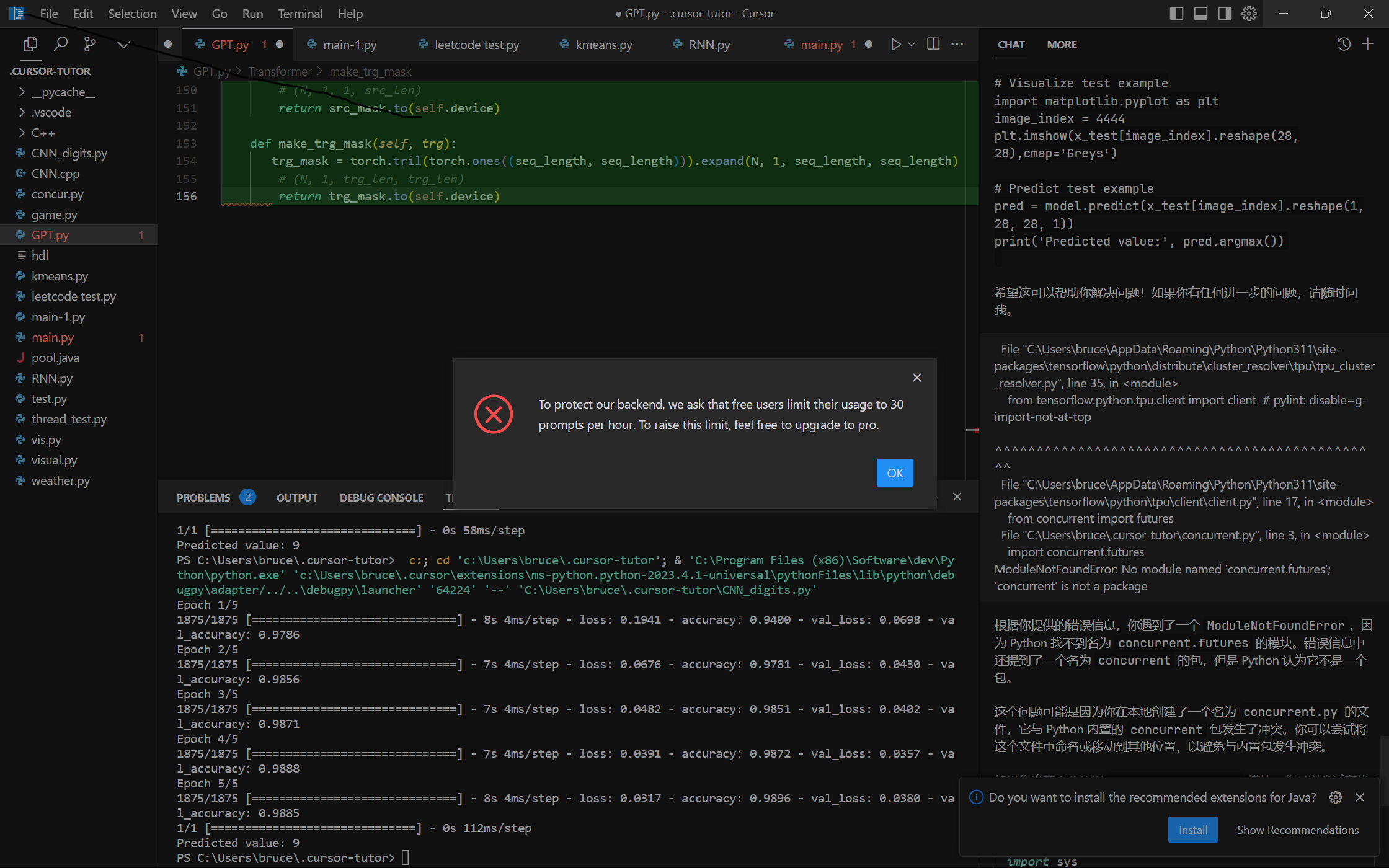
官网下载安装Cursor,然后创建一个代码文件。Ctrl + K生成, Ctrl + L提问。
默认每小时30词。
- 1. Try generating with command K on a new line. Ask for a pytorch script of a feedforward neural network
- 2. Then, select the outputted code and hit chat. Ask if there's a bug. Ask how to improve.
- 3. Try selecting some code and hitting edit. Ask the bot to add residual layers.
- 4. To try out cursor on your own projects, go to the file menu (top left) and open a folder.
有些包需要自行安装,程序不一定一次通过运行,可提问。
二、测试
1. 乒乓球游戏
请用python写一个乒乓球游戏。有如下要求:- 游戏包含两个参与者,一方是电脑,一方是玩家;电脑在界面左侧,玩家在界面右侧。- 游戏界面上包含一个开始按钮,点击开始按钮后,游戏才能开始。- 乒乓球接触球拍和界面上下边界时会反弹。- 玩家通过Up,Down键来控制球拍的上下运动,玩家按住对应的键,球拍会保持一个方向运动。- 电脑通过自动判断乒乓球的位置来进行移动,尽可能的将乒乓球反弹。- 一方的球拍没有接到球的时候,对方得1分,先得够5分的一方获胜,同时游戏结束。- 游戏结束后显示获胜的一方的角色:电脑或者玩家。
# Import necessary modules

import pygame,random

# Initialize Pygame

pygame.init()

# Set up the game window

WINDOW_WIDTH = 800

WINDOW_HEIGHT = 600

WINDOW = pygame.display.set_mode((WINDOW_WIDTH, WINDOW_HEIGHT))

pygame.display.set_caption("Ping Pong Game")

# Set up the colors

WHITE = (255, 255, 255)

BLACK = (0, 0, 0)

# Set up the fonts

FONT = pygame.font.SysFont(None, 48)

# Set up the ball

BALL_RADIUS = 10

ball_x = WINDOW_WIDTH // 2

ball_y = WINDOW_HEIGHT // 2

ball_dx = 5 * random.choice([-1, 1])

ball_dy = 5 * random.choice([-1, 1])

# Set up the paddles

PADDLE_WIDTH = 10

PADDLE_HEIGHT = 100

player_paddle_x = WINDOW_WIDTH - PADDLE_WIDTH - 10

player_paddle_y = WINDOW_HEIGHT // 2 - PADDLE_HEIGHT // 2

computer_paddle_x = 10

computer_paddle_y = WINDOW_HEIGHT // 2 - PADDLE_HEIGHT // 2

paddle_speed = 5

# Set up the scores

player_score = 0

computer_score = 0

# Set up the game loop

game_running = False

game_ended = False

clock = pygame.time.Clock()

while not game_ended:

    # Handle events

    for event in pygame.event.get():

        if event.type == pygame.QUIT:

            game_ended = True

        elif event.type == pygame.KEYDOWN:

            if event.key == pygame.K_SPACE:

                game_running = True

        elif event.type == pygame.KEYUP:

            if event.key == pygame.K_UP or event.key == pygame.K_DOWN:

                player_paddle_dy = 0

    # Handle player input

    keys = pygame.key.get_pressed()

    if keys[pygame.K_UP]:

        player_paddle_dy = -paddle_speed

    elif keys[pygame.K_DOWN]:

        player_paddle_dy = paddle_speed

    else:

        player_paddle_dy = 0

    # Move the paddles

    player_paddle_y += player_paddle_dy

    if player_paddle_y < 0:

        player_paddle_y = 0

    elif player_paddle_y > WINDOW_HEIGHT - PADDLE_HEIGHT:

        player_paddle_y = WINDOW_HEIGHT - PADDLE_HEIGHT

    computer_paddle_y += ball_dy

    if computer_paddle_y < 0:

        computer_paddle_y = 0

    elif computer_paddle_y > WINDOW_HEIGHT - PADDLE_HEIGHT:

        computer_paddle_y = WINDOW_HEIGHT - PADDLE_HEIGHT

    # Move the ball

    if game_running:

        ball_x += ball_dx

        ball_y += ball_dy

        # Check for collisions with the walls

        if ball_y < BALL_RADIUS or ball_y > WINDOW_HEIGHT - BALL_RADIUS:

            ball_dy *= -1

        # Check for collisions with the paddles

        if ball_x < computer_paddle_x + PADDLE_WIDTH and \

                computer_paddle_y < ball_y < computer_paddle_y + PADDLE_HEIGHT:

            ball_dx *= -1

        elif ball_x > player_paddle_x and \

                player_paddle_y < ball_y < player_paddle_y + PADDLE_HEIGHT:

            ball_dx *= -1

        elif ball_x < 0:

            player_score += 1

            game_running = False

            ball_x = WINDOW_WIDTH // 2

            ball_y = WINDOW_HEIGHT // 2

            ball_dx = 5 * random.choice([-1, 1])

            ball_dy = 5 * random.choice([-1, 1])

        elif ball_x > WINDOW_WIDTH:

            computer_score += 1

            game_running = False

            ball_x = WINDOW_WIDTH // 2

            ball_y = WINDOW_HEIGHT // 2

            ball_dx = 5 * random.choice([-1, 1])

            ball_dy = 5 * random.choice([-1, 1])

        # Check for game over

        if player_score == 5 or computer_score == 5:

            game_running = False

            game_over_text = FONT.render("Game Over", True, WHITE)

            if player_score == 5:

                winner_text = FONT.render("Player Wins!", True, WHITE)

            else:

                winner_text = FONT.render("Computer Wins!", True, WHITE)

    # Draw the game

    WINDOW.fill(BLACK)

    if not game_running:

        start_text = FONT.render("Press Space to Start", True, WHITE)

        start_rect = start_text.get_rect(center=(WINDOW_WIDTH // 2, WINDOW_HEIGHT // 2))

        WINDOW.blit(start_text, start_rect)

    pygame.draw.circle(WINDOW, WHITE, (ball_x, ball_y), BALL_RADIUS)

    pygame.draw.rect(WINDOW, WHITE, (player_paddle_x, player_paddle_y, PADDLE_WIDTH, PADDLE_HEIGHT))

    pygame.draw.rect(WINDOW, WHITE, (computer_paddle_x, computer_paddle_y, PADDLE_WIDTH, PADDLE_HEIGHT))

    player_score_text = FONT.render(str(player_score), True, WHITE)

    computer_score_text = FONT.render(str(computer_score), True, WHITE)

    score_rect = player_score_text.get_rect(midtop=(WINDOW_WIDTH // 2, 10))

    WINDOW.blit(player_score_text, score_rect.move(-50, 0))

    WINDOW.blit(computer_score_text, score_rect.move(50, 0))

    if not game_running and (player_score > 0 or computer_score > 0):

        WINDOW.blit(game_over_text, game_over_text.get_rect(center=(WINDOW_WIDTH // 2, WINDOW_HEIGHT // 2 - 50)))

        WINDOW.blit(winner_text, winner_text.get_rect(center=(WINDOW_WIDTH // 2, WINDOW_HEIGHT // 2 + 50)))

    pygame.display.update()

    clock.tick(60)

# Quit Pygame

pygame.quit()
可以运行
2. 手写数字识别
用Python写一个基于MINIST数据集的手写数字识别代码,并给出测试样例
import numpy as np

import tensorflow as tf

from tensorflow.keras.datasets import mnist

from tensorflow.keras.models import Sequential

from tensorflow.keras.layers import Conv2D, MaxPooling2D, Flatten, Dense

# Load MNIST dataset

(x_train, y_train), (x_test, y_test) = mnist.load_data()

# Normalize pixel values to be between 0 and 1

x_train = x_train / 255.0

x_test = x_test / 255.0

# Reshape input data to have a single channel

x_train = np.reshape(x_train, (x_train.shape[0], x_train.shape[1], x_train.shape[2], 1))

x_test = np.reshape(x_test, (x_test.shape[0], x_test.shape[1], x_test.shape[2], 1))

# Define LeNet model

model = Sequential()

model.add(Conv2D(filters=6, kernel_size=(5, 5), activation='relu', input_shape=(28, 28, 1)))

model.add(MaxPooling2D(pool_size=(2, 2)))

model.add(Conv2D(filters=16, kernel_size=(5, 5), activation='relu'))

model.add(MaxPooling2D(pool_size=(2, 2)))

model.add(Flatten())

model.add(Dense(units=120, activation='relu'))

model.add(Dense(units=84, activation='relu'))

model.add(Dense(units=10, activation='softmax'))

# Compile model

model.compile(optimizer='adam', loss='sparse_categorical_crossentropy', metrics=['accuracy'])

# Train model

model.fit(x_train, y_train, epochs=5, validation_data=(x_test, y_test))

# Visualize test example

# Visualize test example

import matplotlib.pyplot as plt

image_index = 4444

plt.imshow(x_test[image_index].reshape(28, 28),cmap='Greys')

plt.show()

# Predict test example

pred = model.predict(x_test[image_index].reshape(1, 28, 28, 1))

print('Predicted value:', pred.argmax())

3. 聚类
k-means: 用Python实现K-means算法,并在iris数据集上进行测试,最后对结果进行可视化
GMM: 用numpy实现GMM算法,给出测试样例
from sklearn.datasets import load_iris

from sklearn.cluster import KMeans

import matplotlib.pyplot as plt

# load iris dataset

iris = load_iris()

X = iris.data

# initialize KMeans model with 3 clusters

kmeans = KMeans(n_clusters=3)

# fit the model to the data

kmeans.fit(X)

# predict the clusters for each data point

y_kmeans = kmeans.predict(X)

# plot the clusters

plt.scatter(X[:, 0], X[:, 1], c=y_kmeans, cmap='viridis')

centers = kmeans.cluster_centers_

plt.scatter(centers[:, 0], centers[:, 1], c='black', s=200, alpha=0.5);

plt.show()
4. RNN
用分别用Pytorh和Numpy写一个RNN网络,然后在一个1960年到2022年世界总人口树的时序数据上对它们进行测试。要求:-对比Arima算法-对数据进行可视化-用1960年到2012年预测2013年到2022年,对预测结果可视化
# PyTorch RNN network

import torch

import torch.nn as nn

class RNN(nn.Module):

    def __init__(self, input_size, hidden_size, output_size):

        super(RNN, self).__init__()

        self.hidden_size = hidden_size

        self.i2h = nn.Linear(input_size + hidden_size, hidden_size)

        self.i2o = nn.Linear(input_size + hidden_size, output_size)

        self.softmax = nn.LogSoftmax(dim=1)

    def forward(self, input, hidden):

        combined = torch.cat((input, hidden), 1)

        hidden = self.i2h(combined)

        output = self.i2o(combined)

        output = self.softmax(output)

        return output, hidden

    def initHidden(self):

        return torch.zeros(1, self.hidden_size)

# Numpy RNN network

import numpy as np

class NumpyRNN:

    def __init__(self, input_size, hidden_size, output_size):

        self.hidden_size = hidden_size

        self.Wxh = np.random.randn(hidden_size, input_size) * 0.01

        self.Whh = np.random.randn(hidden_size, hidden_size) * 0.01

        self.Why = np.random.randn(output_size, hidden_size) * 0.01

        self.bh = np.zeros((hidden_size, 1))

        self.by = np.zeros((output_size, 1))

    def forward(self, inputs, hprev):

        xs, hs, ys, ps = {}, {}, {}, {}

        hs[-1] = np.copy(hprev)

        for t in range(len(inputs)):

            xs[t] = np.zeros((input_size, 1))

            xs[t][inputs[t]] = 1

            hs[t] = np.tanh(np.dot(self.Wxh, xs[t]) + np.dot(self.Whh, hs[t-1]) + self.bh)

            ys[t] = np.dot(self.Why, hs[t]) + self.by

            ps[t] = np.exp(ys[t]) / np.sum(np.exp(ys[t]))

        return ps, hs

    def initHidden(self):

        return np.zeros((self.hidden_size, 1))

# Testing on world population data

import pandas as pd

import matplotlib.pyplot as plt

from statsmodels.tsa.arima_model import ARIMA

# Load data

data = pd.read_csv('world_population.csv', index_col=0)

data.index = pd.to_datetime(data.index)

# Train-test split

train_data = data.loc['1960':'2012']

test_data = data.loc['2013':'2022']

# ARIMA model

model = ARIMA(train_data, order=(1, 1, 1))

model_fit = model.fit(disp=0)

arima_pred = model_fit.predict(start='2013', end='2022', dynamic=False)

# PyTorch RNN model

input_size = 1

hidden_size = 32

output_size = 1

pytorch_rnn = RNN(input_size, hidden_size, output_size)

criterion = nn.MSELoss()

optimizer = torch.optim.Adam(pytorch_rnn.parameters(), lr=0.01)

# Train PyTorch RNN model

for epoch in range(1000):

    hidden = pytorch_rnn.initHidden()

    optimizer.zero_grad()

    loss = 0

    for i in range(len(train_data)-1):

        input_tensor = torch.tensor(train_data.iloc[i])

        target_tensor = torch.tensor(train_data.iloc[i+1])

        output, hidden = pytorch_rnn(input_tensor, hidden)

        loss += criterion(output, target_tensor)

    loss.backward()

    optimizer.step()

# Test PyTorch RNN model

pytorch_rnn.eval()

pytorch_pred = []

hidden = pytorch_rnn.initHidden()

for i in range(len(test_data)):

    input_tensor = torch.tensor(test_data.iloc[i])

    output, hidden = pytorch_rnn(input_tensor, hidden)

    pytorch_pred.append(output.detach().numpy()[0][0])

# Numpy RNN model

input_size = 1

hidden_size = 32

output_size = 1

numpy_rnn = NumpyRNN(input_size, hidden_size, output_size)

# Train Numpy RNN model

loss_fn = nn.MSELoss()

learning_rate = 0.01

for epoch in range(1000):

    hprev = numpy_rnn.initHidden()

    loss = 0

    for i in range(len(train_data)-1):

        x = np.array(train_data.iloc[i])

        y = np.array(train_data.iloc[i+1])

        ps, hprev = numpy_rnn.forward(x, hprev)

        loss += loss_fn(torch.tensor(ps[len(ps)-1]), torch.tensor(y))

        # Backpropagation

        dWhy = np.dot((ps[len(ps)-1]-y), hprev.T)

        dby = ps[len(ps)-1]-y

        dhnext = np.dot(numpy_rnn.Why.T, ps[len(ps)-1]-y)

        dWxh, dWhh, dbh = np.zeros_like(numpy_rnn.Wxh), np.zeros_like(numpy_rnn.Whh), np.zeros_like(numpy_rnn.bh)

        for t in reversed(range(len(ps)-1)):

            dy = np.copy(ps[t])

            dy[train_data.iloc[t+1]] -= 1

            dWhy += np.dot(dy, hs[t].T)

            dby += dy

            dh = np.dot(numpy_rnn.Why.T, dy) + dhnext

            dhraw = (1 - hs[t] * hs[t]) * dh

            dbh += dhraw

            dWxh += np.dot(dhraw, xs[t].T)

            dWhh += np.dot(dhraw, hs[t-1].T)

            dhnext = np.dot(numpy_rnn.Whh.T, dhraw)

        for dparam in [dWxh, dWhh, dWhy, dbh, dby]:

            np.clip(dparam, -5, 5, out=dparam)

        numpy_rnn.Wxh -= learning_rate * dWxh

        numpy_rnn.Whh -= learning_rate * dWhh

        numpy_rnn.Why -= learning_rate * dWhy

        numpy_rnn.bh -= learning_rate * dbh

        numpy_rnn.by -= learning_rate * dby

# Test Numpy RNN model

numpy_pred = []

hprev = numpy_rnn.initHidden()

for i in range(len(test_data)):

    x = np.array(test_data.iloc[i])

    ps, hprev = numpy_rnn.forward(x, hprev)

    numpy_pred.append(ps[len(ps)-1].argmax())

# Visualize results

plt.figure(figsize=(10,5))

plt.plot(train_data.index, train_data, label='Training data')

plt.plot(test_data.index, test_data, label='True values')

plt.plot(test_data.index, arima_pred, label='ARIMA')

plt.plot(test_data.index, pytorch_pred, label='PyTorch RNN')

plt.plot(test_data.index, numpy_pred, label='Numpy RNN')

plt.legend()

plt.show()
不知道对不对,训练代码都给出了
5. 自注意力
用Pytorch实现自注意力网络,并进行测试
import torch

import torch.nn as nn

import torch.nn.functional as F

class SelfAttention(nn.Module):

    def __init__(self, embed_size, heads):

        super(SelfAttention, self).__init__()

        self.embed_size = embed_size

        self.heads = heads

        self.head_dim = embed_size // heads

        assert (self.head_dim * heads == embed_size), "Embed size needs to be divisible by heads"

        self.values = nn.Linear(self.head_dim, self.head_dim, bias=False)

        self.keys = nn.Linear(self.head_dim, self.head_dim, bias=False)

        self.queries = nn.Linear(self.head_dim, self.head_dim, bias=False)

        self.fc_out = nn.Linear(heads*self.head_dim, embed_size)

    def forward(self, values, keys, query, mask):

        N = query.shape[0]

        value_len, key_len, query_len = values.shape[1], keys.shape[1], query.shape[1]

        # Split embedding into self.heads pieces

        values = values.reshape(N, value_len, self.heads, self.head_dim)

        keys = keys.reshape(N, key_len, self.heads, self.head_dim)

        query = query.reshape(N, query_len, self.heads, self.head_dim)

        values = self.values(values) # (N, value_len, heads, head_dim)

        keys = self.keys(keys) # (N, key_len, heads, head_dim)

        queries = self.queries(query) # (N, query_len, heads, head_dim)

        energy = torch.einsum("nqhd,nkhd->nhqk", [queries, keys]) # (N, heads, query_len, key_len)

        if mask is not None:

            energy = energy.masked_fill(mask == 0, float("-1e20"))

        attention = torch.softmax(energy / (self.embed_size ** (1/2)), dim=3) # (N, heads, query_len, key_len)

        out = torch.einsum("nhql,nlhd->nqhd", [attention, values]).reshape(N, query_len, self.heads*self.head_dim)

        out = self.fc_out(out)

        return out

class TransformerBlock(nn.Module):

    def __init__(self, embed_size, heads, dropout, forward_expansion):

        super(TransformerBlock, self).__init__()

        self.attention = SelfAttention(embed_size, heads)

        self.norm1 = nn.LayerNorm(embed_size)

        self.norm2 = nn.LayerNorm(embed_size)

        self.feed_forward = nn.Sequential(

            nn.Linear(embed_size, forward_expansion*embed_size),

            nn.ReLU(),

            nn.Linear(forward_expansion*embed_size, embed_size)

        )

        self.dropout = nn.Dropout(dropout)

    def forward(self, value, key, query, mask):

        attention = self.attention(value, key, query, mask)

        x = self.dropout(self.norm1(attention + query))

        forward = self.feed_forward(x)

        out = self.dropout(self.norm2(forward + x))

        return out

class Encoder(nn.Module):

    def __init__(self, src_vocab_size, embed_size, num_layers, heads, device, forward_expansion, dropout, max_length):

        super(Encoder, self).__init__()

        self.embed_size = embed_size

        self.device = device

        self.word_embedding = nn.Embedding(src_vocab_size, embed_size)

        self.position_embedding = nn.Embedding(max_length, embed_size)

        self.layers = nn.ModuleList([

            TransformerBlock(embed_size, heads, dropout=dropout, forward_expansion=forward_expansion)

            for _ in range(num_layers)

        ])

        self.dropout = nn.Dropout(dropout)

    def forward(self, x, mask):

        N, seq_length = x.shape

        positions = torch.arange(0, seq_length).expand(N, seq_length).to(self.device)

        out = self.dropout(self.word_embedding(x) + self.position_embedding(positions))

        for layer in self.layers:

            out = layer(out, out, out, mask)

        return out

class DecoderBlock(nn.Module):

    def __init__(self, embed_size, heads, forward_expansion, dropout, device):

        super(DecoderBlock, self).__init__()

        self.norm = nn.LayerNorm(embed_size)

        self.attention = SelfAttention(embed_size, heads)

        self.transformer_block = TransformerBlock(embed_size, heads, dropout, forward_expansion)

        self.dropout = nn.Dropout(dropout)

    def forward(self, x, value, key, src_mask, trg_mask):

        attention = self.attention(x, x, x, trg_mask)

        query = self.dropout(self.norm(attention + x))

        out = self.transformer_block(value, key, query, src_mask)

        return out

class Decoder(nn.Module):

    def __init__(self, trg_vocab_size, embed_size, num_layers, heads, forward_expansion, dropout, device, max_length):

        super(Decoder, self).__init__()

        self.device = device

        self.word_embedding = nn.Embedding(trg_vocab_size, embed_size)

        self.position_embedding = nn.Embedding(max_length, embed_size)

        self.layers = nn.ModuleList([

            DecoderBlock(embed_size, heads, forward_expansion, dropout, device)

            for _ in range(num_layers)

        ])

        self.fc_out = nn.Linear(embed_size, trg_vocab_size)

        self.dropout = nn.Dropout(dropout)

    def forward(self, x, enc_out, src_mask, trg_mask):

        N, seq_length = x.shape

        positions = torch.arange(0, seq_length).expand(N, seq_length).to(self.device)

        x = self.dropout(self.word_embedding(x) + self.position_embedding(positions))

        for layer in self.layers:

            x = layer(x, enc_out, enc_out, src_mask, trg_mask)

        out = self.fc_out(x)

        return out

class Transformer(nn.Module):

    def __init__(self, src_vocab_size, trg_vocab_size, src_pad_idx, trg_pad_idx, embed_size=256, num_layers=6, forward_expansion=4, heads=8, dropout=0, device="cuda", max_length=100):

        super(Transformer, self).__init__()

        self.encoder = Encoder(src_vocab_size, embed_size, num_layers, heads, device, forward_expansion, dropout, max_length)

        self.decoder = Decoder(trg_vocab_size, embed_size, num_layers, heads, forward_expansion, dropout, device, max_length)

        self.src_pad_idx = src_pad_idx

        self.trg_pad_idx = trg_pad_idx

        self.device = device

    def make_src_mask(self, src):

        src_mask = (src != self.src_pad_idx).unsqueeze(1).unsqueeze(2)

        # (N, 1, 1, src_len)

        return src_mask.to(self.device)

    def make_trg_mask(self, trg):

       trg_mask = torch.tril(torch.ones((seq_length, seq_length))).expand(N, 1, seq_length, seq_length)

        # (N, 1, trg_len, trg_len)

        return trg_mask.to(self.device)
不知道对不对,写到一般次数受限了(直接写Transformer了)
6. 聊天
实现一个聊天机器人,给出测试样例
# 使用Python调用BERT实现聊天机器人

import torch

from transformers import BertTokenizer, BertForQuestionAnswering

# 加载预训练的BERT模型

tokenizer = BertTokenizer.from_pretrained('bert-base-chinese')

model = BertForQuestionAnswering.from_pretrained('bert-base-chinese')

# 回答问题的函数

def answer_question(question, answer_text):

    # 将问题和答案文本编码为输入ID

    input_ids = tokenizer.encode(question, answer_text)

    tokens = tokenizer.convert_ids_to_tokens(input_ids)

    # 确定问题和答案文本的分段ID

    sep_index = input_ids.index(tokenizer.sep_token_id)

    num_seg_a = sep_index + 1

    num_seg_b = len(input_ids) - num_seg_a

    segment_ids = [0]*num_seg_a + [1]*num_seg_b

    assert len(segment_ids) == len(input_ids)

    # 使用BertForQuestionAnswering模型预测答案的开始和结束位置

    outputs = model(torch.tensor([input_ids]), token_type_ids=torch.tensor([segment_ids]))

    start_scores = outputs.start_logits

    end_scores = outputs.end_logits

    # 找到具有最高“start”和“end”分数的标记

    answer_start = torch.argmax(start_scores)

    answer_end = torch.argmax(end_scores)

    # 将标记转换回字符串

    answer = tokens[answer_start]

    for i in range(answer_start + 1, answer_end + 1):

        if tokens[i][0:2] == '##':

            answer += tokens[i][2:]

        else:

            answer += ' ' + tokens[i]

    return answer
# Here is an example of how to use the answer_question function:

question = "什么是BERT?"

answer_text = "BERT是一种预训练语言模型,可以用于各种自然语言处理任务。"

answer = answer_question(question, answer_text)

print(answer)

# Output: "一种预训练语言模型"
解释
BertForQuestionAnswering是一个预训练的BERT模型,用于回答问题。它是transformers库中的一个类,可以通过from_pretrained方法加载预训练的模型。在给定问题和答案文本的情况下,answer_question函数使用BertTokenizer将文本编码为输入ID,并使用BertForQuestionAnswering模型预测答案的开始和结束位置。然后,它将这些位置转换回标记并返回答案字符串。
直接调包,好像没理解问题,给出QA了。
7. 矩阵乘法
基于C++实现通用矩阵乘法,并给出多个测试样例。要求如下:- 矩阵乘法需要实现分块乘法- 需要根据矩阵的稀疏情况进行优化#include <iostream>
#include <vector>
#include <algorithm>
using namespace std; const int BLOCK_SIZE = 32; void gemm(vector<vector<double>>& A, vector<vector<double>>& B, vector<vector<double>>& C) {
int n = A.size(), m = B.size(), p = B[0].size();
for (int i = 0; i < n; i += BLOCK_SIZE) {
for (int j = 0; j < p; j += BLOCK_SIZE) {
for (int k = 0; k < m; k += BLOCK_SIZE) {
for (int ii = i; ii < min(n, i + BLOCK_SIZE); ii++) {
for (int jj = j; jj < min(p, j + BLOCK_SIZE); jj++) {
for (int kk = k; kk < min(m, k + BLOCK_SIZE); kk++) {
C[ii][jj] += A[ii][kk] * B[kk][jj];
}
}
}
}
}
}
} void optimize_gemm(vector<vector<double>>& A, vector<vector<double>>& B, vector<vector<double>>& C) {
int n = A.size(), m = B.size(), p = B[0].size();
vector<vector<double>> Bt(p, vector<double>(m));
for (int i = 0; i < p; i++) {
for (int j = 0; j < m; j++) {
Bt[i][j] = B[j][i];
}
}
for (int i = 0; i < n; i += BLOCK_SIZE) {
for (int j = 0; j < p; j += BLOCK_SIZE) {
for (int k = 0; k < m; k += BLOCK_SIZE) {
for (int ii = i; ii < min(n, i + BLOCK_SIZE); ii++) {
for (int jj = j; jj < min(p, j + BLOCK_SIZE); jj++) {
double sum = 0;
for (int kk = k; kk < min(m, k + BLOCK_SIZE); kk++) {
sum += A[ii][kk] * Bt[jj][kk];
}
C[ii][jj] += sum;
}
}
}
}
}
} int main() {
vector<vector<double>> A = {{1, 2, 3}, {4, 5, 6}};
vector<vector<double>> B = {{7, 8}, {9, 10}, {11, 12}};
vector<vector<double>> C1(2, vector<double>(2)), C2(2, vector<double>(2));
gemm(A, B, C1);
optimize_gemm(A, B, C2);
cout << "C1:" << endl;
for (auto row : C1) {
for (auto x : row) {
cout << x << " ";
}
cout << endl;
}
cout << "C2:" << endl;
for (auto row : C2) {
for (auto x : row) {
cout << x << " ";
}
cout << endl;
}
return 0;
}可运行
用python写一个基于多线程的并行矩阵乘法,并给出测试样例运行
import numpy as np

import threading

# Define a function to perform matrix multiplication

def matmul(A, B, C, i, j):

    C[i][j] = np.dot(A[i], B[:,j])

# Define a function to perform parallel matrix multiplication

def parallel_matmul(A, B, num_threads):

    # Get the shape of the matrices

    m, n = A.shape

    p, q = B.shape

    # Check if the matrices can be multiplied

    if n != p:

        print("Matrices cannot be multiplied")

        return None

    # Create a matrix to store the result

    C = np.zeros((m, q))

    # Create a list to store the threads

    threads = []

    # Create the threads

    for i in range(m):

        for j in range(q):

            thread = threading.Thread(target=matmul, args=(A, B, C, i, j))

            threads.append(thread)

    # Start the threads

    for i in range(num_threads):

        for j in range(i, len(threads), num_threads):

            threads[j].start()

    # Wait for the threads to finish

    for thread in threads:

        thread.join()

    # Return the result

    return C

# Test the function

A = np.array([[1, 2], [3, 4], [5, 6]])

B = np.array([[7, 8], [9, 10]])

C = parallel_matmul(A, B, 2)

print(C)
8. 可视化
获取贵州茅台从2018年元旦至2023年3月20日的行情数据,计算MACD指标
import tushare as ts

import matplotlib.pyplot as plt

from mpl_finance import candlestick_ochl

from matplotlib.pylab import date2num

import pandas as pd

import numpy as np

# 获取贵州茅台从2018年元旦至2023年3月20日的行情数据

df = ts.get_k_data('600519', start='2018-01-01', end='2023-03-20')

# 计算MACD指标

def MACD(df, fastperiod=12, slowperiod=26, signalperiod=9):

    ewma12 = pd.Series.ewm(df['close'], span=fastperiod).mean()

    ewma26 = pd.Series.ewm(df['close'], span=slowperiod).mean()

    dif = ewma12 - ewma26

    dea = pd.Series.ewm(dif, span=signalperiod).mean()

    macd = (dif - dea) * 2

    return dif, dea, macd

dif, dea, macd = MACD(df)

# 画图展示

df['time'] = pd.to_datetime(df['date'])

df['time'] = df['time'].apply(date2num)

df = df[['time', 'open', 'close', 'high', 'low']]

fig, ax = plt.subplots(figsize=(20, 10))

candlestick_ochl(ax, df.values, width=0.6, colorup='red', colordown='green', alpha=0.8)

plt.plot(dif, label='DIF', color='blue')

plt.plot(dea, label='DEA', color='orange')

plt.bar(macd.index, macd, label='MACD', color='purple')

plt.legend()

plt.title('Guizhou Maotai Stock Price with MACD')

plt.xlabel('Date')

plt.ylabel('Price')

plt.show()
可运行
9.WEB
用python爬取成都的7天内的天气,转换成WEB程序:- 使用Python Flask编写后端代码- 前端页面静态页面, 展示天气图标
from flask import Flask, render_template_string

import requests

from bs4 import BeautifulSoup

app = Flask(__name__)

@app.route('/')

def home():

    # Scrape weather data from website

    url = 'https://www.weather.com/zh-CN/weather/5day/l/CHXX0006:1:CH'

    response = requests.get(url)

    print("Start to crawling")

    soup = BeautifulSoup(response.content, 'html.parser')

    days = soup.find_all('h3', class_='DailyContent--daypartName--3G5Y8')

    temps = soup.find_all('div', class_='DailyContent--temp--_8DL5')

    icons = soup.find_all('img', class_='DailyContent--icon--2s5M5')

    weather_data = []

    for i in range(len(days)):

        day = days[i].text

        temp = temps[i].text

        icon = icons[i]['alt']

        weather_data.append({'day': day, 'temp': temp, 'icon': icon})

    print(weather_data)

    # Render template with weather data

    template = """

    <!DOCTYPE html>

    <html>

      <head>

        <title>Weather App</title>

      </head>

      <body>

        <h1>5-Day Weather Forecast</h1>

        <table>

          <thead>

            <tr>

              <th>Day</th>

              <th>Temperature</th>

              <th>Icon</th>

            </tr>

          </thead>

          <tbody>

            {% for data in weather_data %}

            <tr>

              <td>{{ data.day }}</td>

              <td>{{ data.temp }}</td>

              <td>{{ data.icon }}</td>

            </tr>

            {% endfor %}

          </tbody>

        </table>

      </body>

    </html>

    """

    return render_template_string(template, weather_data=weather_data)

if __name__ == '__main__':

    app.run()
爬虫有问题,程序有的包都没导入。
10.Verilog HDL
加法器 乘法器 矩阵乘法
// This is a Verilog code for a simple adder

module adder(input a, input b, output sum);

    assign sum = a + b;

endmodule

// This is a Verilog code for a simple multiplier

module multiplier(input a, input b, output mult);

    assign mult = a * b;

endmodule

// This is a Verilog code for a matrix multiplication module

module matrix_multiplier(

    input [3:0][3:0] matrix_A, // 4x4 matrix A

    input [3:0][3:0] matrix_B, // 4x4 matrix B

    output [3:0][3:0] matrix_C // 4x4 matrix C = A * B

);

genvar i, j, k;

wire [7:0] temp;

generate

    // Multiply each element of matrix A with corresponding element of matrix B

    // and accumulate the results to get each element of matrix C

    for (i = 0; i < 4; i = i + 1) begin : ROWS_C

        for (j = 0; j < 4; j = j + 1) begin : COLS_C

            assign temp = 8'h0;

            for (k = 0; k < 4; k = k + 1) begin : ELEMENTS_A_B

                assign temp = temp + matrix_A[i][k] * matrix_B[k][j];

            end

            assign matrix_C[i][j] = temp;

        end

    end

endgenerate

endmodule
不知道对不对
11.线程池
用Java写一个线程池,并给出测试样例
import java.util.concurrent.ExecutorService;

import java.util.concurrent.Executors;

public class ThreadPoolExample {

    public static void main(String[] args) {

        ExecutorService executor = Executors.newFixedThreadPool(5);

        for (int i = 0; i < 10; i++) {

            Runnable worker = new WorkerThread("" + i);

            executor.execute(worker);

        }

        executor.shutdown();

        while (!executor.isTerminated()) {

        }

        System.out.println("Finished all threads");

    }

}

class WorkerThread implements Runnable {

    private String message;

    public WorkerThread(String s) {

        this.message = s;

    }

    public void run() {

        System.out.println(Thread.currentThread().getName() + " (Start) message = " + message);

        processMessage();

        System.out.println(Thread.currentThread().getName() + " (End)");

    }

    private void processMessage() {

        try {

            Thread.sleep(2000);

        } catch (InterruptedException e) {

            e.printStackTrace();

        }

    }

}
【LLM应用】基于GPT3.5的代码编辑器Cursor试用-智能代码编辑助手的更多相关文章
- 前端代码编辑器ace 语法提示 代码提示
本文主要是介绍ace编辑器的语法提示,自动完成.其实没什么可特别介绍的,有始有终吧,把项目中使用到的ace的功能都介绍下. { enableBasicAutocompletion: false, // ...
- 代码编辑器的最终选择Sublime Text 2
对于程序员,不是每一种语言都有很好的代码编辑器,VS这样的编辑环境+编译器也不能适合所有的语言,同时VS占用内存量很大,开几个VS,计算机就开始有点吃不消了.所以简便的代码编辑器很重要. 再Windo ...
- 20个最强的基于浏览器的在线代码编辑器 - OPEN资讯
20个最强的基于浏览器的在线代码编辑器 - OPEN资讯 20个最强的基于浏览器的在线代码编辑器
- CodeMirror:基于JavaScript的代码编辑器
官方网站定义: http://codemirror.net/ CodeMirror is a versatile text editor implemented in JavaScript for t ...
- 基于OpenAI的代码编辑器,有点酷有点强!
最近随着OpenAI的一系列大动作,把软件领域搅的天翻地覆.各行各业各领域,都出现了大量新产品. 开发工具领域首当其冲,各种新工具层出不穷,今天TJ就给大家推荐一个全新的开发工具:Cursor 从官网 ...
- NanUI for Winform 使用示例【第一集】——山寨个代码编辑器
NanUI for Winform从昨天写博客发布到现在获得了和多朋友的关注,首先感谢大家的关注和支持!请看昨天本人的博文<NanUI for Winform发布,让Winform界面设计拥有无 ...
- 基于 Angularjs&Node.js 云编辑器架构设计及开发实践
基于 Angularjs&Node.js 云编辑器架构设计及开发实践 一.产品背景 二.总体架构 1. 前端架构 a.前端层次 b.核心基础模块设计 c.业务模块设计 2. Node.js端设 ...
- ACE 1.1.9 发布,开源云端代码编辑器
点这里 ACE 1.1.9 发布,开源云端代码编辑器 oschina 发布于: 2015年04月06日 (1评) 分享到: 收藏 +25 4月18日 武汉 源创会开始报名,送华为开发板 ACE ...
- Html在线编辑器--基于Jquery的xhEditor轻量级编辑器
xhEditor V1.2.2 下载地址 开源中国社区: http://www.oschina.net/p/xheditor xhEditor是一个基于jQuery开发的简单迷你并且高效的可视化XHT ...
- Github Atom开源文本代码编辑器- 由 Github 打造的下一代编程开发利器
个人理解:Github 热度超凡的一个项目Atom,electron是整个atom的核心,对于electron可以理解成 electron =io.js + Chromium 通过 Electr ...
随机推荐
- 实战视频所需要的IDE和工具软件的下载链接
以下是视频实战所需要的IDE和工具软件的下载链接: Visual Studio Code(适用于Windows.Mac和Linux):https://code.visualstudio.com/dow ...
- SESSION会话机制解析
Windows Session(会话)的概念 会话 session 是由代表单个用户登录会话的所有进程和系统对象组成的.其中的对象包括所有的窗口,桌面和windows stations.桌面是特定se ...
- delphi 异常测试(我自己捕捉)
由于最近的短信模块老是报SocketErorr错误,有的时候也不确定是哪里有问题,影响短信的销售,所以这里这样写,把出现的异常捕捉到显示出来.然后跳过这个不发送 ------------------- ...
- PostgreSQL-可以通过localhost连接,无法通过IP地址连接。
(1)如果PostgreSQL配置文件中没有允许访问该服务器的IP地址,则需要先添加允许访问的IP地址,并在防火墙中开放相应的端口.(2)在PostgreSQL配置文件postgresql.conf中 ...
- Linux服务器查看端口是否开启或占用
一.查看端口是否启用 (1)lsof -i :8080 查看8080端口被哪个进程占用 (2)netstat -lnp|grep 8080 查看8080端口被哪个进程占用 (3)ss -nlap | ...
- [Java]format string is malformed java
format string is malformed java 最近在做代码审查,发现很多在使用 String.format 的时候遇到了IDEA报的 Format string 'xxx' is m ...
- Python学习之Pytorch
一.如何查看本机是否安装了Pytorch 在Python环境中查看是否安装了PyTorch可以通过几个简单的步骤来完成.这里有一些方法: 使用Python命令行: 打开你的命令行工具(比如Termin ...
- JS 记一次工作中,由深度优先到广度优先的算法优化
壹 ❀ 引 坦白的说,本人的算法简直一塌糊涂,虽然有刷过一段时间的算法题,但依然只能解决不算复杂的问题,稍微麻烦的问题都只是站在能不能解决问题的角度,至于性能优化,算法方法的选择并没有过于深刻的理解. ...
- C++字符串大写字母转小写字母
#include <iostream> #include <stdio.h> using namespace std; char* Capital_to_Small(char* ...
- 05-Redis系列之-主从复制配置和优化,fork和aof两大阻塞
主从复制 原理 一台主服务器配多台从服务器,主服务器宕机后,从服务器挑选一台顶上去. 从服务器同步主服务器的数据,这个同步是单向的,并且从服务器不能设置值,否则会造成数据的混乱 功能 0.故障处理:s ...