
[转帖]MOUNTING AN S3 BUCKET ON WINDOWS AND LINUX
https://blog.spikeseed.cloud/mount-s3-as-a-disk/#mounting-an-s3-bucket-on-windows-server-2016
Wouldn’t it be perfect to be able to use Amazon S3 as any local folder on your machine? It is all this blog post is about. We will see how to mount Amazon S3 Buckets on both Linux and Windows.
Amazon Simple Storage Service (Amazon S3) is an object storage service that is secure, efficient and highly available. Customers can use it to store and protect an unlimited number of files for multiple use cases, such as websites static resources, mobile applications, backup and restore, archiving, enterprise applications and big data analytics. Amazon S3 provides easy-to-use management features so we can organize our data and configure access control.
Table of Contents
- Mounting an S3 bucket on Windows Server 2016
- Mounting an S3 bucket on a Linux Ubuntu 18.04
- Conclusion
MOUNTING AN S3 BUCKET ON WINDOWS SERVER 2016
Mounting an S3 bucket on Windows is not easy. There are several commercial softwares which can help us mont an S3 Bucket. In this blog post, we will use rclone, an open source command line tool to manage files on cloud storages. rclone can mount any local, cloud or virtual filesystem as a disk on Windows and Linux.
Launch the Windows Server 2016 in the cloud
First, we need to launch a Windows Server 2016 EC2 instance with access to internet and associated with an instance Profile which grants the instance access to our S3 Bucket. The following IAM policy gives the minimum rights to access the bucket we want to mount (for this example, we will use a bucket named tmp-prenard).
1 |
{
|
To mount an S3 bucket on a on-premise Windows Server we have to work with AWS Credentials (see Understanding and getting your AWS credentials for more information).
Mount the S3 bucket on the Windows instance
On the Windows instance.
- download the latest version of rclone and unzip the archive.
create a directory under
c:\Program Files\rcloneand copy the content of the archive in this directory.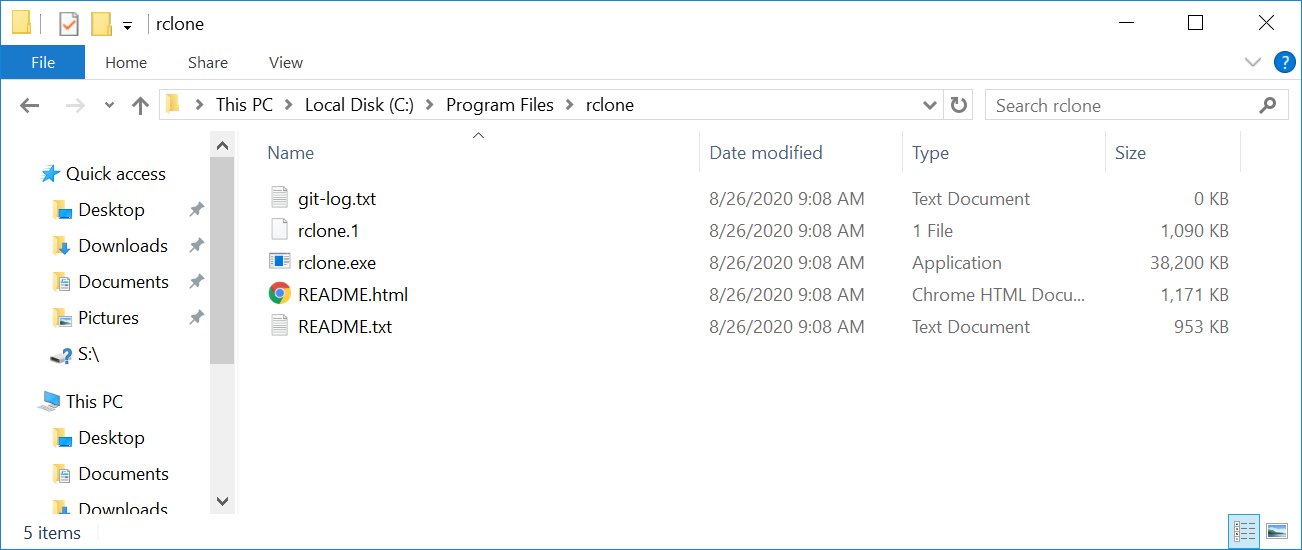
add the path of
rclone(C:\Program Files\rclone\) in the path Windows environment variables.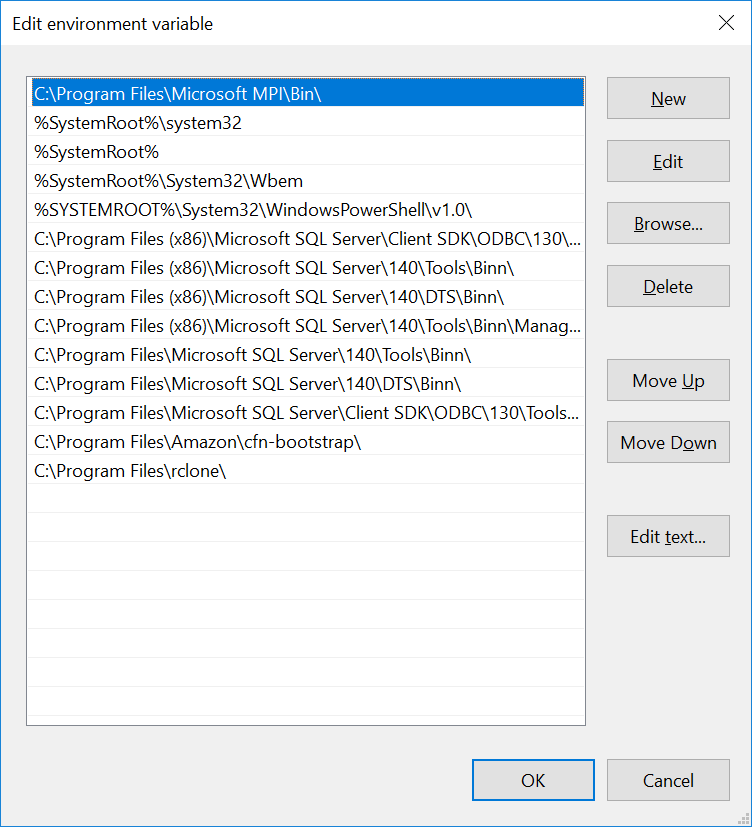
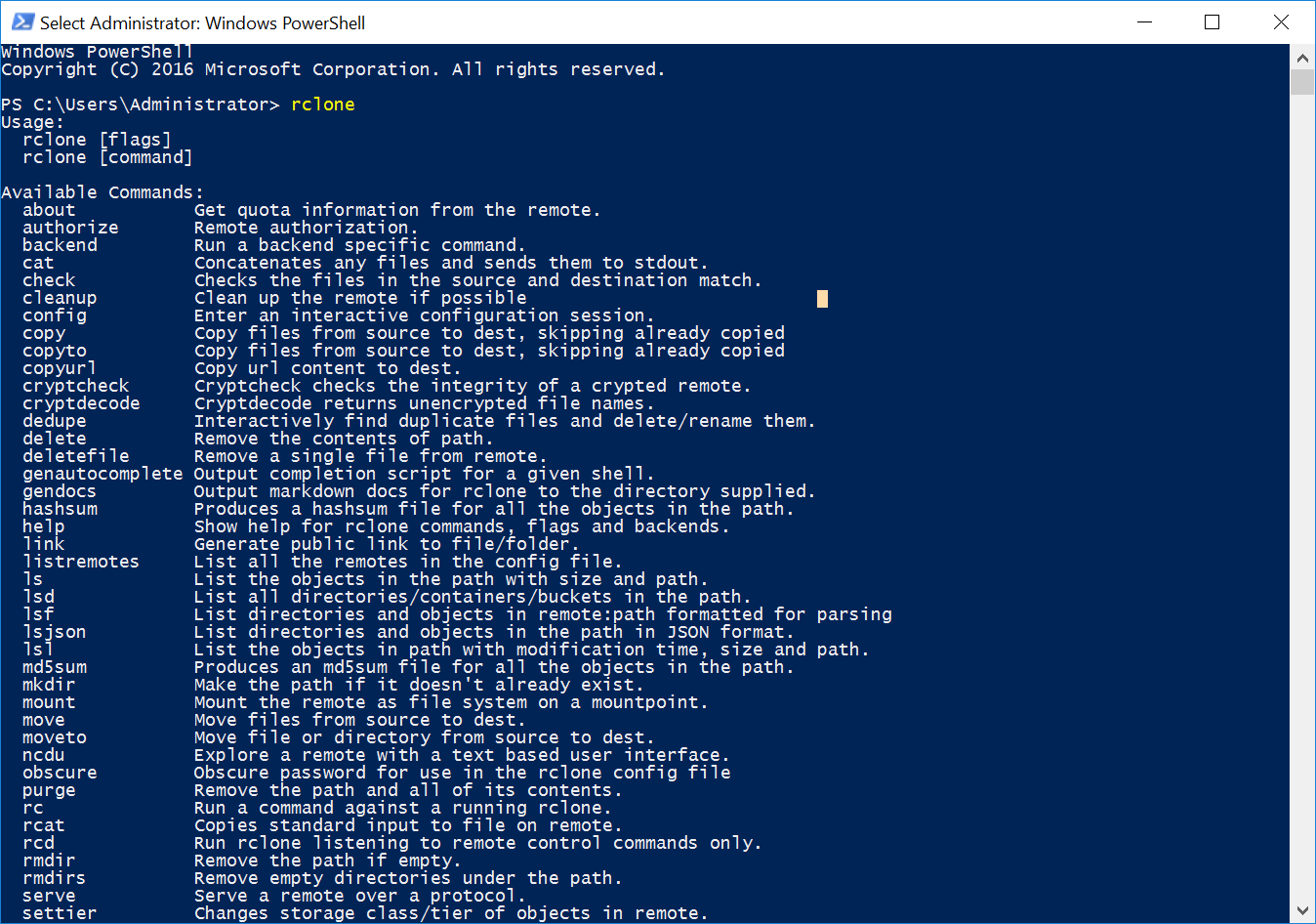
In a Powershell console, if we type rclone we can see all the available commands:
Now that we have installed rclone, we will continue with the configuration by typing rclone config:
select
nfor a new remote configuration.1
2
3
4
5
6
7
8
9
10Windows PowerShell
Copyright (C) 2016 Microsoft Corporation. All rights reserved. PS C:\Users\Administrator> rclone config
2020/08/26 09:22:37 NOTICE: Config file "C:\\Users\\Administrator\\.config\\rclone\\rclone.conf" not found - using defaults
No remotes found - make a new one
n) New remote
s) Set configuration password
q) Quit config
n/s/q> ngive a name to the connection (e.g.
aws_s3)1
name> aws_s3
select
4for “Amazon S3 Compliant Storage Provider”.1
2
3
4
5
6
7
8
9
10
11
12
13
14
15
16
17
18Type of storage to configure.
Enter a string value. Press Enter for the default ("").
Choose a number from below, or type in your own value
1 / 1Fichier
\ "fichier"
2 / Alias for an existing remote
\ "alias"
3 / Amazon Drive
\ "amazon cloud drive"
4 / Amazon S3 Compliant Storage Provider (AWS, Alibaba, Ceph, Digital Ocean, Dreamhost, IBM COS, Minio, etc)
\ "s3"
5 / Backblaze B2
\ "b2"
6 / Box
\ "box"
[...]
Storage> 4
** See help for s3 backend at: https://rclone.org/s3/ **select
1for the S3 provider.1
2
3
4
5
6
7
8
9Choose your S3 provider.
Enter a string value. Press Enter for the default ("").
Choose a number from below, or type in your own value
1 / Amazon Web Services (AWS) S3
\ "AWS"
2 / Alibaba Cloud Object Storage System (OSS) formerly Aliyun
\ "Alibaba"
[...]
provider> 1select
2to use AWS credentials from the Instance Profile we defined earlier.1
2
3
4
5
6
7
8
9Get AWS credentials from runtime (environment variables or EC2/ECS meta data if no env vars).
Only applies if access_key_id and secret_access_key is blank.
Enter a boolean value (true or false). Press Enter for the default ("false").
Choose a number from below, or type in your own value
1 / Enter AWS credentials in the next step
\ "false"
2 / Get AWS credentials from the environment (env vars or IAM)
\ "true"
env_auth> 2leave blank
access_key_idandsecret_access_key, by pressingEntertwice.1
2
3
4
5
6
7
8AWS Access Key ID.
Leave blank for anonymous access or runtime credentials.
Enter a string value. Press Enter for the default ("").
access_key_id>
AWS Secret Access Key (password)
Leave blank for anonymous access or runtime credentials.
Enter a string value. Press Enter for the default ("").
secret_access_key>select the AWS region in which the S3 bucket has been created (
eu-west-1in this example).1
2
3
4
5
6
7
8
9
10
11
12
13
14
15
16
17
18
19
20
21
22
23
24
25
26
27
28Region to connect to.
Enter a string value. Press Enter for the default ("").
Choose a number from below, or type in your own value
/ The default endpoint - a good choice if you are unsure.
1 | US Region, Northern Virginia or Pacific Northwest.
| Leave location constraint empty.
\ "us-east-1"
/ US East (Ohio) Region
2 | Needs location constraint us-east-2.
\ "us-east-2"
/ US West (Oregon) Region
3 | Needs location constraint us-west-2.
\ "us-west-2"
/ US West (Northern California) Region
4 | Needs location constraint us-west-1.
\ "us-west-1"
/ Canada (Central) Region
5 | Needs location constraint ca-central-1.
\ "ca-central-1"
/ EU (Ireland) Region
6 | Needs location constraint EU or eu-west-1.
\ "eu-west-1"
/ EU (London) Region
7 | Needs location constraint eu-west-2.
\ "eu-west-2"
/ EU (Stockholm) Region
[...]
region> 6leave blank all the remaining fields, as we do not use any “special” configuration such as endpoint or specific ACL.
1

2

3

4

5

6

7

8

9

10

11

12

13

14

15

16

17

18

19

20

21

22

23

24
25
26
27
28
29
30
31
32
33
34
35
36
37
38
39
40
41
42
43
44
45
46
47
48
49
50
51
52
53
54
55
56
57
58
59
60
61
62
63
64
65
66
67
68
69
70
71
72
73
74
75
76
77
78
79
80
81
82
83
84
85
86
87
88
89
90
91
92
93
94
95
96
97
98
99
100
101
102
103
104
105Endpoint for S3 API.
Leave blank if using AWS to use the default endpoint for the region.
Enter a string value. Press Enter for the default ("").
endpoint>
Location constraint - must be set to match the Region.
Used when creating buckets only.
Enter a string value. Press Enter for the default ("").
Choose a number from below, or type in your own value
1 / Empty for US Region, Northern Virginia or Pacific Northwest.
\ ""
2 / US East (Ohio) Region.
\ "us-east-2"
3 / US West (Oregon) Region.
\ "us-west-2"
4 / US West (Northern California) Region.
\ "us-west-1"
5 / Canada (Central) Region.
\ "ca-central-1"
6 / EU (Ireland) Region.
\ "eu-west-1"
7 / EU (London) Region.
\ "eu-west-2"
8 / EU (Stockholm) Region.
\ "eu-north-1"
9 / EU Region.
\ "EU"
10 / Asia Pacific (Singapore) Region.
\ "ap-southeast-1"
11 / Asia Pacific (Sydney) Region.
\ "ap-southeast-2"
12 / Asia Pacific (Tokyo) Region.
\ "ap-northeast-1"
13 / Asia Pacific (Seoul)
\ "ap-northeast-2"
14 / Asia Pacific (Mumbai)
\ "ap-south-1"
15 / Asia Pacific (Hong Kong)
\ "ap-east-1"
16 / South America (Sao Paulo) Region.
\ "sa-east-1"
location_constraint>
Canned ACL used when creating buckets and storing or copying objects. This ACL is used for creating objects and if bucket_acl isn't set, for creating buckets too. For more info visit https://docs.aws.amazon.com/AmazonS3/latest/dev/acl-overview.html#canned-acl Note that this ACL is applied when server side copying objects as S3
doesn't copy the ACL from the source but rather writes a fresh one.
Enter a string value. Press Enter for the default ("").
Choose a number from below, or type in your own value
1 / Owner gets FULL_CONTROL. No one else has access rights (default).
\ "private"
2 / Owner gets FULL_CONTROL. The AllUsers group gets READ access.
\ "public-read"
/ Owner gets FULL_CONTROL. The AllUsers group gets READ and WRITE access.
3 | Granting this on a bucket is generally not recommended.
\ "public-read-write"
4 / Owner gets FULL_CONTROL. The AuthenticatedUsers group gets READ access.
\ "authenticated-read"
/ Object owner gets FULL_CONTROL. Bucket owner gets READ access.
5 | If you specify this canned ACL when creating a bucket, Amazon S3 ignores it.
\ "bucket-owner-read"
/ Both the object owner and the bucket owner get FULL_CONTROL over the object.
6 | If you specify this canned ACL when creating a bucket, Amazon S3 ignores it.
\ "bucket-owner-full-control"
acl>
The server-side encryption algorithm used when storing this object in S3.
Enter a string value. Press Enter for the default ("").
Choose a number from below, or type in your own value
1 / None
\ ""
2 / AES256
\ "AES256"
3 / aws:kms
\ "aws:kms"
server_side_encryption>
If using KMS ID you must provide the ARN of Key.
Enter a string value. Press Enter for the default ("").
Choose a number from below, or type in your own value
1 / None
\ ""
2 / arn:aws:kms:*
\ "arn:aws:kms:us-east-1:*"
sse_kms_key_id>
The storage class to use when storing new objects in S3.
Enter a string value. Press Enter for the default ("").
Choose a number from below, or type in your own value
1 / Default
\ ""
2 / Standard storage class
\ "STANDARD"
3 / Reduced redundancy storage class
\ "REDUCED_REDUNDANCY"
4 / Standard Infrequent Access storage class
\ "STANDARD_IA"
5 / One Zone Infrequent Access storage class
\ "ONEZONE_IA"
6 / Glacier storage class
\ "GLACIER"
7 / Glacier Deep Archive storage class
\ "DEEP_ARCHIVE"
8 / Intelligent-Tiering storage class
\ "INTELLIGENT_TIERING"
storage_class>finally, skip the advanced configuration by typing
n. We get a summary of the configuration. If everything is fine we can typey. Otherwisento restart the configuration process.1
2
3
4
5
6
7
8
9
10
11
12
13
14
15
16
17
18
19
20
21
22
23
24
25
26
27
28
29
30Edit advanced config? (y/n)
y) Yes
n) No (default)
y/n> n
Remote config
--------------------
[aws_s3]
type = s3
provider = AWS
env_auth = true
region = eu-west-1
--------------------
y) Yes this is OK (default)
e) Edit this remote
d) Delete this remote
y/e/d> y
Current remotes: Name Type
==== ====
aws_s3 s3 e) Edit existing remote
n) New remote
d) Delete remote
r) Rename remote
c) Copy remote
s) Set configuration password
q) Quit config
e/n/d/r/c/s/q> q
rclone setup is now complete. Unfortunately, we are not done yet. If we try to mount the bucket by typing: rclone mount <configuration_name>:<bucket_name> we get an error.
1 |
PS C:\Users\Administrator> rclone mount aws_s3:tmp-prenard S: --vfs-cache-mode full |
In order to make rclone work we need winfsp, an open source Windows File System Proxy which makes it easy to write user space filesystems for Windows. It provides a FUSE emulation layer which rclone uses in combination with cgofuse.
To get rid of this error, we need to download and install winfsp-1.7.20172.msi.
After that we can try again to mount the bucket on the instance.
1 |
Windows PowerShell |
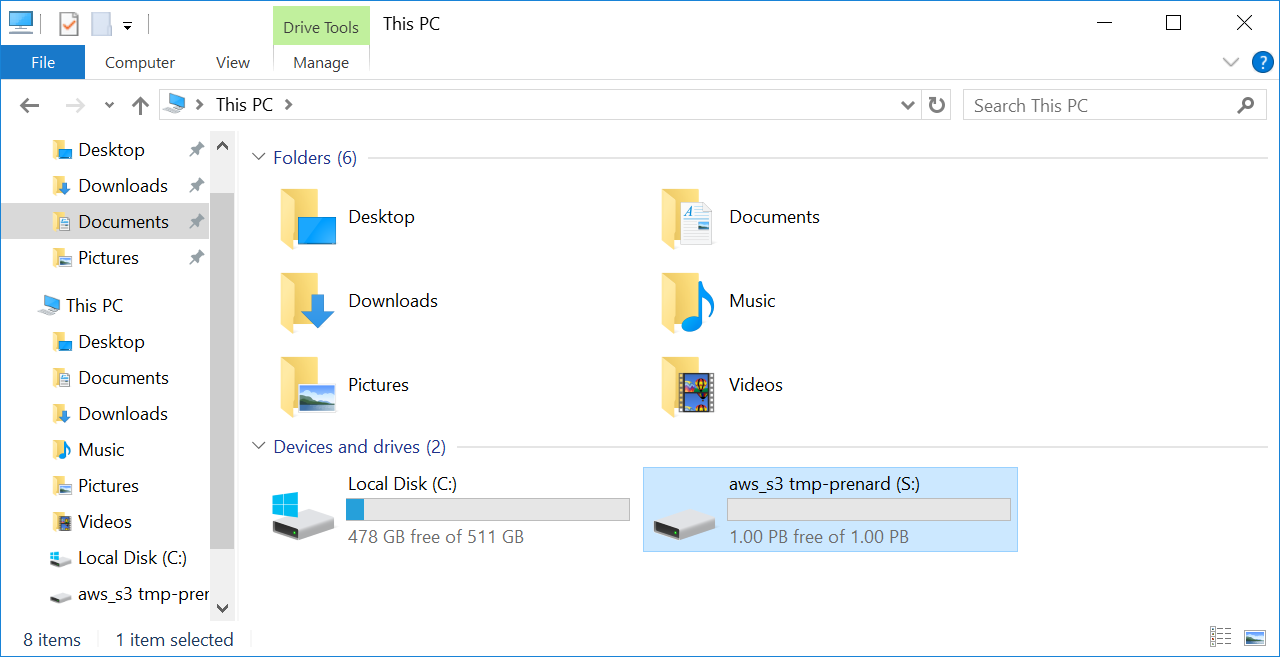
We can now see a new disk mounted on the instance. Let’s drop a file at the root of the disk to see if everything is working.
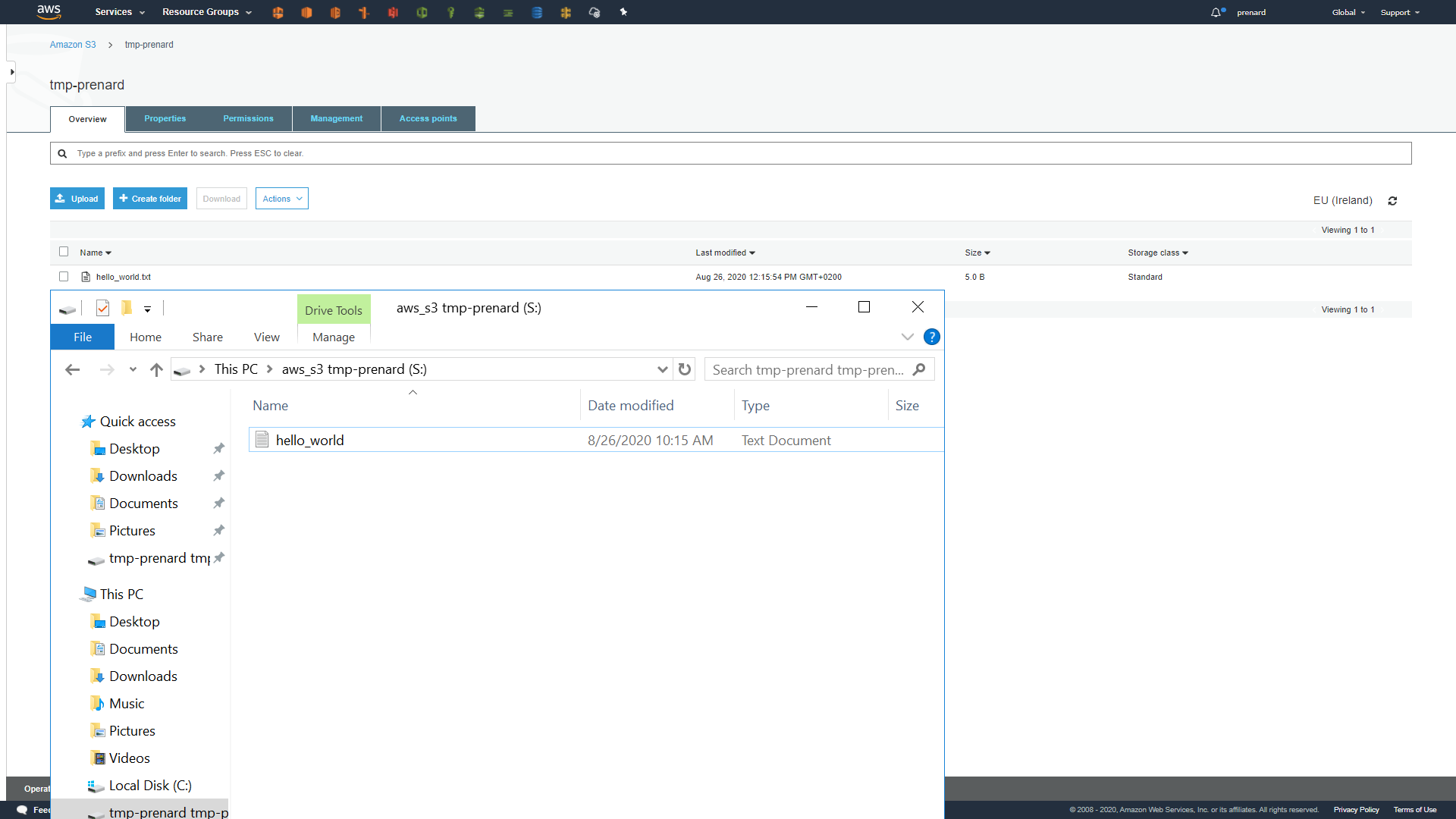
Wonderful, it’s working! We can see that the synchronization is working between the instance and the S3 bucket.
It is worth mentioning that it is also possible to specify a Bucket prefix after the Bucket name in the rclone mount command to mount only what is under this prefix.
Automate everything!
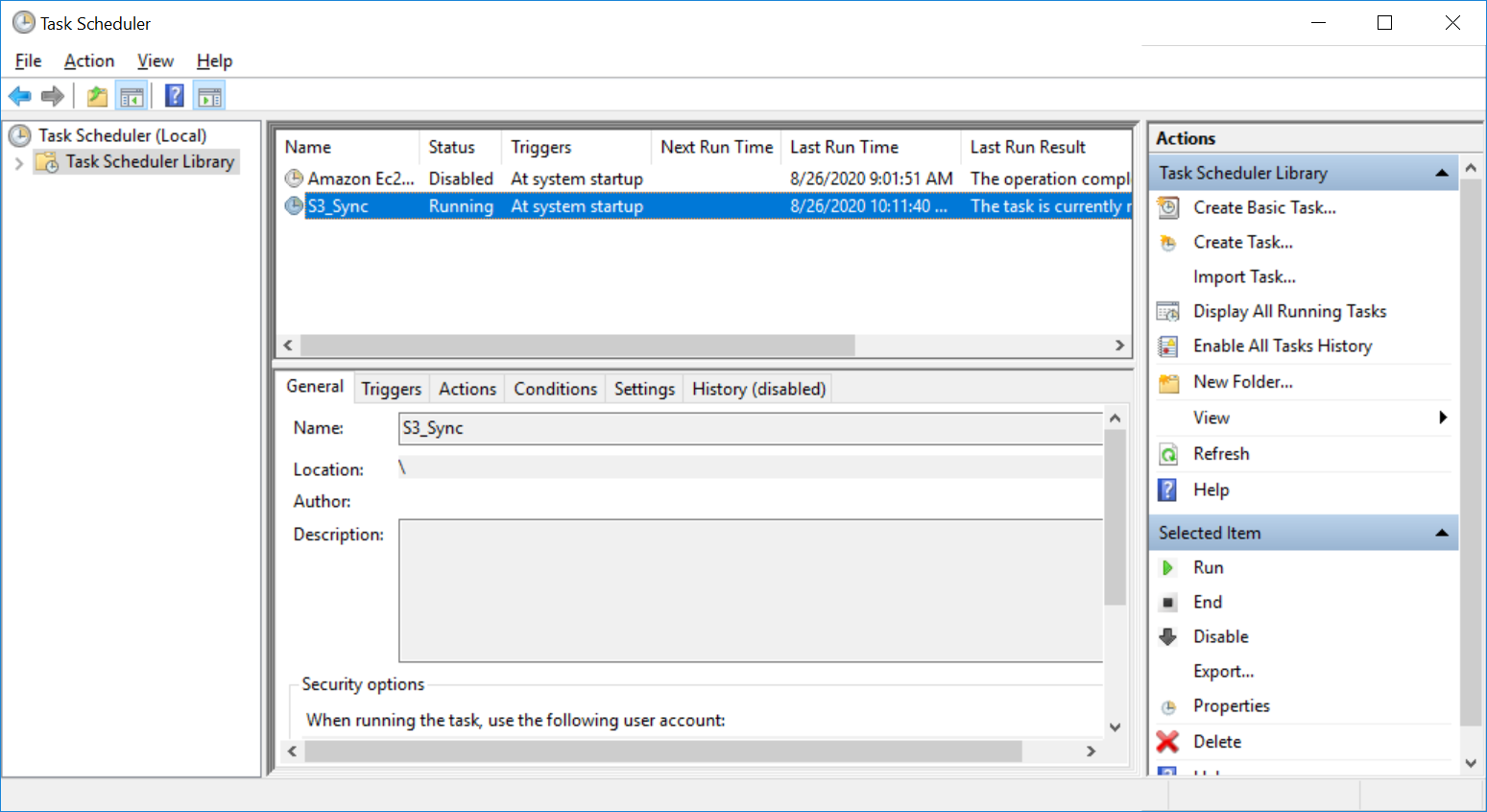
Unfortunately, nothing is automated, and we still need to execute the same command when the instance is started. Here are some PowerShell commands for the creation of a Windows Scheduled Tasks that will be executed at startup.
1 |
$time = New-ScheduledTaskTrigger -AtStartup |
[转帖]MOUNTING AN S3 BUCKET ON WINDOWS AND LINUX的更多相关文章
- [AWS] S3 Bucket
云存储服务 2.1 为网站打开属性 属性和权限设置 设置bucket属性,打开功能:Static website hosting(静态网站托管) 设置bucket权限,Permissions ---- ...
- [转帖]Windows和Linux对决(多进程多线程)
Windows和Linux对决(多进程多线程) https://blog.csdn.net/world_2015/article/details/44920467 太长了 还没看完.. 还是没太理解好 ...
- 【转帖】Linux上搭建Samba,实现windows与Linux文件数据同步
Linux上搭建Samba,实现windows与Linux文件数据同步 2018年06月09日 :: m_nanle_xiaobudiu 阅读数 15812更多 分类专栏: Linux Samba 版 ...
- 【转帖】Windows与Linux系统下的库介绍
Windows与Linux系统下的库介绍 http://embeddedlinux.org.cn/emb-linux/entry-level/200903/12-553.html 库的定义 库文件是一 ...
- [转帖]Windows与Linux的命令行命令对比
Windows与Linux的命令行命令对比 https://www.cnblogs.com/sztom/p/10785140.html * Windows不区分大小写,Linux区分大小写的. sn ...
- 使用scp在windows和Linux之间互传文件
转自:http://yangzhongfei.blog.163.com/blog/static/4610987520103141050918/ 为了进行系统维护操作,有时需要再windows和linu ...
- 两台服务器共享文件Windows和Linux
最近遇到一个问题,新装的两台服务器死活就是挂载不上samba服务器上的文件,在输入mount挂载命令的时候提示只读什么的,尝试了在挂载的时候用只读的方式去挂载也是不行,最终发现了,缺少安装cifs包, ...
- windows和linux执行class
windows java -classpath .;lib/* com.Test linux java -classpath .:ib/* com.Test "."代表当前路径,这 ...
- windows和linux中搭建python集成开发环境IDE——如何设置多个python环境
本系列分为两篇: 1.[转]windows和linux中搭建python集成开发环境IDE 2.[转]linux和windows下安装python集成开发环境及其python包 3.windows和l ...
- Windows和Linux都有的Copy-on-write技术
Windows和Linux都有的Copy-on-write技术 MySQL技术内幕Innodb存储引擎第2版 P375 SQL Server2008 实现与维护(MCTS教程)P199 LVM快照技术 ...
随机推荐
- JavaScript apply、call、bind 函数详解
apply和call apply和call非常类似,都是用于改变函数中this的指向,只是传入的参数不同,等于间接调用一个函数,也等于将这个函数绑定到一个指定的对象上: let name = 'win ...
- 神经网络优化篇:理解mini-batch梯度下降法(Understanding mini-batch gradient descent)
理解mini-batch梯度下降法 使用batch梯度下降法时,每次迭代都需要历遍整个训练集,可以预期每次迭代成本都会下降,所以如果成本函数\(J\)是迭代次数的一个函数,它应该会随着每次迭代而减少, ...
- 六一新玩法!AI涂鸦秒变精美艺术画
摘要:上华为云ModelArts体验AI涂鸦新玩法,赢漫威复仇者联盟乐高!祝大小朋友们六一儿童节快乐~ 本文分享自华为云社区<[云享热点]六一新玩法!AI 涂鸦秒变精美艺术画>,作者:华为 ...
- 划重点!DWS开发的五大要点
摘要:高效使用数据库是一个合格的开发工程师的必备技能,如何使用DWS进行高效开发,提升应用效率,技术干货来喽~~~ 高效使用数据库是一个合格的开发工程师的必备技能,如何使用DWS进行高效开发,提升应用 ...
- 实践丨手把手教你用STM32设计WiFi语音播报日程表
摘要:随着电子产品的发展,数字日程表这项应用在人们工作和生活中起到越来越重要的作用.本文带领大家基于STM32自己动手制作一个WiFi语音播报日程表. 本文分享自华为云社区<基于STM32设计的 ...
- 列举GaussDB(DWS)常见的查询时索引失效场景
摘要:使用GaussDB(DWS)时,有时为了加快查询速度,需要对表建立索引.有时我们会遇到明明建立了索引,查询计划中却发现索引没有被使用的情况.本文将列举几种常见的场景和优化方法. 本文分享自华为云 ...
- 大力出奇迹,揭秘昇腾CANN的AI超能力
摘要:CANN(Compute Architecture for Neural Networks)异构计算架构,是以提升用户开发效率和释放昇腾AI处理器极致算力为目标,专门面向AI场景的异构计算架构. ...
- 抖音APP如何实现用户生命周期提升
> 更多技术交流.求职机会,欢迎关注字节跳动数据平台微信公众号,回复[1]进入官方交流群 近日,在火山引擎数智平台在北京举办的"超话数据:企业产品优化分享"的活动上,抖音策略 ...
- 火山引擎DataTester:一个爆款游戏产品,是如何用A/B测试打磨出来的?
随着国内游戏用户数量趋于饱和,中国游戏产业也从高速成长期逐渐转型,市场成熟度提升,竞争趋于精细化. 随着游戏出海以及私域流量运营的挑战,游戏企业对数据分析的使用需求和依赖度进一步提高.而在游戏研发立项 ...
- 火山引擎DataTester:小改动带来大收益,A/B实验助力幸福里APP精准优化
幸福里APP是抖音集团旗下开发运营的集内容.社区.工具于一体的房产信息综合平台,基于个性化推荐引擎向用户推荐优质的房产内容房源信息.本文将介绍幸福里APP应用火山引擎A/B测试DataTester ...