
用canvas实现验证码的绘制
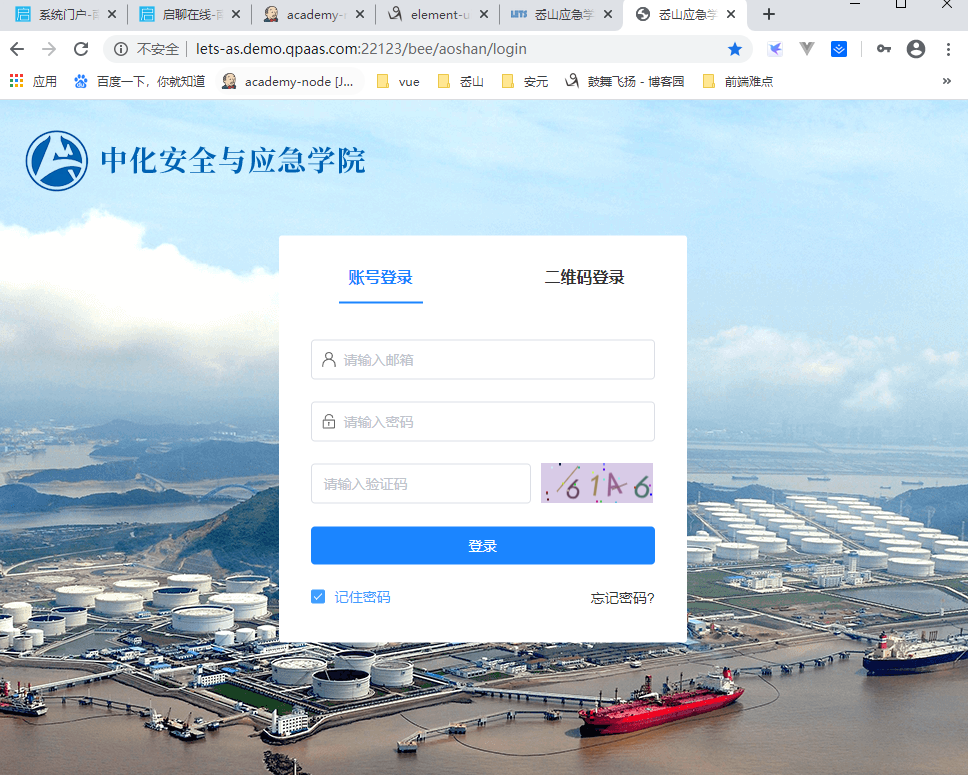
login.vue主文件
  1 <template>

  2     <div class="login-wrapper">

  3         <img src="../../assets/images/logo.png" class="logo" />

  4         <div class="login-box">

  5             <ul class="login-title-list">

  6                 <li class="login-title-item active">账号登录</li>

  7                 <li class="login-title-item">二维码登录</li>

  8             </ul>

  9             <div class="login-body">

 10                 <el-form

 11                     autocomplete="off"

 12                     :model="loginForm"

 13                     :rules="loginRules"

 14                     ref="loginForm"

 15                     label-position="left"

 16                     label-width="0px"

 17                     class="card-box login-form"

 18                 >

 19                     <el-form-item prop="username">

 20                         <svg-icon icon-class="user" class="icon-svg" />

 21                         <el-input placeholder="请输入邮箱" type="text" v-model="loginForm.username" />

 22                     </el-form-item>

 23                     <el-form-item prop="password">

 24                         <svg-icon icon-class="password" class="icon-svg" />

 25                         <el-input placeholder="请输入密码" type="password" v-model="loginForm.password" />

 26                     </el-form-item>

 27                     <el-form-item prop="verifycode" class="form-item-captcha">

 28                         <el-input placeholder="请输入验证码" type="captcha" v-model="loginForm.verifycode" />

 29                         <span @click="refreshCode" class="yzm">

 30                             <s-identify :identifyCode="identifyCode"></s-identify>

 31                         </span>

 32                     </el-form-item>

 33                     <el-form-item class="login-wrap">

 34                         <el-button type="primary" :loading="loading" style="width:100%;" @click="handleLogin"

 35                             >登录</el-button

 36                         >

 37                     </el-form-item>

 38                 </el-form>

 39                 <div class="login-footer">

 40                     <el-checkbox v-model="rememberPassword">记住密码</el-checkbox>

 41                     <span>忘记密码?</span>

 42                 </div>

 43             </div>

 44         </div>

 45     </div>

 46 </template>

 47

 48 <script>

 49 import { mapState } from 'vuex';

 50 import SIdentify from './identify.vue';

 51 import { encryptDes } from '../../assets/js/utils/des';

 52

 53 export default {

 54     name: 'Login',

 55     components: {

 56         SIdentify

 57     },

 58     data() {

 59         // 验证码自定义验证规则

 60         const validateVerifycode = (rule, value, callback) => {

 61             let newVal = value.toLowerCase();

 62             let identifyStr = this.identifyCode.toLowerCase();

 63             if (newVal === '') {

 64                 callback(new Error('请输入验证码'));

 65             } else if (newVal !== identifyStr) {

 66                 callback(new Error('验证码不正确!'));

 67             } else {

 68                 callback();

 69             }

 70         };

 71         return {

 72             loginForm: {

 73                 username: '',

 74                 password: '',

 75                 verifycode: ''

 76             },

 77             identifyCodes: '1234567890ABCDEFGHIGKLMNOPQRSTUVWXYZ',

 78             identifyCode: '',

 79             rememberPassword: true,

 80             loading: false,

 81             loginRules: {

 82                 username: [{ required: true, trigger: 'blur', message: '账号不能为空' }],

 83                 password: [

 84                     { required: true, message: '请输入密码', trigger: 'blur' },

 85                     { min: 6, message: '密码长度最少为6位', trigger: 'blur' }

 86                 ],

 87                 verifycode: [{ required: true, trigger: 'blur', validator: validateVerifycode }]

 88             }

 89         };

 90     },

 91     methods: {

 92         // 生成随机数

 93         randomNum(min, max) {

 94             return Math.floor(Math.random() * (max - min) + min);

 95         },

 96         // 切换验证码

 97         refreshCode() {

 98             this.identifyCode = '';

 99             this.makeCode(this.identifyCodes, 4);

100         },

101         // 生成四位随机验证码

102         makeCode(o, l) {

103             for (let i = 0; i < l; i++) {

104                 this.identifyCode += this.identifyCodes[this.randomNum(0, this.identifyCodes.length)];

105             }

106         },

107         handleLogin() {

108             this.$refs.loginForm.validate(valid => {

109                 if (valid) {

110                     this.loading = true;

111                     const loginParams = {

112                         loginUserId: this.loginForm.username,

113                         password: encryptDes(this.loginForm.password)

114                     };

115                     this.$store.dispatch('login', loginParams).then(res => {

116                         this.loading = false;

117                         if (res.status === 200) {

118                             this.$store.commit('SET_USER_INFO', res.data.onlineUserInfo);

119                             this.$router.push({ path: '/' });

120                         }

121                     });

122                 } else {

123                     return false;

124                 }

125             });

126         }

127     },

128     mounted() {

129         // 验证码初始化

130         this.identifyCode = '';

131         this.makeCode(this.identifyCodes, 4);

132     }

133 };

134 </script>
identify.vue文件
  1 <template>

  2     <div class="s-canvas">

  3         <canvas id="s-canvas" :width="contentWidth" :height="contentHeight"></canvas>

  4     </div>

  5 </template>

  6 <script>

  7 export default {

  8   name: 'SIdentify',

  9   props: {

 10     identifyCode: {

 11       type: String,

 12       default: '1234'

 13     },

 14     fontSizeMin: {

 15       type: Number,

 16       default: 28

 17     },

 18     fontSizeMax: {

 19       type: Number,

 20       default: 40

 21     },

 22     backgroundColorMin: {

 23       type: Number,

 24       default: 180

 25     },

 26     backgroundColorMax: {

 27       type: Number,

 28       default: 240

 29     },

 30     colorMin: {

 31       type: Number,

 32       default: 50

 33     },

 34     colorMax: {

 35       type: Number,

 36       default: 160

 37     },

 38     lineColorMin: {

 39       type: Number,

 40       default: 40

 41     },

 42     lineColorMax: {

 43       type: Number,

 44       default: 180

 45     },

 46     dotColorMin: {

 47       type: Number,

 48       default: 0

 49     },

 50     dotColorMax: {

 51       type: Number,

 52       default: 255

 53     },

 54     contentWidth: {

 55       type: Number,

 56       default: 112

 57     },

 58     contentHeight: {

 59       type: Number,

 60       default: 40

 61     }

 62   },

 63   methods: {

 64     // 生成一个随机数

 65     randomNum(min, max) {

 66       return Math.floor(Math.random() * (max - min) + min);

 67     },

 68     // 生成一个随机的颜色

 69     randomColor(min, max) {

 70       let r = this.randomNum(min, max);

 71       let g = this.randomNum(min, max);

 72       let b = this.randomNum(min, max);

 73       return `rgb(${r},${g},${b})`;

 74     },

 75     drawPic() {

 76       let canvas = document.getElementById('s-canvas');

 77       let ctx = canvas.getContext('2d');

 78       ctx.textBaseline = 'bottom';

 79       // 绘制背景

 80       ctx.fillStyle = this.randomColor(this.backgroundColorMin, this.backgroundColorMax);

 81       ctx.fillRect(0, 0, this.contentWidth, this.contentHeight);

 82       // 绘制文字

 83       for (let i = 0; i < this.identifyCode.length; i++) {

 84         this.drawText(ctx, this.identifyCode[i], i);

 85       }

 86       this.drawLine(ctx);

 87       this.drawDot(ctx);

 88     },

 89     drawText(ctx, txt, i) {

 90       ctx.fillStyle = this.randomColor(this.colorMin, this.colorMax);

 91       ctx.font = `${this.randomNum(this.fontSizeMin, this.fontSizeMax)}px SimHei`;

 92       let x = (i + 1) * (this.contentWidth / (this.identifyCode.length + 1));

 93       let y = this.randomNum(this.fontSizeMax, this.contentHeight - 5);

 94       let deg = this.randomNum(-30, 30);

 95       // 修改坐标原点和旋转角度

 96       ctx.translate(x, y);

 97       ctx.rotate((deg * Math.PI) / 270);

 98       ctx.fillText(txt, 0, 0);

 99       // 恢复坐标原点和旋转角度

100       ctx.rotate((-deg * Math.PI) / 270);

101       ctx.translate(-x, -y);

102     },

103     drawLine(ctx) {

104       // 绘制干扰线

105       for (let i = 0; i < 2; i++) {

106         ctx.strokeStyle = this.randomColor(this.lineColorMin, this.lineColorMax);

107         ctx.beginPath();

108         ctx.moveTo(this.randomNum(0, this.contentWidth), this.randomNum(0, this.contentHeight));

109         ctx.lineTo(this.randomNum(0, this.contentWidth), this.randomNum(0, this.contentHeight));

110         ctx.stroke();

111       }

112     },

113     drawDot(ctx) {

114       // 绘制干扰点

115       for (let i = 0; i < 20; i++) {

116         ctx.fillStyle = this.randomColor(0, 255);

117         ctx.beginPath();

118         ctx.arc(

119           this.randomNum(0, this.contentWidth),

120           this.randomNum(0, this.contentHeight),

121           1,

122           0,

123           2 * Math.PI

124         );

125         ctx.fill();

126       }

127     }

128   },

129   watch: {

130     identifyCode() {

131       this.drawPic();

132     }

133   },

134   mounted() {

135     this.drawPic();

136   }

137 };

138 </script>
用canvas实现验证码的绘制的更多相关文章
- canvas实现验证码
在通常的登录界面我们都可以看到验证码,验证码的作用是检测是不是人在操作,防止机器等非人操作,防止数据库被轻而易举的攻破. 验证码一般用PHP和java等后端语言编写. 但是在前端,用canva或者SV ...
- canvas自适应圆形时钟绘制
前面的话 前面介绍过canvas粒子时钟的绘制,本文将详细介绍canvas自适应圆形时钟绘制 效果演示 最终自适应圆形时钟的效果如下所示 功能分析 下面来分析一下该圆形时钟的功能 [1]静态背景 对于 ...
- Canvas:橡皮筋线条绘制
Canvas:橡皮筋线条绘制 效果演示 实现要点 事件监听 [说明]: 在Canvas中检测鼠标事件是非常简单的,可以在canvas中添加一个事件监听器,当事件发生时,浏览器就会调用这个监听器. 我们 ...
- 神奇的canvas——点与线绘制的绚丽动画效果
代码地址如下:http://www.demodashi.com/demo/11636.html 前言 之前在某网站上看到了一个canvas绘制的动画效果,虽然组成的元素很简单,只有点和线,但是视觉效果 ...
- HTML5 Canvas(实战:绘制饼图2 Tooltip)
继上一篇HTML5 Canvas(实战:绘制饼图)之后,笔者研究了一下如何给饼图加鼠标停留时显示的提示框. Plot对象 在开始Coding之前,笔者能够想到的最easy的方式,就是给饼图的每一个区域 ...
- android 开发 View _12_ 用Canvas 绘制一张图片(博客中演示用Canvas画验证码图片)
package net.yt.yuncare.widgets; import android.graphics.Bitmap; import android.graphics.Canvas; impo ...
- 使用canvas元素-art方法绘制圆弧
最近在学习HTML5,发现canvas真的很棒,canvas元素是一种可供绘图的平面,我们用JavaScript对它进行配置和操作.我这里说一下arc方法绘制圆弧,顺便提一下涉及到的基础知识. 首先看 ...
- html5 canvas 笔记三(绘制文本和图片)
绘制文本 fillText(text, x, y [, maxWidth]) 在指定的(x,y)位置填充指定的文本,绘制的最大宽度是可选的. strokeText(text, x, y [, ma ...
- 自定义View(4)Canvas和Paint常用绘制函数
画布Canvas 在Android下进行2D绘图需要Canvas类的支持,它位于"android.graphics.Canvas"包下,直译过来为画布的意思,用于完成在View上的 ...
- JavaScript+canvas 利用贝塞尔曲线绘制曲线
效果图: <body> <canvas id="test" width="800" height="300">< ...
随机推荐
- maven使用指定的pom文件构建子模块
有条件的同学建议直接浏览原文: https://stackoverflow.com/questions/33396390/custom-pom-xml-filename-in-maven-multim ...
- 7-8次PTA和期末成绩总结
(1)前言:总结之前所涉及到的知识点.题量.难度等情况 课程成绩统计程序-3在第二次的基础上修改了计算总成绩的方式(修改类结构,将成绩类的继承关系改为组合关系,成绩信息由课程成绩类和分项成绩类组成,课 ...
- java文件读取 while ((len = reader.read(buffer)) != -1){}的理解
源文件 InputStreamReader reader=new InputStreamReader(new FileInputStream(file),"UTF-8"); //读 ...
- 无序对的GCD
求\(\sum_{i = 1}^n \sum_{j = i+1}^n GCD(a_i, a_j)\) \(N\)为上确界,\(n\)为\(a\)数组元素个数,\(D\)为约数个数. 方法一 \(1.\ ...
- vue-test ------class绑定
<template> <p :class="{'active':isActive}">Class样式绑定</p> <p :class=&q ...
- 【论文阅读】HTTP 流量和恶意 URL 的异常检测
Part 1关于论文 基本信息 题目:HTTP 流量和恶意 URL 的异常检测 源码:sec2vec源代码 摘要 在本文中,我们将展示如何利用自然语言处理(NLP)中已知 的方法来检测 HTTP 请求 ...
- MybatisPlus查询时过滤不需要的字段~
解释一下:乍一看标题可能有点懵~,其实就是想查询的时候过滤掉某些字段 例如: select name,email,password from user; --改为-> select name,e ...
- 若依集成mybatisplus实现mybatis增强
- ElasticSearch之Search settings
相关参数 indices.query.bool.max_clause_count 本参数当前已失效. search.max_buckets 本参数用于控制在单个响应中返回的聚合的桶的数量. 默认值为6 ...
- 工作中常用的一些Linux指令,简单易记还实用(三)
成功路上最大的困难就是坚持,每天坚持看一道算法,每周坚持看一本好书! 工作中,离不开Linux系统,很多刚步入职场的小白,往往对于Linux操作系统的使用都显得生疏,最主要的就是对一些常用的指令记忆不 ...