
Linux之SELinux
1、什么是SELinux?
安全增强型 Linux(Security-Enhanced Linux)简称 SELinux,它是一个 Linux 内核模块,也是 Linux 的一个安全子系统。
SELinux 主要由美国国家安全局开发,2.6 及以上版本的 Linux 内核都已经集成了 SELinux 模块。
2、SELinux的工作模式
SELinux 有三种工作模式:
(1)enforcing:强制模式 --------> 违反 SELinux 规则的行为将被阻止并记录到日志中
(2)permissive:宽容模式 --------> 违反 SELinux 规则的行为只会记录到日志中(一般为调试用)
(3)disabled:关闭
3、查看SELinux的状态
(1)方式1:getenforce
(2)方式2:sestatus
4、临时修改SELinux的状态
setenforce 0/1
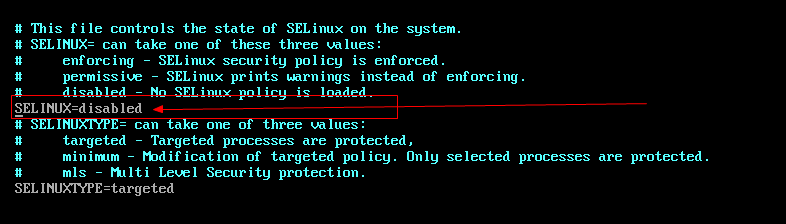
5、永久修改SELinux的状态
vim /etc/selinux/config
6、SELinux的日志
(1)SELinux 日志的记录需要借助 auditd.service 服务
(2)SELinux 违规日志保存在 /var/log/audit/audit.log 中
(3)SELinux的日志内容
/var/log/audit/audit.log 的内容如下:
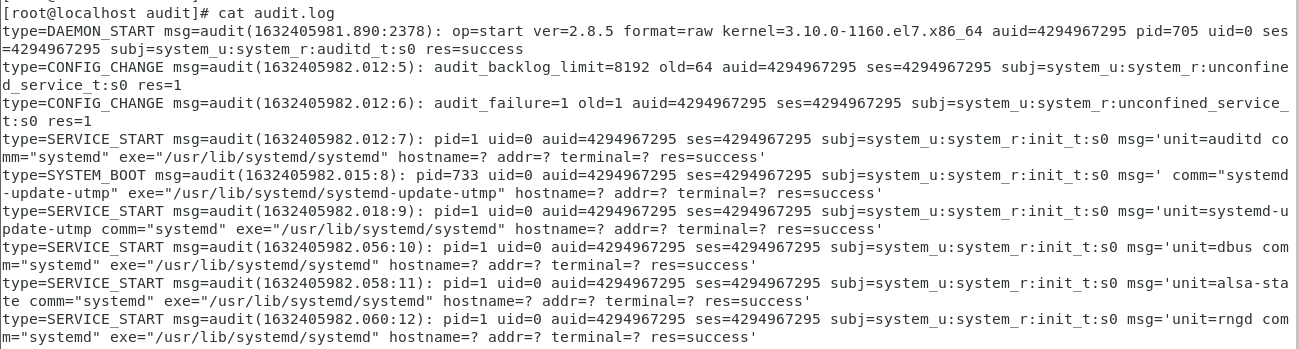
该文件的内容很多,而且混有很多与 SELinux 错误无关的系统审计日志。我们要借助 sealert 这个实用工具来帮忙分析(如果提示找不到命令的话请安装 setroubleshoot 软件包)。
(4)SELinux的日志分析(使用sealert分析错误)
命令基本用法:
sealert -a /var/log/audit/audit.log
执行完命令之后,系统需要花一段时间去分析日志中的违规行为,并给出分析报告。
[root@localhost audit]# sealert -a /var/log/audit/audit.log

100% done

found 1 alerts in /var/log/audit/audit.log

--------------------------------------------------------------------------------

SELinux is preventing /usr/sbin/sshd from name_bind access on the tcp_socket port 22022.

*****  Plugin bind_ports (92.2 confidence) suggests   ************************

If you want to allow /usr/sbin/sshd to bind to network port 22022

Then you need to modify the port type.

Do

# semanage port -a -t PORT_TYPE -p tcp 22022

    where PORT_TYPE is one of the following: ssh_port_t, vnc_port_t, xserver_port_t.

*****  Plugin catchall_boolean (7.83 confidence) suggests   ******************

If you want to allow nis to enabled

Then you must tell SELinux about this by enabling the 'nis_enabled' boolean.

Do

setsebool -P nis_enabled 1

*****  Plugin catchall (1.41 confidence) suggests   **************************

If you believe that sshd should be allowed name_bind access on the port 22022 tcp_socket by default.

Then you should report this as a bug.

You can generate a local policy module to allow this access.

Do

allow this access for now by executing:

# ausearch -c 'sshd' --raw | audit2allow -M my-sshd

# semodule -i my-sshd.pp

Additional Information:

Source Context                system_u:system_r:sshd_t:s0-s0:c0.c1023

Target Context                system_u:object_r:unreserved_port_t:s0

Target Objects                port 22022 [ tcp_socket ]

Source                        sshd

Source Path                   /usr/sbin/sshd

Port                          22022

Host                          <Unknown>

Source RPM Packages           openssh-server-7.4p1-21.el7.x86_64

Target RPM Packages

Policy RPM                    selinux-policy-3.13.1-268.el7.noarch

Selinux Enabled               True

Policy Type                   targeted

Enforcing Mode                Enforcing

Host Name                     localhost.localdomain

Platform                      Linux localhost.localdomain 3.10.0-1160.el7.x86_64

                              #1 SMP Mon Oct 19 16:18:59 UTC 2020 x86_64 x86_64

Alert Count                   1

First Seen                    2021-11-17 18:19:52 CST

Last Seen                     2021-11-17 18:19:52 CST

Local ID                      fc4c4c27-7df7-40f3-ad58-24db465276b6

Raw Audit Messages

type=AVC msg=audit(1637144392.425:131): avc:  denied  { name_bind } for  pid=3190 comm="sshd" src=22022 scontext=system_u:system_r:sshd_t:s0-s0:c0.c1023 tcontext=system_u:object_r:unreserved_port_t:s0 tclass=tcp_socket permissive=0

type=SYSCALL msg=audit(1637144392.425:131): arch=x86_64 syscall=bind success=no exit=EACCES a0=3 a1=55bedf4ebb90 a2=10 a3=7ffd55861148 items=0 ppid=1 pid=3190 auid=4294967295 uid=0 gid=0 euid=0 suid=0 fsuid=0 egid=0 sgid=0 fsgid=0 tty=(none) ses=4294967295 comm=sshd exe=/usr/sbin/sshd subj=system_u:system_r:sshd_t:s0-s0:c0.c1023 key=(null)

Hash: sshd,sshd_t,unreserved_port_t,tcp_socket,name_bind
Linux之SELinux的更多相关文章
- linux初学者-SElinux篇
linux初学者-SElinux篇 SElinux是强制访问控制(MAC)安全系统,是linux历史上最杰出的新安全系统.对于linux安全模块来说,SElinux的功能是最全面的,测试也是最充分的, ...
- Linux关闭selinux
最近在折腾Linux服务器,配置环境时,安装php的一个拓展,明明编译成功了,就是加载不进去,phpinfo不显示,查看错误日志是显示加载失败,没权限==,配置ftp程序也会有意想不到的问题,搞了好久 ...
- 【linux】Linux系统SELinux简介
安全加强型Linux(Security-Enhanced Linux)简称 SELinux,它是一个 Linux 内核模块,也是 Linux 的一个安全子系统. 是linux安全加强的另一种实现方式. ...
- RedHat Linux关闭seLinux命令
Redhat使用了SELinux来增强安全,关闭的办法为: 1. 永久有效 修改 /etc/selinux/config 文件中的 SELINUX="" 为 disabled ,然 ...
- Linux下selinux简单梳理
在linux环境下执行某些程序时,偶尔会遇到来一个关于selinux的强制模式不可执行的情况,这种情况下需要关闭selinux或者将enforcing改为permissive模式后才能进行执行.sel ...
- Linux之SElinux安全上下文件(1)
SELinux:Secure Enhanced Linux,是美国国家安全局(NSA=The National Security Agency)和SCC(Secure Computing Courpo ...
- Linux学习-SELinux 初探
什么是 SELinux 什么是 SELinux 呢?其实他是『 Security Enhanced Linux 』的缩写,字面上的意义就是安全强化的 Linux 之意! 当初设计的目标:避免资源的误用 ...
- Linux开启SELinux的情况下怎么解决nginx403跟502错误
https://www.cnblogs.com/caijt/p/10978324.html 以上篇博客中说了怎么在linux部署asp.net core 跟 nginx,里面成功的前提是把SElin ...
- 一 SSH 无密码登陆 & Linux防火墙 & SELinux关闭
如果系统环境崩溃. 调用/usr/bin/vim /etc/profile SHH无密码登陆 所有要做得节点上运行 修改 host name vi /etc/sysconfig/netwo ...
- 自学linux——17.selinux的了解及使用
SElinux是强制访问控制(MAC)安全系统,是linux历史上最杰出的新安全系统.对于linux安全模块来说,SElinux的功能是最全面的,测试也是最充分的,这是一种基于内核的安全系统. 1.S ...
随机推荐
- openGauss数据库xlog目录满问题处理
openGauss 数据库 xlog 目录满问题处理 openGauss 数据库 xlog 满通常为以下几个原因: 1.主备状态不正常,存在网络问题,集群内有宕机的节点 2.xlog 保留数量过多 3 ...
- mysql 重新整理——sql 执行语句的顺序[五]
前言 盗图: 其实在复杂的语句中,需要我们逐步去分析,然后呢,我们了解一些优化器到底是如何帮我们优化的,就知道到底是mysql怎么执行代码. 我把以前的丢了,后续补全.
- leetcode:1380. 矩阵中的幸运数
1380. 矩阵中的幸运数 给你一个 m * n 的矩阵,矩阵中的数字 各不相同 .请你按 任意 顺序返回矩阵中的所有幸运数. 幸运数是指矩阵中满足同时下列两个条件的元素: 在同一行的所有元素中最小 ...
- locust的 -T,--tags使用
官网的TAG配置说明:-T [TAG [TAG ...]], --tags [TAG [TAG ...]]List of tags to include in the test, so only ta ...
- 【Azure APIM】列举几种在APIM 策略中的主动生产的错误语句
问题描述 在为APIM服务配置了诊断日志(Diagnostic Setting),把日志收集在Log A Workspace中,需要验证日志中是否能查看到请求的错误信息. 所以想人为的来制造一些错误. ...
- 第12課-Mirth生产环境宕机后基于服务配置XML备份恢复之记录
Mirth Connect作为集成交换平台,生产环境互联互通了众多系统,脑残的是连自家关键业务系统都依托mirth来进行交互,宕机或故障对身处其中的一次紧张的业务系统升级都造成高度的精神紧张:这种宕机 ...
- 02_Vue模板语法
Vue模板语法有2大类: 1.插值语法: 功能:用于解析标签体内容. 写法:{{xxx}},xxx是js的表达式,且可以直接读取到data中的所 ...
- 力扣219(java&python)-存在重复元素 II(简单)
题目: 给你一个整数数组 nums 和一个整数 k ,判断数组中是否存在两个 不同的索引 i 和 j ,满足 nums[i] == nums[j] 且 abs(i - j) <= k .如果存在 ...
- Serverless 在阿里云函数计算中的实践
简介: 近日,阿里云 aPaaS&Serverless 前端技术专家袁坤在 CSDN 云原生 meetup 长沙站分享了 Serverless 在阿里云函数计算 FC 的实践. 作者:CSDN ...
- Hologres+Hologres+Flink流批一体首次落地4982亿背后的营销分析大屏Flink流批一体首次落地4982亿背后的营销分析大屏
简介: 本篇将重点介绍Hologres在阿里巴巴淘宝营销活动分析场景的最佳实践,揭秘Flink+Hologres流批一体首次落地阿里双11营销分析大屏背后的技术考验. 概要:刚刚结束的2020天猫双1 ...