
SimpleHTTPServer模块详解
SimpleHTTPServer实现文件的展示和下载
可以用python2.7直接启动一个进程。以命令执行的当前目录为页面根目录,如果不存在index.html,默认展示当前目录的所有文件。
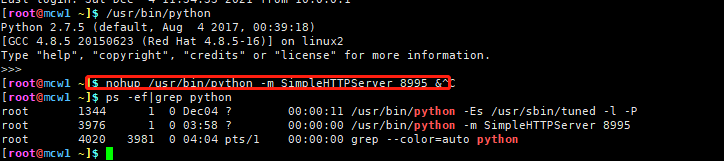
python3改动了:python -m http.server 端口号
如果有txt文件就是,可以浏览器页面读取内容,如果是不可读取的文件。那么点击可以直接下载
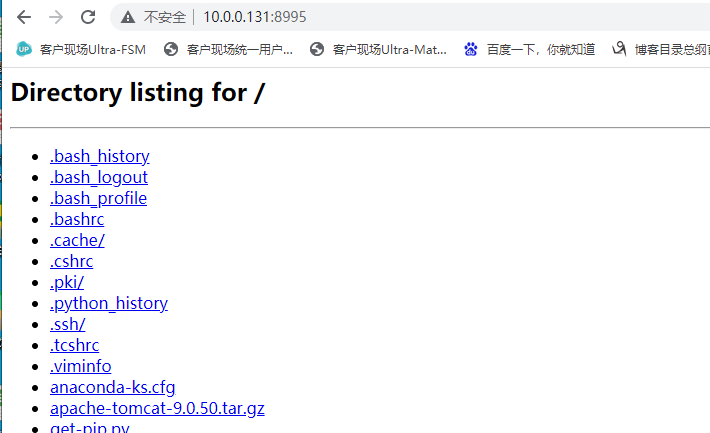
如果是通过远程连接windows服务器,或者再连接一层。当被限制不能从笔记本本地复制粘贴过去时,可以 使用此方法,xshell上创建这个进程,上传文件,然后在windows远程桌面进行地址访问,来下载文件。
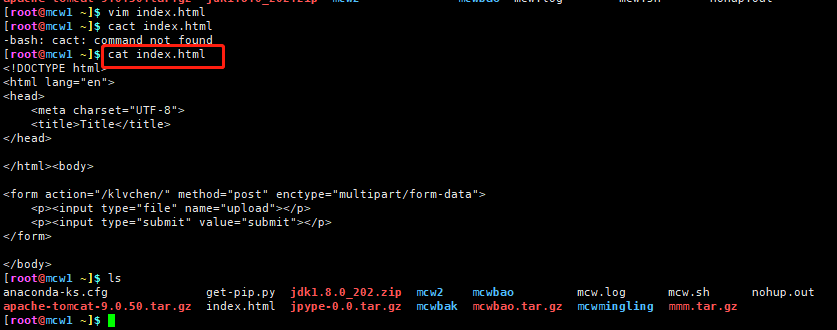
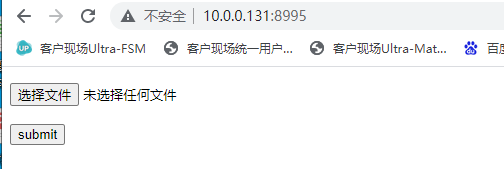
如何实现上传 文件到服务器
当我编辑了index。html文件时,默认展示index.html的内容
wsgiref创建网站


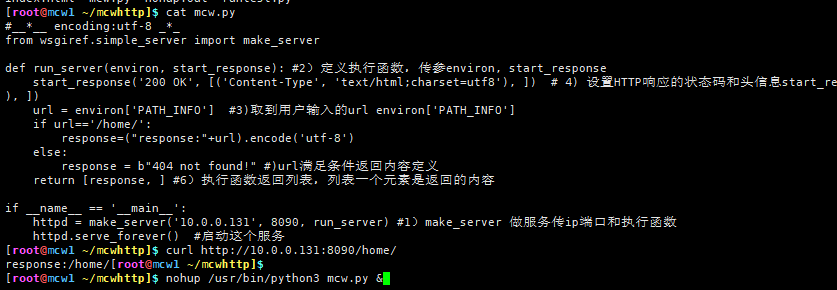
#__*__ encoding:utf-8 _*_

from wsgiref.simple_server import make_server

def run_server(environ, start_response): #2)定义执行函数,传参environ, start_response

    start_response('200 OK', [('Content-Type', 'text/html;charset=utf8'), ])  # 4) 设置HTTP响应的状态码和头信息start_response('200 OK', [('Content-Type', 'text/html;charset=utf8'), ])

    url = environ['PATH_INFO']  #3)取到用户输入的url environ['PATH_INFO']

    if url=='/home/':

        response=("response:"+url).encode('utf-8')

    else:

        response = b"404 not found!" #)url满足条件返回内容定义

    return [response, ] #6)执行函数返回列表,列表一个元素是返回的内容

if __name__ == '__main__':

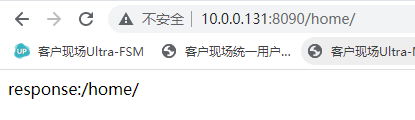
    httpd = make_server('10.0.0.131', 8090, run_server) #1)make_server 做服务传ip端口和执行函数

    httpd.serve_forever()  #启动这个服务
程序
参考:https://www.cnblogs.com/machangwei-8/p/11003934.html#_label1_0
SimpleHTTPServer和SocketServer实现index网页访问
官网地址:https://docs.python.org/2/library/simplehttpserver.html
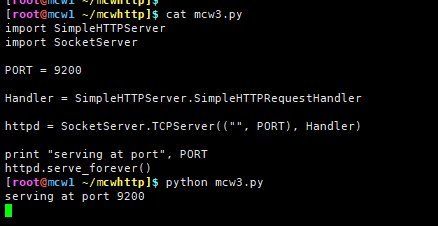
import SimpleHTTPServer

import SocketServer

PORT = 9200

Handler = SimpleHTTPServer.SimpleHTTPRequestHandler

httpd = SocketServer.TCPServer(("", PORT), Handler)

print "serving at port", PORT

httpd.serve_forever()
程序
<!DOCTYPE html PUBLIC "-//W3C//DTD HTML 4.01 Transitional//EN" "http://www.w3.org/TR/html4/loose.dtd">

<html>

<head>

<meta http-equiv="Content-Type" content="text/html; charset=ISO-8859-1">

<title>Insert title here</title>

</head>

<body>

    <form action="http://10.0.0.131:8000/" method="post">

        username:<input type="text" name="username"><br>

        password:<input type="password" name="password"><br>

        <input type="submit" value="login">

    </form>

</body>

</html>
index.html
运行程序。
本机另一个会话访问服务
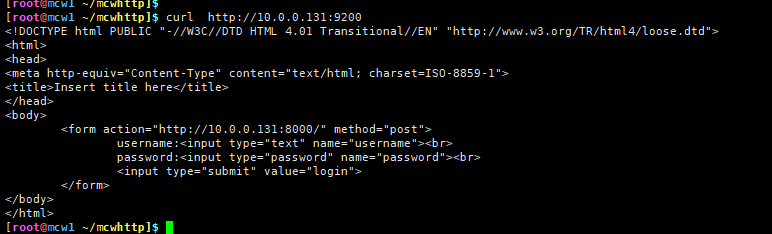
访问的程序运行当前目录下的 index文件

查看访问情况
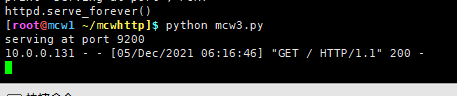
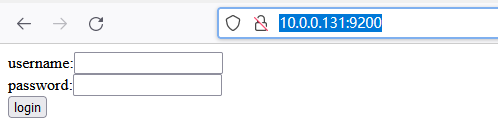
现在使用浏览器进行服务的访问,能发现正常访问到index文件的内容
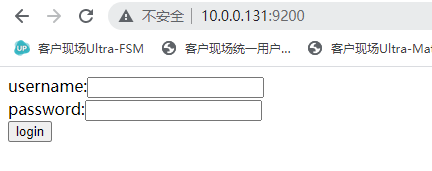
查看浏览器访问情况

SimpleHTTPServer自定义get响应内容
import SimpleHTTPServer

import SocketServer

PORT = 9200

class mcwhandler(SimpleHTTPServer.SimpleHTTPRequestHandler):

    def do_GET(self):

        print "GET"

        print self.headers

        self.wfile.write('wo shi machangwei')

Handler = mcwhandler

httpd = SocketServer.TCPServer(("", PORT), Handler)

print "serving at port", PORT

httpd.serve_forever()
程序
import SimpleHTTPServer

import SocketServer

PORT = 9200

class mcwhandler(SimpleHTTPServer.SimpleHTTPRequestHandler):  #自定义handler类,继承括号里的类

    def do_GET(self):  #定义get请求方法

        print "GET"

        print self.headers  #headers请求头信息吧

        self.wfile.write('wo shi machangwei')  #用这个方法来定返回义请求响应内容

Handler = mcwhandler #自定义handler类

httpd = SocketServer.TCPServer(("", PORT), Handler) #传参handler

print "serving at port", PORT

httpd.serve_forever()
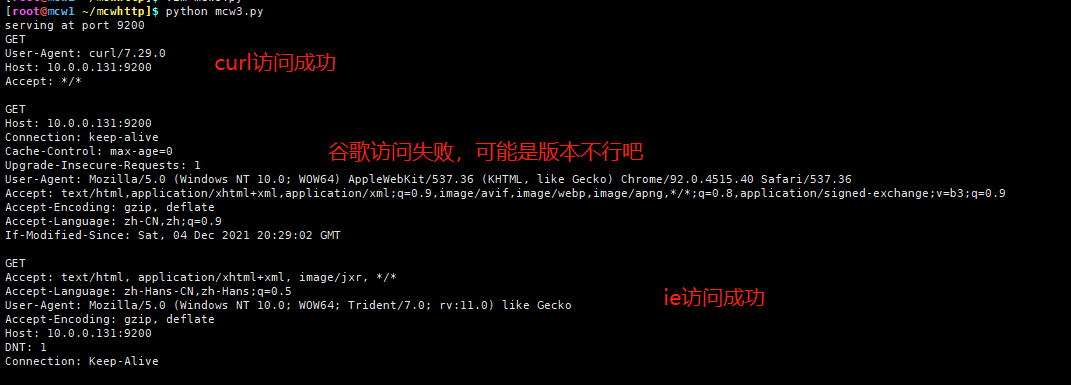
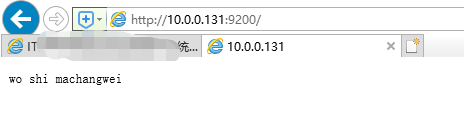
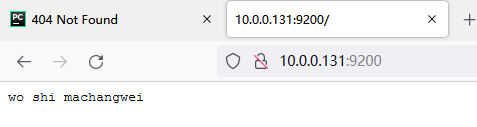
访问结果:

ie访问:
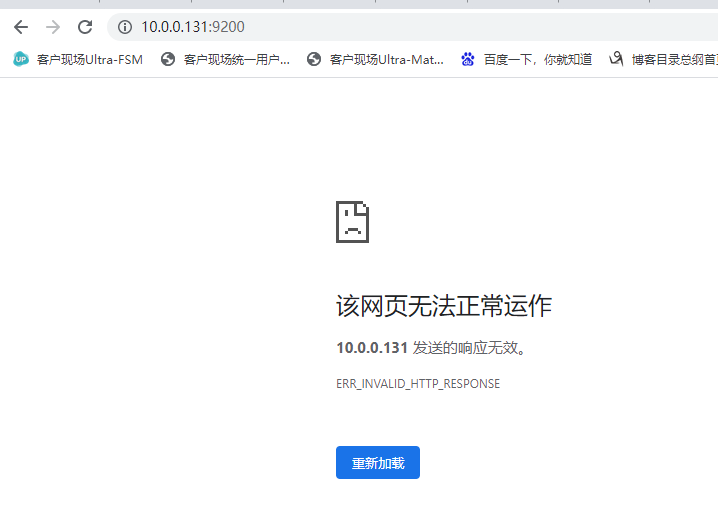
谷歌访问:
火狐浏览器访问:
# -*- coding: utf-8 -*-

import SimpleHTTPServer

import SocketServer

PORT = 9200

class mcwhandler(SimpleHTTPServer.SimpleHTTPRequestHandler):  #自定义handler类,继承括号里的类

    def createHTML(self):

        html = file("index.html", "r")

        for line in html:

            line.encode(encoding='utf-8')

            self.wfile.write(line)

    def do_GET(self):  #定义get请求方法

        print "GET"

        self.request

        self.responses["Content-type"]="application/json"

        print self.headers  #headers请求头信息吧

        print self.send_head()

        self.createHTML()  #用这个方法来定返回义请求响应内容

Handler = mcwhandler #自定义handler类

httpd = SocketServer.TCPServer(("", PORT), Handler) #传参handler

print "serving at port", PORT

httpd.serve_forever()
程序
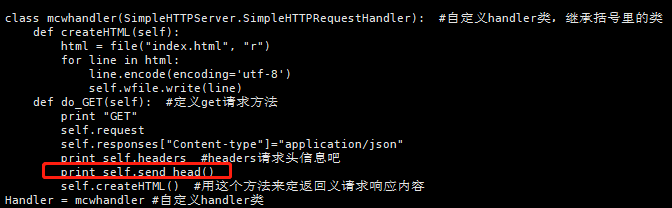
get方法里需要调用self.send_head(),浏览器才能将前端页面正常展示
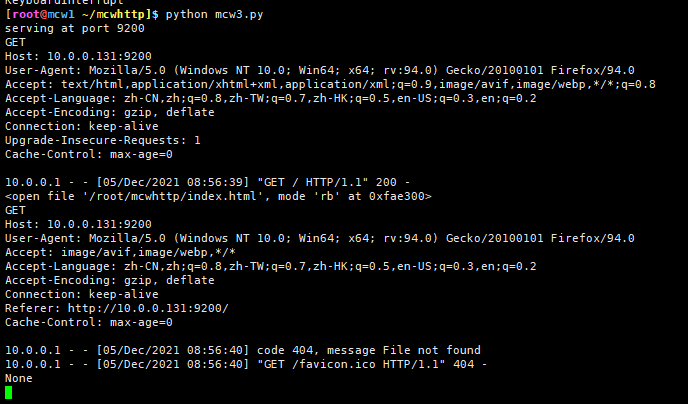
火狐访问打印结果显示
浏览器访问结果
打印具体效果:
  def do_GET(self):  #定义get请求方法

        print "GET"

        print "request:============\n",self.request

        print "path=============\n",self.path

        print "headers:============\n",self.headers  #headers请求头信息吧

        print "respon:===========\n",self.responses

        print "send_head:==============\n"

        print self.send_head()

        # self.createHTML()  #用这个方法来定返回义请求响应内容

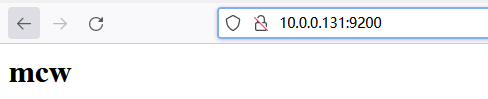
        self.wfile.write("<h1>mcw</h1>")
[root@mcw1 ~/mcwhttp]$ python mcw4.py

serving at port 9200

GET

request:============

<socket._socketobject object at 0x7f3e24cbac20>

path=============

/

headers:============

Host: 10.0.0.131:9200

User-Agent: Mozilla/5.0 (Windows NT 10.0; Win64; x64; rv:94.0) Gecko/20100101 Firefox/94.0

Accept: text/html,application/xhtml+xml,application/xml;q=0.9,image/avif,image/webp,*/*;q=0.8

Accept-Language: zh-CN,zh;q=0.8,zh-TW;q=0.7,zh-HK;q=0.5,en-US;q=0.3,en;q=0.2

Accept-Encoding: gzip, deflate

Connection: keep-alive

Upgrade-Insecure-Requests: 1

Cache-Control: max-age=0

respon:===========

{200: ('OK', 'Request fulfilled, document follows'), 201: ('Created', 'Document created, URL follows'), 202: ('Accepted', 'Request accepted, processing continues off-line'), 203: ('Non-Authoritative Information', 'Request fulfilled from cache'), 204: ('No Content', 'Request fulfilled, nothing follows'), 205: ('Reset Content', 'Clear input form for further input.'), 206: ('Partial Content', 'Partial content follows.'), 400: ('Bad Request', 'Bad request syntax or unsupported method'), 401: ('Unauthorized', 'No permission -- see authorization schemes'), 402: ('Payment Required', 'No payment -- see charging schemes'), 403: ('Forbidden', 'Request forbidden -- authorization will not help'), 404: ('Not Found', 'Nothing matches the given URI'), 405: ('Method Not Allowed', 'Specified method is invalid for this resource.'), 406: ('Not Acceptable', 'URI not available in preferred format.'), 407: ('Proxy Authentication Required', 'You must authenticate with this proxy before proceeding.'), 408: ('Request Timeout', 'Request timed out; try again later.'), 409: ('Conflict', 'Request conflict.'), 410: ('Gone', 'URI no longer exists and has been permanently removed.'), 411: ('Length Required', 'Client must specify Content-Length.'), 412: ('Precondition Failed', 'Precondition in headers is false.'), 413: ('Request Entity Too Large', 'Entity is too large.'), 414: ('Request-URI Too Long', 'URI is too long.'), 415: ('Unsupported Media Type', 'Entity body in unsupported format.'), 416: ('Requested Range Not Satisfiable', 'Cannot satisfy request range.'), 417: ('Expectation Failed', 'Expect condition could not be satisfied.'), 100: ('Continue', 'Request received, please continue'), 101: ('Switching Protocols', 'Switching to new protocol; obey Upgrade header'), 300: ('Multiple Choices', 'Object has several resources -- see URI list'), 301: ('Moved Permanently', 'Object moved permanently -- see URI list'), 302: ('Found', 'Object moved temporarily -- see URI list'), 303: ('See Other', 'Object moved -- see Method and URL list'), 304: ('Not Modified', 'Document has not changed since given time'), 305: ('Use Proxy', 'You must use proxy specified in Location to access this resource.'), 307: ('Temporary Redirect', 'Object moved temporarily -- see URI list'), 500: ('Internal Server Error', 'Server got itself in trouble'), 501: ('Not Implemented', 'Server does not support this operation'), 502: ('Bad Gateway', 'Invalid responses from another server/proxy.'), 503: ('Service Unavailable', 'The server cannot process the request due to a high load'), 504: ('Gateway Timeout', 'The gateway server did not receive a timely response'), 505: ('HTTP Version Not Supported', 'Cannot fulfill request.')}

send_head:==============

10.0.0.1 - - [05/Dec/2021 09:13:16] "GET / HTTP/1.1" 200 -

<open file '/root/mcwhttp/index.html', mode 'rb' at 0x7f3e24c63300>

GET

request:============

<socket._socketobject object at 0x7f3e24cbac20>

path=============

/favicon.ico

headers:============

Host: 10.0.0.131:9200

User-Agent: Mozilla/5.0 (Windows NT 10.0; Win64; x64; rv:94.0) Gecko/20100101 Firefox/94.0

Accept: image/avif,image/webp,*/*

Accept-Language: zh-CN,zh;q=0.8,zh-TW;q=0.7,zh-HK;q=0.5,en-US;q=0.3,en;q=0.2

Accept-Encoding: gzip, deflate

Connection: keep-alive

Referer: http://10.0.0.131:9200/

Cache-Control: max-age=0

respon:===========

{200: ('OK', 'Request fulfilled, document follows'), 201: ('Created', 'Document created, URL follows'), 202: ('Accepted', 'Request accepted, processing continues off-line'), 203: ('Non-Authoritative Information', 'Request fulfilled from cache'), 204: ('No Content', 'Request fulfilled, nothing follows'), 205: ('Reset Content', 'Clear input form for further input.'), 206: ('Partial Content', 'Partial content follows.'), 400: ('Bad Request', 'Bad request syntax or unsupported method'), 401: ('Unauthorized', 'No permission -- see authorization schemes'), 402: ('Payment Required', 'No payment -- see charging schemes'), 403: ('Forbidden', 'Request forbidden -- authorization will not help'), 404: ('Not Found', 'Nothing matches the given URI'), 405: ('Method Not Allowed', 'Specified method is invalid for this resource.'), 406: ('Not Acceptable', 'URI not available in preferred format.'), 407: ('Proxy Authentication Required', 'You must authenticate with this proxy before proceeding.'), 408: ('Request Timeout', 'Request timed out; try again later.'), 409: ('Conflict', 'Request conflict.'), 410: ('Gone', 'URI no longer exists and has been permanently removed.'), 411: ('Length Required', 'Client must specify Content-Length.'), 412: ('Precondition Failed', 'Precondition in headers is false.'), 413: ('Request Entity Too Large', 'Entity is too large.'), 414: ('Request-URI Too Long', 'URI is too long.'), 415: ('Unsupported Media Type', 'Entity body in unsupported format.'), 416: ('Requested Range Not Satisfiable', 'Cannot satisfy request range.'), 417: ('Expectation Failed', 'Expect condition could not be satisfied.'), 100: ('Continue', 'Request received, please continue'), 101: ('Switching Protocols', 'Switching to new protocol; obey Upgrade header'), 300: ('Multiple Choices', 'Object has several resources -- see URI list'), 301: ('Moved Permanently', 'Object moved permanently -- see URI list'), 302: ('Found', 'Object moved temporarily -- see URI list'), 303: ('See Other', 'Object moved -- see Method and URL list'), 304: ('Not Modified', 'Document has not changed since given time'), 305: ('Use Proxy', 'You must use proxy specified in Location to access this resource.'), 307: ('Temporary Redirect', 'Object moved temporarily -- see URI list'), 500: ('Internal Server Error', 'Server got itself in trouble'), 501: ('Not Implemented', 'Server does not support this operation'), 502: ('Bad Gateway', 'Invalid responses from another server/proxy.'), 503: ('Service Unavailable', 'The server cannot process the request due to a high load'), 504: ('Gateway Timeout', 'The gateway server did not receive a timely response'), 505: ('HTTP Version Not Supported', 'Cannot fulfill request.')}

send_head:==============

10.0.0.1 - - [05/Dec/2021 09:13:16] code 404, message File not found

10.0.0.1 - - [05/Dec/2021 09:13:16] "GET /favicon.ico HTTP/1.1" 404 -

None
访问展示
其它信息打印效果
代码:

[root@mcw1 ~/mcwhttp]$ cat mcw4.py

# -*- coding: utf-8 -*-

import SimpleHTTPServer

import SocketServer

PORT = 9200

class mcwhandler(SimpleHTTPServer.SimpleHTTPRequestHandler):  #自定义handler类,继承括号里的类

    def createHTML(self):

        html = file("index.html", "r")

        for line in html:

            line.encode(encoding='utf-8')

            self.wfile.write(line)

    def do_GET(self):  #定义get请求方法

        print "一次请求开始===========================\n"

        print "GET"

        print "path=============\n",self.path

        print "send_head:==============\n"

        print self.send_head()

        print "其它===========\n"

        print "address_string:",self.address_string()

        print "client_address:",self.client_address

        print "date_time_string:",self.date_time_string()

        print "error_content_type:",self.error_content_type

        print "requestline:",self.requestline

        print "raw_requestline",self.raw_requestline

        # self.createHTML()  #用这个方法来定返回义请求响应内容

        self.wfile.write("<h1>mcw</h1>")

Handler = mcwhandler #自定义handler类

httpd = SocketServer.TCPServer(("", PORT), Handler) #传参handler

print "serving at port", PORT

httpd.serve_forever()

浏览器访问打印结果:

[root@mcw1 ~/mcwhttp]$ python mcw4.py

serving at port 9200

一次请求开始===========================

GET

path=============

/

send_head:==============

10.0.0.1 - - [05/Dec/2021 09:26:41] "GET / HTTP/1.1" 200 -

<open file '/root/mcwhttp/index.html', mode 'rb' at 0x7f4db3bf1300>

其它===========

address_string: 10.0.0.1

client_address: ('10.0.0.1', 57243)

date_time_string: Sun, 05 Dec 2021 01:27:01 GMT

error_content_type: text/html

requestline: GET / HTTP/1.1

raw_requestline GET / HTTP/1.1

一次请求开始===========================

GET

path=============

/favicon.ico

send_head:==============

10.0.0.1 - - [05/Dec/2021 09:27:02] code 404, message File not found

10.0.0.1 - - [05/Dec/2021 09:27:02] "GET /favicon.ico HTTP/1.1" 404 -

None

其它===========

address_string: 10.0.0.1

client_address: ('10.0.0.1', 61636)

date_time_string: Sun, 05 Dec 2021 01:27:22 GMT

error_content_type: text/html

requestline: GET /favicon.ico HTTP/1.1

raw_requestline GET /favicon.ico HTTP/1.1
由上可知:浏览器上访问,10.0.0.131的9200端口。会先走到vmvare虚拟机的网关10.0.0.1。这里客户端ip也是展示的网关ip10.0.0.1。浏览器一次访问发送了两次请求,一个是请求/ 一个是请求/favicon.ico,这是火狐浏览器的头头部图片
调用就行了,内部实现打印了

post请求
# -*- coding: utf-8 -*-

import SimpleHTTPServer

import SocketServer

PORT = 9200

class mcwhandler(SimpleHTTPServer.SimpleHTTPRequestHandler):  #自定义handler类,继承括号里的类

    def createHTML(self):

        html = file("index.html", "r")

        for line in html:

            line.encode(encoding='utf-8')

            self.wfile.write(line)

    def do_GET(self):  #定义get请求方法

        print "一次请求开始===========================\n"

        self.send_head()

        self.createHTML()

Handler = mcwhandler #自定义handler类

httpd = SocketServer.TCPServer(("", PORT), Handler) #传参handler

print "serving at port", PORT

httpd.serve_forever()
程序
<!DOCTYPE html PUBLIC "-//W3C//DTD HTML 4.01 Transitional//EN" "http://www.w3.org/TR/html4/loose.dtd">

<html>

<head>

<meta http-equiv="Content-Type" content="text/html; charset=ISO-8859-1">

<title> Insert title here</title>

</head>

<body>

    <form action="http://10.0.0.131:8000/" method="post">

        username:<input type="text" name="username"><br>

        password:<input type="password" name="password"><br>

        <input type="submit" value="login">

    </form>

</body>

</html>
index.html
点击请求:
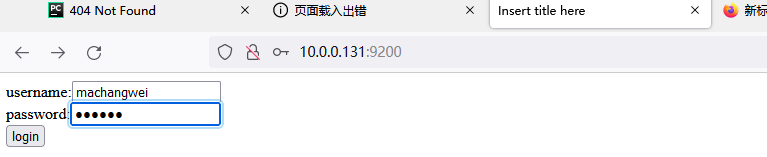
因为后端未实现post请求的函数
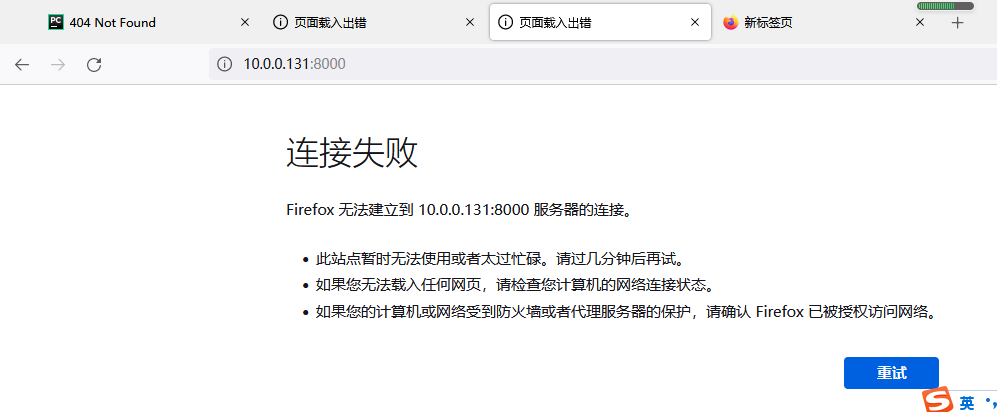
添加后端post视图函数
[root@mcw1 ~/mcwhttp]$ cat mcw5.py

# -*- coding: utf-8 -*-

import SimpleHTTPServer

import SocketServer

PORT = 9200

class mcwhandler(SimpleHTTPServer.SimpleHTTPRequestHandler):  #自定义handler类,继承括号里的类

    def createHTML(self):

        html = file("index.html", "r")

        for line in html:

            line.encode(encoding='utf-8')

            self.wfile.write(line)

    def do_GET(self):  #定义get请求方法

        print "一次请求开始===========================\n"

        self.send_head()

        self.createHTML()

    def do_POST(self):

        print "POST请求开始===================\n"

        self.send_head()

        self.wfile.write('''<html>

<head>

    <meta charset="UTF-8"></head>

<body>

    <div style="color:red;"><h1 charset="ISO-8859-1">post请求返回的页面</h1></div>

</body>

</html>''')

Handler = mcwhandler #自定义handler类

httpd = SocketServer.TCPServer(("", PORT), Handler) #传参handler

print "serving at port", PORT

httpd.serve_forever()
post视图函数
[root@mcw1 ~/mcwhttp]$ cat index.html

<!DOCTYPE html PUBLIC "-//W3C//DTD HTML 4.01 Transitional//EN" "http://www.w3.org/TR/html4/loose.dtd">

<html>

<head>

<meta http-equiv="Content-Type" content="text/html; charset=ISO-8859-1">

<title> Insert title here</title>

</head>

<body>

    <form action="" method="post">

        username:<input type="text" name="username"><br>

        password:<input type="password" name="password"><br>

        <input type="submit" value="login">

    </form>

</body>

</html>
前端代码
get请求,输入内容,点击登录
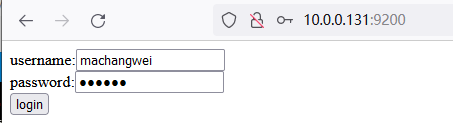
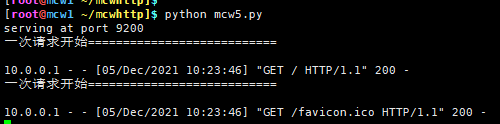
点击登录,成功返回内容
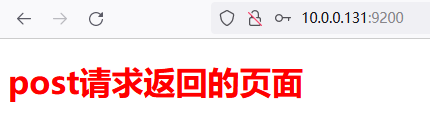
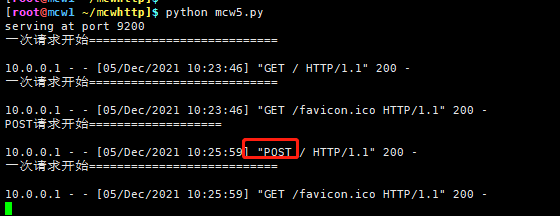
后面就可以根据path自己写路由(url),写html模块,自己定义替换语言。数据库可以用Excel来实现,使用txt文本来实现等等。
两个模块,一个提供tcp网络编程,一个实现将http请求作为tcp网络编程的参数传进去做处理
获取请求的数据
length = int(self.headers.getheader('content-length'))
qs = self.rfile.read(length)
# -*- coding: utf-8 -*-

import SimpleHTTPServer

import SocketServer

PORT = 9200

class mcwhandler(SimpleHTTPServer.SimpleHTTPRequestHandler):  #自定义handler类,继承括号里的类

    def createHTML(self):

        html = file("index.html", "r")

        for line in html:

            line.encode(encoding='utf-8')

            self.wfile.write(line)

    def do_GET(self):  #定义get请求方法

        print "一次请求开始===========================\n"

        self.send_head()

        self.createHTML()

    def do_POST(self):

        print "POST请求开始===================\n"

        self.send_head()

        length = int(self.headers.getheader('content-length'))

        qs = self.rfile.read(length)

        print "====================\npost 请求的数据内容: %s"%qs

        self.wfile.write('''<html>

<head>

    <meta charset="UTF-8"></head>

<body>

    <div style="color:red;"><h1 charset="ISO-8859-1">post请求返回的页面</h1></div>

</body>

</html>''')

Handler = mcwhandler #自定义handler类

httpd = SocketServer.TCPServer(("", PORT), Handler) #传参handler

print "serving at port", PORT

httpd.serve_forever()
程序
查看请求头信息 dir
headers: [
'Host: 10.0.0.131:9200\r\n',
'User-Agent: Mozilla/5.0 (Windows NT 10.0;
Win64; x64; rv:94.0) Gecko/20100101
Firefox/94.0\r\n',
 'Accept: text/html,application/xhtml+xml,application/xml;q=0.9,image/avif,image/webp,*/*;q=0.8\r\n',
'Accept-Language: zh-CN,zh;q=0.8,zh-TW;q=0.7,zh-HK;q=0.5,en-US;q=0.3,en;q=0.2\r\n',
'Accept-Encoding: gzip, deflate\r\n',
'Connection: keep-alive\r\n',
'Upgrade-Insecure-Requests: 1\r\n']

=======

dict: {
'accept-language': 'zh-CN,zh;q=0.8,zh-TW;q=0.7,zh-HK;q=0.5,en-US;q=0.3,en;q=0.2',
'accept-encoding': 'gzip, deflate',
 'host': '10.0.0.131:9200',
'accept': 'text/html,application/xhtml+xml,application/xml;q=0.9,
image/avif,image/webp,*/*;q=0.8',
'user-agent': 'Mozilla/5.0 (Windows NT 10.0; Win64; x64; rv:94.0) Gecko/20100101 Firefox/94.0',
'connection': 'keep-alive',
'upgrade-insecure-requests': '1'}

items(): [
('origin', 'http://10.0.0.131:9200'),
 ('content-length', '35'),
('accept-language', 'zh-CN,zh;q=0.8,zh-TW;q=0.7,zh-HK;q=0.5,en-US;q=0.3,en;q=0.2'),
('accept-encoding', 'gzip, deflate'),
 ('connection', 'keep-alive'),
('accept', 'text/html,application/xhtml+xml,application/xml;q=0.9,image/avif,image/webp,*/*;q=0.8'),
('user-agent', 'Mozilla/5.0 (Windows NT 10.0; Win64; x64; rv:94.0) Gecko/20100101 Firefox/94.0'),
('host', '10.0.0.131:9200'),
('referer', 'http://10.0.0.131:9200/'),
('upgrade-insecure-requests', '1'),
('content-type', 'application/x-www-form-urlencoded')]

=======

keys(): ['origin', 'content-length', 'accept-language', 'accept-encoding', 'connection',
'accept', 'user-agent', 'host', 'referer',
 'upgrade-insecure-requests', 'content-type']

=======

values(): ['http://10.0.0.131:9200', '35', 'zh-CN,zh;q=0.8,zh-TW;q=0.7,zh-HK;q=0.5,en-US;q=0.3,en;q=0.2',
'gzip, deflate', 'keep-alive',
'text/html,application/xhtml+xml,application/xml;q=0.9,image/avif,image/webp,*/*;q=0.8',
'Mozilla/5.0 (Windows NT 10.0; Win64; x64; rv:94.0) Gecko/20100101 Firefox/94.0',
'10.0.0.131:9200', 'http://10.0.0.131:9200/',
'1', 'application/x-www-form-urlencoded']

=====================

headers 的dir: ['__contains__', '__delitem__', '__doc__', '__getitem__', '__init__',
'__iter__', '__len__', '__module__',
'__setitem__', '__str__', 'dict', 'encodingheader', 'fp', 'get', 'getaddr', 'getaddrlist',
'getallmatchingheaders', 'getdate',
'getdate_tz', 'getencoding', 'getfirstmatchingheader', 'getheader', 'getheaders', 'getmaintype',
 'getparam', 'getparamnames',
 'getplist', 'getrawheader', 'getsubtype', 'gettype', 'has_key', 'headers', 'iscomment',
'isheader', 'islast', 'items', 'keys',
'maintype', 'parseplist', 'parsetype', 'plist', 'plisttext', 'readheaders',
'rewindbody', 'seekable', 'setdefault', 'startofbody',
'startofheaders', 'status', 'subtype', 'type', 'typeheader', 'unixfrom', 'values']
# -*- coding: utf-8 -*-

import SimpleHTTPServer

import SocketServer

PORT = 9200

class mcwhandler(SimpleHTTPServer.SimpleHTTPRequestHandler):  #自定义handler类,继承括号里的类

    def createHTML(self):

        html = file("index.html", "r")

        for line in html:

            line.encode(encoding='utf-8')

            self.wfile.write(line)

    def do_GET(self):  #定义get请求方法

        print "一次请求开始===========================\n"

        self.send_head()

        self.createHTML()

    def do_POST(self):

        print "POST请求开始===================\n"

        self.send_head()

        length = int(self.headers.getheader('content-length'))

        print "============\nlength: ",self.headers.getheader('content-length')

        qs = self.rfile.read(length)

        print "====================\npost 请求的数据内容: %s"%qs

        print "=====================\nheaders 的dir:",dir(self.headers)

        self.wfile.write('''<html>

<head>

    <meta charset="UTF-8"></head>

<body>

    <div style="color:red;"><h1 charset="ISO-8859-1">post请求返回的页面</h1></div>

</body>

</html>''')

Handler = mcwhandler #自定义handler类

httpd = SocketServer.TCPServer(("", PORT), Handler) #传参handler

print "serving at port", PORT

httpd.serve_forever()
程序
视图函数:

   def do_POST(self):

        print "POST请求开始===================\n"

        self.send_head()

        length = int(self.headers.getheader('content-length'))

        print "============\nlength: ",self.headers.getheader('content-length')

        qs = self.rfile.read(length)

        print "====================\npost 请求的数据内容: %s"%qs

        print "=====================\nheaders 的dir:",dir(self.headers)

        self.wfile.write('''<html>

<head>

    <meta charset="UTF-8"></head>

<body>

    <div style="color:red;"><h1 charset="ISO-8859-1">post请求返回的页面</h1></div>

</body>

</html>''')

结果:

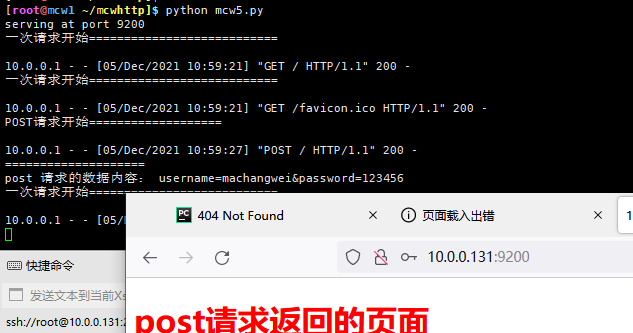
[root@mcw1 ~/mcwhttp]$ python mcw5.py

serving at port 9200

一次请求开始===========================

10.0.0.1 - - [05/Dec/2021 11:07:16] "GET / HTTP/1.1" 200 -

一次请求开始===========================

10.0.0.1 - - [05/Dec/2021 11:07:16] "GET /favicon.ico HTTP/1.1" 200 -

POST请求开始===================

10.0.0.1 - - [05/Dec/2021 11:07:22] "POST / HTTP/1.1" 200 -

============

length:  35

====================

post 请求的数据内容: username=machangwei&password=123456

=====================

headers 的dir: ['__contains__', '__delitem__', '__doc__', '__getitem__', '__init__', '__iter__', '__len__', '__module__', '__setitem__', '__str__', 'dict', 'encodingheader', 'fp', 'get', 'getaddr', 'getaddrlist', 'getallmatchingheaders', 'getdate', 'getdate_tz', 'getencoding', 'getfirstmatchingheader', 'getheader', 'getheaders', 'getmaintype', 'getparam', 'getparamnames', 'getplist', 'getrawheader', 'getsubtype', 'gettype', 'has_key', 'headers', 'iscomment', 'isheader', 'islast', 'items', 'keys', 'maintype', 'parseplist', 'parsetype', 'plist', 'plisttext', 'readheaders', 'rewindbody', 'seekable', 'setdefault', 'startofbody', 'startofheaders', 'status', 'subtype', 'type', 'typeheader', 'unixfrom', 'values']

一次请求开始===========================

10.0.0.1 - - [05/Dec/2021 11:07:22] "GET /favicon.ico HTTP/1.1" 200 -
# -*- coding: utf-8 -*-

import SimpleHTTPServer

import SocketServer

PORT = 9200

class mcwhandler(SimpleHTTPServer.SimpleHTTPRequestHandler):  # 自定义handler类,继承括号里的类

    def createHTML(self):

        html = file("index.html", "r")

        for line in html:

            line.encode(encoding='utf-8')

            self.wfile.write(line)

    def do_GET(self):  # 定义get请求方法

        print "一次请求开始===========================\n"

        self.send_head()

        if self.path=="/":

            print "=======\nget():", self.headers.get('mcw')

            print "=======\nstatus:", self.headers.status

            print "=======\ntype:", self.headers.type

            print "=======\nheaders:", self.headers.headers

            print "=======\ndict:", self.headers.dict

            print "=======\nencodingheader:", self.headers.encodingheader

            print "=======\ngetaddr():", self.headers.getaddr('host')

            print "=======\ngetaddrlist():", self.headers.getaddrlist('host')

            print "=======\ngetfirstmatchingheader():", self.headers.getfirstmatchingheader('host')

            print "=======\nfp:", self.headers.fp

            print "=======\ngetallmatchingheaders():", self.headers.getallmatchingheaders('host')

            print "=======\ngetdate():", self.headers.getdate('host')

            print "=======\ngetdate_tz():", self.headers.getdate_tz('host')

            print "=======\ngetrawheader():", self.headers.getrawheader('host')

            print "=======\ngetplist():", self.headers.getplist()

            print "=======\ngetmaintype():", self.headers.getmaintype()

            print "=======\ngetheader():", self.headers.getheader('host')

            print "=======\ngetparam():", self.headers.getparam("mcw")

            print "=======\ngetparamnames():", self.headers.getparamnames()

            print "=======\nparseplist():", self.headers.parseplist()

            print "=======\ngettype():", self.headers.gettype()

            #print "=======\nreadheaders():", self.headers.readheaders()

            print "=======\nunixfrom:", self.headers.unixfrom

            print "=======\nstartofbody:", self.headers.startofbody

            print "=======\nplist:", self.headers.plist

            print "=======\nplisttext:", self.headers.plisttext

        self.createHTML()

    def do_POST(self):

        aa=self.send_head()

        if self.path=="/":

            print "POST请求开始===================\n"

            print "=======\nitems():", self.headers.items()

            print "=======\nkeys():", self.headers.keys()

            print "=======\nvalues():", self.headers.values()

            print "=======\ngetparam():", self.headers.getparam('username')

            print "=======\ngetparamnames():", self.headers.getparamnames()

            print "=======\nparseplist():", self.headers.parseplist()

            length = int(self.headers.getheader('content-length'))

            print "============\n请求的数据内容长度getheader('content-length'): ", self.headers.getheader('content-length')

            qs = self.rfile.read(length)

            print "====================\npost 请求的数据内容self.rfile.read(length): %s" % qs

            print "=====================\nheaders 的dir:", dir(self.headers)

        print "==================\nself.send_head()返回内容:",aa

        self.wfile.write('''<html>

<head>

    <meta charset="UTF-8"></head>

<body>

    <div style="color:red;"><h1 charset="ISO-8859-1">post请求返回的页面</h1></div>

</body>

</html>''')

Handler = mcwhandler  # 自定义handler类

httpd = SocketServer.TCPServer(("", PORT), Handler)  # 传参handler

print "serving at port", PORT

httpd.serve_forever()
执行结果:
[root@mcw1 ~/mcwhttp]$ python mcw6.py

serving at port 9200

一次请求开始===========================

10.0.0.1 - - [05/Dec/2021 12:05:15] "GET / HTTP/1.1" 200 -

=======

get(): None

=======

status:

=======

type: text/plain

=======

headers: ['Host: 10.0.0.131:9200\r\n', 'User-Agent: Mozilla/5.0 (Windows NT 10.0; Win64; x64; rv:94.0) Gecko/20100101 Firefox/94.0\r\n', 'Accept: text/html,application/xhtml+xml,application/xml;q=0.9,image/avif,image/webp,*/*;q=0.8\r\n', 'Accept-Language: zh-CN,zh;q=0.8,zh-TW;q=0.7,zh-HK;q=0.5,en-US;q=0.3,en;q=0.2\r\n', 'Accept-Encoding: gzip, deflate\r\n', 'Connection: keep-alive\r\n', 'Upgrade-Insecure-Requests: 1\r\n']

=======

dict: {'accept-language': 'zh-CN,zh;q=0.8,zh-TW;q=0.7,zh-HK;q=0.5,en-US;q=0.3,en;q=0.2', 'accept-encoding': 'gzip, deflate', 'host': '10.0.0.131:9200', 'accept': 'text/html,application/xhtml+xml,application/xml;q=0.9,image/avif,image/webp,*/*;q=0.8', 'user-agent': 'Mozilla/5.0 (Windows NT 10.0; Win64; x64; rv:94.0) Gecko/20100101 Firefox/94.0', 'connection': 'keep-alive', 'upgrade-insecure-requests': '1'}

=======

encodingheader: None

=======

getaddr(): ('', '9200')

=======

getaddrlist(): [('', '9200')]

=======

getfirstmatchingheader(): ['Host: 10.0.0.131:9200\r\n']

=======

fp: <socket._fileobject object at 0x7fb84a902450>

=======

getallmatchingheaders(): ['Host: 10.0.0.131:9200\r\n']

=======

getdate(): None

=======

getdate_tz(): None

=======

getrawheader():  10.0.0.131:9200

=======

getplist(): []

=======

getmaintype(): text

=======

getheader(): 10.0.0.131:9200

=======

getparam(): None

=======

getparamnames(): []

=======

parseplist(): None

=======

gettype(): text/plain

=======

unixfrom:

=======

startofbody: None

=======

plist: []

=======

plisttext:

一次请求开始===========================

10.0.0.1 - - [05/Dec/2021 12:05:15] "GET /favicon.ico HTTP/1.1" 200 -

10.0.0.1 - - [05/Dec/2021 12:05:20] "POST / HTTP/1.1" 200 -

POST请求开始===================

=======

items(): [('origin', 'http://10.0.0.131:9200'), ('content-length', '35'), ('accept-language', 'zh-CN,zh;q=0.8,zh-TW;q=0.7,zh-HK;q=0.5,en-US;q=0.3,en;q=0.2'), ('accept-encoding', 'gzip, deflate'), ('connection', 'keep-alive'), ('accept', 'text/html,application/xhtml+xml,application/xml;q=0.9,image/avif,image/webp,*/*;q=0.8'), ('user-agent', 'Mozilla/5.0 (Windows NT 10.0; Win64; x64; rv:94.0) Gecko/20100101 Firefox/94.0'), ('host', '10.0.0.131:9200'), ('referer', 'http://10.0.0.131:9200/'), ('upgrade-insecure-requests', '1'), ('content-type', 'application/x-www-form-urlencoded')]

=======

keys(): ['origin', 'content-length', 'accept-language', 'accept-encoding', 'connection', 'accept', 'user-agent', 'host', 'referer', 'upgrade-insecure-requests', 'content-type']

=======

values(): ['http://10.0.0.131:9200', '35', 'zh-CN,zh;q=0.8,zh-TW;q=0.7,zh-HK;q=0.5,en-US;q=0.3,en;q=0.2', 'gzip, deflate', 'keep-alive', 'text/html,application/xhtml+xml,application/xml;q=0.9,image/avif,image/webp,*/*;q=0.8', 'Mozilla/5.0 (Windows NT 10.0; Win64; x64; rv:94.0) Gecko/20100101 Firefox/94.0', '10.0.0.131:9200', 'http://10.0.0.131:9200/', '1', 'application/x-www-form-urlencoded']

=======

getparam(): None

=======

getparamnames(): []

=======

parseplist(): None

============

请求的数据内容长度getheader('content-length'):  35

====================

post 请求的数据内容self.rfile.read(length): username=machangwei&password=123456

=====================

headers 的dir: ['__contains__', '__delitem__', '__doc__', '__getitem__', '__init__', '__iter__', '__len__', '__module__', '__setitem__', '__str__', 'dict', 'encodingheader', 'fp', 'get', 'getaddr', 'getaddrlist', 'getallmatchingheaders', 'getdate', 'getdate_tz', 'getencoding', 'getfirstmatchingheader', 'getheader', 'getheaders', 'getmaintype', 'getparam', 'getparamnames', 'getplist', 'getrawheader', 'getsubtype', 'gettype', 'has_key', 'headers', 'iscomment', 'isheader', 'islast', 'items', 'keys', 'maintype', 'parseplist', 'parsetype', 'plist', 'plisttext', 'readheaders', 'rewindbody', 'seekable', 'setdefault', 'startofbody', 'startofheaders', 'status', 'subtype', 'type', 'typeheader', 'unixfrom', 'values']

==================

self.send_head()返回内容: <open file '/root/mcwhttp/index.html', mode 'rb' at 0x12d7300>

一次请求开始===========================

10.0.0.1 - - [05/Dec/2021 12:05:21] "GET /favicon.ico HTTP/1.1" 200 -
[root@mcw1 ~/mcwhttp]$ cat runtest.py

import SimpleHTTPServer

import SocketServer

import re

def htc(m):

    return chr(int(m.group(1), 16))

def urldecode(url):

    rex = re.compile('%([0-9a-hA-H][0-9a-hA-H])', re.M)

    return rex.sub(htc, url)

class SETHandler(SimpleHTTPServer.SimpleHTTPRequestHandler):

    def createHTML(self):

        html = file("index.html", "r")

        for line in html:

            self.wfile.write(line)

    def do_GET(self):

        print "GET"

        print self.headers

        self.createHTML()

    def do_POST(self):

        print "POST"

        print self.headers

        length = int(self.headers.getheader('content-length'))

        qs = self.rfile.read(length)

        url = urldecode(qs)

        print "url="

        print  url

        self.createHTML()

Handler = SETHandler

PORT = 8000

httpd = SocketServer.TCPServer(('0.0.0.0', PORT), Handler)

print "serving at port", PORT

httpd.serve_forever()
可参考程序
mcwstr2='''-----------------------------15257289834991275059027017

Content-Disposition: form-data; name="upload"; filename="mcw1.txt"

Content-Type: text/plainsssssssss

    at sun.reflect.GeneratedMethodAccessor177.invoke(Unknown Source)

    at sun.reflect.DelegatingMethodAccessorImpl.invoke(DelegatingMethodAccessorImpl.java:43)

-----------------------------15257289834991275059027017--

'''

import re

# ret2 = re.search('.*Content-Type:(?P<mcw2>.*).*(?P<mcw3>a.*)',mcwstr2[56:])

str_len=len(mcwstr2)

li=mcwstr2.splitlines()

li_len=len(li)

start_len=0

end_len=0

for i in range(li_len):

    if i in [0,1,2,3]:

        start_len=start_len+len(li[i])

    if i in [li_len-1,li_len-2]:

        end_len=end_len+len(li[i])

my_start=start_len+1+3

my_end=str_len-end_len

my_str=mcwstr2[my_start:my_end]

# print mcwstr2[158:374-61]

print len(li),str_len,start_len,end_len,"\n",my_str,
某次調試
参考链接:https://www.jb51.net/article/65453.htm
上传参考:https://www.cnblogs.com/fatt/p/6722419.html
SimpleHTTPServer模块详解的更多相关文章
- Python中操作mysql的pymysql模块详解
Python中操作mysql的pymysql模块详解 前言 pymsql是Python中操作MySQL的模块,其使用方法和MySQLdb几乎相同.但目前pymysql支持python3.x而后者不支持 ...
- python之OS模块详解
python之OS模块详解 ^_^,步入第二个模块世界----->OS 常见函数列表 os.sep:取代操作系统特定的路径分隔符 os.name:指示你正在使用的工作平台.比如对于Windows ...
- python之sys模块详解
python之sys模块详解 sys模块功能多,我们这里介绍一些比较实用的功能,相信你会喜欢的,和我一起走进python的模块吧! sys模块的常见函数列表 sys.argv: 实现从程序外部向程序传 ...
- python中threading模块详解(一)
python中threading模块详解(一) 来源 http://blog.chinaunix.net/uid-27571599-id-3484048.html threading提供了一个比thr ...
- python time 模块详解
Python中time模块详解 发表于2011年5月5日 12:58 a.m. 位于分类我爱Python 在平常的代码中,我们常常需要与时间打交道.在Python中,与时间处理有关的模块就包括: ...
- python time模块详解
python time模块详解 转自:http://blog.csdn.net/kiki113/article/details/4033017 python 的内嵌time模板翻译及说明 一.简介 ...
- 小白的Python之路 day5 time,datatime模块详解
一.模块的分类 可以分成三大类: 1.标准库 2.开源模块 3.自定义模块 二.标准库模块详解 1.time与datetime 在Python中,通常有这几种方式来表示时间:1)时间戳 2)格式化的时 ...
- 小白的Python之路 day5 random模块和string模块详解
random模块详解 一.概述 首先我们看到这个单词是随机的意思,他在python中的主要用于一些随机数,或者需要写一些随机数的代码,下面我们就来整理他的一些用法 二.常用方法 1. random.r ...
- Python中time模块详解
Python中time模块详解 在平常的代码中,我们常常需要与时间打交道.在Python中,与时间处理有关的模块就包括:time,datetime以及calendar.这篇文章,主要讲解time模块. ...
- Ansible安装部署及常用模块详解
Ansible命令使用 Ansible语法使用ansible <pattern_goes_here> -m <module_name> -a <arguments> ...
随机推荐
- C 语言中布尔值的用法和案例解析
C语言中的布尔值 在编程中,您经常需要一种只能有两个值的数据类型,例如: 是/否 开/关 真/假 为此,C语言有一个 bool 数据类型,称为布尔值. 布尔变量 在C语言中,bool 类型不是内置数据 ...
- Git安装和配置教程:Windows/Mac/Linux三平台详细图文教程,带你一次性搞定Git环境
Git是一款免费.开源的分布式版本控制系统,广泛应用于软件开发领域.随着开源和云计算的发展,Git已经成为了开发者必备的工具之一.本文将为大家介绍Git在Windows.Mac和Linux三个平台上的 ...
- HMS Core上新啦!
HMS Core上新啦!分析服务营销分析报告全新上线:运动健康服务支持目标场景事件订阅:音频编辑服务提供专业的三维声音频编辑与渲染能力,更多HMS Core能力可点击网页链接了解. 了解更多详情> ...
- 优先队列的基本实现【数据结构与算法—TypeScript 实现】
笔记整理自 coderwhy 『TypeScript 高阶数据结构与算法』课程 特性 效率比普通队列高 每个出队元素拥有最高优先级 可以用 数组.链表 等数据结构实现,但是 堆结构 是最常用的实现方式 ...
- 什么是MurmurHash
MurmurHash简介 MurmurHash是一种非加密散列函数,名称来自两个基本操作,乘法(MU)和旋转(R).与加密散列函数不同,它不是专门设计为难以被对手逆转,因此不适用于加密目的.在2018 ...
- 重新点亮shell————文本搜索[九]
前言 简单整理一下文本搜索. 正文 文本搜索需要学下面: 元字符 扩展元字符 文件的查找命令find 例子1: 例子2(通配符): 例子3(正则表达): 例子4(可以根据文件类型匹配): 例子5(找到 ...
- django中对模型字段名的限制
Django 对模型的字段名有一些限制: 一个字段的名称不能是 Python 保留字,因为这会导致 Python 语法错误.比如: class Example(models.Model): pass ...
- FPGA技术脚本使用
做fpga 不会脚本,基本跟残废一个概念.以前我觉得做FPGA应该学习什么人工智能,大数据,机器人.现在想起来真是傻逼,做fpga也好,做ic,做逻辑其实基本能力都是一样的. 一个学习tcl脚本,pe ...
- 力扣844(Java)-比较含退格的字符串(简单)
题目: 给定 s 和 t 两个字符串,当它们分别被输入到空白的文本编辑器后,如果两者相等,返回 true .# 代表退格字符. 注意:如果对空文本输入退格字符,文本继续为空. 示例 1: 输入:s = ...
- 力扣535(java)-TinyURL的加密与解密(中等)
题目: TinyURL 是一种 URL 简化服务, 比如:当你输入一个 URL https://leetcode.com/problems/design-tinyurl 时,它将返回一个简化的URL ...