
error: ‘to_string’ was not declared in this scope
错误:
error: ‘to_string’ was not declared in this scope
原因:
to_string是C++11引入的新功能,旧版本编译器可能不支持它,所以要给编译器加上“C++11”编译支持
解决方案:
Linux下的GCC编译器:在 g++ 命令行加入编译选项 -std=c++11,例如:
g++ -o test test.cpp -std=c++
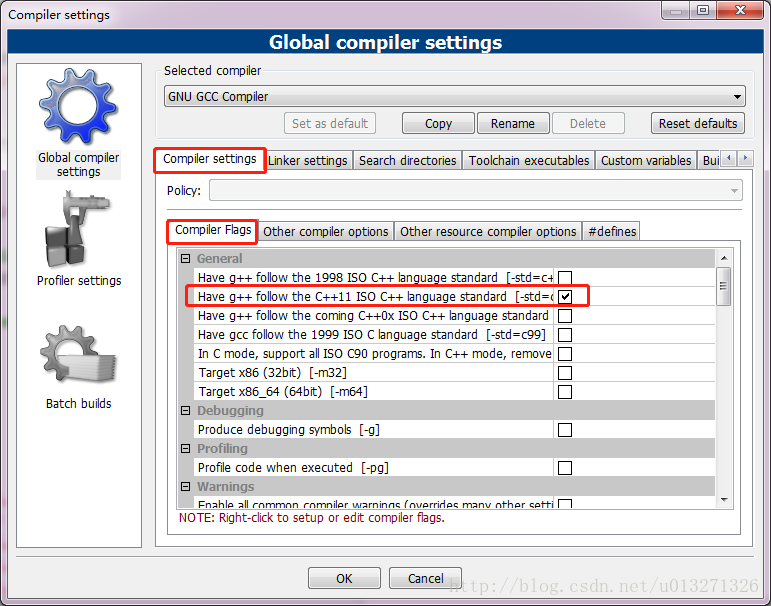
CodeBlocks编译器:工具栏打开Settings->Compiler,在这里勾选C++11标准即可。(参考链接)
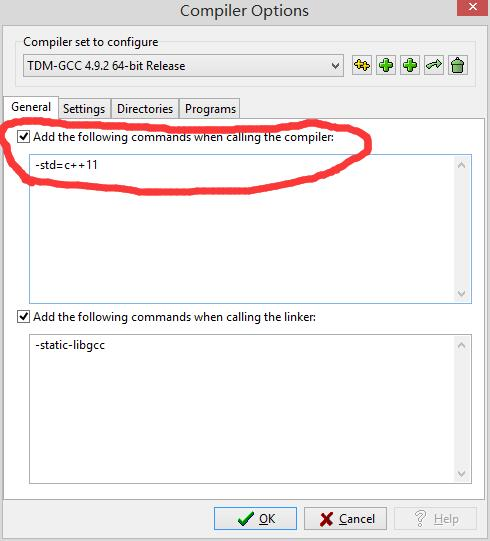
Dev C++ 编译器:在菜单栏点开Tools -> Compile Options,加上圈住的编译指令即可让编译器支持c++11的标准。(参考链接)
error: ‘to_string’ was not declared in this scope的更多相关文章
- error: 'LOGE' was not declared in this scope
移植了下HAL,发现编译出现如下错误 error: 'LOGE' was not declared in this scope 比较了一下android4.1的 system/core/include ...
- c++ - fcgio.cpp:50: error: 'EOF' was not declared in this scope - Stack Overflow
c++ - fcgio.cpp:50: error: 'EOF' was not declared in this scope - Stack Overflow fcgio.cpp:50: error ...
- 【QT】error: 'SIGNAL' was not declared in this scope
error: 'SIGNAL' was not declared in this scope 未在此范围内声明. connect(ui->Btnshowhello,SIGNAL(clicked ...
- [Error] 'exit' was not declared in this scope的解决方法
新手刚开始用Linux和c++写程序,可能会出现下面的错误 error: ‘exit’ was not declared in this scope 解决方法是 添加 #include <cst ...
- 解决Cygwin编译cocos2dx 遇到的 error: 'UINT64_C' was not declared in this scope 问题
环境工具:Win10.VS2013.cocos2d-x-2.2.6.Cygwin.ADT 问题来源:写了一个小游戏,VS2013上运行成功,就尝试着打包apk,项目导入到ADT里面,添加了cocos2 ...
- 编译是报error: 'EVNET_COME_TO_FOREGROUND' was not declared in this scope
Compile++ thumb : game_shared <= main.cpp jni/hellocpp/main.cpp: In function 'void Java_org_coco ...
- 调用ffmpeg库编译时出现common.h:175:47: error: 'UINT64_C' was not declared in this scope
解决办法 出现错误:jni/ffmpeg/libavutil/common.h:175:47: error: 'UINT64_C' was not declared in this scope 解决: ...
- In function 'int av_clipl_int32_c(int64_t)': error: 'UINT64_C' was not declared in this scope
cygwin下使用ndk编译jni时遇到的错误: /ffmpeg/include/libavutil/common.h: In function 'int av_clipl_int32_c(int64 ...
- 程设刷题 | 编译C++文件出现to_string is not a member of std 或者 to_string was not declared in this scope的解决方法
写在前面 原文链接:Enabling string conversion functions in MinGW C++在将整型.浮点型.长整型等数据类型转换为字符串时,可使用<string> ...
随机推荐
- Java源码——HashMap的源码分析及原理学习记录
学习HashMap时,需要带着这几个问题去,会有很大的收获: 一.什么是哈希表 二.HashMap实现原理 三.为何HashMap的数组长度一定是2的次幂? 四.重写equals方法需同时重写hash ...
- SQL SERVER 2012数据库自动备份的方法
SQL SERVER 2012数据库自动备份的方法 为了防止数据丢失,这里给大家介绍SQL SERVER2012数据自动备份的方法: 一.打开SQL SERVER 2012,如图所示: 服务器类型:数 ...
- nodejs fs路径
引用:https://www.cnblogs.com/guangzhou11/p/7705257.html require()别的js文件的时候,将执行那个js文件. 注意: require()中的路 ...
- MySQL - RIGHT JOIN
RIGHT JOIN 关键字 RIGHT JOIN 关键字会右表 (table_name2) 那里返回所有的行,即使在左表 (table_name1) 中没有匹配的行. RIGHT JOIN 关键字语 ...
- goaccess 安装
今天尝试搭建goaccess,用于分析access.log文件,但安装并不顺利,小记一下自己遇到的问题及解决方法 系统环境:CentOS release 6.9 一.参照官网教程进行搭建 $ wget ...
- composer 自动加载源码解析
一直在用 composer,最近想看一下具体的原理是什么,就仔细阅读了一下源码,一下是个人理解.在看该文章前最好了解一下 PSR-4 自动加载规范 引入类自动加载文件 # 加载类自动加载文件 requ ...
- day09-函数讲解
1.如何定义一个函数 s = '华为加油a' def s_len(): i = 0 for k in s: i += 1 print(i) s_len() 这个函数的功能就是输出字符串的长度.但是他只 ...
- 初学js之多组图片切换实例
需求是以上效果展示.话不多说,直接代码显示,不涉及代码优化.已实现功能为目的. 先看html部分: <body> <div class="dream" id=&q ...
- __setitem__,__getitem,__delitem__的作用
class Foo: def __init__(self, name): self.name = name def __getitem__(self, item): print('obj[key]时, ...
- POJ 2763 Housewife Wind 树链拋分
一.前言 这破题WA了一天,最后重构还是WA,最后通过POJ讨论版得到的数据显示,我看上去是把某个变量写错了..于是,还是低级错误背锅啊....代码能力有待进一步提升2333333 二.题意 某家庭主 ...