
error: ‘to_string’ was not declared in this scope
错误:
error: ‘to_string’ was not declared in this scope
原因:
to_string是C++11引入的新功能,旧版本编译器可能不支持它,所以要给编译器加上“C++11”编译支持
解决方案:
Linux下的GCC编译器:在 g++ 命令行加入编译选项 -std=c++11,例如:
g++ -o test test.cpp -std=c++
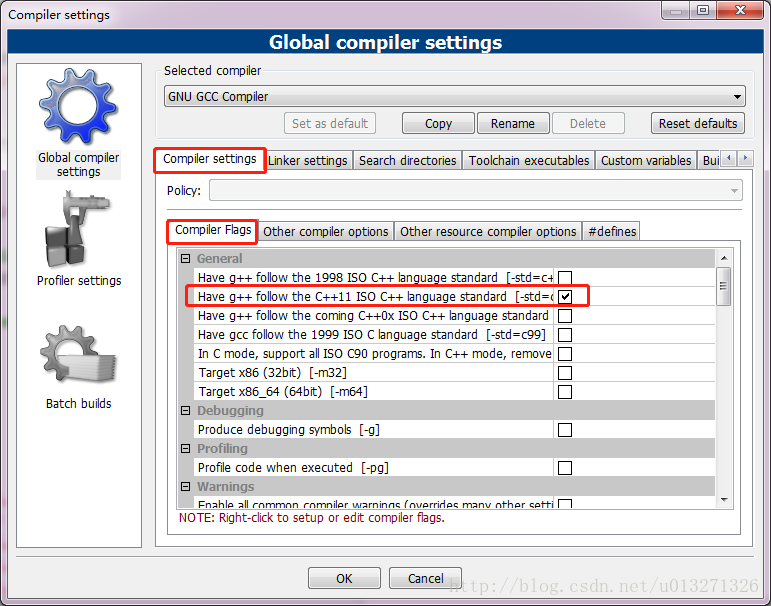
CodeBlocks编译器:工具栏打开Settings->Compiler,在这里勾选C++11标准即可。(参考链接)
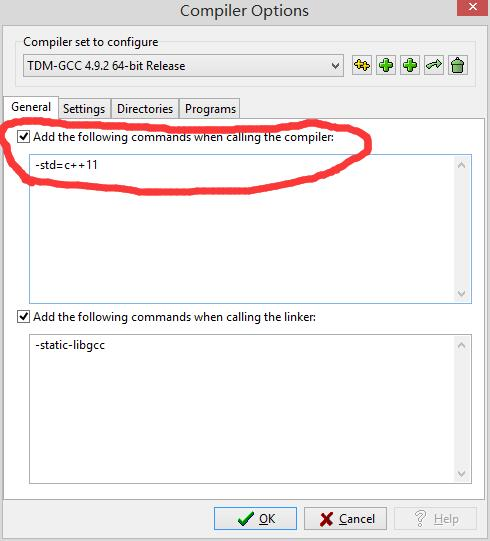
Dev C++ 编译器:在菜单栏点开Tools -> Compile Options,加上圈住的编译指令即可让编译器支持c++11的标准。(参考链接)
error: ‘to_string’ was not declared in this scope的更多相关文章
- error: 'LOGE' was not declared in this scope
移植了下HAL,发现编译出现如下错误 error: 'LOGE' was not declared in this scope 比较了一下android4.1的 system/core/include ...
- c++ - fcgio.cpp:50: error: 'EOF' was not declared in this scope - Stack Overflow
c++ - fcgio.cpp:50: error: 'EOF' was not declared in this scope - Stack Overflow fcgio.cpp:50: error ...
- 【QT】error: 'SIGNAL' was not declared in this scope
error: 'SIGNAL' was not declared in this scope 未在此范围内声明. connect(ui->Btnshowhello,SIGNAL(clicked ...
- [Error] 'exit' was not declared in this scope的解决方法
新手刚开始用Linux和c++写程序,可能会出现下面的错误 error: ‘exit’ was not declared in this scope 解决方法是 添加 #include <cst ...
- 解决Cygwin编译cocos2dx 遇到的 error: 'UINT64_C' was not declared in this scope 问题
环境工具:Win10.VS2013.cocos2d-x-2.2.6.Cygwin.ADT 问题来源:写了一个小游戏,VS2013上运行成功,就尝试着打包apk,项目导入到ADT里面,添加了cocos2 ...
- 编译是报error: 'EVNET_COME_TO_FOREGROUND' was not declared in this scope
Compile++ thumb : game_shared <= main.cpp jni/hellocpp/main.cpp: In function 'void Java_org_coco ...
- 调用ffmpeg库编译时出现common.h:175:47: error: 'UINT64_C' was not declared in this scope
解决办法 出现错误:jni/ffmpeg/libavutil/common.h:175:47: error: 'UINT64_C' was not declared in this scope 解决: ...
- In function 'int av_clipl_int32_c(int64_t)': error: 'UINT64_C' was not declared in this scope
cygwin下使用ndk编译jni时遇到的错误: /ffmpeg/include/libavutil/common.h: In function 'int av_clipl_int32_c(int64 ...
- 程设刷题 | 编译C++文件出现to_string is not a member of std 或者 to_string was not declared in this scope的解决方法
写在前面 原文链接:Enabling string conversion functions in MinGW C++在将整型.浮点型.长整型等数据类型转换为字符串时,可使用<string> ...
随机推荐
- 干净的架构The Clean Architecture_软件架构系列
本文转载自:https://www.jdon.com/artichect/the-clean-architecture.html ,这个博客站很有历史了,博主经常翻译Github大牛的文章,值得墙裂推 ...
- vue列表过渡效果
<transition-group></transition-group> ① 列表 <transition-group> </transition-grou ...
- js display, visible 区别
注意: display:none和visible:hidden都能把网页上某个元素隐藏起来,在视觉效果上没有区别,但是在一些DOM操作中两者有区别: display:none ---不为被隐藏的对象保 ...
- python笔记-dict字典的方法
#!/usr/bin/env python #-*- coding:utf-8 -*- #打印0001-9999的数字 for i in range(9999): s = "%04d&quo ...
- ATM-lib-common
import logging.configfrom conf import settingsfrom core import src def get_logger(name): logging.con ...
- Django基于类的增删改查,简单逻辑都不用写
Django是Python中一个非常牛逼的web框架,他帮我们做了很多事,里边也提前封装了很多牛逼的功能,用起来简直不要太爽,在写网站的过程中,增删改查这几个基本的功能我们是经常会用到,Django把 ...
- ThinkPHP邮件发送S(Smtp + Mail + phpmailer)
三种邮件发送介绍:(Smtp,Mail以及phpmailer)ThinkPhp 框架下开发. 邮件发送配置先前准备(用该账号做测试用):(这里用新浪邮箱服务器)将自己的新浪邮箱开通 POP3/SMTP ...
- 洛谷 P2279 [HNOI2003]消防局的设立
题目描述 2020年,人类在火星上建立了一个庞大的基地群,总共有n个基地.起初为了节约材料,人类只修建了n-1条道路来连接这些基地,并且每两个基地都能够通过道路到达,所以所有的基地形成了一个巨大的树状 ...
- GoF23种设计模式之创建型模式之原型模式
一.概述 用原型实例指定创建对象的种类,并且通过拷贝这些原型创建新的对象. 二.适用性 1.当一个系统应该独立于它的产品创建.构成和表示的时候. 2.当要实例化的类是在运行时刻指定的时候,例如:通过动 ...
- Green Space【绿色空间】
Green Space Living in an urban area with green spaces has a long-lasting positive impact on people's ...