
安装dubbo的监控中心dubbo-monitor-simple
1、下载dubbo-monitor-simple
2、修改配置指定注册中心地址
进入dubbo-monitor-simple\src\main\resources\conf目录修改 dubbo.properties文件
# Licensed to the Apache Software Foundation (ASF) under one or more

# contributor license agreements.  See the NOTICE file distributed with

# this work for additional information regarding copyright ownership.

# The ASF licenses this file to You under the Apache License, Version 2.0

# (the "License"); you may not use this file except in compliance with

# the License.  You may obtain a copy of the License at

#

#      http://www.apache.org/licenses/LICENSE-2.0

#

# Unless required by applicable law or agreed to in writing, software

# distributed under the License is distributed on an "AS IS" BASIS,

# WITHOUT WARRANTIES OR CONDITIONS OF ANY KIND, either express or implied.

# See the License for the specific language governing permissions and

# limitations under the License.

dubbo.container=log4j,spring,registry,jetty-monitor

dubbo.application.name=simple-monitor

dubbo.application.owner=dubbo

#dubbo.registry.address=multicast://224.5.6.7:1234

dubbo.registry.address=zookeeper://127.0.0.1:2181

#dubbo.registry.address=redis://127.0.0.1:6379

#dubbo.registry.address=dubbo://127.0.0.1:9090

dubbo.protocol.port=7070

dubbo.jetty.port=8080

dubbo.jetty.directory=${user.home}/monitor

dubbo.charts.directory=${user.home}/monitor/charts

dubbo.statistics.directory=${user.home}/monitor/statistics

dubbo.log4j.file=logs/dubbo-monitor-simple.log

dubbo.log4j.level=WARN
3、打包dubbo-monitor-simple
进入pom.xml文件所在目录D:\BaiduNetdiskDownload\Dubbo\incubator-dubbo-ops-master\dubbo-monitor-simple
运行mvn clean package -Dmaven.test.skip=true命令进行打包
4、解压dubbo-monitor-simple-2.0.0-assembly.tar.gz文件
5、进入D:\BaiduNetdiskDownload\Dubbo\dubbo-monitor-simple-2.0.0\assembly.bin目录,运行start.bat
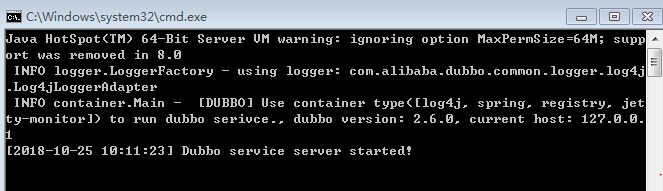
6、在浏览器中访问8080端口
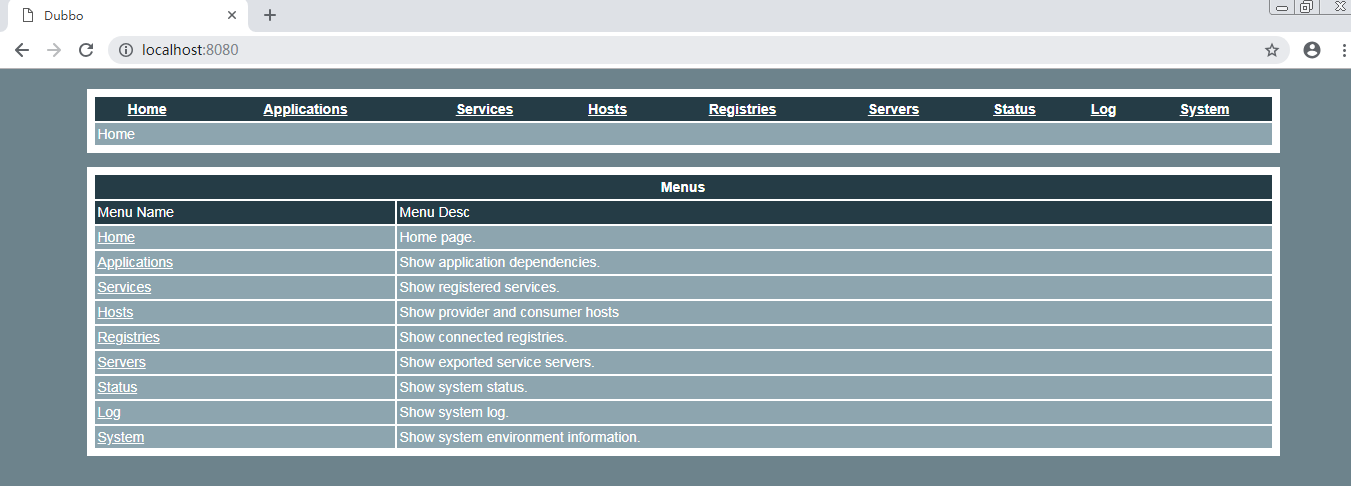
7、配置监控中心
所有服务配置连接监控中心,进行监控统计
<!-- 监控中心协议,如果为protocol="registry",表示从注册中心发现监控中心地址,否则直连监控中心 -->
<dubbo:monitor protocol="registry"></dubbo:monitor>
Simple Monitor 挂掉不会影响到 Consumer 和 Provider 之间的调用,所以用于生产环境不会有风险。Simple Monitor 采用磁盘存储统计信息,请注意安装机器的磁盘限制,如果要集群,建议用mount共享磁盘。
1)、在服务提供者user-service-provider的配置文件provider.xml中添加如下内容:
<!-- 连接监控中心 -->

<dubbo:monitor protocol="registry"></dubbo:monitor>

<!--直连监控中心-->

<!-- <dubbo:monitor address="127.0.0.1:7070"></dubbo:monitor> -->
添加后的provider.xml文件内容如下:
<?xml version="1.0" encoding="UTF-8"?>

<beans xmlns="http://www.springframework.org/schema/beans"

       xmlns:xsi="http://www.w3.org/2001/XMLSchema-instance"

       xmlns:dubbo="http://code.alibabatech.com/schema/dubbo"

       xsi:schemaLocation="http://www.springframework.org/schema/beans http://www.springframework.org/schema/beans/spring-beans.xsd

		http://code.alibabatech.com/schema/dubbo http://code.alibabatech.com/schema/dubbo/dubbo.xsd">

    <!-- 1、指定当前服务/应用的名字(同样的服务名字相同,不要和别的服务同名) -->

    <dubbo:application name="user-service-provider"></dubbo:application>

    <!-- 2、指定注册中心的位置 -->

    <!-- <dubbo:registry address="zookeeper://127.0.0.1:2181"></dubbo:registry> -->

    <dubbo:registry protocol="zookeeper" address="127.0.0.1:2181"></dubbo:registry>

    <!-- 3、指定通信规则(通信协议&通信端口) -->

    <dubbo:protocol name="dubbo" port="20880"></dubbo:protocol>

    <!-- 4、暴露服务   ref:指向服务的真正的实现对象 -->

    <dubbo:service interface="com.lina02.gmall.service.UserService" ref="userServiceImpl"/>

    <!-- 服务的实现 -->

    <bean id="userServiceImpl" class="com.lina02.gmall.service.impl.UserServiceImpl"></bean>

    <!-- 连接监控中心 -->

    <dubbo:monitor protocol="registry"></dubbo:monitor>

    <!--直连监控中心-->

    <!-- <dubbo:monitor address="127.0.0.1:7070"></dubbo:monitor> -->

</beans>
2)在服务消费者order-service-consumer的配置文件consumer.xml中添加如下内容:
<!-- 连接监控中心 -->

<dubbo:monitor protocol="registry"></dubbo:monitor>

<!--直连监控中心-->

<!-- <dubbo:monitor address="127.0.0.1:7070"></dubbo:monitor> -->
添加后的consumer.xml文件内容如下:
<?xml version="1.0" encoding="UTF-8"?>

<beans xmlns="http://www.springframework.org/schema/beans"

	xmlns:xsi="http://www.w3.org/2001/XMLSchema-instance"

	xmlns:dubbo="http://dubbo.apache.org/schema/dubbo"

	xmlns:context="http://www.springframework.org/schema/context"

	xsi:schemaLocation="http://www.springframework.org/schema/beans http://www.springframework.org/schema/beans/spring-beans.xsd

		http://www.springframework.org/schema/context http://www.springframework.org/schema/context/spring-context-4.3.xsd

		http://dubbo.apache.org/schema/dubbo http://dubbo.apache.org/schema/dubbo/dubbo.xsd

		http://code.alibabatech.com/schema/dubbo http://code.alibabatech.com/schema/dubbo/dubbo.xsd">

	<context:component-scan base-package="com.lina02.gmall.service.impl"></context:component-scan>

	<dubbo:application name="order-service-consumer"></dubbo:application>

	<dubbo:registry address="zookeeper://127.0.0.1:2181"></dubbo:registry>

	<!--声明需要调用的远程服务的接口;生成远程服务代理  -->

	<dubbo:reference interface="com.lina02.gmall.service.UserService" id="userService">

	</dubbo:reference>

	<!-- 连接监控中心 -->

	<dubbo:monitor protocol="registry"></dubbo:monitor>

	<!--直连监控中心-->

	<!-- <dubbo:monitor address="127.0.0.1:7070"></dubbo:monitor> -->

</beans>
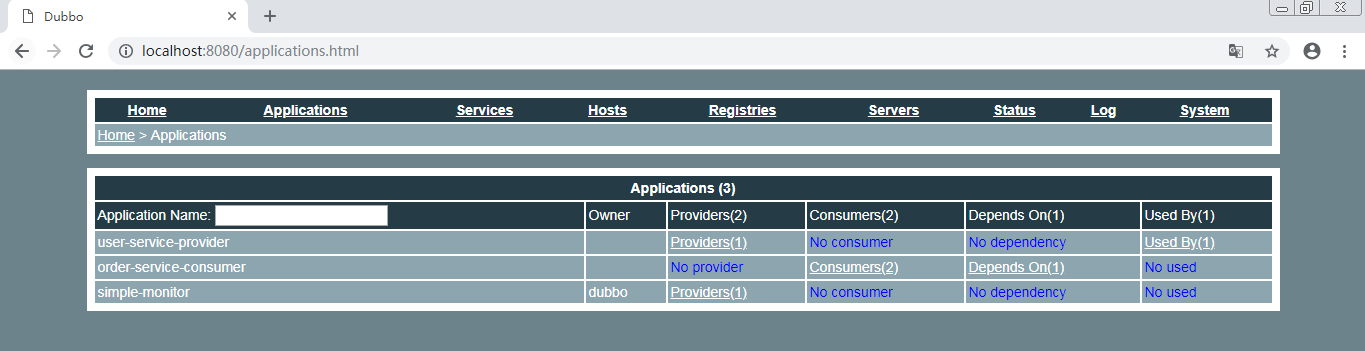
8、查看监控中心
安装dubbo的监控中心dubbo-monitor-simple的更多相关文章
- dubbo之监控中心(monitor)
一.monitor是dubbo框架中的一个监控中心.这个只是针对于消费者和提供者进行一个数据记录,不参与业务和使用.当然当monitor挂掉之后,也不会影响服务的正常运行. 二.在阿里的dubbo中也 ...
- 【Dubbo篇】--Dubbo框架的使用
一.前述 Dubbo是一种提供高性能,透明化的RPC框架.是阿里开源的一个框架. 官网地址:http://dubbo.io/ 二.架构 组件解释: Provider: 提供者.发布服务的项目.Regi ...
- Spring Boot 2.x (十五):Dubbo + Zookeeper + 新版Dubbo Admin
Dubbo 简介 Dubbo是阿里巴巴公司开源的一个高性能优秀的服务框架,使得应用可通过高性能的RPC实现服务的输出和输入功能,可以和Spring框架无缝集成. 它提供了三大核心能力: 面向接口的远程 ...
- Dubbo学习(六) dubbo 架构图 以及调用过程
一.Dubbo结构图 duubo结构图 我们解释以下这个架构图:Consumer服务消费者,Provider服务提供者.Container服务容器.消费当然是invoke提供者了,invoke这条 ...
- Dubbo学习(二) Dubbo 集群容错模式-负载均衡模式
Dubbo是Alibaba开源的分布式服务框架,我们可以非常容易地通过Dubbo来构建分布式服务,并根据自己实际业务应用场景来选择合适的集群容错模式,这个对于很多应用都是迫切希望的,只需要通过简单的配 ...
- 【Dubbo】Zookeeper+Dubbo项目demo搭建
一.Dubbo的注解配置 在Dubbo 2.6.3及以上版本提供支持. 1.@Service(全路径@org.apache.dubbo.config.annotation.Service) 配置服务提 ...
- 【Dubbo基础】dubbo学习过程、使用经验分享及实现原理简单介绍
一.前言 部门去年年中开始各种改造,第一步是模块服务化,这边初选dubbo试用在一些非重要模块上,慢慢引入到一些稍微重要的功能上,半年时间,学习过程及线上使用遇到的些问题在此总结下. 整理这篇文章差不 ...
- Dubbo API 笔记——Dubbo架构与使用
转载于: https://blog.csdn.net/benhuo931115/article/details/78457149 架构演变 单一应用架构 所有功能部署在一个应用上,用于简化增删改查工作 ...
- DUBBO初探-搭建DUBBO开发环境
我所理解的DUBBO 相对于传统web开发框架,dubbo更加适合于并行系统开发,分布式,模块化.将server和client都注册到zookeeper注册中心上,然后由最外层客户端发起请求到相应cl ...
随机推荐
- dhclient命令
语法:dhclient(选项)(参数) 选项0:指定dhcp客户但监听的端口号-d:总是以前台方式运行程序-q:安静模式,不打印任何错误的提示信息-r:释放ip地址 参数:网络接口:操作的网络接口 示 ...
- Android自动化测试怎么填写Xpath
aaarticlea/png;base64,iVBORw0KGgoAAAANSUhEUgAAA5sAAAJYCAIAAABjAmXpAAAgAElEQVR4nOzdeZhb5Z0veNV/M88sz7 ...
- cogs1070玻璃球游戏
1070. [焦作一中2012] 玻璃球游戏 ★ 输入文件:marbles.in 输出文件:marbles.out 简单对比时间限制:1 s 内存限制:128 MB [问题描述] 小x ...
- 截图工具,更改系统默认快捷键,系统配置实用程序,以管理员身份运行cmd(win7)
截图工具: 开始--附件--右键发送到桌面快捷方式---桌面截图工具右键属性--快捷方式 更改系统默认快捷键: 控制面板--外观和个性化--调整屏幕分辨率--高级设置---英特尔图形和媒体控制面板-- ...
- vue.js 组件共用函数的方法之一
如果我现在写一个组件pullMore,想要用到loadMore里面的方法(函数), 那么只需要在当前组件pullMore,script里面先引入组件import loadMore from './lo ...
- C++模板之函数模板实例化和具体化
模板声明 template<typename/class T>, typename比class最近后添加到C++标准. 常规模板,具体化模板,非模板函数的优先调用顺序. 非模板函数(普通 ...
- Storm 01之 Storm基本概念及第一个demo
2.1 Storm基本概念 在运行一个Storm任务之前,需要了解一些概念: Topologies :[tə'pɑ:lədʒɪ]拓扑结构 Streams Spouts:[spaʊt]喷出; 喷射; 滔 ...
- bzoj1598
K短路 和超级钢琴之类的差不多 先反图跑最短路,从原点向外拓展,每个点最多拓展k次,否则不可能是k短路 #include<bits/stdc++.h> using namespace st ...
- tetrahedron
题意: 求解一个四面体的内切球. 解法: 首先假设内切球球心为$(x0,x1,x2)$,可以用$r = \frac{3V}{S_1+S_2+S_3+S_4}$得出半径, 这样对于四个平面列出三个方程, ...
- 1.18-1.21 Oozie Coordinator调度
一.时区问题 1.修改系统时区 ## [root@hadoop-senior hadoop-2.5.0-cdh5.3.6]# rm -rf /etc/localtime [root@hadoop-se ...