
4、css之position
一、position
position属性:指定一个元素(静态的,相对的,绝对或固定)的定位方法的类型。
1、fixed值
fixed值:生成固定定位的元素,相对于浏览器窗口进行定位。元素的位置通过 "left", "top", "right" 以及 "bottom" 属性进行规定。

############################

<!DOCTYPE html>

<html lang="en">

<head>

    <meta charset="UTF-8">

    <title>Title</title>

</head>

<body>

    <div onclick="GoTop();" style="height: 50px; width: 50px; background-color: black; color: white;

    position: fixed;

    bottom:20px;

    right: 20px;

    ">返回顶部</div>

    <div style="height: 5000px; background-color: #dddddd"></div>

    <script>

        function GoTop() {

            document.body.scrollTop = 0;

        }

    </script>

</body>

</html>

###############################

<!DOCTYPE html>

<html lang="en">

<head>

    <meta charset="UTF-8">

    <title>Title</title>

    <style>

        .pg-header{

            height: 48px;

            background-color: black;

            color: #dddddd;

            position: fixed;

            top: 0px;

            right: 0;

            left: 0px;

        }

        .pg-body{

            background-color: #dddddd;

            height: 5000px;

            margin-top: 50px;

        }

    </style>

</head>

<body>

    <div class="pg-header">头部</div>

    <div class="pg-body">内容</div>

</body>

</html>
2、absolute、relative组合使用
absolute:

生成绝对定位的元素,相对于 static 定位以外的第一个父元素进行定位。

元素的位置通过 "left", "top", "right" 以及 "bottom" 属性进行规定。

relative:

生成相对定位的元素,相对于其正常位置进行定位。

因此,"left:20" 会向元素的 LEFT 位置添加 20 像素。

#############################
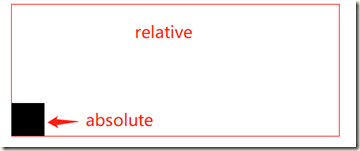
##relative在父标签中,absolute在子标签中;
##absolute是相对于父标签来定位的;
<!DOCTYPE html>
<html lang="en">
<head>
    <meta charset="UTF-8">
    <title>Title</title>
</head>
<body>

    <div style="position:relative; width: 500px; height: 200px; border: 1px solid red; margin: 0 auto;">
        <div style="position: absolute; left: 0; bottom: 0; width: 50px; height: 50px; background-color: black;"></div>
    </div>

</body>
</html>
3、层级显示
##代码

<!DOCTYPE html>

<html lang="en">

<head>

    <meta charset="UTF-8">

    <title>Title</title>

</head>

<body>

    <div style="z-index: 2; position: fixed; top: 50%; left: 50%;

    margin-left: -250px; margin-top: -200px; background-color: white; height: 400px; width: 500px;">

        <input type="text">

    </div>

    <div style="z-index: 1; position: fixed; background-color: black;

    top: 0;

    bottom: 0;

    right: 0;

    left: 0;

    opacity: 0.4;"></div>

    <div style="height: 5000px; background-color: green;">最底层页面</div>

</body>

</html>

##

opacity: 0.4;    //透明度

z-index: 1;    //层级顺序,值小的层在下面
4、css之position的更多相关文章
- 深入理解css中position属性及z-index属性
深入理解css中position属性及z-index属性 在网页设计中,position属性的使用是非常重要的.有时如果不能认识清楚这个属性,将会给我们带来很多意想不到的困难. position属性共 ...
- div+css定位position详解
div+css定位position详解 1.div+css中的定位position 最主要的两个属性:属性 absolute(绝对定位) relative(相对定位),有他们才造就了div+css布局 ...
- 十步图解CSS的position
CSS的positon,我想做为一个Web制作者来说都有碰到过,但至于对其是否真正的了解呢?那我就不也说了,至少我自己并不非常的了解其内核的运行.今天在Learn CSS Positioning in ...
- css 之position用法详解
css 之position用法详解: http://www.jb51.net/web/77495.html
- CSS中Position属性
也许你看到这个标题觉得很简单,确实这是一篇关于CSS中Position属性基础知识的文章,但是关于Position的一些细节也许你不了解. 1.简介 position有五个属性: static | r ...
- CSS的position(位置)
position: 位置,absolute绝对位置,相对于浏览器边界的位置:relative相对位置,相对于它本应该出现的位置.fixed:固定位置,它不会随着滚动. 设置好position之后,就可 ...
- CSS的position设置
CSS的position设置: <%@ page language="java" contentType="text/html; charset=UTF-8&quo ...
- 关于CSS 的position定位问题
对于初学者来说,css的position定位问题是比较常见的.之前搞不清楚postion定位是怎么回事,排版一直歪歪斜斜的,老是排不好 css的定位一般来说,分为四种: position:static ...
- 《css定位 position》课程笔记
这是我学习课程css定位 position时做的笔记! 本节内容 html的三种布局方式 position可选参数 z-index 盒子模型和定位的区别 侧边栏导航跟随实例 html的三种布局方式 三 ...
- css的position中absolute和fixed的区别
fixed:固定定位 absolute:绝对定位 区别很简单: 1.没有滚动条的情况下没有差异 2.在有滚动条的情况下,fixed定位不会随滚动条移动而移动,而absolute则会随滚动条移动 常用场 ...
随机推荐
- 物联网网络编程和web编程
本文是基于嵌入式物联网研发project师的视觉对网络编程和web编程进行阐述. 对于专注J2EE后端服务开发的同学来说,这篇文章可能略微简单.可是网络编程和web编程对于绝大部分嵌入式物联网proj ...
- beyond compare添加右键快捷方式
如果安装beyond compare后,右键不能出现比较选项,可以通过设置 beyond compare完成. 选择 工具->选项,在资源管理器整合下面,有一个在资源管理器关联菜单中显示beyo ...
- linux下解压命令大全(转载)
转自:http://www.cnblogs.com/eoiioe/archive/2008/09/20/1294681.html .tar 解包:tar xvf FileName.tar打包:tar ...
- (转)Java web 项目中文件路径
文件路径分为绝对路径和相对路径,在项目中页面跳转.配置文件读写.文件上传下载等等许多地方都涉及到文件路径问题. 一篇好文转载于此:http://blog.csdn.net/shendl/archive ...
- WPF触发器(Trigger、DataTrigger、EventTrigger)
WPF中有种叫做触发器的东西(记住不是数据库的trigger哦).它的主要作用是根据trigger的不同条件来自动更改外观属性,或者执行动画等操作. WPFtrigger的主要类型有:Trigger. ...
- CSS常识
1.给一个div设置边框:border:1px #CCCCCC bold; 2.给DOM加小手:cursor:pointer; 取消小手:cursor:auto;
- quick-cocos2d-x教程3:程序框架内文件夹分析之docs文件夹
如今我们分析框架中的docs文件夹.看看这个文档文件夹中,究竟放了那些对我们实用的东西. docs文件夹分析 UPGRADE_TO_2_2_3.md 就是讲升级的变化.详细说明:quick-cocos ...
- pyinstaller-py2exe-cx_Freeze打包第一个wxPython程序HelloWorld
pyinstaller 打包hello 7Mb ================= www.pyinstaller.org pip install pypiwin32 pip install pyin ...
- win10搭建selendroid测试环境
官网对于搭建selendroid列出如下要求: 就如 Junit 一样,Selendroid 可以在 Mac,Linux 和 Windows 上使用.Java 主打的就是跨平台. Java SDK ( ...
- xml 基础属性
xml属性 对应的方法 说明 android:alpha setAlpha(float) 设置组件的透明度(0——1) android:background setBackgroundResource ...