
Cisco ASA 5505 Routing Between Two (Internal) VLANS
Referenced:http://www.petenetlive.com/KB/Article/0000869
Problem
I had to set this up for a client this week, I’ve setup a DMZ on a 5505 before and I’ve setup other VLANs to do other jobs, e.g. visitor Internet access. But this client needed a secondary VLAN setting up for IP Phones. In addition I needed to route traffic between both the internal VLANs.
I did an internet search and tried to find some configs I could reverse engineer, the few I found were old (Pre version 8.3) ones and the little info I got were more people in forums asking why theirs did not work. So I built a firewall with 8.2 code, then worked out how to do it, then upgraded the firewall to version 9.1. Finally I picked out the relevant parts of the upgraded config.
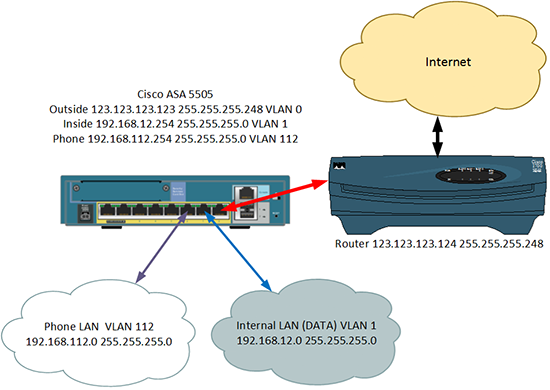
Here's the scenario I'm going to use for this example.
Solution
Before we start, yes I know the ASA is a firewall not a router! A better solution would be to have either a router behind the firewall or, (as is more common) a switch that is layer 3 capable, i.e it can route.
Your ASA MUST have a Security Plus licence to be able to do this. Check your license version.
The commands you use will be different if your firewall is running an operating system earlier than 8.3, check your ASA version and proceed to the correct set of commands.
For Firewalls running an Operating System OLDER than 8.3 go here
How to Setup VLAN Routing on an ASA 5505 (Version 8.3 and Newer)
1. Connect to the firewall, go to enable mode, then go to configure terminal mode.
User Access Verification
Password: Type help or '?' for a list of available commands. Petes-ASA> enable Password: ******** Petes-ASA# configure terminal Petes-ASA(config)#
2. As in the diagram (above) I have three VLANs, VLAN 0 is outside and will be connected to Ethernet 0/0. VLAN 1 is inside and will be connected to Ethernet 0/1. VLAN 112 is for my phones and will be connected to Ethernet 0/2. Here I setup the IP addresses, and add the VLANs to the physical interfaces.
Note: I don't need to Add VLAN 1 to Ethernet 0/1, because all ports are in VLAN 1 by default.
3. To get traffic working to the internet you will need to specify a 'route' to your outside router.
4. Turn on 'Hair Pinning' (the ability to route traffic back out of the same interface it came in through) and allow traffic to pass between interfaces.
5. Out of the box, if you have not configured any access-lists then you can skip this step, as traffic will flow from a more secure interface (the inside and the phone one) to a less secure interface (the outside one). Here I'm going to use an ACL and allow all traffic anyway.
6. Now setup 'dynamic' NAT so that all traffic leaving both the inside VLAN and the Phone VLAN network get NATTEDto the public IP address.
7. Now setup 'static' NAT so that traffic travelling between the inside VLAN and the phone VLAN does NOT getNATTED.
8. Enable routing, and set the MTU for all three VLANs.
9. Save the changes, and give it a test.
Full Config for you to Copy and Paste;
How to Setup VLAN Routing on an ASA 5505 (Pre Version 8.3)
1. Connect to the firewall, go to enable mode, then go to configure terminal mode.
User Access Verification
Password: Type help or '?' for a list of available commands. Petes-ASA> enable Password: ******** Petes-ASA# configure terminal Petes-ASA(config)#
2. 2. As in the diagram (above) I have three VLANs, VLAN 0 is outside and will be connected to Ethernet 0/0. VLAN 1 is inside and will be connected to Ethernet 0/1. VLAN 112 is for my phones and will be connected to Ethernet 0/2. Here I setup the IP addresses, and add the VLANs to the physical interfaces.
Note: I don't need to Add VLAN 1 to Ethernet 0/1 because all ports are in VLAN 1 by default.
3. To get traffic working to the internet you will need to specify a 'route' to your outside router.
4. Turn on 'Hair Pinning' (the ability to route traffic back out of the same interface it came in through). and allow traffic to pass between interfaces.
5. Out of the box, if you have not configured any access-lists then you can skip this step, as traffic will flow from a more secure interface (the inside and the phone one) to a less secure interface (the outside one). Here I'm going to use an ACL and allow all traffic anyway.
6. Enable NAT so that all traffic leaving both the inside VLAN and the Phone VLAN network get NATTED to the publicIP address.
7. Now setup 'static' NAT so that traffic travelling between the inside VLAN and the phone VLAN does NOT getNATTED.
8. Enable routing, and set the MTU for all three VLANs.
9. Save the changes, and give it a test.
Full Config for you to Copy and Paste;
Cisco ASA 5505 Routing Between Two (Internal) VLANS的更多相关文章
- CISCO ASA 5505 经典配置案例
nterface Vlan2 nameif outside ----------------------------------------对端口命名外端口 security-level 0 -- ...
- Cisco ASA 5505配置详解(v8.3之前版本)
在配ASA 5505时用到的命令 2009-11-22 22:49 nat-control命令 在6.3的时候只要是穿越防火墙都需要创建转换项,比如:nat:static等等,没有转换项是不能穿越防火 ...
- Cisco ASA intra-interface routing
LAN1和LAN2的默认路由指向各自的ASA,各ASA中设置对方LAN的静态路由指向ROUTER,打开ASA的intra-interface traffic,关闭LAN1和LAN2地址互相访问的NAT ...
- Cisco ASA 配置案例---anyconnect拨通后所有流量从服务器端出去
一.目的: 1.Cisco ASA之Lan端能正常上网. 2.anyconnect端所有流量从Cisco ASA的Outside出去. 3.anyconnect端能访问Cisco ASA的Inside ...
- Cisco ASA使用证书加密
使用ASDM配置HTTPS证书加密anyconnect连接 一.在没有使用证书的情况下每次连接VPN都会出现如下提示 ASA Version: 8.4.(1) ASDM Version: 6.4.(7 ...
- Cisco ASA端口映射
Cisco ASA 端口映射设置 1.使用ASDM进入到配置页面,点开NAT Rules,然后新增Network Object,NAT选项如下图所示设定. 下图设定外网IP映射到内网IP地址192.1 ...
- Cisco ASA 高级配置
Cisco ASA 高级配置 一.防范IP分片攻击 1.Ip分片的原理: 2.Ip分片的安全问题: 3.防范Ip分片. 这三个问题在之前已经详细介绍过了,在此就不多介绍了.详细介绍请查看上一篇文章:I ...
- Cisco asa 5510升级IOS和ASDM
asa asa(config)# dir ...
- cisco ASA ios升级或恢复
cisco ASA ios升级或恢复 一.升级前准备工作 1.准备好所要升级的IOS文件及对应的ASDM文件 2.在一台电脑上架设好tftp,设置好目录,与防火墙进行连接(假设电脑IP为192.168 ...
随机推荐
- c/c++----网站及其后门(CGI应用程序)
C/C++学习到这儿,结合自己曾经学过的javasweb知识,现在让我们来看看,如何做一个CGI程序吧! 首先了解一下啥子叫CGI :CGI全称是“公共网关接口”(Common Gateway In ...
- ARM 汇编的一些规范
A.5.1 文件格式 ARM 源程序文件(即源文件)为文件格式,可以使用任一文本编辑器编写程序代码. 在一个项目中,至少要有一个汇编源文件或C 程序文件,可以有多个汇编 ...
- VMware vSphere Client5.0与 Windows8不再有问题,解决VMware 5.0 客户端提示VMRC控制台的连接已断开
问题:VMware 5.0 客户端提示VMRC控制台的连接已断开...正在尝试重新连接,系统是win8的 网上解决办法: WIN8,在安装vmware vsphere client 5.0时出现兼容性 ...
- 实验一 Java开发环境的熟悉境的熟悉
- 运行结果: (一)命令行下Java程序开发 (二)Eclipse下Java程序开发.调试 设置断点和单步运行 单步运行:Step Into(快捷捷F5)和Step Over(快捷捷F5) 使程序直 ...
- Hibernate的generator属性之意义
Hibernate的generator属性之意义 本文讲述Hibernate的generator属性的意义.Generator属性有7种class,本文简略描述了这7种class的意义和用法. Hib ...
- http错误和异常处理,认证和代理设置
http错误: import urllib.requestreq = urllib.request.Request('http://www.python.org/fish.html')try:urll ...
- POJ 3009 Curling 2.0 回溯,dfs 难度:0
http://poj.org/problem?id=3009 如果目前起点紧挨着终点,可以直接向终点滚(终点不算障碍) #include <cstdio> #include <cst ...
- JobTracker启动流程源码级分析
org.apache.hadoop.mapred.JobTracker类是个独立的进程,有自己的main函数.JobTracker是在网络环境中提交及运行MR任务的核心位置. main方法主要代码有两 ...
- 快餐问题(dp好题)
Peter最近在R市开了一家快餐店,为了招揽顾客,该快餐店准备推出一种套餐,该套餐由A个 汉堡,B个薯条和C个饮料组成.价格便宜.为了提高产量,Peter从著名的麦当劳公司引进了N条 生产线.所有的生 ...
- 使用ROS节点(五)
先启动roscore roscore 为了获取节点信息,可以使用rosnode命令 $ rosnode 获取得一个可接受参数清单