
使用DataGridView数据窗口控件,构建用户快速输入体验
在“随风飘散” 博客里面,介绍了一个不错的DataGridView数据窗口控件《DataGridView数据窗口控件开发方法及其源码提供下载》,这种控件在有些场合下,还是非常直观的。因为,在一般要求客户录入数据的地方,一般有两种途径,其一是通过弹出一个新的窗口,在里面列出各种需要输入的要素,然后保存的,如下图所示;
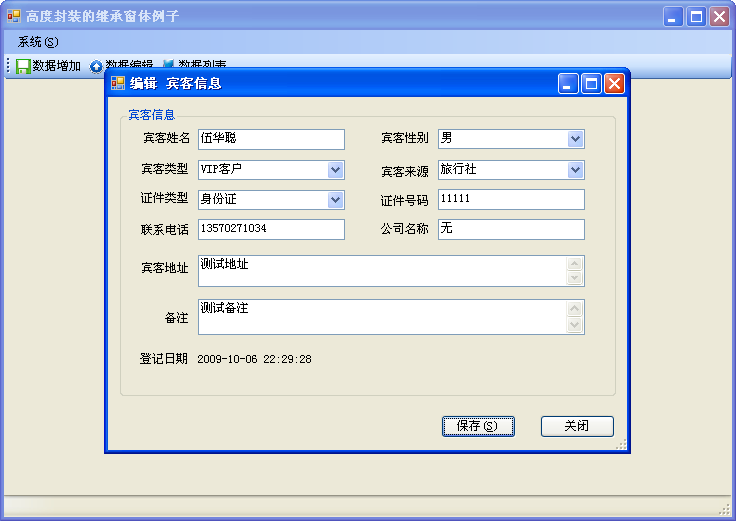
其二就是直接在DataGridView中直接输入。这两种方式各有优劣,本文介绍采用该控件实现第二种模式的数据数据。如下图所示
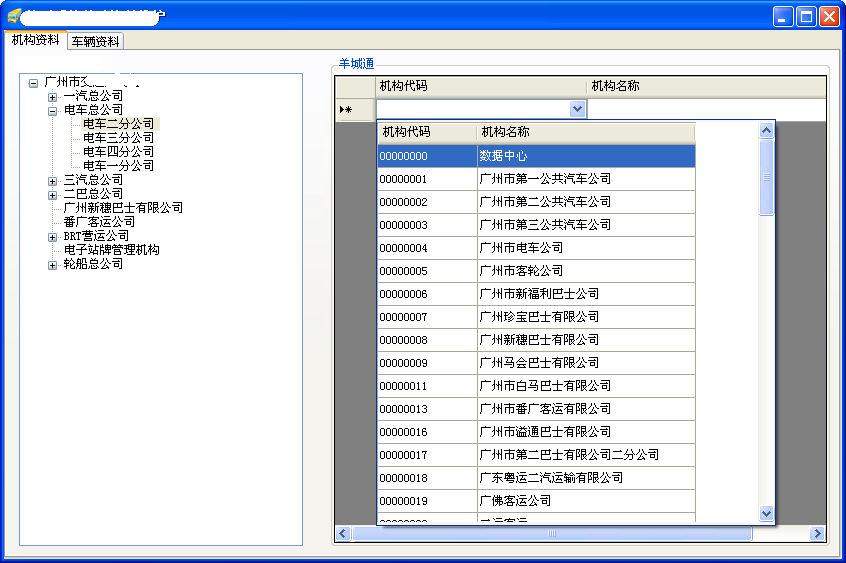
这种方式,直接通过在DataGridView中下拉列表或者文本框中输入内容,每列的数据可以联动或者做限制,实现用户数据的约束及规范化。
控件只要接受了DataTable的DataSource之后,会根据列的HeadText内容,显示表格的标题及内容,应用还是比较直观方便的。
Code highlighting produced by Actipro CodeHighlighter (freeware)http://www.CodeHighlighter.com/-->        private void BindGridViewData(DataTable dt, DataTable dtNoRelation)

        {

            organTable = dt;

            noRelationTable = dtNoRelation;

            DataGridView dataGridView1 = new DataGridView();

            this.groupBox1.Controls.Clear();

            this.groupBox1.Controls.Add(dataGridView1);

            dataGridView1.Dock = DockStyle.Fill;

            dataGridView1.CellValueChanged +=new DataGridViewCellEventHandler(organDataGridView_CellValueChanged);

            dataGridView1.UserDeletedRow += new DataGridViewRowEventHandler(organDataGridView_UserDeletedRow);

            dataGridView1.AutoGenerateColumns = false;

            dataGridView1.Rows.Clear();

            dataGridView1.Columns.Clear();

            DataGridViewDataWindowColumn col1 = new DataGridViewDataWindowColumn();

            col1.HeaderText = "机构代码";

            col1.Name = "机构代码";

            //下拉列表的数据

            col1.DataSource = GetDataTable(dtNoRelation);

            dataGridView1.Columns.Add(col1);

            DataGridViewTextBoxColumn col2 = new DataGridViewTextBoxColumn();

            col2.HeaderText = "机构名称";

            col2.Name = "机构名称";

            col2.Width = 300;

            col2.ReadOnly = true;

            dataGridView1.Columns.Add(col2);

            if (dt != null)

            {

                foreach (DataRow dr in dt.Rows)

                {

                    string value = dr[0].ToString();

                    DataGridViewRow row = new DataGridViewRow();

                    DataGridViewDataWindowCell cell = new DataGridViewDataWindowCell();

                    cell.Value = value;

                    row.Cells.Add(cell);

                    cell.DropDownHeight = 400;

                    cell.DropDownWidth = 300;

                    DataGridViewTextBoxCell cell2 = new DataGridViewTextBoxCell();

                    cell2.Value = dr[1].ToString();

                    row.Cells.Add(cell2);

                    dataGridView1.Rows.Add(row);

                }

            }

        }
由于列之间的数据输入等相关的影响需要处理,因此控件的处理方式是通过委托函数进行处理,如上面的部分代码中就是处理这些事件的。
            dataGridView1.CellValueChanged +=new DataGridViewCellEventHandler(organDataGridView_CellValueChanged);

            dataGridView1.UserDeletedRow += new DataGridViewRowEventHandler(organDataGridView_UserDeletedRow);
由于本例子是通过输入内容后,及时更新数据库及控件的显示,因此需要对该事件进行处理,处理代码如下所示。
Code highlighting produced by Actipro CodeHighlighter (freeware)http://www.CodeHighlighter.com/-->        private void organDataGridView_CellValueChanged(object sender, DataGridViewCellEventArgs e)

        {

            DataGridView organDataGridView = sender as DataGridView;

            if (!organDataGridView.IsCurrentCellInEditMode)

                return;

            #region 显示关联机构名称

            if (e.RowIndex > -1)

            {

                if (organDataGridView.CurrentCell.Value == System.DBNull.Value)

                {

                    return;

                }

                if (e.ColumnIndex == 0)

                {

                    DataGridViewCell cell = organDataGridView.Rows[e.RowIndex].Cells["机构代码"];

                    if (cell.Value == null)

                        return;

                    string organCode = cell.Value.ToString();

                    string organName = GetOrganName(organTable, organCode);

                    if (string.IsNullOrEmpty(organName))

                    {

                        organName = GetOrganName(noRelationTable, organCode);

                    }

                    organDataGridView.Rows[e.RowIndex].Cells["机构名称"].Value = organName;

                }

            }

            #endregion

            if (this.treeView1.SelectedNode != null)

            {

                string gjOrganCode = this.treeView1.SelectedNode.Tag.ToString();

                if (!string.IsNullOrEmpty(gjOrganCode))

                {

                    string yctOrganCode = organDataGridView.CurrentCell.Value.ToString();

                    OrganCodeMapDAL organMapDal = new OrganCodeMapDAL();

                    organMapDal.UpdateOrganMapData(gjOrganCode, yctOrganCode);

                }

            }

        }

        private void organDataGridView_UserDeletedRow(object sender, DataGridViewRowEventArgs e)

        {

            DataGridView organDataGridView = sender as DataGridView;

            string organCode = e.Row.Cells[0].Value.ToString();

            OrganCodeMapDAL organMapDal = new OrganCodeMapDAL();

            organMapDal.DeleteOrganMapData(organCode);

        }
另外,该控件还提供了一个用于对话框窗体中的复杂下拉列表的数据显示方式,控件支持内容的过滤检索,非常方便实用,如下所示

该控件的使用代码如下所示:
Code highlighting produced by Actipro CodeHighlighter (freeware)http://www.CodeHighlighter.com/-->        private void BindData()

        {

            //设置DataWindow属性

            this.dataWindow1.PopupGridAutoSize = false;

            this.dataWindow1.DropDownHeight = 300;

            this.dataWindow1.DropDownWidth = 240;

            this.dataWindow1.FormattingEnabled = true;

            this.dataWindow1.sDisplayField = "车辆编码,车牌号码";

            this.dataWindow1.sDisplayMember = "车辆编码";

            this.dataWindow1.sValueMember = "车辆编码";

            this.dataWindow1.SeparatorChar = "|";

            BusDAL busDal = new BusDAL();

            DataTable dt = busDal.GetYCTBusTable(this.txtOrganName.Tag.ToString());

            this.dataWindow1.DataSource = dt;

            this.dataWindow1.AfterSelector += new EventHandler(dataWindow1_AfterSelector);

            //必须在DataSource绑定之后设置该属性

            this.dataWindow1.RowFilterVisible = true;

        }

        //选择完下拉表格后执行的事件

        private void dataWindow1_AfterSelector(object sender, EventArgs e)

        {

        }
使用DataGridView数据窗口控件,构建用户快速输入体验的更多相关文章
- C# DataGridView自定义分页控件
好些日子不仔细写C#代码了,现在主要是Java项目,C#.Net相关项目不多了,有点手生了,以下代码不足之处望各位提出建议和批评. 近日闲来无事想研究一下自定义控件,虽然之前也看过,那也仅限于皮毛,粗 ...
- C# Winform 通过FlowLayoutPanel及自定义的编辑控件,实现快速构建C/S版的编辑表单页面
个人理解,开发应用程序的目的,不论是B/S或是C/S结构类型,无非就是实现可供用户进行查.增.改.删,其中查询用到最多,开发设计的场景也最为复杂,包括但不限于:表格记录查询.报表查询.导出文件查询等等 ...
- 基于MVC4+EasyUI的Web开发框架经验总结(2)- 使用EasyUI的树控件构建Web界面
最近花了不少时间在重构和进一步提炼我的Web开发框架上,力求在用户体验和界面设计方面,和Winform开发框架保持一致,而在Web上,我主要采用EasyUI的前端界面处理技术,走MVC的技术路线,在重 ...
- Winform 通过FlowLayoutPanel及自定义的编辑控件,实现快速构建C/S版的编辑表单页面 z
http://www.cnblogs.com/zuowj/p/4504130.html 不论是B/S或是C/S结构类型,无非就是实现可供用户进行查.增.改.删,其中查询用到最多,开发设计的场景 也最为 ...
- 使用EasyUI的树控件构建Web界面
最近花了不少时间在重构和进一步提炼我的Web开发框架上,力求在用户体验和界面设计方面,和Winform开发框架保持一致,而在Web上,我主要采用EasyUI的前端界面处理技术,走MVC的技术路线,在重 ...
- (转)基于MVC4+EasyUI的Web开发框架经验总结(2)- 使用EasyUI的树控件构建Web界面
http://www.cnblogs.com/wuhuacong/p/3669575.html 最近花了不少时间在重构和进一步提炼我的Web开发框架上,力求在用户体验和界面设计方面,和Winform开 ...
- [ PyQt入门教程 ] PyQt5中数据表格控件QTableWidget使用方法
如果你想让你开发的PyQt5工具展示的数据显得整齐.美观.好看,显得符合你的气质,可以考虑使用QTableWidget控件.之前一直使用的是textBrowser文本框控件,数据展示还是不太美观.其中 ...
- .NET各大平台数据列表控件绑定原理及比较(WebForm、Winform、WPF)
说说WebForm: 数据列表控件: WebForm 下的列表绑定控件基本就是GridView.DataList.Repeater:当然还有其它DropDownList.ListBox等. 它们的共同 ...
- Delphi 查找标题已知的窗口句柄,遍历窗口控件句柄(转)
用我的方法来控制其他程序窗体上的窗口控件,必须先了解什么是 回调函数.我的理解是这样的: 回 调函数写出来不是自己的程序去调用的,反而是让其他的东西去调用,比如windows操作系统,比如其他的程序等 ...
随机推荐
- Oracle 删除数据后释放数据文件所占磁盘空间
测试的时候向数据库中插入了大量的数据,测试完成后删除了测试用户以及其全部数据,但是数据文件却没有缩小.经查阅资料之后发现这是 Oracle “高水位”所致,那么怎么把这些数据文件的大小降下来呢?解决办 ...
- The Ninth Hunan Collegiate Programming Contest (2013) Problem A
Problem A Almost Palindrome Given a line of text, find the longest almost-palindrome substring. A st ...
- Vertex中实现每顶点光照的镜面高光效果
1,基础知识讲解 一个物体在自然界会收到三种光的影响,周围的环境光.漫反射和镜面反射.那么对于计算机要想模拟现实中的光照,就应该也会实现这三种基本光照->环境光.漫反射.镜面高光.对于这三种光照 ...
- GUI创建各常用控件(二)
继续接着上一篇! 在我看来有一点需要申明:由于是GUI的相关知识,所以我只是在复习中粗略的总结而已,因此参考价值可能有限,更多的是当作自己学习的一个记录以及便于自己查阅. 好啦!干货继续: 1.类似于 ...
- Epic - Desirable Number
A number is called 'desirable' if all thedigits are strictly ascending eg: 159 as 1<5<9. You k ...
- 翻译「C++ Rvalue References Explained」C++右值引用详解 Part8:Perfect Forwarding(完美转发):解决方案
本文为第八部分,目录请参阅概述部分:http://www.cnblogs.com/harrywong/p/cpp-rvalue-references-explained-introduction.ht ...
- 关于NopCommerce3.6版用户登录详解
一.登录方式 Nop登录方式有两种(且只能选择一种方式登录):一种是用用户名登录,另一种是用户注册邮箱登录,这个在后台可配置: 第一种:用户名登录 后台配置路径在商城设置à设置管理à客户设置:使用用户 ...
- Ceph–s ceph 集群状态
[root@ceph-mon1 ~]# ceph -s cluster 03f3afd4-4cc6-4083-a34c-845446a59cd4 health HEALTH_OK monmap e1: ...
- Linux重置系统root密码
linux的root享有至高无上的权力,一旦root密码忘记或者被盗,是一件非常头痛的事情,那么怎么样才能找回root的密码呢,本人把其总结(亲身试验)如下: (一)Linux 系统密码破解 ...
- startup毕业论文
今天起得相对比较晚,为的是一个没有目的面试,去了的结果.只是打击一下自己的自信心,走的时候,面试官冷冷的说了一句,你的面试到此结束,是的,我并没有很伤心,在门外等面试的时候,我就非常的后悔,今天是不该 ...